
Top 5 Cutting Machines
for Crafters
Our #1 pick is the Cricut Maker 4. Decals, stickers, cards and iron-on shirts. We compared the 5 best cutting machines on Amazon, from the compact Cricut Joy Xtra to the Maker 4, Silhouette Cameo 5 and Brother’s scanning ScanNCut.
How we picked: we shortlist by Amazon Best Seller rank and number of ratings, then compare published specs. We don't test these products hands-on.
By Jamilur Rahman, Founder & Editor · Updated October 9, 2026
- Owner reviews checked
- Features side by side
- Quick & easy compare
- Smarter purchase

The short answer
For most crafters, the Cricut Maker 4 is the cutting machine to buy. The listing says it works with 300+ materials, from vinyl and iron-on to leather and wood, and it does more than cut: it draws, foils, scores, engraves, debosses and perforates with the right tools. Cricut’s Design Space app is the easiest to learn, and the huge community means there is a tutorial for almost every project. This Digital Content Bundle adds the blade, a mat, a pen, a weeder and a materials sampler.
If you would rather avoid Cricut’s subscription-heavy ecosystem, the Silhouette Cameo 5 Alpha is the best alternative: whisper-quiet, very accurate for print-then-cut stickers, and it handles materials up to 3 mm thick. Short on space or budget? The Cricut Joy Xtra fits on a desk and still makes stickers, cards and shirts. Quilters and sewists should look at the Brother ScanNCut SDX125E, the only machine here with a built-in scanner. And the brand-new Cricut Maker 5 Deluxe Bundle is the pick if you want the latest Cricut plus enough tools and supplies to start right away.
Skip the Maker 4 if you only ever cut vinyl decals and greeting cards. You will pay for cutting force and tool support you never use, and the Joy Xtra does those jobs in less space for less money. Skip any Cricut if you hate subscriptions: the free Design Space library is limited, and most crafters end up paying for Cricut Access.
Compare them side by side
Everything that matters, in one table. Swipe to see all 5.
| Product | Best Overall Cricut Maker 4 Smart cutting machine bundle |  Best Cricut Alternative Silhouette Cameo 5 Alpha Smart cutting machine |  Best Small and Budget Pick Cricut Joy Xtra Compact cutting machine bundle | 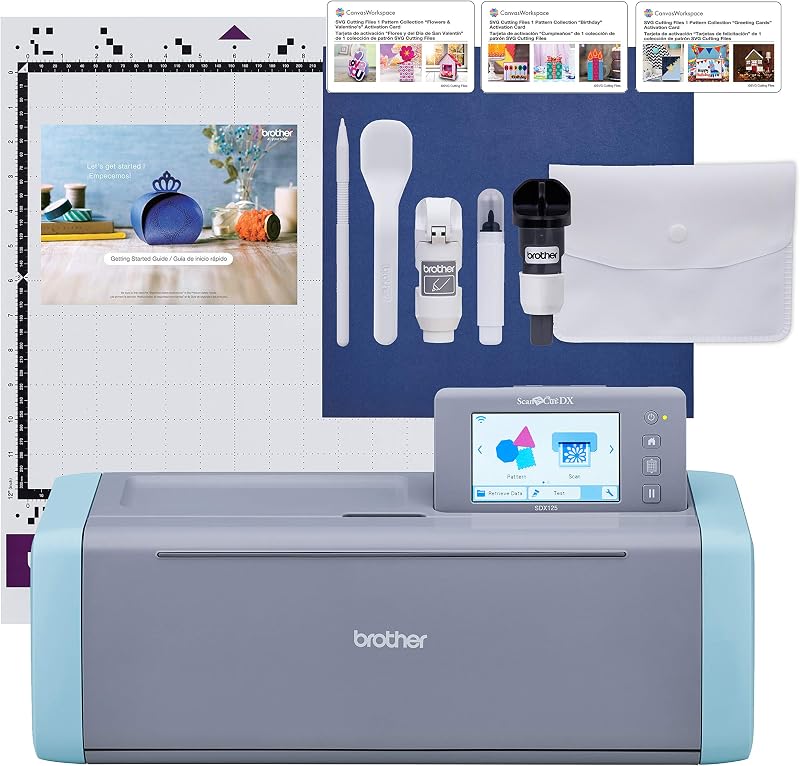 Best for Quilters and Sewists Brother ScanNCut SDX125E Cutting machine with scanner |  Best Starter Bundle Cricut Maker 5 Deluxe Newest Cricut, deluxe bundle |
|---|---|---|---|---|---|
| BeastScore | 92 / 100 | 89 / 100 | 86 / 100 | 84 / 100 | 87 / 100 |
| Best for | Crafters who want to make everything | Sticker sellers and print-and-cut work | Beginners, small desks, cards and decals | Fabric, quilting and tracing hand drawings | Gift buyers who want everything in one box |
| Typical price (checked October 9, 2026) | $300–$350 | $280–$320 | $130–$160 | $430–$470 | $430–$500 |
| Max cut width | See listing | See listing | See listing | 12" x 12" mat | 12 in |
| Materials | 300+ incl. leather and wood | Vinyl, paper, fabric, up to 3 mm thick | 50+ incl. vinyl, iron-on, cardstock | Paper, vinyl, fabric, felt, balsa, up to 3 mm | 300+, cuts and engraves up to 3 mm |
| Software | Cricut Design Space (free, Access optional) | Silhouette Studio | Cricut Design Space | Built-in screen + 682 designs | Cricut Design Space |
| In the box | Blade, mat, pen, weeder, materials sampler | AutoBlade, cutting mat, software | Blade, pen, mini weeder, cables, practice materials | Auto blade, mat, pen, touch pen, spatula | Machine, scoring, engraving and deep-cut tools, supplies |
| Key features |
|
|
|
|
|
BeastScore here is our overall rating out of 100, based on published specs and Amazon owner reviews. Prices change daily, so tap "View on Amazon" for today's price. We may earn a small commission, at no extra cost to you. Learn more
Why each one made the list
What each pick does best, where it falls short, and the typical Amazon price when we checked.
- 1. Best Overall
Cricut Maker 4
BeastScore 92 / 100Typically $300–$350 on Amazon (checked October 9, 2026)The Maker 4 is the most capable machine for the money. The listing says it works with 300+ materials, from vinyl, iron-on and cardstock to leather and wood, and that with the right tools it also draws, foils, scores, engraves, debosses and perforates. Print-then-cut works with most inkjet printers, so full-color stickers are easy. Design Space is the friendliest software here, with guided projects for beginners. This bundle adds a fine-point blade, light grip mat, pen, weeder and a sampler of Smart Vinyl, iron-on and cardstock. The catches: specialty tools cost extra, and the full image library needs a paid Cricut Access plan.
Pros- Widest material range of any machine here
- Easiest software and the biggest tutorial community
- Bundle includes enough to make a first project
Cons- Specialty blades and tools sold separately
- Full design library needs a Cricut Access subscription
- Overkill if you only cut vinyl and cards
- 2. Best Cricut Alternative
Silhouette Cameo 5 Alpha
BeastScore 89 / 100Typically $280–$320 on Amazon (checked October 9, 2026)The Cameo 5 Alpha is the pick for crafters who sell stickers or want precise print-and-cut work. The listing says a new 4-point registration system corrects alignment both ways for accurate cuts around printed images. Intelligent Path Technology reorders cuts to reduce material stress, and the motor cuts at up to 400 mm/s while staying whisper-quiet, handy in a shared room. It handles vinyl, paper and fabric up to 3 mm thick, and also sketches and embosses. Silhouette Studio does not lock designs behind a subscription the way Cricut does. The trade-off: Studio has a steeper learning curve, and there are fewer beginner tutorials.
Pros- Very accurate print-and-cut for stickers
- Quiet operation with fast cutting
- Silhouette Studio works without a subscription
Cons- Software is harder to learn than Design Space
- Smaller community than Cricut for help and projects
- 3. Best Small and Budget Pick
Cricut Joy Xtra
BeastScore 86 / 100Typically $130–$160 on Amazon (checked October 9, 2026)Joy Xtra is the cutting machine for people who mainly make cards, labels, decals and shirts. The listing says it works with 50+ materials, including vinyl, iron-on and cardstock, and it cuts, writes, draws and foils. Unlike the original Cricut Joy, it supports print-then-cut, so full-color stickers are on the table. It is small enough to live on a desk and put away in a drawer. This bundle adds a fine-point blade, a pen, a mini weeder, practice materials and a free Cricut Access trial for new subscribers. The limits: no leather, wood or engraving, and big projects like large banners are out of reach.
Pros- Small enough for any desk
- Low price with print-then-cut stickers
- Uses the same easy Design Space app as the Maker
Cons- 50+ materials vs 300+ on the Maker 4
- No engraving, debossing or thick materials
- Smaller cut width limits big projects
- 4. Best for Quilters and Sewists
Brother ScanNCut SDX125E
BeastScore 84 / 100Typically $430–$470 on Amazon (checked October 9, 2026)ScanNCut does something no Cricut or Silhouette can: it has a built-in scanner. The listing says you can scan a hand drawing to turn it into a cut file, cut around printed stickers directly, and place designs on fabric precisely. It works on its own with a 5-inch touchscreen and 682 built-in designs, including 100 quilting patterns, so you do not need a computer. The auto blade senses material thickness, and it cuts up to 3 mm, from fabric and felt to balsa and chipboard. That makes it a favorite with quilters. The trade-offs: it costs more, and owners rate it a notch below the Cricuts.
Pros- Built-in scanner for drawings and fabric placement
- Works standalone with a touchscreen, no computer needed
- Auto blade adjusts to material thickness
Cons- Costs as much as the Maker 5 bundle, without the extra tools
- Owners rate it a notch below the Cricuts
- Smaller online project community
- 5. Best Starter Bundle
Cricut Maker 5 Deluxe
BeastScore 87 / 100Typically $430–$500 on Amazon (checked October 9, 2026)The Maker 5 is Cricut’s newest flagship, and this Deluxe Bundle is the gift-ready way to buy it. The listing says it is 30% more compact than earlier Makers while keeping 12-inch cutting, works with 13 tools, and adds a hassle-free snap-in pen holder. It cuts 300+ materials and engraves metal and acrylic up to 3 mm. The bundle includes the Scoring, Engraving and Deep Cutting tools that cost extra with the Maker 4, plus printable vinyl and insert cards for up to 100 projects. It is new, so the owner base is still small. You pay more up front, but less if you would buy those tools anyway.
Pros- Newest Cricut in a smaller body
- Engraving, scoring and deep-cut tools included
- Enough supplies to start right away
Cons- Priciest Cricut here
- New model with a small owner track record so far
- Full content library still needs Cricut Access
All 5 compared, in one look
See every pick on one chart, or tap one to put it head to head with Cricut Maker 4. Ratings out of 10 are our estimates from published specs and Amazon owner reviews, not hands-on tests. Bigger shape = better.
- Material rangeTie
- Cut precisionSilhouette Cameo 5 Alpha · 9.6/10
- Easy to learnCricut Joy Xtra · 9.6/10
- Cut sizeSilhouette Cameo 5 Alpha · 9.2/10
- Software valueSilhouette Cameo 5 Alpha · 9.0/10
- ValueCricut Joy Xtra · 9.4/10
Cricut Maker 4
300+ materials, the easiest software and the biggest project community, for a mid-range price.
- 300+ materials
- Print-then-cut
- Engraves and debosses
Quick tips before you buy
Cards and decals: a compact machine is enough. Banners, wall art and big shirt designs need a 12-inch machine.
Engraving, debossing and rotary blades are often sold separately. A bundle can be cheaper than buying them later.
Download Design Space or Silhouette Studio before you buy. The app is what you will use every day.
Dull blades and tired mats cause most bad cuts. Keep spares and replace them before blaming the machine.
Quick answers
What is the best cutting machine for beginners?+
The Cricut Joy Xtra if you mainly make cards, labels, decals and shirts. It is small, cheap and uses the easy Design Space app. Choose the Cricut Maker 4 if you want room to grow into leather, wood and engraving.
Cricut or Silhouette: which is better?+
Cricut is easier to learn and has the biggest community and tool range. Silhouette’s Cameo 5 is quieter, very accurate for print-and-cut stickers, and its Studio software does not push a subscription. Hobbyists usually prefer Cricut; sticker sellers often prefer Silhouette.
Do I need a Cricut Access subscription?+
No. You can upload your own designs and use the free images, fonts and projects. Cricut Access unlocks the full library of images, fonts and projects. Many hobbyists start without it.
Can a cutting machine make T-shirts?+
Yes. All five cut iron-on (heat transfer vinyl). You also need a heat press or household iron to apply it. A dedicated heat press gives longer-lasting results than an iron.
Cricut Maker 4 or Maker 5?+
The Maker 5 is newer and more compact, and the Deluxe Bundle includes the scoring, engraving and deep-cut tools. The Maker 4 costs less and does the same core cutting. Buy the Maker 5 bundle if you would buy those tools anyway.
Is the Brother ScanNCut good for fabric?+
Yes, it is a favorite with quilters. The built-in scanner places cuts precisely on fabric, it has 100 quilting patterns built in, and the auto blade handles fabric and felt without manual blade changes.


