
Best Ergonomic Mice
Vertical & Trackball Picks
Our #1 pick is the Logitech Lift. Wrist sore after a long day at the desk? We compared the 5 best ergonomic mice on Amazon, from Logitech’s vertical mice to thumb trackballs and a budget pick under $30.
How we picked: we shortlist by Amazon Best Seller rank and number of ratings, then compare published specs. We don't test these products hands-on.
By Jamilur Rahman, Founder & Editor · Updated October 13, 2026
- Owner reviews checked
- Features side by side
- Quick & easy compare
- Smarter purchase
The short answer
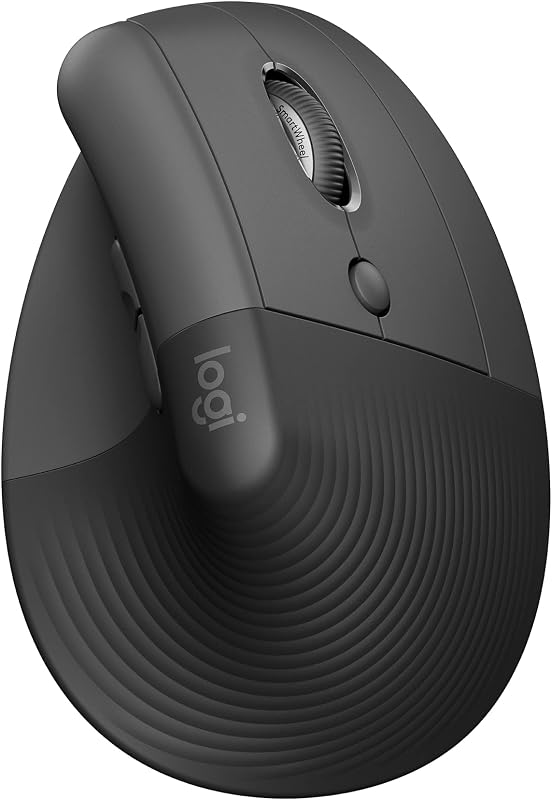
For most desk workers, the Logitech Lift is the ergonomic mouse to buy. It holds your hand at a 57° angle, like a handshake, so your forearm isn’t twisted flat all day. It is sized for small to medium hands, the clicks are quiet, and Logitech says it is ergo-certified by ergonomists. It connects by Bluetooth or the Logi Bolt receiver, and the listing claims up to two years from one AA battery. It costs well under the MX Vertical.
If you have large hands, the Logitech MX Vertical uses the same 57° angle in a bigger, rechargeable body with a cursor-speed button. If moving your whole arm is what hurts, a trackball is the better fix: the Logitech Ergo M575S lets you steer with your thumb while your hand stays still, and the MX Ergo S adds a tilt, more buttons and USB-C charging. On a tight budget, the TECKNET vertical mouse gives you the upright shape for around $20.
Skip the Lift if you have big hands, play fast games, or need pixel-perfect precision for design work: a vertical grip takes a week or two to get used to, and it is less precise than a regular mouse at first. Also, no mouse cures a wrist injury on its own. Desk height, chair position and breaks matter as much. If pain is sharp or lasts, see a doctor.
How we picked: we compared the most popular ergonomic mice on Amazon and what real buyers say about them, the praise and the complaints after weeks of daily use. Then we checked each product’s listing and specs side by side. We don’t claim hands-on lab tests or medical results: these picks reflect the listings and real owner experience. Checked October 2026.
Compare them side by side
Everything that matters, in one table. Swipe to see all 5.
| Product | Best Overall Logitech Lift Vertical mouse |  Best for Large Hands Logitech MX Vertical Vertical mouse |  Best Trackball Logitech Ergo M575S Thumb trackball |  Best Premium Trackball Logitech MX Ergo S Tilting trackball |  Best Budget TECKNET Ergonomic Vertical Mouse Budget vertical mouse |
|---|---|---|---|---|---|
| BeastScore | 92 / 100 | 89 / 100 | 88 / 100 | 87 / 100 | 82 / 100 |
| Best for | Small to medium hands, all-day office work | Medium to large hands and multi-monitor setups | Shoulder or arm pain and small desks | Power users who want a trackball with every feature | Trying a vertical mouse for cheap |
| Typical price (checked October 13, 2026) | $60–$80 | $100–$150 | $40–$50 | $100–$120 | $20–$30 |
| Style | 57° vertical | 57° vertical | Thumb trackball | Thumb trackball, 20° tilt | Vertical |
| Hand size | Small to medium (right hand) | Medium to large (right hand) | Most hand sizes (right hand) | Medium to large (right hand) | See listing (right hand) |
| Power | 1 AA, up to 2 years | Rechargeable | 1 AA, up to 18 months | USB-C rechargeable, up to 120 days | 2 AAA (not included) |
| Key features |
|
|
|
|
|
BeastScore here is our overall rating out of 100, based on published specs and Amazon owner reviews. Prices change daily, so tap "View on Amazon" for today's price. We may earn a small commission, at no extra cost to you. Learn more
Why each one made the list
What each pick does best, where it falls short, and the typical Amazon price when we checked.
- 1. Best Overall
Logitech Lift
BeastScore 92 / 100Typically $60–$80 on Amazon (checked October 13, 2026)The Lift is the easiest way into a vertical mouse. The listing describes a 57° angle that puts your forearm in a more natural handshake position, a soft textured grip and a snug thumb rest. It is built for small to medium right hands, which covers most people, and Logitech says it was designed and approved with ergonomists. Clicks are whisper-quiet, the SmartWheel spins fast for long pages, and it pairs by Bluetooth or the Logi Bolt receiver with Windows, Mac, ChromeOS, iPad and Linux. Owners report wrist relief within a couple of weeks. The catches: big hands find it cramped, and it runs on an AA battery rather than USB-C.
Pros- 57° grip takes the twist out of your forearm
- Quiet clicks for shared offices
- Up to two years on one AA battery
Cons- Too small for large hands
- Takes a week or two to adjust to
- No USB-C charging
- 2. Best for Large Hands
Logitech MX Vertical
BeastScore 89 / 100Typically $100–$150 on Amazon (checked October 13, 2026)The MX Vertical is Logitech’s bigger, premium take on the same idea. It uses the same 57° angle, and the listing says the handshake position reduces muscle activity by 10% compared with a standard mouse. The 4000 DPI sensor means less hand movement to cross a big screen, and a cursor-speed switch jumps between fast and precise with one press, handy on dual monitors. The body is larger and heavier than the Lift, which suits medium to large hands, and the rubber surface gives a steady grip. Owners like the solid feel. The downsides: it is older and pricier than the Lift, and small hands find it too tall.
Pros- Same 57° angle in a bigger body
- 4000 DPI with a one-touch speed switch
- Rechargeable, no batteries to buy
Cons- Costs much more than the Lift
- Too tall for small hands
- Heavier to push around the desk
- 3. Best Trackball
Logitech Ergo M575S
BeastScore 88 / 100Typically $40–$50 on Amazon (checked October 13, 2026)A trackball fixes a different problem than a vertical mouse. Instead of moving your arm, you roll the ball with your thumb while your hand rests still. The listing says the M575S cuts forearm muscle strain by 25% and is certified by ergonomists, and it fits most hand sizes. It works on any surface, even a couch arm, and needs almost no desk space. This updated S version adds quieter clicks, three customizable buttons and the Logi Bolt receiver, and the listing claims up to 18 months on one AA. Owners often call it the best value ergonomic mouse. The trade-offs: thumb control takes practice, and the ball needs a quick clean now and then.
Pros- Hand stays still: no arm movement at all
- Fits most hand sizes and tiny desks
- Low price for a Logitech ergo mouse
Cons- Thumb control takes practice
- Ball needs regular cleaning
- Only three customizable buttons
- 4. Best Premium Trackball
Logitech MX Ergo S
BeastScore 87 / 100Typically $100–$120 on Amazon (checked October 13, 2026)The MX Ergo S is the trackball for people who want more control. A hinged base gives a 20° tilt that the listing says reduces muscle strain by 27%, and a precision button drops the cursor speed for fine work. You get six customizable buttons, Easy-Switch between two computers, and Bluetooth or a Logi Bolt receiver. It charges over USB-C: the listing claims up to 120 days per charge, and a 1-minute top-up gives a full day. The new S version has 80% quieter clicks. Owners praise the heavy, stable base. It is pricey, and it is shaped for medium to large hands, so small hands may prefer the M575S.
Pros- 20° tilt for a more natural forearm angle
- Precision button for fine detail work
- USB-C charging with long battery life
Cons- More than twice the price of the M575S
- Best for medium to large hands
- Heavy, not great for travel
- 5. Best Budget
TECKNET Ergonomic Vertical Mouse
BeastScore 82 / 100Typically $20–$30 on Amazon (checked October 13, 2026)Not sure a vertical mouse is for you? The TECKNET lets you find out for about a quarter of the Lift’s price. It has the upright, near-vertical grip, silent left and right clicks, and six DPI levels up to 4800. It connects by Bluetooth or a 2.4 GHz receiver that stores in the base, and can switch between three devices. TECKNET backs it with a 36-month warranty when you register it. It is one of the most-reviewed budget vertical mice on Amazon. The compromises are clear: it runs on two AAA batteries (not included), the side buttons don’t work on a Mac, and the plastic feels cheaper than a Logitech.
Pros- Vertical grip for a fraction of the price
- Bluetooth plus USB receiver, three devices
- Silent main clicks
Cons- Needs two AAA batteries, not included
- Side buttons don’t work on macOS
- Build feels cheaper than Logitech
All 5 compared, in one look
See every pick on one chart, or tap one to put it head to head with Logitech Lift. Ratings out of 10 are our estimates from published specs and Amazon owner reviews, not hands-on tests. Bigger shape = better.
- Wrist comfortLogitech Lift · 9.4/10
- PrecisionTie
- Hand fit rangeLogitech Ergo M575S · 9.0/10
- Buttons & featuresLogitech MX Ergo S · 9.4/10
- BatteryLogitech Lift · 9.4/10
- ValueTECKNET Ergonomic Vertical Mouse · 9.8/10
Which one should you buy?
Find your situation below. That's your pick.
- You have small to medium hands
- You want quiet, all-day comfort
- You have large hands
- You use multiple monitors
- Moving your arm or shoulder hurts
- You have a small desk
- You want a trackball with a tilt and precision mode
- You want USB-C charging
- You want to try a vertical mouse cheaply
- You need Bluetooth and a USB receiver
Logitech Lift
A comfortable 57° vertical grip, quiet clicks and long battery life at a fair price.
- 57° vertical angle
- Ergo-certified
- Up to 2 years per AA
Quick tips before you buy
Measure from wrist crease to the tip of your middle finger. Under about 7 in suits the Lift; bigger hands suit the MX Vertical.
Set your desk or chair so your forearm rests level. A great mouse can’t fix a desk that is too high.
Vertical mice and trackballs feel odd at first. Most owners say it clicks after a week or two of daily use.
Most ergonomic mice here are right-hand only. Logitech also sells a left-handed version of the Lift.
Quick answers
What is the best ergonomic mouse?+
The Logitech Lift for most people. Its 57° vertical grip reduces forearm twist, it fits small to medium hands, clicks quietly and lasts up to two years on one AA battery. Large hands should get the MX Vertical.
Vertical mouse or trackball: which is better for wrist pain?+
A vertical mouse fixes the twisted forearm of a flat mouse. A trackball removes arm movement entirely, which helps if your shoulder or elbow hurts. Many people start with a vertical mouse and switch to a trackball if moving the arm is the problem.
Logitech Lift vs MX Vertical: what is the difference?+
Both use a 57° angle. The Lift is smaller, cheaper, quieter and runs on an AA battery, made for small to medium hands. The MX Vertical is bigger, rechargeable and has a 4000 DPI sensor with a speed switch, made for larger hands.
Does an ergonomic mouse help carpal tunnel?+
It can ease strain, since a vertical grip keeps your forearm in a more natural position. But it is not a treatment. Combine it with good desk height, breaks and stretches, and see a doctor if numbness or pain continues.
How long does it take to get used to a vertical mouse?+
Most owners report a few days to two weeks. Precision feels off at first, so lower the cursor speed early on and raise it as you adjust.
Is there a cheap ergonomic mouse that is still good?+
Yes. The TECKNET vertical mouse usually sells for $20 to $30 and has a vertical grip, silent clicks and Bluetooth. The Logitech Ergo M575S trackball is the best value from a big brand, often around $40 to $50.
Are ergonomic mice good for gaming?+
Not really. Vertical mice and trackballs trade speed for comfort. For gaming, a light, well-shaped gaming mouse is the better choice, and you can keep an ergonomic mouse for work.
Keep comparing
 Best Ergonomic Keyboards: Top 5 on AmazonSplit, wave or curved: easier on sore wrists.
 Best Office Chairs: Top 5 on AmazonSit better, hurt less. Ergonomic chairs compared.
 Best Standing Desks: Top 5 on AmazonSit less, feel better. Electric desks and converters compared.
 Best Gaming Mice: Top 5 on AmazonLighter, faster, wireless. The best gaming mice compared.