
Best Mechanical Keyboards
For Typing and Work
Our #1 pick is the Keychron K2 (Version 2). A good mechanical keyboard makes every email feel better. We compared the 5 best mechanical keyboards on Amazon for typing and work, from Keychron’s Mac-friendly K2 to a creamy $65 AULA.
How we picked: we shortlist by Amazon Best Seller rank and number of ratings, then compare published specs. We don't test these products hands-on.
By Jamilur Rahman, Founder & Editor · Updated October 13, 2026
- Owner reviews checked
- Features side by side
- Quick & easy compare
- Smarter purchase

The short answer
For most people who type all day, the Keychron K2 (Version 2) is the mechanical keyboard to buy. Its 75% layout keeps the arrow and function keys but drops the number pad, so your mouse sits closer. It pairs with three devices over Bluetooth or plugs in by USB-C, ships with both Mac and Windows keycaps, and the 4000 mAh battery lasts days between charges. It is a long-time favorite on Amazon and costs under $100.
Want the soft, “creamy” sound people love on custom keyboards without the price? The AULA F75 has a gasket-style build, pre-lubed linear switches, hot-swap sockets and a volume knob for well under $100. Office workers who want a quieter, full-size board should look at the Logitech MX Mechanical, with tactile-quiet switches and smart backlighting. If high keys strain your wrists, the low-profile Lofree Flow Lite 84 is light and soft to type on, and the Keychron K2 HE adds magnetic switches with adjustable actuation for gaming.
Skip the K2 if you need a number pad, want a silent keyboard for shared spaces, or care mostly about gaming. Its Keychron switches are not hot-swappable, and the tall profile works best with a wrist rest. Gamers chasing speed are better off with a Hall effect board like the K2 HE, and number crunchers should get the full-size MX Mechanical.
How we picked: we compared the most popular mechanical keyboards on Amazon and what real buyers say about them, the praise and the complaints after months of typing. Then we checked each product’s listing and specs side by side. We don’t claim hands-on lab tests: these picks reflect the listings and real owner experience. Checked October 2026.
Compare them side by side
Everything that matters, in one table. Swipe to see all 5.
| Product | Best Overall Keychron K2 (Version 2) 75% wireless keyboard |  Best Budget AULA F75 75% gasket-style keyboard | 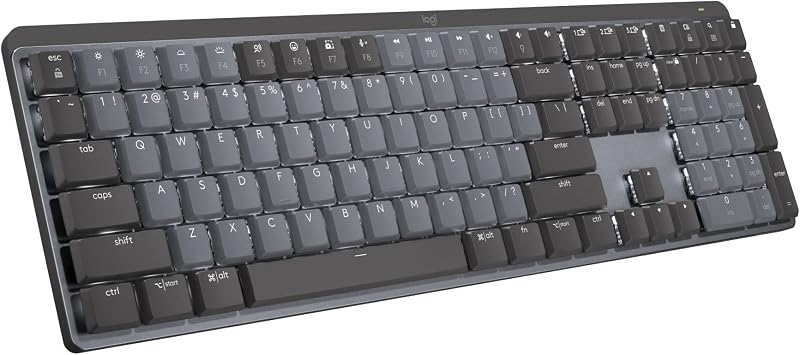 Best for the Office Logitech MX Mechanical Full-size low-profile keyboard |  Best Low-Profile Lofree Flow Lite 84 75% low-profile keyboard |  Best for Gaming and Typing Keychron K2 HE 75% magnetic (Hall effect) keyboard |
|---|---|---|---|---|---|
| BeastScore | 91 / 100 | 89 / 100 | 87 / 100 | 85 / 100 | 84 / 100 |
| Best for | Mac and Windows typists who want one board for everything | A “creamy” custom-keyboard sound for under $70 | Shared offices, spreadsheets and multi-computer setups | Laptop users who want a thin, soft keyboard | People who type by day and game by night |
| Typical price (checked October 13, 2026) | $80–$100 | $60–$80 | $140–$180 | $90–$110 | $130–$150 |
| Layout | 75% (84 keys) | 75% (81 keys) | Full size with number pad | 75% (84 keys) | 75% |
| Switches | Keychron mechanical (not hot-swap) | Pre-lubed linear, hot-swap (3/5-pin) | Low-profile Tactile Quiet | Kailh Specter linear, 40 gf, swappable | Gateron magnetic, 0.2–3.8 mm actuation |
| Connection | Bluetooth 5.1 (3 devices), USB-C | 2.4 GHz, Bluetooth 5.0, USB-C | Bluetooth, Logi Bolt (3 devices) | 2.4 GHz, Bluetooth, USB-C | 2.4 GHz (1000 Hz), Bluetooth 5.2, USB-C |
| Key features |
|
|
|
|
|
BeastScore here is our overall rating out of 100, based on published specs and Amazon owner reviews. Prices change daily, so tap "View on Amazon" for today's price. We may earn a small commission, at no extra cost to you. Learn more
Why each one made the list
What each pick does best, where it falls short, and the typical Amazon price when we checked.
- 1. Best Overall
Keychron K2 (Version 2)
BeastScore 91 / 100Typically $80–$100 on Amazon (checked October 13, 2026)The K2 is the keyboard that made Keychron famous, and Version 2 is still a smart buy. The 75% layout gives you arrows and an F-row in a compact body. It pairs with up to three devices over Bluetooth 5.1 and also works wired over USB-C. It has a true Mac layout with Mac function keys, and the box includes Windows keycaps too, so it moves between a MacBook and a work PC easily. The listing claims up to 72 hours of typing from the 4000 mAh battery. Owners love the feel and multi-device switching. The trade-offs: it is tall, so most people add a wrist rest, and the switches are not hot-swappable.
Pros- True Mac layout plus Windows keycaps
- Three Bluetooth devices plus USB-C wired
- Big battery lasts days of typing
Cons- Tall profile: a wrist rest helps
- Switches can’t be swapped without soldering
- Plastic frame, not aluminum
- 2. Best Budget
AULA F75
BeastScore 89 / 100Typically $60–$80 on Amazon (checked October 13, 2026)The F75 is why budget mechanical keyboards got exciting. For well under $100 you get what used to cost twice as much: pre-lubed linear switches and stabilizers, a gasket-style build with five layers of sound-dampening foam, and hot-swap sockets that take 3-pin or 5-pin switches, so you can try new switches without soldering. The result is the deep, creamy sound owners rave about. It connects by 2.4 GHz, Bluetooth or USB-C, has a 4000 mAh battery and a knob for volume or lighting. It is one of the most popular keyboards in its price band. Downsides: the software is basic, and it is built for Windows first.
Pros- Creamy, dampened sound for the price
- Hot-swap sockets for easy switch upgrades
- Tri-mode wireless with a handy knob
Cons- Basic driver software
- Windows-first layout; Mac users need remapping
- Plastic case, not aluminum
- 3. Best for the Office
Logitech MX Mechanical
BeastScore 87 / 100Typically $140–$180 on Amazon (checked October 13, 2026)The MX Mechanical is a mechanical keyboard that won’t annoy your coworkers. The Tactile Quiet switches give a clear bump with less noise, and the low-profile keys sit closer to the desk for a flatter wrist angle. It is full size, so you keep the number pad. Smart backlighting turns on as your hands approach and adjusts to the room. It pairs with three devices via Bluetooth or the Logi Bolt receiver, and Logi Options+ lets you set Fn keys and use Flow to move between computers. The listing claims up to 15 days per charge, or 10 months with lights off. The catches: it costs a lot, and the switches are not swappable.
Pros- Quiet tactile switches for shared spaces
- Full size with a number pad
- Smart backlight and easy three-device switching
Cons- Most expensive pick here
- Switches are fixed, no hot-swap
- Less satisfying sound than custom-style boards
- 4. Best Low-Profile
Lofree Flow Lite 84
BeastScore 85 / 100Typically $90–$110 on Amazon (checked October 13, 2026)The Flow Lite is a cheaper, plastic version of Lofree’s well-known Flow, and it keeps what people liked: a thin body and a soft, smooth typing feel. The low-profile design has a lower front edge than the original, so your wrists sit flatter without a rest. The Kailh Specter linear switches need only 40 gf to press, and the listing says that reduces finger fatigue on long sessions. A gasket mount with dampening adds a fuller sound, keycaps are textured PBT, and switches are swappable. It connects by 2.4 GHz, Bluetooth or USB-C. The trade-offs: the ABS body feels less premium, and low-profile keycaps are hard to replace.
Pros- Thin, laptop-like height without a wrist rest
- Light 40 gf switches for long typing days
- Tri-mode wireless for Mac and Windows
Cons- ABS body feels cheaper than the aluminum Flow
- Few replacement keycap options for low-profile switches
- Light switches can cause typos at first
- 5. Best for Gaming and Typing
Keychron K2 HE
BeastScore 84 / 100Typically $130–$150 on Amazon (checked October 13, 2026)The K2 HE takes the K2’s friendly 75% layout and swaps in magnetic Gateron switches. Instead of a fixed click point, you set how far each key travels before it fires, anywhere from 0.2 to 3.8 mm: deep for careful typing, shallow for fast gaming. Rapid Trigger resets a key the instant you start lifting, a real edge in competitive shooters. Everything is set in Keychron’s web-based Launcher, no install needed. It runs over 2.4 GHz at 1000 Hz, Bluetooth 5.2 or USB-C, with Mac and Windows keycaps. The catches: it only accepts Gateron magnetic switches, and it costs more than the standard K2.
Pros- Adjustable actuation for typing or gaming
- Rapid Trigger for fast games
- Browser-based setup, Mac and Windows
Cons- Only takes Gateron magnetic switches
- Pricier than the standard K2
- Fewer owner reviews than the older K2
All 5 compared, in one look
See every pick on one chart, or tap one to put it head to head with Keychron K2 (Version 2). Ratings out of 10 are our estimates from published specs and Amazon owner reviews, not hands-on tests. Bigger shape = better.
- Typing feelTie
- SoundAULA F75 · 9.4/10
- BuildLogitech MX Mechanical · 9.0/10
- WirelessLogitech MX Mechanical · 9.4/10
- CustomizationKeychron K2 HE · 9.6/10
- ValueAULA F75 · 9.8/10
Which one should you buy?
Find your situation below. That's your pick.
- You switch between a Mac and a PC
- You want a compact board under $100
- You want a creamy custom sound on a budget
- You want to try different switches
- You work in a shared office
- You need a number pad
- You want a thin, low-profile board
- You type for hours and want light keys
- You game as much as you type
- You want adjustable actuation and Rapid Trigger
Keychron K2 (Version 2)
A compact 75% layout, three-device Bluetooth and a real Mac layout for under $100.
- 75% layout
- Mac and Windows keycaps
- Bluetooth + USB-C
Quick tips before you buy
75% keeps arrows and F-keys in a small body. Get full size only if you use the number pad every day.
Linear is smooth and quiet, tactile has a bump, clicky is loud. Shared office? Go linear or tactile-quiet.
Tall keyboards bend your wrists up. Use a wrist rest, or pick a low-profile board like the Flow Lite.
Hot-swap sockets let you change switches without soldering, so the board can grow with you.
Quick answers
What is the best mechanical keyboard?+
The Keychron K2 Version 2 for most people. It has a compact 75% layout, connects to three devices by Bluetooth or USB-C, includes Mac and Windows keycaps and costs under $100.
What is the best mechanical keyboard for typing?+
The Keychron K2 or the AULA F75. The K2 is the easy, multi-device pick; the AULA has pre-lubed linear switches and dampening for a softer, creamier feel. Long-hour typists with wrist strain should try the low-profile Lofree Flow Lite 84.
What is the best mechanical keyboard for Mac?+
The Keychron K2. It has a true Mac layout with Mac function keys and ships with Mac keycaps. The Lofree Flow Lite and Logitech MX Mechanical also support macOS well.
What is the best budget mechanical keyboard?+
The AULA F75. It usually sells for $60 to $80 and has hot-swap sockets, pre-lubed switches, five layers of dampening and tri-mode wireless, features that used to cost twice as much.
Are mechanical keyboards better for typing?+
Many people find them more comfortable and accurate, because each key has a consistent feel and you don’t need to press all the way down. They are also more durable and repairable than most membrane keyboards.
What does hot-swappable mean?+
It means you can pull out the switches and plug in new ones without soldering. The AULA F75 is hot-swappable, the Lofree Flow Lite takes its own low-profile switches, and the K2 HE accepts Gateron magnetic switches.
Are Hall effect keyboards worth it?+
For competitive gamers, yes: adjustable actuation and Rapid Trigger make movement faster and more precise. For pure typing, a standard mechanical board like the K2 or AULA F75 is just as good and cheaper.
Keep comparing
 Best Gaming Keyboards: Top 5 on AmazonHall effect, rapid trigger or wireless: the right board for how you play.
 Best Ergonomic Keyboards: Top 5 on AmazonSplit, wave or curved: easier on sore wrists.
 Best Gaming Mice: Top 5 on AmazonLighter, faster, wireless. The best gaming mice compared.
 Best Monitors: Top 5 on AmazonOne great screen for work, play or photos. The best monitors compared.