
Fire Kids vs iPad
Which Is Better for Kids?
Our overall winner is the Amazon Fire HD 10 Kids. A Fire Kids tablet costs a fraction of an iPad and comes with a case, a guarantee and a year of kids content. An iPad is faster and lasts longer. We compared both, side by side, to help you choose.
How we picked: we shortlist by Amazon Best Seller rank and number of ratings, then compare published specs. We don't test these products hands-on.
By Jamilur Rahman, Founder & Editor · Updated October 15, 2026
- Owner reviews checked
- Features side by side
- Quick & easy compare
- Smarter purchase

The short answer
For most kids under 8, the Fire HD 10 Kids is the better buy. It comes ready for a child out of the box: a thick kid-proof case, a 2-year worry-free guarantee (if it breaks, Amazon replaces it), a year of Amazon Kids+ content, and parental controls you run from your phone. It costs a fraction of an iPad, so a cracked screen or a lost tablet isn’t a disaster.
The Apple iPad 11-inch (A16) wins for older kids, roughly 9 and up, who need a real computer for school. The A16 chip is far faster, the 11-inch screen is sharper, and the App Store has the school, drawing and coding apps teachers ask for. It also works with Apple Pencil and will get software updates for years. The catch: there is no case or guarantee in the box, so plan to add a kid case like the BMOUO EVA case. For kids 6 to 12 who want something less babyish than the Fire HD 10 Kids, the Fire HD 8 Kids Pro is a cheaper middle ground with a slim case and a filtered web browser.
Don’t buy the Fire HD 10 Kids for a child who is 10 or older, or who needs specific school apps. Fire tablets run Amazon’s own app store, so many apps that schools use aren’t there, and older kids quickly outgrow the chunky case and the young-kids content. Don’t buy an iPad for a toddler if you can’t live with a repair bill: even in a good case, a dropped iPad isn’t covered like the Fire Kids is.
How we picked: we compared the Fire Kids tablets and the iPad on Amazon, what real parents say about them, and each listing’s specs and features. We don’t claim hands-on testing: these picks reflect real owner experience and the listings. Checked October 2026.
Compare them side by side
Everything that matters, in one table. Swipe to see all 4.
| Product | Best for Kids Under 8 Amazon Fire HD 10 Kids 10.1" kids tablet | 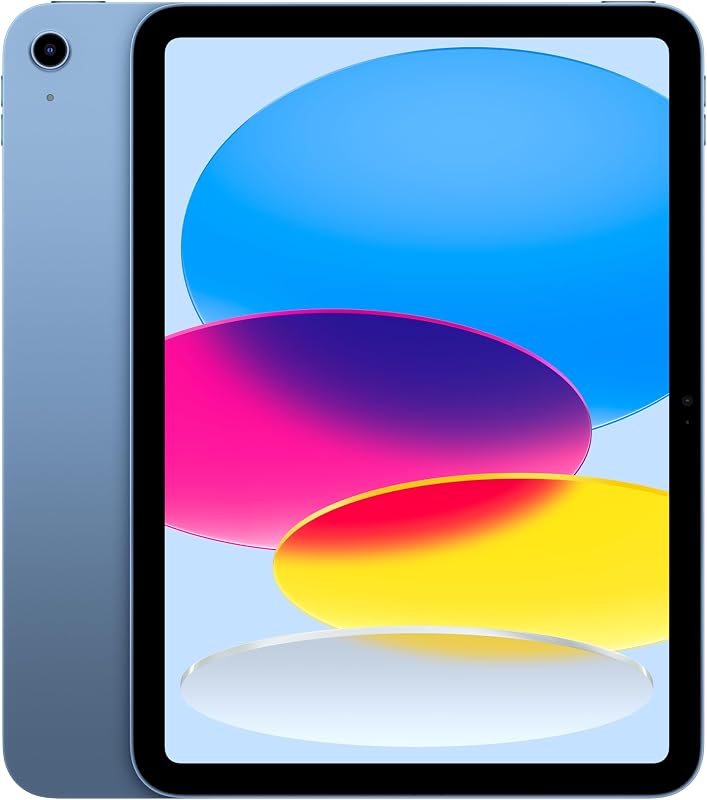 Best for Kids 9+ Apple iPad 11-inch (A16) 11" tablet |  Best Budget for Ages 6–12 Amazon Fire HD 8 Kids Pro 8" kids tablet |  Must-Have iPad Add-On BMOUO Kids Case for iPad (A16) EVA kid case for iPad |
|---|---|---|---|---|
| BeastScore | 91 / 100 | 90 / 100 | 86 / 100 | 82 / 100 |
| Best for | Ages 3 to 7 | Older kids and school work | Big kids on a budget | Making an iPad kid-ready |
| Typical price (checked October 15, 2026) | $100–$190 | $300–$350 | $80–$150 | $12–$20 |
| Screen | 10.1" HD | 11" Liquid Retina | 8" HD | Built-in screen protector |
| Storage | 32 GB | 128 GB | 64 GB | n/a |
| Ages (maker) | 3–7 | All ages | 6–12 | All ages |
| Kid case | Included, kid-proof | Not included | Included, slim | Shock-absorbing EVA foam |
| Breakage cover | 2-year worry-free guarantee | Standard Apple warranty | 2-year worry-free guarantee | See listing |
| Key features |
|
|
|
|
BeastScore here is our overall rating out of 100, based on published specs and Amazon owner reviews. Prices change daily, so tap "View on Amazon" for today's price. We may earn a small commission, at no extra cost to you. Learn more
Why each one made the list
What each pick does best, where it falls short, and the typical Amazon price when we checked.
- 1. Best for Kids Under 8
Amazon Fire HD 10 Kids
BeastScore 91 / 100Typically $100–$190 on Amazon (checked October 15, 2026)This is the tablet that is built for a young child before you even open the box. The listing includes a kid-proof case, a 2-year worry-free guarantee that replaces it if it breaks, and 1 year of Amazon Kids+, with ad-free books, games and videos from brands like Disney, Nickelodeon and PBS Kids. Parents set screen-time limits, pause the tablet and approve app requests (like Netflix or Disney+) from their own phone. The 10.1-inch screen is big enough for shows on a trip. The trade-offs: it is much slower than an iPad, the app store is smaller, and Kids+ auto-renews after the first year.
Pros- Kid-proof case and 2-year replace-if-broken guarantee included
- A year of ad-free kids content in the box
- Costs a fraction of an iPad
Cons- Much slower than the iPad for games and apps
- Amazon Appstore lacks many school apps
- Kids+ auto-renews monthly after year one
- 2. Best for Kids 9+
Apple iPad 11-inch (A16)
BeastScore 90 / 100Typically $300–$350 on Amazon (checked October 15, 2026)The iPad is the tablet a child won’t outgrow. The listing’s A16 chip makes games, video calls and drawing apps feel quick, the 11-inch Liquid Retina screen is sharp, and storage starts at 128 GB, four times the Fire HD 10 Kids. It supports Apple Pencil (USB-C), which matters for kids who draw or take notes. Apple’s built-in Screen Time and Family Sharing let you limit apps, set downtime and approve purchases. The downsides are cost and fragility: no case or breakage guarantee comes in the box, and an iPad is a lot to lose to a single drop.
Pros- Far faster, with years of software updates ahead
- Full App Store with the apps schools use
- Apple Pencil support for drawing and notes
Cons- Costs two to three times a Fire Kids tablet
- No kid case or breakage guarantee included
- Easy to give a young child more than they need
- 3. Best Budget for Ages 6–12
Amazon Fire HD 8 Kids Pro
BeastScore 86 / 100Typically $80–$150 on Amazon (checked October 15, 2026)The Kids Pro is Amazon’s answer for school-age kids who think the chunky Fire Kids case is for babies. The listing gives it a slim kid-friendly case, the same 2-year worry-free guarantee, 6 months of Amazon Kids+ and 64 GB of storage with room for a microSD card. Older kids get a web browser with built-in filters, and parents can review activity and approve downloads. It is the cheapest way to give a 6 to 12-year-old a tablet that looks less like a toy. The 8-inch screen is small next to the iPad, and it shares the Fire app-store limits.
Pros- Slim case looks grown-up for school-age kids
- Same 2-year replace-if-broken guarantee
- Filtered web browser with parent oversight
Cons- Small 8-inch screen
- Same limited app store as other Fire tablets
- Only 6 months of Kids+ included
- 4. Must-Have iPad Add-On
BMOUO Kids Case for iPad (A16)
BeastScore 82 / 100Typically $12–$20 on Amazon (checked October 15, 2026)If you choose the iPad for a younger child, buy a foam case the same day. This BMOUO case is one of the most popular kid cases for the iPad A16, and the listing says it fits both the 2025 A16 and the 2022 10th-gen iPad. It wraps the tablet in shock-absorbing EVA foam and has a built-in screen protector, so it gets an iPad closer to the Fire Kids for drop-proofing. Owners like the light weight and the handle. Note that it is not a guarantee: if the screen still breaks, you pay for the repair. The foam also makes a slim iPad much bulkier.
Pros- Thick EVA foam softens drops
- Built-in screen protector
- Cheap way to make an iPad kid-friendly
Cons- No breakage cover like the Fire Kids guarantee
- Makes the iPad bulky to pack
All 4 compared, in one look
See every pick on one chart, or tap one to put it head to head with Amazon Fire HD 10 Kids. Ratings out of 10 are our estimates from published specs and Amazon owner reviews, not hands-on tests. Bigger shape = better.
- Kid-proofAmazon Fire HD 10 Kids · 9.6/10
- Parental controlsAmazon Fire HD 10 Kids · 9.4/10
- SpeedApple iPad 11-inch (A16) · 9.6/10
- Apps for schoolApple iPad 11-inch (A16) · 9.8/10
- Grows with kidApple iPad 11-inch (A16) · 9.6/10
- ValueTie
Who wins where
The winner of each category, based on published specs and Amazon owner reviews. Pick the rounds that matter to you.
- Round 1
Durability
Amazon Fire HD 10 Kids winsThe Fire HD 10 Kids comes in a thick kid-proof case with a 2-year worry-free guarantee: if it breaks, Amazon replaces it. The iPad has neither in the box. A foam case helps, but a broken iPad screen is still your bill.
- Round 2
Parental controls
Amazon Fire HD 10 Kids winsBoth are strong. Amazon’s Parent Dashboard is built for kids from the start: age filters, time limits, pause, and app approval from your phone. Apple’s Screen Time does as much, but takes more setup and is designed for every age.
- Round 3
Kids content
Amazon Fire HD 10 Kids winsThe Fire HD 10 Kids includes 1 year of Amazon Kids+, thousands of ad-free books, games and videos. On an iPad you build your own library of apps, and many good ones cost extra or show in-app offers.
- Round 4
Speed and screen
Apple iPad 11-inch (A16) winsThe iPad’s A16 chip and 11-inch Liquid Retina screen are in a different class. Big games, video calls and drawing apps run smoothly. Fire tablets are fine for shows and simple games, but slow down with heavier apps.
- Round 5
Apps for school
Apple iPad 11-inch (A16) winsThe App Store has the reading, maths, coding and drawing apps schools ask for, plus Apple Pencil support. Fire tablets use the Amazon Appstore, which is missing many of them.
- Round 6
Price and long-term value
TieA Fire Kids tablet costs a fraction of an iPad up front, with the case and guarantee included. An iPad costs more but gets years of updates, so one iPad can last from age 8 to high school. Young kids: Fire wins. Older kids: the iPad pays back.
Which one should you buy?
Find your situation below. That's your pick.
- Your child is 3 to 7
- You want a case and breakage cover in the box
- You’d rather not hand a young child a costly tablet
- Your child is about 9 or older
- School asks for specific iPad apps
- You want one tablet to last many years
- Your child is 6 to 12 on a small budget
- They want a slimmer, less toy-like look
- They need a filtered web browser
- You chose the iPad for a younger child
- You want drop protection for little money
Amazon Fire HD 10 Kids
For kids under 8: a kid-proof case, a 2-year replace-if-broken guarantee and a year of content, for far less than an iPad.
- 2-year guarantee
- Kid-proof case included
- 1 year Amazon Kids+
Quick tips before you buy
An iPad has no breakage cover for kids. Add a foam case at least, and consider AppleCare+ for young children.
Set up Amazon Parent Dashboard or Apple Screen Time before you hand it over. It is harder to add limits later.
Amazon Kids+ renews monthly after the included period. Set a reminder if you don’t want to keep it.
Under 8: Fire HD 10 Kids. 6 to 12 on a budget: Fire HD 8 Kids Pro. 9 and up with school apps: iPad.
Quick answers
Is a Fire Kids tablet better than an iPad for kids?+
For kids under about 8, yes. The Fire Kids comes with a kid-proof case, a 2-year guarantee and a year of kids content, for far less money. For older kids who need school apps or will use it for years, the iPad is better.
Should I get my 5 year old an iPad or a Fire tablet?+
A Fire HD 10 Kids. At five, drops are likely, and the Fire Kids guarantee replaces it if it breaks. Five-year-olds don’t need the iPad’s speed, and Amazon Kids+ covers most of what they’ll want.
Can you get YouTube or Netflix on a Fire Kids tablet?+
Yes. The listing says parents can approve app requests like Netflix and Disney+ from the Amazon Kids Parent Dashboard. You control what gets installed.
Does the iPad have parental controls?+
Yes. Apple Screen Time lets you set downtime, app limits and content ratings, and Family Sharing with Ask to Buy makes kids request purchases. It takes a little more setup than Amazon’s kids mode.
What happens to the Fire Kids tablet when my child gets older?+
Amazon says it grows with kids: you can change the age filters and, on most Fire Kids tablets, switch it to a regular Fire tablet later. Most kids still outgrow it by around 9 or 10.
What is the difference between Fire HD 10 Kids and Fire HD 8 Kids Pro?+
The HD 10 Kids is for ages 3 to 7, with a bigger 10.1-inch screen, a chunky case and a year of Kids+. The HD 8 Kids Pro is for ages 6 to 12, with a slim case, a filtered web browser, 64 GB of storage and 6 months of Kids+.
Is the iPad A16 worth it for a kid?+
For a child 9 or older who will use it for school, yes: it is fast, gets years of updates and runs the apps teachers use. For a young child who mostly watches shows, it is more tablet than they need.
Keep comparing
Best Kids Tablets: Top 5 on AmazonFun, safe and built for drops, for every age.Best Tablets: Top 5 on AmazoniPad vs Galaxy Tab vs Fire: the right tablet for you. Best iPad Cases: Top 5 on AmazonFolio, rugged, keyboard or kid-proof. The best iPad cases compared.
 Best Kids Smartwatches: Top 5 with GPS and callingCall and find your kid, no phone needed. 5 GPS kids watches compared.