
Fire TV Stick HD vs 4K Plus vs 4K Max
Which is worth it?
For most people, get the Fire TV Stick 4K Plus. All three run the new 2026 Fire TV home screen with Alexa+. The real differences are picture quality, Wi-Fi, storage and the remote.
How we picked: we shortlist by Amazon Best Seller rank and number of ratings, then compare published specs. We don't test these products hands-on.
- Owner reviews checked
- Features side by side
- Quick & easy compare
- Smarter purchase

The short answer
If you have a 4K TV, get the Fire TV Stick 4K Plus. It streams in 4K with Dolby Vision, HDR10+ and Dolby Atmos, has Wi-Fi 6, and costs a lot less than the Max.
Pick the 4K Max if you want the fastest stick, Wi-Fi 6E, double the storage (16 GB) and the backlit Alexa Voice Remote Pro, which rings when you lose it. Pick the Fire TV Stick HD only for an older HD TV, like a bedroom or kitchen set.
Fire Stick is one of the most searched products on Amazon, and Fire TV devices are among the biggest discounts at Prime Big Deal Days (October 6–7, 2026). Decide here, then buy on sale.
Compare them side by side
Everything that matters, in one table. Swipe to see all 3.
| Product | Best for Most 4K TVs Fire TV Stick 4K Plus 4K streaming stick |  Most Powerful Fire TV Stick 4K Max 4K stick with Alexa Voice Remote Pro | 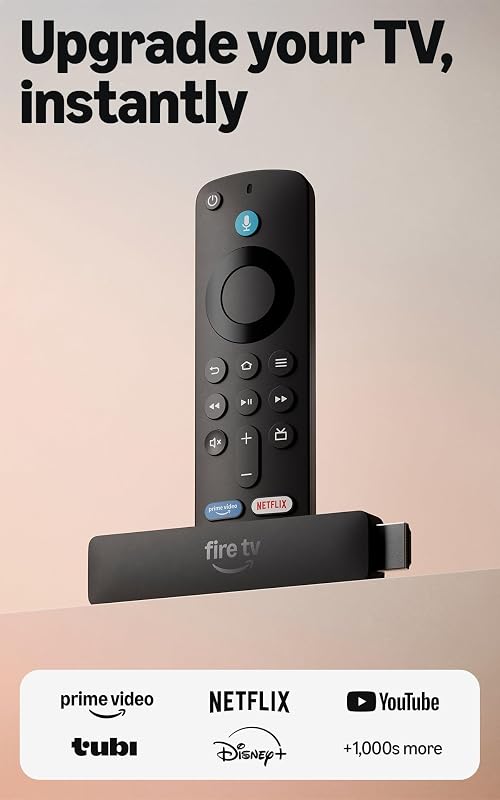 Best for HD TVs Fire TV Stick HD HD streaming stick |
|---|---|---|---|
| BeastScore | 92 / 100 | 91 / 100 | 84 / 100 |
| Best for | Any 4K TV, best value | Big app libraries and busy Wi-Fi | Bedroom, kitchen or older TVs |
| Resolution | Up to 4K, 60 fps | Up to 4K, 60 fps | HD |
| HDR & audio | Dolby Vision, HDR10+, Dolby Atmos | Dolby Vision, HDR10+, Dolby Atmos | See listing |
| Wi-Fi | Wi-Fi 6 | Wi-Fi 6E (tri-band) | See listing |
| Storage | 8 GB | 16 GB | See listing |
| Processor | Quad-core 1.7 GHz | Quad-core 2.0 GHz | See listing |
| Remote | Alexa Voice Remote | Voice Remote Pro (backlit) | Alexa Voice Remote |
| Key features |
|
|
|
BeastScore here is our overall rating out of 100, based on published specs and Amazon owner reviews. Prices change daily, so tap "View on Amazon" for today's price. We may earn a small commission, at no extra cost to you. Learn more
All 3 compared, in one look
See every pick on one chart, or tap one to put it head to head with Fire TV Stick 4K Plus. Ratings out of 10 are our estimates from published specs and Amazon owner reviews, not hands-on tests. Bigger shape = better.
- PictureTie
- SpeedFire TV Stick 4K Max · 9.8/10
- Wi-FiFire TV Stick 4K Max · 9.8/10
- RemoteFire TV Stick 4K Max · 9.8/10
- StorageFire TV Stick 4K Max · 9.6/10
- ValueFire TV Stick 4K Plus · 9.6/10
Who wins where
The winner of each category, based on published specs and Amazon owner reviews. Pick the rounds that matter to you.
- Round 1
Picture quality
TieThe 4K Plus and 4K Max look the same on screen: both do 4K at 60 fps with Dolby Vision, HDR10+ and Dolby Atmos. The HD stick tops out at HD, so it only makes sense on a non-4K TV.
- Round 2
Speed
Fire TV Stick 4K Max winsThe Max has a 2.0 GHz quad-core chip and a faster 850 MHz GPU, vs 1.7 GHz and 650 MHz in the 4K Plus. Apps open faster and menus feel smoother, which you notice most with lots of apps installed.
- Round 3
Wi-Fi
Fire TV Stick 4K Max winsThe Max supports Wi-Fi 6E (the 6 GHz band), the 4K Plus Wi-Fi 6. Wi-Fi 6E only helps if your router supports it. With a normal router, both stream 4K smoothly.
- Round 4
Storage
Fire TV Stick 4K Max winsThe Max has 16 GB, double the 4K Plus’s 8 GB. That matters if you install many apps or games. Most people who stick to Netflix, Prime Video and YouTube never fill 8 GB.
- Round 5
Remote
Fire TV Stick 4K Max winsThis 4K Max bundle comes with the Alexa Voice Remote Pro: backlit buttons, two custom shortcuts, and it rings when you say “Alexa, find my remote.” The other two use the standard Alexa Voice Remote.
- Round 6
Value
Fire TV Stick 4K Plus winsThe 4K Plus gives you the same 4K picture as the Max for less money. Unless you need the speed, storage or Pro remote, it is the smarter buy.
Which one should you buy?
Find your situation below. That's your pick.
- You have a 4K TV
- You mostly watch Netflix, Prime Video and YouTube
- You want the best price for 4K
- You install lots of apps or play cloud games
- You have a Wi-Fi 6E router
- You always lose the remote
- Your TV is HD, not 4K
- It’s for a bedroom, kitchen or dorm
- You want the simplest setup, powered by the TV
Fire TV Stick 4K Plus
Everything most people need for a 4K TV: Dolby Vision, Atmos and Wi-Fi 6, for much less than the Max.
- 4K Dolby Vision & HDR10+
- Wi-Fi 6
- Xbox cloud gaming
Quick tips before you buy
No 4K TV? The HD stick is enough. A 4K stick won’t make an HD TV look sharper.
The Max’s extra Wi-Fi band only works with a Wi-Fi 6E router.
For 4K sticks, plug into the wall adapter if your TV’s USB port is weak.
Fire TV Sticks are some of the biggest Prime Big Deal Days discounts.
Quick answers
What is the difference between the Fire TV Stick 4K Plus and 4K Max?+
Picture quality is the same. The 4K Max has a faster processor (2.0 vs 1.7 GHz), Wi-Fi 6E instead of Wi-Fi 6, 16 GB instead of 8 GB of storage, and this bundle includes the backlit Alexa Voice Remote Pro.
Is the Fire TV Stick 4K Max worth it?+
If you install many apps, play cloud games or have a Wi-Fi 6E router, yes. For normal streaming on a 4K TV, the 4K Plus looks just as good for less money.
Can I use a 4K Fire Stick on a non-4K TV?+
Yes. It works on any TV with HDMI, it just plays at your TV’s resolution. But you’d be paying for 4K you can’t see, so the HD stick is better value there.
Can you play games on a Fire TV Stick?+
Yes. The 4K Plus and 4K Max support cloud gaming with Xbox Game Pass and Amazon Luna. You need a subscription and a compatible controller.
What about the newest Fire TV Stick bundles?+
Amazon also sells newer 2026 bundles with a USB power cable. Early owner reviews on those listings are mixed, so we picked the versions with a longer track record.
