
Best Gaming Monitors
Top 5 on Amazon
Our #1 pick is the Alienware AW2725DF. From a $200 1440p IPS to 360Hz QD-OLED and a 32-inch 4K OLED. We compared the 5 best gaming monitors on Amazon for PC and console players.
How we picked: we shortlist by Amazon Best Seller rank and number of ratings, then compare published specs. We don't test these products hands-on.
By Jamilur Rahman, Founder & Editor · Updated October 12, 2026
- Owner reviews checked
- Features side by side
- Quick & easy compare
- Smarter purchase
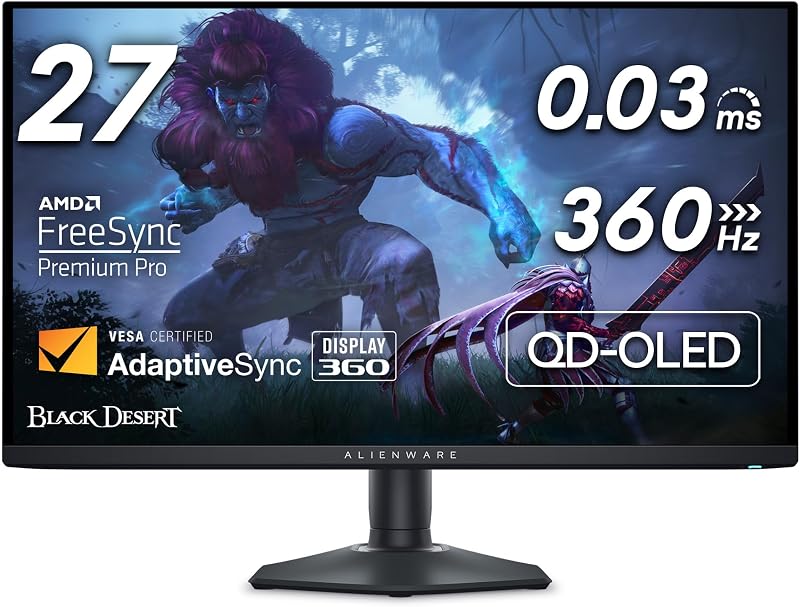
The short answer
For most PC gamers, the Alienware AW2725DF is the gaming monitor to buy. It pairs a 27-inch-class QD-OLED panel with 1440p resolution and a 360Hz refresh rate, so you get the inky blacks and instant pixel response of OLED plus the motion clarity of an esports screen. The listing quotes 99.3% DCI-P3 color, a full height, tilt, swivel and pivot stand, and DisplayHDR True Black 400. It is the best all-round mix of speed and picture quality on Amazon right now.
On a tighter budget, the Samsung Odyssey OLED G6 gets you a 1440p QD-OLED at 240Hz for a lot less, with a glare-free coating and Samsung’s burn-in safeguards. If you have a high-end graphics card or a PS5 Pro and want maximum sharpness, the Samsung Odyssey OLED G8 32-inch is the 4K pick. For racing, flight and open-world games, the Alienware AW3425DW ultrawide wraps a 34-inch QD-OLED around you. And if you just want a fast, sharp screen for around $200, the ASUS TUF VG27AQ3A is the long-time budget favorite.
Don’t buy the AW2725DF if you mostly play on a console, work long hours with static windows open, or play games that run below 100 fps on your PC. A PS5 or Xbox can’t use 360Hz, and OLED panels carry some burn-in risk with fixed taskbars and HUDs. Console players get more from a 4K screen, and office-heavy users are safer with a fast IPS like the ASUS. Our general-purpose monitor picks are in our best monitors guide.
How we picked: we compared the most popular gaming monitors on Amazon and what real buyers say about them, from motion clarity and HDR to stands, coatings and long-term burn-in worries. Then we checked each listing’s panel type, resolution, refresh rate and ports and ranked the top 5. We don’t claim lab tests: these picks reflect owner experience and the listings. Checked October 2026.
Compare them side by side
Everything that matters, in one table. Swipe to see all 5.
| Product | Best Overall Alienware AW2725DF 27-inch QD-OLED |  Best Value OLED Samsung Odyssey OLED G6 (G61SH) 27-inch QD-OLED |  Best 4K Samsung Odyssey OLED G8 32" (G80SH) 32-inch 4K QD-OLED |  Best Ultrawide Alienware AW3425DW 34-inch curved QD-OLED | 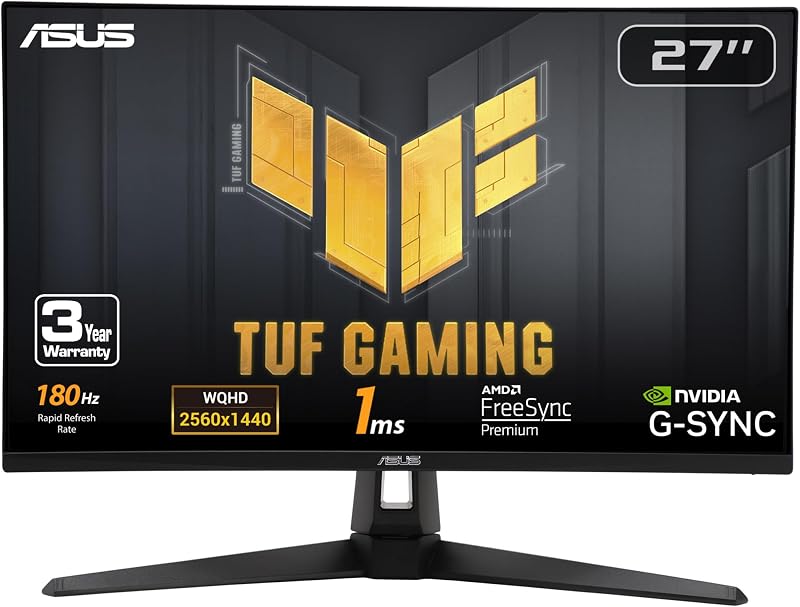 Best Budget ASUS TUF Gaming VG27AQ3A 27-inch Fast IPS |
|---|---|---|---|---|---|
| BeastScore | 94 / 100 | 91 / 100 | 90 / 100 | 89 / 100 | 86 / 100 |
| Best for | PC gamers who want speed and OLED contrast | Getting OLED for far less | High-end PCs, PS5 Pro and big-screen detail | Racing, flight sims and open-world games | A first 1440p high-refresh monitor |
| Typical price (checked October 12, 2026) | $550–$650 | $370–$450 | $900–$1,000 | $700–$800 | $170–$200 |
| Screen size | 26.7 in | 27 in | 32 in | 34.2 in | 27 in |
| Resolution | 2560 x 1440 | 2560 x 1440 | 3840 x 2160 | 3440 x 1440 | 2560 x 1440 |
| Refresh rate | 360Hz | 240Hz | 240Hz | 240Hz | 180Hz |
| Panel | QD-OLED | QD-OLED | QD-OLED | QD-OLED, 1800R curve | Fast IPS |
| Key features |
|
|
|
|
|
BeastScore here is our overall rating out of 100, based on published specs and Amazon owner reviews. Prices change daily, so tap "View on Amazon" for today's price. We may earn a small commission, at no extra cost to you. Learn more
Why each one made the list
What each pick does best, where it falls short, and the typical Amazon price when we checked.
- 1. Best Overall
Alienware AW2725DF
BeastScore 94 / 100Typically $550–$650 on Amazon (checked October 12, 2026)The AW2725DF is the rare monitor that doesn’t make you choose between an esports screen and a beautiful one. Its 360Hz refresh rate and 0.03 ms response time give extremely clean motion, which owners say is obvious in shooters. Because it is QD-OLED, every pixel lights itself, so blacks are truly black and colors are rich; the listing quotes 99.3% DCI-P3 coverage and Delta E under 2. 1440p is the sweet spot for a 27-inch screen and is much easier to drive at high frame rates than 4K. The trade-offs: OLED burn-in risk with static content, and HDR brightness is modest.
Pros- 360Hz plus near-instant OLED response for very clean motion
- Infinite contrast and wide color for rich games
- Fully adjustable stand with pivot
Cons- Consoles can’t use anywhere near 360Hz
- Some burn-in risk with static taskbars and HUDs
- HDR is True Black 400, not as punchy as bright mini-LED screens
- 2. Best Value OLED
Samsung Odyssey OLED G6 (G61SH)
BeastScore 91 / 100Typically $370–$450 on Amazon (checked October 12, 2026)The G6 is the cheapest way to get a proper QD-OLED gaming monitor from a big brand. You still get 1440p at 240Hz with a 0.03 ms response time, which is plenty for almost every game and graphics card. Samsung adds a Glare Free coating that cuts reflections in bright rooms and an OLED Safeguard thermal system that the listing says helps prevent burn-in. The stand adjusts for height, tilt, swivel and pivot, and the screen is Pantone Validated for color. Next to the Alienware it gives up 120Hz of refresh and some HDR punch, and it uses HDR10 rather than a True Black badge.
Pros- QD-OLED picture and 240Hz for much less than flagships
- Glare-free finish works in bright rooms
- Burn-in safeguard and fully adjustable stand
Cons- 240Hz, not 360Hz, for top-tier esports
- Plain HDR10 rating, less HDR punch than the Alienware
- 3. Best 4K
Samsung Odyssey OLED G8 32" (G80SH)
BeastScore 90 / 100Typically $900–$1,000 on Amazon (checked October 12, 2026)If you want the sharpest, most immersive picture, a 32-inch 4K OLED is the upgrade, and this G8 is a strong one. The listing quotes 3840 x 2160 at 240Hz, about 140 pixels per inch, and DisplayHDR True Black 500, a step above the other OLEDs here. It is also the best-connected: DisplayPort 2.1 has the bandwidth for 4K at 240Hz, and USB-C with up to 98 W can power a laptop with one cable. Samsung adds its upgraded OLED Safeguard+ burn-in protection, a glare-free coating and a 3-year warranty. The downsides are price and the graphics card you need to run modern games near 240 fps at 4K.
Pros- Very sharp 4K on a big 32-inch QD-OLED
- DP 2.1 and 98 W USB-C for one-cable setups
- Strongest HDR rating of our picks
Cons- Costs well over twice as much as the G6
- Needs a top graphics card to use 240Hz at 4K
- Newer listing with fewer owner reviews so far
- 4. Best Ultrawide
Alienware AW3425DW
BeastScore 89 / 100Typically $700–$800 on Amazon (checked October 12, 2026)An ultrawide changes how games feel more than any spec bump. The AW3425DW stretches a 34-inch QD-OLED to 3440 x 1440 with a gentle 1800R curve, so a cockpit or a city fills your side vision. It still runs at 240Hz, and the listing quotes 1000 nits peak HDR brightness, DisplayHDR True Black 400 and 99.3% DCI-P3. It supports G-SYNC Compatible, FreeSync Premium Pro and VESA AdaptiveSync, so it works smoothly with any modern graphics card. Owners love it for sims and single-player games. Not every game supports 21:9, consoles mostly don’t, and competitive players often prefer a smaller screen.
Pros- Wraparound 21:9 view for sims and story games
- 240Hz QD-OLED with high peak HDR brightness
- Works with both NVIDIA and AMD adaptive sync
Cons- Consoles and some games show black bars at 21:9
- Needs a deep desk and a strong graphics card
- Burn-in risk with static content, like any OLED
- 5. Best Budget
ASUS TUF Gaming VG27AQ3A
BeastScore 86 / 100Typically $170–$200 on Amazon (checked October 12, 2026)For around $200, the VG27AQ3A gets the important things right. A 27-inch 1440p Fast IPS panel at 180Hz is a big jump from a 60Hz or 1080p screen, and the listing quotes a 1 ms response time and 130% sRGB color. ASUS’s ELMB Sync combines motion-blur reduction with variable refresh, and it supports FreeSync Premium and G-SYNC Compatible. IPS also has no burn-in risk, so it is fine for long work days with static windows. It is one of the most-reviewed gaming monitors on Amazon. Contrast and HDR are where it falls short of OLED, and the stand is basic next to the OLED picks.
Pros- 1440p at 180Hz for a budget price
- No burn-in worries, good for work and play
- ELMB Sync plus G-SYNC and FreeSync support
Cons- IPS glow and grey blacks next to OLED
- HDR10 support is basic and adds little
- Basic stand with fewer adjustments than the OLED picks
All 5 compared, in one look
See every pick on one chart, or tap one to put it head to head with Alienware AW2725DF. Ratings out of 10 are our estimates from published specs and Amazon owner reviews, not hands-on tests. Bigger shape = better.
- Motion clarityAlienware AW2725DF · 9.8/10
- Picture qualitySamsung Odyssey OLED G8 32" (G80SH) · 9.8/10
- HDRSamsung Odyssey OLED G8 32" (G80SH) · 9.0/10
- Stand & portsSamsung Odyssey OLED G8 32" (G80SH) · 9.4/10
- Console fitSamsung Odyssey OLED G8 32" (G80SH) · 9.2/10
- ValueASUS TUF Gaming VG27AQ3A · 9.8/10
Which one should you buy?
Find your situation below. That's your pick.
- You play on a strong PC and want the best motion clarity
- You want OLED contrast at 1440p
- You want OLED for the least money
- Your room is bright and you want a glare-free screen
- You have a high-end GPU or a PS5 Pro
- You want a big, sharp 4K screen with one-cable USB-C
- You play racing, flight or open-world games
- You want a wraparound ultrawide view
- You want a first 1440p high-refresh screen on a budget
- You also use it for long work days
Alienware AW2725DF
1440p QD-OLED at 360Hz: esports speed with OLED contrast.
- 360Hz refresh
- 0.03 ms response
- Fully adjustable stand
Quick tips before you buy
A 360Hz screen only helps if your PC can push well over 200 fps. Mid-range cards are a better fit for 180Hz to 240Hz.
1440p looks sharp at 27 inches and is far easier to run at high frame rates than 4K. Go 4K at 32 inches if you have the GPU.
Hide the taskbar, use a dark wallpaper and let the panel run its refresh cycles. That keeps burn-in risk low.
Use DisplayPort for full refresh on PC. Consoles need HDMI 2.1 for 4K at 120Hz, so check the port specs on the listing.
Quick answers
What is the best gaming monitor in 2026?+
For most PC gamers, the Alienware AW2725DF. It combines a 1440p QD-OLED panel with a 360Hz refresh rate, so you get both very fast motion and OLED contrast. The Samsung Odyssey OLED G6 is the best value OLED.
Is OLED worth it for gaming?+
For most gamers, yes. OLED gives perfect blacks and near-instant pixel response, which makes games look and feel better than IPS or VA. The trade-offs are a higher price and some burn-in risk with static images, which modern safeguards reduce.
1440p or 4K for gaming?+
1440p is the better choice for most people on a 27-inch screen: it looks sharp and is much easier to run at high frame rates. Choose 4K at 32 inches if you have a high-end graphics card or mainly play slower, cinematic games or console titles.
What is the best gaming monitor for PS5?+
A 4K screen with HDMI 2.1 is the best match, because the PS5 tops out at 120Hz. The Samsung Odyssey OLED G8 32-inch is our 4K pick; check the listing’s HDMI version before you buy any monitor for console 4K at 120Hz.
Is 360Hz worth it over 240Hz?+
Only if you play fast competitive shooters and your PC can hold well above 240 fps. For single-player games and most players, 240Hz already looks extremely smooth.
Will an OLED monitor burn in?+
It can, with long hours of the same static image, like a taskbar or game HUD. Brands now add pixel shifting, refresh cycles and thermal safeguards, and many offer burn-in warranty cover. Check the warranty terms on the listing.
What is the best budget gaming monitor?+
The ASUS TUF VG27AQ3A. It is a 27-inch 1440p Fast IPS at 180Hz, usually around $200, with G-SYNC Compatible and FreeSync support and no burn-in risk.
Keep comparing
 Best Graphics Cards: Top 5 on AmazonRTX 50 or Radeon RX 9000? The best GPUs for 1440p and 4K compared.
 Best Gaming Keyboards: Top 5 on AmazonHall effect, rapid trigger or wireless: the right board for how you play.
 Best Gaming Mice: Top 5 on AmazonLighter, faster, wireless. The best gaming mice compared.
 Best Monitors: Top 5 on AmazonOne great screen for work, play or photos. The best monitors compared.