
Top 5 PS5 Accessories
for new owners
Our #1 pick is the DualSense Wireless Controller. A second controller, more storage, a charging dock and two bigger upgrades. We compared the five PS5 accessories that make the biggest difference, from under $20 to a full SSD.
How we picked: we shortlist by Amazon Best Seller rank and number of ratings, then compare published specs. We don't test these products hands-on.
By Jamilur Rahman, Founder & Editor · Updated October 9, 2026
- Owner reviews checked
- Features side by side
- Quick & easy compare
- Smarter purchase

The short answer
The first PS5 accessory to buy is a second DualSense Wireless Controller. Every PS5 ships with just one, so you can’t play couch co-op, and you’re stuck waiting when the battery dies mid-game. A spare controller fixes both problems, and it is the cheapest official upgrade Sony makes. After that, the most useful buy is storage: the WD_BLACK SN850P 2TB slots into the PS5’s built-in M.2 bay and more than doubles the space for games.
The other picks depend on how you play. If someone else wants the TV, the PlayStation Portal streams your PS5 games to an 8-inch handheld screen anywhere in the house. If you play shooters or competitive games, the DualSense Edge adds back buttons, trigger stops and swappable sticks. And for under $20, the OIVO charging station keeps two controllers topped up so you never start a session on a flat battery.
Skip the extra DualSense if you only ever play alone and don’t mind charging over a cable; a charging dock solves the dead-battery problem for much less. And don’t buy the SSD until you actually run out of space. A PS5 Slim or Pro has about 1TB built in, which holds a good number of games, and SSD prices have climbed this year, so it’s worth waiting until your library is full or a sale comes along.
Compare them side by side
Everything that matters, in one table. Swipe to see all 5.
| Product | Best Overall DualSense Wireless Controller Official PS5 controller |  Best Storage Upgrade WD_BLACK SN850P 2TB PS5 M.2 SSD with heatsink | 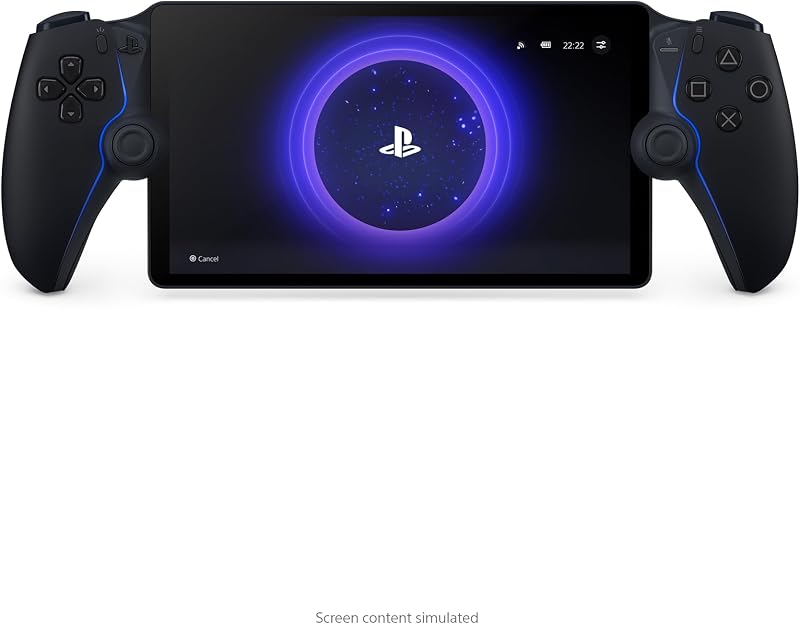 Best for Sharing the TV PlayStation Portal Remote Play handheld |  Best Pro Controller DualSense Edge Pro wireless controller |  Best Budget Accessory OIVO PS5 Charging Station Dual controller charger |
|---|---|---|---|---|---|
| BeastScore | 93 / 100 | 91 / 100 | 89 / 100 | 88 / 100 | 86 / 100 |
| Best for | Co-op games and a spare when one dies | Big game libraries | Playing when someone else has the TV | Shooters and competitive players | Never starting on a flat controller |
| Typical price (checked October 9, 2026) | $70–$80 | $430–$460 | $250–$280 | $200–$220 | $15–$20 |
| What it is | Wireless controller | Internal M.2 NVMe SSD | Handheld streaming player | Pro wireless controller | Charging dock |
| Works with | PS5, PC, Mac, Android, iOS | PS5, PS5 Slim, PS5 Pro | PS5 over Wi-Fi | PS5 | DualSense and DualSense Edge |
| Key spec | Haptics + adaptive triggers | 2TB, up to 7,300 MB/s | 8-inch 1080p, up to 60fps | Back buttons + swappable sticks | Charges 2 controllers |
| Key features |
|
|
|
|
|
BeastScore here is our overall rating out of 100, based on published specs and Amazon owner reviews. Prices change daily, so tap "View on Amazon" for today's price. We may earn a small commission, at no extra cost to you. Learn more
Why each one made the list
What each pick does best, where it falls short, and the typical Amazon price when we checked.
- 1. Best Overall
DualSense Wireless Controller
BeastScore 93 / 100Typically $70–$80 on Amazon (checked October 9, 2026)A second controller is the accessory nearly every new PS5 owner ends up buying, so it is our top pick. This is the same DualSense that comes in the box, with haptic feedback and adaptive triggers that games like Astro Bot are built around. The listing confirms a built-in mic, a mute button and a 3.5 mm jack for any wired headset, plus USB-C and Bluetooth so it also works on a PC, Mac or phone. It is one of the most-reviewed PS5 accessories on Amazon. Owners’ main complaint is battery life: heavy haptics drain it within an evening, which is why a charging dock pairs well with it.
Pros- Lets two people play couch co-op straight away
- Same haptics and adaptive triggers as the boxed controller
- Also works on PC, Mac and phones over Bluetooth
Cons- Battery runs down fast with haptics on
- Owners report stick drift can appear after heavy use
- Price has crept up since launch
- 2. Best Storage Upgrade
WD_BLACK SN850P 2TB
BeastScore 91 / 100Typically $430–$460 on Amazon (checked October 9, 2026)Big games now take 100GB or more, so storage fills fast. The SN850P is an officially licensed PS5 SSD, which takes the guesswork out of compatibility. It slides into the console’s M.2 expansion slot, ships with a heatsink shaped for the PS5, and the listing rates it at up to 7,300 MB/s, comfortably above what the console needs. Games run straight from the drive, so you don’t have to shuffle installs around. Owners report the install takes about ten minutes with a small screwdriver. The 1TB version costs less but gives worse value per gigabyte, and this is still the priciest pick here.
Pros- Officially licensed, so it works with every PS5 model
- PS5-shaped heatsink is pre-fitted
- Doubles or triples total game storage
Cons- Most expensive accessory on this list
- Needs a screwdriver and a few minutes of setup
- Overkill if you only keep a few games installed
- 3. Best for Sharing the TV
PlayStation Portal
BeastScore 89 / 100Typically $250–$280 on Amazon (checked October 9, 2026)The Portal is the most-wanted PS5 gift for one reason: it frees you from the TV. It streams games running on your PS5 to an 8-inch, 1080p screen at up to 60fps, wrapped in a split DualSense with haptics and adaptive triggers. With PlayStation Plus Premium, the listing says it can also cloud-stream games from the catalog without the console doing the work. The catch is Wi-Fi: Sony asks for at least 5 Mbps and recommends 15 Mbps, and owners say a weak signal means lag. Audio runs over PlayStation Link or the 3.5 mm jack, not regular Bluetooth. Check the seller, since stock often comes from third parties.
Pros- Big, sharp 8-inch screen with full DualSense controls
- Lets you play anywhere your home Wi-Fi reaches
- Cloud streaming with PlayStation Plus Premium
Cons- Only as good as your Wi-Fi connection
- Most Bluetooth earbuds won’t connect
- Sony raised the price in 2026
- 4. Best Pro Controller
DualSense Edge
BeastScore 88 / 100Typically $200–$220 on Amazon (checked October 9, 2026)The Edge is Sony’s answer to pro controllers, and it solves the DualSense’s biggest weakness. The stick modules swap out, so if drift shows up you replace a part instead of the whole controller. The listing also adds two sets of back buttons you can map to any input, trigger stops that shorten travel for faster shots, and profiles you can switch mid-game. Owners love it for shooters and racing games. The trade-offs are price and battery: it costs close to three standard controllers, and owners report noticeably shorter battery life than the regular DualSense, so plan to keep it on a charger.
Pros- Swappable stick modules fix drift without a new controller
- Back buttons and trigger stops help in shooters
- Saved profiles switch on the fly
Cons- Costs nearly three times a standard DualSense
- Owners report shorter battery life
- Extra buttons are wasted on casual games
- 5. Best Budget Accessory
OIVO PS5 Charging Station
BeastScore 86 / 100Typically $15–$20 on Amazon (checked October 9, 2026)For less than a game’s season pass, this dock ends the dead-controller problem. You drop two controllers onto the cradle and they charge; the listing says a full charge takes about 2 hours, and it fits the DualSense Edge as well. It comes with its own AC adapter, so it doesn’t need a free USB port on the console, and an on/off switch on the back saves power. It is one of the most-reviewed PS5 chargers on Amazon and costs a fraction of Sony’s own dock. The downsides are a plasticky build and status lights some owners find too bright in a dark room.
Pros- Charges two controllers at the same time
- Works with the DualSense Edge too
- Costs a fraction of Sony’s own dock
Cons- Plastic build feels cheaper than Sony’s
- Status lights can be bright at night
All 5 compared, in one look
See every pick on one chart, or tap one to put it head to head with DualSense Wireless Controller. Ratings out of 10 are our estimates from published specs and Amazon owner reviews, not hands-on tests. Bigger shape = better.
- Everyday useDualSense Wireless Controller · 9.8/10
- Build qualityWD_BLACK SN850P 2TB · 9.6/10
- Easy setupDualSense Wireless Controller · 9.8/10
- Gift appealPlayStation Portal · 9.6/10
- ValueOIVO PS5 Charging Station · 9.8/10
DualSense Wireless Controller
The PS5 only comes with one controller. A second is the most useful add-on you can buy.
- Couch co-op
- Haptics + adaptive triggers
- Works on PC too
Quick tips before you buy
A cheap charging dock solves most controller complaints. Buy it before anything pricey.
Use a PCIe Gen4 M.2 drive with a heatsink. Sony recommends 5,500 MB/s or faster.
Before buying a Portal, check the signal where you’ll play. Wire the PS5 to the router if you can.
Fake controllers and chargers are common. Check “Ships from” and “Sold by” before you buy.
Quick answers
What accessories do I need for a new PS5?+
Start with a second DualSense controller and a charging dock. Add an M.2 SSD when storage fills up. The Portal and DualSense Edge are nice upgrades, not must-haves.
Does the PS5 come with a controller?+
Yes, one DualSense controller and a USB cable. You need to buy a second controller for local co-op or split-screen games.
What SSD works with the PS5?+
An M.2 NVMe PCIe Gen4 SSD with a heatsink. Sony recommends read speeds of 5,500 MB/s or faster. The WD_BLACK SN850P is officially licensed, so it is a safe choice for any PS5 model.
Is the PlayStation Portal worth it?+
Yes if your TV is shared and your home Wi-Fi is strong. It streams games from your PS5 to an 8-inch screen. It is not a standalone handheld; your console has to be on, unless you use cloud streaming with PlayStation Plus Premium.
Is the DualSense Edge worth the money?+
For shooters and competitive games, yes: back buttons, trigger stops and swappable sticks make a real difference. For casual play, a standard DualSense does the same job for about a third of the price.
Do I need a vertical stand for the PS5?+
Only if you want to stand a PS5 Slim or PS5 Pro upright. Those models come with feet for lying flat, and Sony sells the vertical stand separately. Lying flat is fine for airflow.
Can I use any headset with a PS5?+
Any wired headset works through the controller’s 3.5 mm jack. USB and 2.4 GHz wireless headsets with a dongle also work. Regular Bluetooth headphones don’t connect directly to the PS5.


