
Best TV Wall Mounts
Top 5 for 65 and 75 inch TVs
Our #1 pick is the SANUS Tilting TV Wall Mount. A TV mount looks simple until the TV hangs crooked, sticks out too far or is too heavy for the arm. We compared 5 popular TV wall mounts on Amazon: tilting, full motion, fixed and corner.
How we picked: we shortlist by Amazon Best Seller rank and number of ratings, then compare published specs. We don't test these products hands-on.
By Jamilur Rahman, Founder & Editor · Updated October 21, 2026
- Owner reviews checked
- Features side by side
- Quick & easy compare
- Smarter purchase

The short answer
For most TVs in most living rooms, the SANUS Tilting TV Wall Mount is the one to buy. The listing says it fits 37 to 80 inch TVs up to 130 lbs, tilts up to 10 degrees without tools to cut glare from windows and lamps, and lets you slide the TV left or right after you hang it, so off-center wall studs do not put your screen off-center. It is UL listed and sits only 1.9 inches from the wall. It is not the cheapest mount, but it is the one with the fewest compromises.
If you want to pull the TV out and swivel it, the ECHOGEAR MaxMotion is our full-motion pick. It extends up to 22 inches and swivels 130 degrees. On a tight budget, the Mounting Dream Tilting mount fits up to 90 inch TVs and holds up to 132 lbs for a fraction of the price. For the slimmest look, the SANUS Fixed mount holds the TV just 1 inch from the wall, and the Perlegear Corner Long Arm is built for corners and awkward rooms.
Skip a fixed or tilting mount if you will often reach behind the TV or want to turn it toward a sofa, because those mounts barely move. Skip every mount here if your TV is heavier than its limit or its VESA pattern (the hole spacing on the back) is larger than the mount supports. And never hang a TV on drywall alone: find the studs, or use the right anchors for concrete or brick. One listing says plainly that its mount is not suitable for drywall only.
How we picked: we compared popular TV mounts sold by the brand on Amazon, read each product listing’s specs for TV size, weight, VESA range and how far it sits from the wall, and what owners report about installation. We do not install or load-test mounts ourselves. Always check your TV’s weight and VESA pattern against the listing before you buy. Checked October 2026.
Compare them side by side
Everything that matters, in one table. Swipe to see all 5.
| Product | Best Overall SANUS Tilting TV Wall Mount Tilting mount for 37–80" TVs |  Best Full Motion ECHOGEAR MaxMotion Full-motion mount for 42–90" TVs |  Best Budget Mount Mounting Dream Tilting TV Mount Tilting mount for 37–90" TVs | 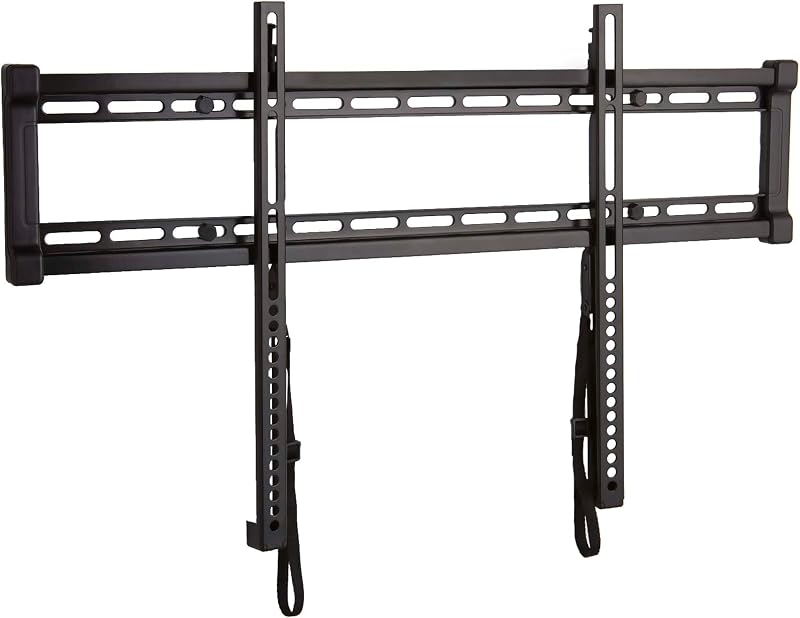 Best Slim Fixed Mount SANUS Fixed TV Wall Mount Slim fixed mount for 40–80" TVs |  Best for Corners Perlegear Corner Long Arm Long-arm corner mount for 37–75" TVs |
|---|---|---|---|---|---|
| BeastScore | 93 / 100 | 91 / 100 | 88 / 100 | 86 / 100 | 84 / 100 |
| Best for | Most TVs in most rooms | Pulling the TV out and turning it | The lowest price for a big TV | A flat, gallery look at eye level | Corners and off-center walls |
| Typical price (checked October 21, 2026) | $50–$70 | $110–$130 | $25–$40 | $55–$70 | $60–$80 |
| Type | Tilting | Full motion | Tilting | Fixed | Full motion, long arm |
| TV size | 37–80" | 42–90" | 37–90" | 40–80" | 37–75" |
| Max weight | 130 lbs | 125 lbs | 132 lbs | 130 lbs | 100 lbs |
| Distance from wall | 1.9" from the wall | Extends up to 22" | 1.5" from the wall | 1" from the wall | Extends 32.4", retracts to 3.1" |
| Key features |
|
|
|
|
|
BeastScore here is our overall rating out of 100, based on published specs and Amazon owner reviews. Prices change daily, so tap "View on Amazon" for today's price. We may earn a small commission, at no extra cost to you. Learn more
Why each one made the list
What each pick does best, where it falls short, and the typical Amazon price when we checked.
- 1. Best Overall
SANUS Tilting TV Wall Mount
BeastScore 93 / 100Typically $50–$70 on Amazon (checked October 21, 2026)This is the mount that gets the basics right. The listing says it fits 37 to 80 inch TVs up to 130 lbs with VESA patterns from 100x100 to 600x400, and it is UL listed. You can tilt the TV up to 10 degrees without tools to fight glare, then slide it left or right after install, which helps when studs are not where you wanted them. It sits just 1.9 inches from the wall, and hidden pull straps help you reach cables. SANUS lists a 30-minute install with hardware included. The limits: it only tilts, so it will not swivel toward a sofa, and TVs above 80 inches need a bigger mount.
Pros- Tilts up to 10° without tools, to cut window glare
- Shifts left or right after install, for off-center studs
- UL listed, with a 130 lb limit and full hardware included
Cons- Tilt only, so no swivel or pull-out
- Tops out at 80 inch TVs
- Costs more than the budget mounts here
- 2. Best Full Motion
ECHOGEAR MaxMotion
BeastScore 91 / 100Typically $110–$130 on Amazon (checked October 21, 2026)If you want the TV to move, the MaxMotion is the one. The listing says it holds 42 to 90 inch TVs up to 125 lbs, extends the screen up to 22 inches from the wall and swivels 130 degrees, so you can face a kitchen, a corner sofa or a dining table. You can also push it flat for a cleaner look. It is UL listed, comes with a drilling template and a large hardware kit, and ECHOGEAR lists an install time under 30 minutes. The trade-offs: it sticks out more than a tilting mount even when pushed back, and it costs about twice as much as a tilting mount.
Pros- Extends up to 22 inches and swivels 130°
- Holds 90 inch TVs up to 125 lbs
- UL listed, with a drilling template and full hardware
Cons- Sits farther from the wall than a tilting mount
- Costs about twice as much as a tilting mount
- A heavy arm needs strong wall studs
- 3. Best Budget Mount
Mounting Dream Tilting TV Mount
BeastScore 88 / 100Typically $25–$40 on Amazon (checked October 21, 2026)For about the price of a pizza, this mount holds TVs from 37 to 90 inches and up to 132 lbs, with a maximum VESA of 600x400. The listing says it tilts forward up to 8 degrees to cut glare, sits only 1.5 inches from the wall and comes with a level and clear instructions for a three-step install. It is one of the most-reviewed TV mounts on Amazon, which says a lot about how many people use it. The catches: the tilt is smaller than the SANUS, you cannot shift the TV sideways after install, and the listing warns it is not suitable for drywall alone.
Pros- Lowest price here, for TVs up to 90 inches and 132 lbs
- Sits only 1.5 inches from the wall
- One of the most-reviewed mounts on Amazon
Cons- Smaller 8° tilt than the SANUS
- No sideways shift after install, so stud spacing matters
- Not suitable for drywall alone, per the listing
- 4. Best Slim Fixed Mount
SANUS Fixed TV Wall Mount
BeastScore 86 / 100Typically $55–$70 on Amazon (checked October 21, 2026)A fixed mount does one thing: it puts the TV flat against the wall. The listing says this SANUS holds 40 to 80 inch TVs up to 130 lbs just 1 inch from the wall, the cleanest look of any mount here. It works with 16 and 24 inch stud spacing, has an open wall plate for in-wall cable routing, and lets you level and center the TV after install. Quick-release straps let you take it off the wall without tools. It is UL listed. The cost of that tidy look is zero movement: no tilt, no swivel, and you will need a way to reach the ports before you hang the TV.
Pros- Just 1 inch from the wall for the slimmest look
- Open plate and straps make cables and removal easier
- Works with 16 and 24 inch stud spacing
Cons- No tilt or swivel, so place the TV at eye level
- Costs about twice as much as the Mounting Dream tilt mount
- Ports are hard to reach once the TV is hung
- 5. Best for Corners
Perlegear Corner Long Arm
BeastScore 84 / 100Typically $60–$80 on Amazon (checked October 21, 2026)Corners are hard. This mount has an extra-long arm that extends 32.37 inches from the wall and retracts to 3.12 inches, so the TV can sit in a corner and still swing out to face the room. The listing says it fits 37 to 75 inch TVs with VESA patterns from 200x100 to 600x400 and is UL listed for TVs up to 100 lbs. Its single-stud design is easier when studs are in odd places, and it works on wood stud, concrete and brick walls. The limits are weight and size: 100 lbs and 75 inches is less than the other mounts here, and a long arm needs a firm wall.
Pros- Extends 32.37 inches, perfect for corners
- Single-stud design for awkward wall layouts
- UL listed, and works on wood stud, concrete and brick
Cons- Lower limits: 75 inch TVs and 100 lbs
- Does not sit as flat as a tilting or fixed mount
- A long arm adds strain, so use solid studs
All 5 compared, in one look
See every pick on one chart, or tap one to put it head to head with SANUS Tilting TV Wall Mount. Ratings out of 10 are our estimates from published specs and Amazon owner reviews, not hands-on tests. Bigger shape = better.
- Strength & safetySANUS Tilting TV Wall Mount · 9.4/10
- AdjustabilityECHOGEAR MaxMotion · 9.8/10
- Slim profileSANUS Fixed TV Wall Mount · 9.8/10
- Easy installSANUS Tilting TV Wall Mount · 9.2/10
- ValueMounting Dream Tilting TV Mount · 9.8/10
Which one should you buy?
Find your situation below. That's your pick.
- You want one mount that suits most TVs and rooms
- Your wall studs are not where the TV needs to go
- You want to pull the TV out and swivel it toward the seats
- You have a big TV and sturdy studs
- You want the lowest price for a large TV
- You only need a little tilt for glare
- You want the TV as flat to the wall as possible
- You hang the TV at eye level and rarely touch the cables
- Your TV goes in a corner
- You need a long arm to face the room
SANUS Tilting TV Wall Mount
Tilt, shift and a slim 1.9 inch profile in a UL listed mount that fits most 65 and 75 inch TVs.
- Fits 37–80" TVs up to 130 lbs
- 10° tool-free tilt
- Shifts left or right after install
Quick tips before you buy
Check three numbers on the listing: the TV size range, the maximum weight and the VESA pattern (the hole spacing on the back of the TV). All three must fit your TV.
Use wall studs, or the right anchors for concrete or brick. A TV mount is not safe on drywall alone, and one listing here says so directly.
Sit where you watch and mark the middle of the screen at eye level, about 42 inches for most sofas. Tilt mounts help when the TV has to go higher, above a fireplace for example.
Connect cables before you hang the TV, and leave room for a soundbar under the screen. A mount that extends or tilts lets you reach the ports later.
Quick answers
What is the best TV wall mount?+
For most TVs, the SANUS Tilting TV Wall Mount. It fits 37 to 80 inch TVs up to 130 lbs, tilts up to 10 degrees without tools and shifts left or right after install. For a TV that must swivel, pick the ECHOGEAR MaxMotion. For the lowest price, pick the Mounting Dream Tilting mount.
What is the best TV wall mount for a 65 inch TV?+
All five mounts here fit a 65 inch TV, since the smallest range starts at 37 inches and the largest ends at 90. Check your TV’s weight and VESA pattern first. The SANUS Tilting is the best all-round pick, and the Mounting Dream Tilting is the best budget pick.
What is the best TV wall mount for a 75 inch TV?+
The SANUS Tilting (up to 80 inches, 130 lbs) and ECHOGEAR MaxMotion (up to 90 inches, 125 lbs) both fit most 75 inch TVs. Many 75 inch sets are heavier than a 65, so check the weight limit. The Perlegear Corner mount tops out at 75 inches and 100 lbs, so check it carefully.
Fixed, tilting or full motion TV mount: which should I choose?+
Choose fixed for the slimmest look at eye level. Choose tilting if the TV hangs high or gets window glare. Choose full motion if you need to swivel the screen or reach the ports. Full-motion mounts sit farther from the wall and put more strain on the studs.
What does VESA mean on a TV mount?+
VESA is the hole pattern on the back of your TV, such as 400x400 mm. The mount must support that pattern. Mounts list their range, for example 100x100 to 600x400. If your TV’s pattern is inside the range, the mount fits.
Can I mount a TV on drywall without studs?+
Not safely with a standard TV mount. Use wall studs, or the proper anchors for concrete or brick. The Mounting Dream listing says its mount is not suitable for drywall only. If you cannot find studs, ask an installer about a stud-spanning plate or a TV stand.
How high should I mount a TV?+
The middle of the screen should sit at eye level when you are seated, usually about 42 inches from the floor for most sofas. If the TV must go higher, such as above a fireplace, choose a tilting mount and angle it down.
Keep comparing
 Best TVs: Top 5 on AmazonOLED, Mini-LED or budget? The best TV for your room and money.Best 65-Inch TVs: OLED vs Mini-LED on AmazonThe most popular TV size, compared: the best 65-inch OLED and Mini-LED TVs.
 Best 75-Inch TVs: Big screens for lessGo big for movie night and the game. The best 75-inch TVs compared.
 Best Soundbars: Top 5 on AmazonClear dialogue and cinema sound. The best soundbars compared.