
Best Xbox Accessories
Top 5 on Amazon
Our #1 pick is the Xbox Elite Wireless Controller Series 2. A better controller, more storage, a proper headset and an end to dead batteries. We compared the 5 best Xbox Series X|S accessories on Amazon, all officially licensed or made by Microsoft.
How we picked: we shortlist by Amazon Best Seller rank and number of ratings, then compare published specs. We don't test these products hands-on.
By Jamilur Rahman, Founder & Editor · Updated October 11, 2026
- Owner reviews checked
- Features side by side
- Quick & easy compare
- Smarter purchase
The short answer
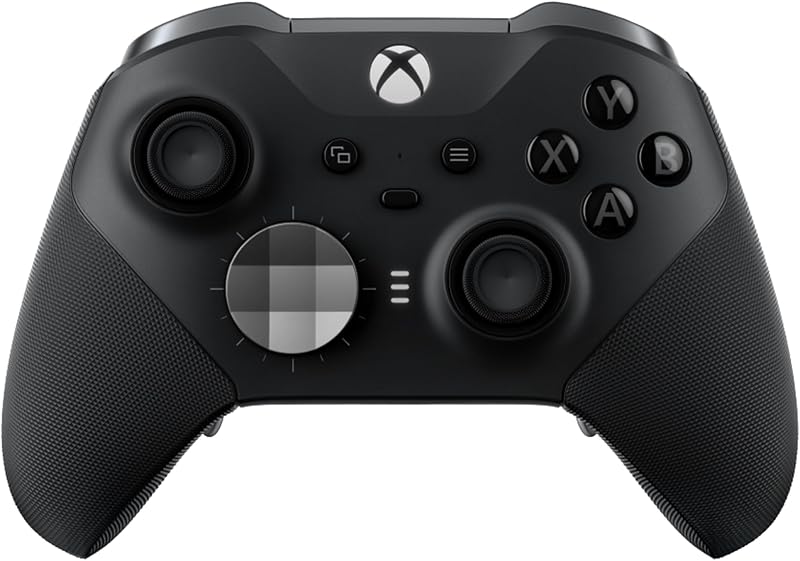
For most Xbox owners, the best upgrade is the Xbox Elite Wireless Controller Series 2. It is the controller you hold every minute you play, and the Elite adds adjustable-tension thumbsticks, shorter trigger locks, four back paddles and up to 40 hours of rechargeable battery. It also comes with a charging dock and a carrying case, so it fixes the AA battery problem of the standard pad at the same time.
If your console keeps telling you it is full, the WD_Black C50 Storage Expansion Card is the next buy: it plugs into the back and plays Series X|S games at full speed with Quick Resume. For better chat and spatial sound, the Xbox Wireless Headset connects straight to the console with no dongle. And if you just want to stop buying batteries, the PowerA Dual Charging Station charges two standard controllers, while the PowerA Play & Charge Kit is the cheapest fix for one.
Skip the Elite Series 2 if you play casually, share controllers with kids, or mostly play single-player games on the couch. It is expensive, and some owners report the bumpers or thumbsticks wearing out over time. A standard Xbox controller with a Play & Charge Kit gets you most of the comfort for a fraction of the cost. And if you only play one or two big games at a time, you may not need the storage card yet.
How we picked: we compared the most popular Xbox accessories on Amazon and what owners say about them, the praise and the complaints after months of use. We stuck to products made by Microsoft or officially licensed for Xbox, then checked each listing and its specs side by side. We don’t claim lab tests: these picks reflect the listings and real owner experience. Checked October 2026.
Compare them side by side
Everything that matters, in one table. Swipe to see all 5.
| Product | Best Overall Upgrade Xbox Elite Wireless Controller Series 2 Pro controller |  Best Storage Upgrade WD_Black C50 Storage Expansion Card 1TB Plug-in storage card |  Best Headset Xbox Wireless Headset Wireless gaming headset | 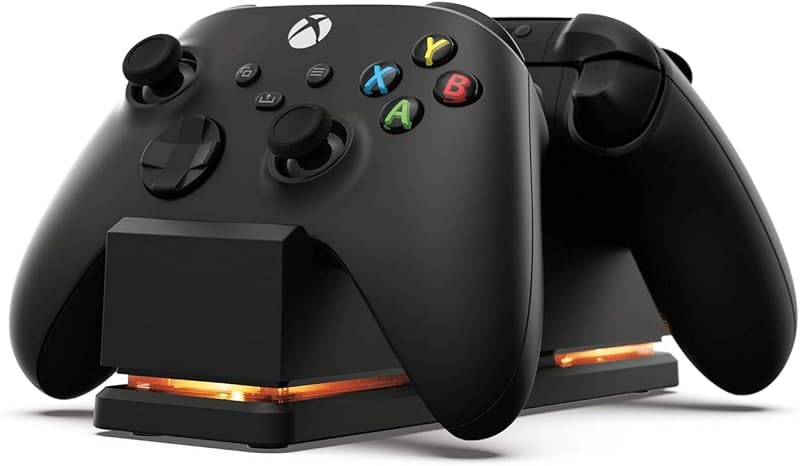 Best Charging Dock PowerA Dual Charging Station Two-controller charging dock |  Best Budget Fix PowerA Play & Charge Kit Rechargeable battery kit |
|---|---|---|---|---|---|
| BeastScore | 92 / 100 | 91 / 100 | 88 / 100 | 86 / 100 | 84 / 100 |
| Best for | Players who game every day | Consoles that are always full | Clear party chat with no dongle | Homes with two standard controllers | One controller, charge while you play |
| Typical price (checked October 11, 2026) | $160–$180 | $220–$250 | $100–$120 | $40–$50 | $40–$50 |
| What it is | Wireless controller | 1TB NVMe expansion card | Wireless headset | Charging station | Battery pack + cable |
| Works with | Xbox Series X|S, Xbox One, Windows, cloud | Xbox Series X|S | Xbox console, PC, phone (Bluetooth 5.3) | Xbox Series X|S and Xbox One controllers | Xbox Series X|S, Xbox One, Windows |
| Battery / power | Rechargeable, up to 40 hours | Powered by the console | Rechargeable, up to 20 hours | AC adapter, 2 x 1100 mAh batteries | Rechargeable battery pack |
| Key features |
|
|
|
|
|
BeastScore here is our overall rating out of 100, based on published specs and Amazon owner reviews. Prices change daily, so tap "View on Amazon" for today's price. We may earn a small commission, at no extra cost to you. Learn more
Why each one made the list
What each pick does best, where it falls short, and the typical Amazon price when we checked.
- 1. Best Overall Upgrade
Xbox Elite Wireless Controller Series 2
BeastScore 92 / 100Typically $160–$180 on Amazon (checked October 11, 2026)The Elite Series 2 changes how every game feels. The listing counts over 30 ways to customize it: adjustable-tension thumbsticks for steadier aim, three-step hair trigger locks that shorten the pull for faster shots, and swappable thumbsticks, D-pads and four back paddles so you can jump or reload without leaving the right stick. Three profiles save on the controller. In the box you get 6 thumbsticks, 4 paddles, 2 D-pads, a case and a charging dock, and the battery lasts up to 40 hours. Owners love the grip and paddles. The main complaint is long-term durability: some report bumper or stick problems after heavy use.
Pros- Back paddles and trigger locks give a real competitive edge
- Up to 40 hours of battery, with a charging dock included
- Works on Xbox, Windows PC, cloud and Bluetooth devices
Cons- Expensive next to a standard controller
- Some owners report bumper or thumbstick wear over time
- Heavier than the standard pad
- 2. Best Storage Upgrade
WD_Black C50 Storage Expansion Card 1TB
BeastScore 91 / 100Typically $220–$250 on Amazon (checked October 11, 2026)Series X|S games are huge, and they only run from fast storage. A regular USB drive can hold them but can’t play them. The WD_Black C50 is an officially licensed card that plugs into the expansion slot on the back and works exactly like the internal drive. The listing says it uses an NVMe core tuned for the Xbox Velocity Architecture and supports Quick Resume, so you can jump between suspended games stored on the card. Owners like that it is truly plug and play and that game load times match the internal drive. Storage is still pricey, and the card only works in Xbox Series X|S.
Pros- Plays Series X|S games at full internal-drive speed
- Plug and play with Quick Resume support
- Officially licensed, no compatibility worries
Cons- Costs much more per terabyte than a USB drive
- Only works in Xbox Series X|S, not PC or other consoles
- 1TB fills up fast with big modern games
- 3. Best Headset
Xbox Wireless Headset
BeastScore 88 / 100Typically $100–$120 on Amazon (checked October 11, 2026)Microsoft’s own headset connects straight to the console with the built-in Xbox Wireless radio, so there is no dongle or base station. It can also pair to your phone over Bluetooth 5.3 at the same time, which owners like for taking calls mid-game. Spatial audio comes with Dolby Atmos included at no extra cost, plus Windows Sonic and DTS Headphone:X. The listing highlights dual boom mics with voice isolation and auto-mute, and the earcup dials set volume and the game-chat balance. Battery life is up to 20 hours. Owners praise the easy setup and chat quality; some wish the battery lasted longer.
Pros- Pairs directly to Xbox with no dongle
- Dolby Atmos spatial audio included
- Earcup dials make volume and chat mix easy
Cons- Up to 20 hours of battery is shorter than some rivals
- Not a great match for PlayStation
- Costs more than wired headsets that sound similar
- 4. Best Charging Dock
PowerA Dual Charging Station
BeastScore 86 / 100Typically $40–$50 on Amazon (checked October 11, 2026)Standard Xbox controllers still run on AA batteries. This licensed station fixes that for two pads at once. It comes with two 1100 mAh rechargeable batteries and four battery doors, so you swap the door on each controller once and then just snap them down to charge. An LED changes color when they are full, and it runs from a wall AC adapter, which leaves the console’s USB ports free. Owners like how tidy it looks next to the TV. The batteries are smaller than some third-party packs, so you may charge more often, and the Elite Series 2 needs its own dock.
Pros- Charges two controllers at once
- Batteries and battery doors included
- Wall powered, keeps USB ports free
Cons- 1100 mAh batteries mean more frequent charging
- Doesn’t fit the Elite Series 2
- Needs a free wall outlet near the TV
- 5. Best Budget Fix
PowerA Play & Charge Kit
BeastScore 84 / 100Typically $40–$50 on Amazon (checked October 11, 2026)If you only have one controller, this kit is the simplest way to stop buying AAs. It swaps the batteries for a rechargeable pack you can charge two ways: plugged into the controller while you play, or directly. The listing says it is officially licensed for Xbox Series X|S, works with Xbox One and Windows, and is compatible with all PowerA charging stands and stations, so it pairs with the dock above if you add a second controller later. A two-year limited warranty is included. Owners like that it just works. A cable while playing is the trade-off, and there is no dock in the box.
Pros- Cheapest way to make one controller rechargeable
- Charge while playing, so you never stop for batteries
- Works with PowerA stands if you upgrade later
Cons- Charging while playing means a cable to the console
- No dock in the box
- Covers one controller only
All 5 compared, in one look
See every pick on one chart, or tap one to put it head to head with Xbox Elite Wireless Controller Series 2. Ratings out of 10 are our estimates from published specs and Amazon owner reviews, not hands-on tests. Bigger shape = better.
- Upgrade impactXbox Elite Wireless Controller Series 2 · 9.6/10
- Build qualityWD_Black C50 Storage Expansion Card 1TB · 9.2/10
- Easy setupWD_Black C50 Storage Expansion Card 1TB · 9.8/10
- FeaturesXbox Elite Wireless Controller Series 2 · 9.8/10
- CompatibilityXbox Elite Wireless Controller Series 2 · 9.4/10
- ValuePowerA Play & Charge Kit · 9.2/10
Xbox Elite Wireless Controller Series 2
Back paddles, trigger locks and a 40-hour rechargeable battery.
- 4 back paddles
- Up to 40 hours of battery
- Charging dock included
Quick tips before you buy
Series X|S games only play from the internal drive or an expansion card. A USB drive can store them, but not run them.
Standard Xbox controllers use AA batteries. A charging dock or Play & Charge Kit pays for itself quickly.
Turn on Dolby Atmos or Windows Sonic in the console’s audio settings to hear where footsteps come from.
Officially licensed or Microsoft-made accessories avoid pairing and firmware problems after console updates.
Quick answers
What accessories do I need for Xbox Series X?+
Most owners only need two: a way to charge their controllers (a charging station or Play & Charge Kit) and, as their library grows, a storage expansion card. A headset helps if you play online with friends, and an Elite controller is the best upgrade for serious players.
Is the Xbox Elite Series 2 worth it?+
Yes if you play a lot, especially shooters or competitive games. Back paddles and trigger locks make a real difference, and the rechargeable battery and dock are included. For casual play, a standard controller with a rechargeable pack is better value.
Can I use any SSD with Xbox Series X?+
You can store games on any fast USB drive, but Series X|S games only run from the internal drive or an official storage expansion card like the WD_Black C50 or Seagate card. Older Xbox One games can play from a USB drive.
Does the Xbox Wireless Headset work on PC?+
Yes. It connects to a PC over Bluetooth, or with the Xbox Wireless Adapter for Windows, which is sold separately. It also pairs to your phone over Bluetooth at the same time as your console.
Do Xbox controllers come with rechargeable batteries?+
No. The standard Xbox Wireless Controller runs on two AA batteries. The Elite Series 2 is the exception: it has a built-in rechargeable battery and comes with a charging dock.
Will these accessories work with Xbox Series S?+
Yes. Every pick here works with both Xbox Series X and Series S, including the storage expansion card, which uses the same slot on both consoles.
Keep comparing
 Best Gaming Headsets: Top 5 on AmazonHear footsteps first and talk clearly to your team.
 Best Portable SSDs: Top 5 on AmazonFast, pocketable storage. The best portable SSDs compared.
 Best TVs: Top 5 on AmazonOLED, Mini-LED or budget? The best TV for your room and money.
 Best Tech Gifts Under $50: Top 8 on AmazonUseful gadgets from Apple, Amazon, JBL and Anker, all under $50.