
Best Desk Gadgets
for Students
Our #1 pick is the LED Desk Lamp with Clamp. A lamp, a timer, a laptop stand, noise-cancelling earbuds and a desk pad. Five desk gadgets for students that fit a dorm desk, a library table and a tight budget.
How we picked: we shortlist by Amazon Best Seller rank and number of ratings, then compare published specs. We don’t test these products hands-on.
By Jamilur Rahman, Founder & Editor · Updated October 26, 2026
- Owner reviews checked
- Features side by side
- Quick & easy compare
- Smarter purchase
The short answer
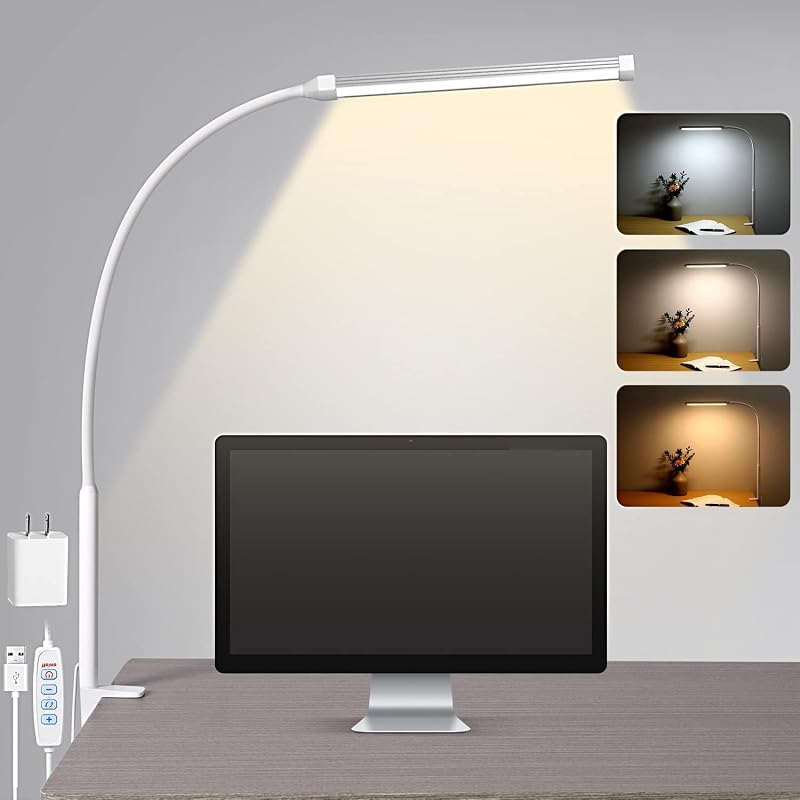
The best desk gadget for most students is the LED Desk Lamp with Clamp (USB, 3 color modes). It clips onto the edge of a small desk, so it takes no surface space, gives you warm or cool light for late-night study, and usually costs about $20. If you can only buy one thing for your desk, buy the lamp, because bad light is the first thing that makes studying feel tiring.
The other four picks each fix one common student problem. The Rotating Productivity Timer 5/25/10/50 is a flip-over Pomodoro timer for people who lose hours to their phone. The Nulaxy Adjustable Laptop Stand lifts your screen so your neck stops hurting after long essays. The Soundcore Space A40 earbuds block out a loud dorm or library, and the Aothia PU Leather Desk Pad protects the desk and gives your mouse and notes a clean surface for under $10. Together they cost less than most single headphones.
Why these five fit student life: students study in small, shared and noisy places: a dorm desk, a kitchen table, a library carrel. So every pick here is small, works on any desk and either clamps, folds flat or fits in a backpack. Skip the Soundcore earbuds if you never study around noise, since the cheaper timer and lamp will do more for your focus. And skip the laptop stand if you already use a separate monitor. Prices checked October 2026.
Compare them side by side
Everything that matters, in one table. Swipe to see all 5.
| Product | Best Overall LED Desk Lamp with Clamp USB clip-on desk lamp |  Best for Focus (Budget) Rotating Productivity Timer 5/25/10/50 Flip-over Pomodoro timer |  Best for Posture Nulaxy Adjustable Laptop Stand Foldable laptop riser |  Best for Noisy Dorms Soundcore Space A40 Noise-cancelling earbuds | 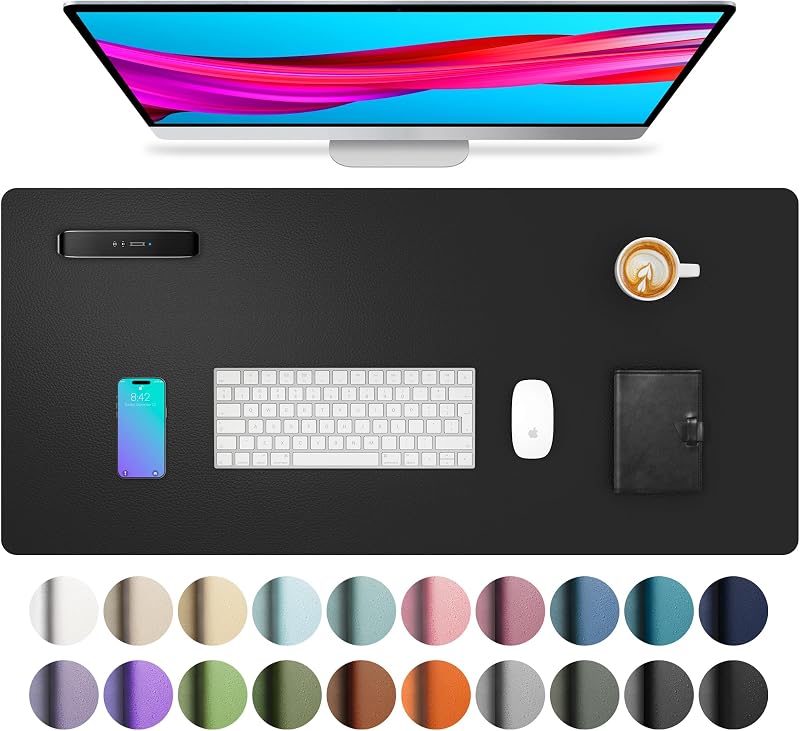 Best Under $10 Aothia PU Leather Desk Pad Non-slip desk pad |
|---|---|---|---|---|---|
| BeastScore | 93 / 100 | 90 / 100 | 89 / 100 | 88 / 100 | 85 / 100 |
| Best for | Any student who studies at night and has a small desk. | Students who lose study time to their phone and want a simple Pomodoro timer. | Students who write on a laptop for hours and get neck or shoulder pain. | Students who study in loud dorms, libraries or coffee shops. | Students on a tight budget who share or rent a desk and want it protected. |
| Typical price (checked October 26, 2026) | $20–$30 | $15–$20 | $15–$25 | $70–$100 | $10–$20 |
| Size / type | Clamp mount, 360° gooseneck | Small desk cube | Fits 10–16 inch laptops | In-ear earbuds with charging case | 23.6 x 13.7 in |
| Power | USB, 5V/2A adapter included | See listing | None | Rechargeable, 10 hrs per charge | None |
| Fits in a backpack | Not really | Yes | Yes, folds flat | Yes | Not needed |
| Key features |
|
|
|
|
|
BeastScore here is our overall rating out of 100, based on published specs and Amazon owner reviews. Prices change daily, so tap "View on Amazon" for today's price. We may earn a small commission, at no extra cost to you. Learn more
Why each one made the list
What each pick does best, where it falls short, and the typical Amazon price when we checked.
- 1. Best Overall
LED Desk Lamp with Clamp
BeastScore 93 / 100Typically $20–$30 on Amazon (checked October 26, 2026)A lamp is the single best desk upgrade for a student, and this one is cheap and small. The clamp grips the desk edge, so your surface stays free for books and a laptop. The listing says it has three color temperatures (warm 2700K for evenings, 4500K neutral, 6500K cool white for daytime work) and ten brightness levels, so you can use it for late reading without a harsh glare. The gooseneck bends 360° to point light at a page instead of your screen. It plugs into any USB port or the included 5V/2A adapter, and it remembers your last setting. Owners report it is bright enough for reading and notes. The limits: it needs a desk edge thick enough for the clamp, and a USB cable adds one more wire.
Pros- Clamps on, so it uses zero desk space
- Warm, neutral and cool light for day and night study
- Runs from a USB port or the included adapter
Cons- Needs a desk edge the clamp can grip
- USB cable can look messy without a cable clip
- Not portable, so it stays in one place
- 2. Best for Focus (Budget)
Rotating Productivity Timer 5/25/10/50
BeastScore 90 / 100Typically $15–$20 on Amazon (checked October 26, 2026)The Pomodoro method means 25 minutes of work, then a 5-minute break, and this cube makes it automatic. You flip it to the preset face-up and it starts counting down, with no buttons and no phone. The listing says it has 5, 25, 10 and 50 minute presets, a custom mode from 0 to 99 minutes, and a stopwatch. A silent vibration mode is useful in a library or a shared dorm room, while the loud mode is listed at 90–100 dB for a noisy room. It is also popular with people with ADHD who need a visible timer. The trade-offs: it only works if you actually flip it, and the cube does nothing for posture or light.
Pros- Starts when you flip it, no phone needed
- Silent vibration mode for libraries and shared rooms
- Fits in a pencil case or backpack
Cons- Only helps if you build the habit of flipping it
- Loud alarm setting is very loud in a quiet room
- Fewer presets than a full phone timer app
- 3. Best for Posture
Nulaxy Adjustable Laptop Stand
BeastScore 89 / 100Typically $15–$25 on Amazon (checked October 26, 2026)Typing on a laptop flat on the desk means looking down for hours, which is a common cause of neck and shoulder ache. This stand raises the screen toward eye level, and you add a cheap keyboard and mouse if you want to type comfortably. The listing says it fits laptops from 10 to 16 inches, holds up to 22 lbs, and has a dual-rod hinge for a wobble-free feel. The vented panel lets air reach the base of the laptop, and it folds flat to slide into a backpack for the library. Owners like how steady it is for the price. The catch: raising the laptop means the built-in keyboard is now too high, so you will want an external keyboard to get the full benefit.
Pros- Lifts the screen to a healthier height
- Folds flat and goes in a backpack
- Fits most laptops from 10 to 16 inches
Cons- You need an external keyboard to type comfortably
- Adjustment is by hand, with fixed height steps
- Plain look, nothing fancy
- 4. Best for Noisy Dorms
Soundcore Space A40
BeastScore 88 / 100Typically $70–$100 on Amazon (checked October 26, 2026)If your desk is in a loud place, a quiet head is worth more than any gadget on the desk. The Space A40 is a noise-cancelling earbud that the listing says reduces noise by up to 98% and adjusts the cancelling level to your surroundings. It lasts 10 hours on one charge and 50 hours with the case, and 10 minutes on the charger gives about 4 hours, so a full day of classes and study is covered. The app has an equalizer and lets you change how strong the cancelling is. They are small and light, so they work for long sessions. They cost more than the other four picks, and any earbuds can feel tiring in the ear after many hours, so take breaks.
Pros- Strong noise cancelling that adapts to the room
- Long battery life for a full study day
- Small and light for hours of wear
Cons- The most expensive pick in this guide
- In-ear fit can feel tiring after many hours
- Battery in the earbuds is only 10 hours per charge
- 5. Best Under $10
Aothia PU Leather Desk Pad
BeastScore 85 / 100Typically $10–$20 on Amazon (checked October 26, 2026)A desk pad is the cheapest upgrade here, and it does more than it looks. The 23.6 x 13.7 inch pad is large enough for a laptop, a mouse and a notebook, and the listing says it is waterproof, so a spilled coffee wipes off with a cloth. The suede back is non-slip, which keeps it from sliding while you write, and the smooth top suits a mouse and a pen. For students in a dorm or a rented room, it protects the desk from scratches, ink and heat. It is one of the most-reviewed desk pads on Amazon. The downsides: PU leather can show wear at the edges over time, and it is not a pad for a large two-monitor desk.
Pros- Protects the desk from spills, scratches and ink
- Non-slip back stays put while you write
- Costs under $10 for the main size
Cons- PU leather can wear at the edges after a year or two
- Too small for a very large desk
- Does not add focus on its own
All 5 compared, in one look
See every pick on one chart, or tap one to put it head to head with LED Desk Lamp with Clamp. Ratings out of 10 are our estimates from published specs and Amazon owner reviews, not hands-on tests. Bigger shape = better.
- Focus helpRotating Productivity Timer 5/25/10/50 · 9.6/10
- ComfortNulaxy Adjustable Laptop Stand · 9.6/10
- PortabilitySoundcore Space A40 · 9.6/10
- Small-desk fitTie
- ValueAothia PU Leather Desk Pad · 10.0/10
Which one should you buy?
Find your situation below. That's your pick.
- You study at night or in a dim room
- You want a lamp that takes no desk space
- Your phone keeps stealing your study time
- You want to try the Pomodoro method without an app
- You write on a laptop for hours
- You get neck or shoulder pain from looking down
- You study in a loud dorm, library or cafe
- You want long battery life for a full day
- You rent or share a desk and want to protect it
- You want the cheapest upgrade that still helps
LED Desk Lamp with Clamp
The cheapest way to make studying easier on the eyes, and it uses no desk space.
- Clamp mount
- 3 color modes
- 10 brightness levels
Quick tips before you buy
Dorm desks are small. Clamp and fold-flat gadgets save the most space.
In a library or shared room, pick vibration or silent alerts, not loud alarms.
Raise the laptop so the top of the screen is near eye height, and use a separate keyboard.
Lamps and chargers use USB. A small hub or power strip stops you running out of ports.
Quick answers
What desk gadgets do students actually need?+
Start with good light and a way to stay on task. A clamp desk lamp and a simple flip timer cover the two biggest problems for under $40. Add a laptop stand if you study for hours on a laptop, and noise-cancelling earbuds if your space is loud.
What are the best desk accessories for students on a budget?+
The desk pad, the flip timer and the laptop stand each cost about $20 or less. The Aothia desk pad is under $10 for the main size, and the Rotating Productivity Timer is around $15 to $20.
What gadgets help students focus?+
A Pomodoro-style flip timer helps you commit to 25 minutes of work at a time. Noise-cancelling earbuds like the Soundcore Space A40 block distracting sound, and a good lamp reduces eye strain that makes you stop early.
What is the best desk lamp for studying?+
A lamp with adjustable color and brightness works best. The LED Desk Lamp with Clamp has three color modes and ten brightness levels, so you can use warm light at night and cooler light by day.
Do I need a laptop stand for college?+
It helps if you write long papers on a laptop. Looking down at a flat laptop strains your neck, so a stand like the Nulaxy lifts the screen. Pair it with an external keyboard, or you will just move the strain to your wrists.
Are noise-cancelling earbuds worth it for studying?+
Yes, if you study in a dorm, library or cafe. Noise cancelling cuts steady sounds like fans and chatter. If your room is already quiet, spend the money on a lamp and a laptop stand first.
How do I keep a small dorm desk organized?+
Use gadgets that clamp, fold flat or sit on the pad: a clamp lamp, a folding laptop stand and a desk pad that defines your work area. Keep only what you use today on the desk and put the rest in a drawer or bag.
Keep comparing
 Best Laptops: Top 5 on AmazonMacBook, Windows, gaming or Chromebook: find yours fast.
 Best USB-C Hubs: Top 5 on AmazonMore ports for your MacBook, laptop or iPad in one plug.
 Best Noise Cancelling Headphones: Top 5 on AmazonBlock out the world, from $50 to premium.
 Best Office Chairs: Top 5 on AmazonSit better, hurt less. Ergonomic chairs compared.