
Logitech vs Razer Mouse
The winner at every price, in 5 matchups
Our #1 pick is the Razer Viper V4 Pro. Five price tiers, one Logitech and one Razer in each. We compared the 10 mice on listing specs and what owners say, from a wired mouse around $25 to a 49-gram wireless flagship.
How we picked: we shortlist by Amazon Best Seller rank and number of ratings, then compare published specs. We don’t test these products hands-on.
By Jamilur Rahman, Founder & Editor · Updated November 13, 2026
- Owner reviews checked
- Features side by side
- Quick & easy compare
- Smarter purchase

The short answer
Logitech or Razer? Neither brand wins every tier: Logitech wins the cheap half of the shelf, Razer wins the expensive half, and if you can spend flagship money, the Razer Viper V4 Pro is the one to buy. It weighs 49 g, has true 8,000 Hz polling and runs up to 180 hours at 1,000 Hz, all for about the price of a Logitech G Pro X Superlight 2. Under $70, buy Logitech instead: the Logitech G203 for a wired mouse and the Logitech G309 for a wireless one.
The middle of the page depends on how you play. For MMOs and macro-heavy setups, the Razer Basilisk V3 Pro 35K beats the Logitech G502 X Plus on price and battery, though the Logitech is a few grams lighter. For an ergonomic right-hand shell, the Razer DeathAdder V4 Pro is the premium winner and the Logitech G Pro X Superlight 2 DEX is the cheaper option. If you want Logitech’s proven symmetrical esports shape, the Logitech G Pro X Superlight 2 is the safe choice, and the Razer DeathAdder Essential and Razer DeathAdder V2 X HyperSpeed are the budget picks for big hands.
Skip the Viper V4 Pro if you have large hands and a full palm grip, because its low, symmetrical shell suits claw and fingertip grips better. Skip it too if you want side buttons for macros, or if you do not need a flagship: the Logitech G309 covers everyday gaming for a fraction of the price. It is also the newest mouse here, so it has a shorter track record than the Superlight 2.
How we picked: we paired the 10 current Amazon listings by price and job (wired budget, wireless budget, many buttons, esports flagship, ergonomic flagship), one Logitech and one Razer in each tier. Then we compared each listing’s specs and what owners say about it and called a winner per tier. We don’t claim lab tests: the calls are based on published specs and owner reports. Checked November 2026.
Compare them side by side
Everything that matters, in one table. Swipe to see all 10.
| Product |  Wired Budget Winner Logitech G203 Wired budget mouse |  Wired Budget Runner-Up Razer DeathAdder Essential Wired budget mouse |  Wireless Budget Winner Logitech G309 Wireless budget mouse |  Wireless Budget Runner-Up Razer DeathAdder V2 X HyperSpeed Wireless budget mouse |  Multi-Button Runner-Up Logitech G502 X Plus Wireless multi-button mouse |  Multi-Button Winner Razer Basilisk V3 Pro 35K Wireless multi-button mouse |  Esports Runner-Up Logitech G Pro X Superlight 2 Wireless esports mouse | Best Overall Razer Viper V4 Pro Wireless esports mouse | 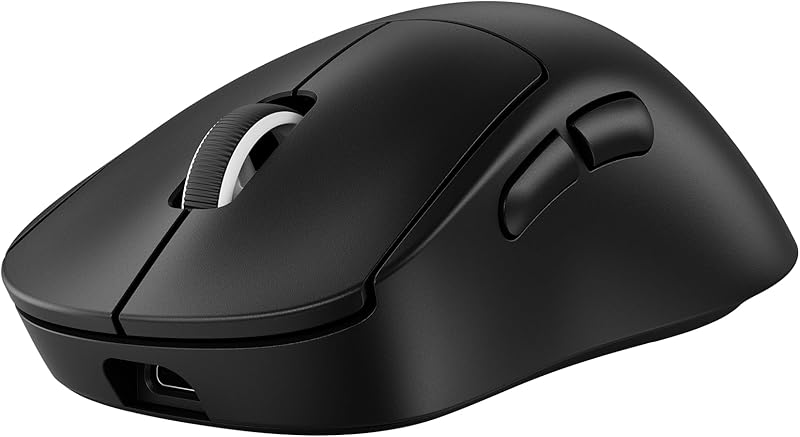 Ergonomic Runner-Up Logitech G Pro X Superlight 2 DEX Wireless ergonomic esports mouse | 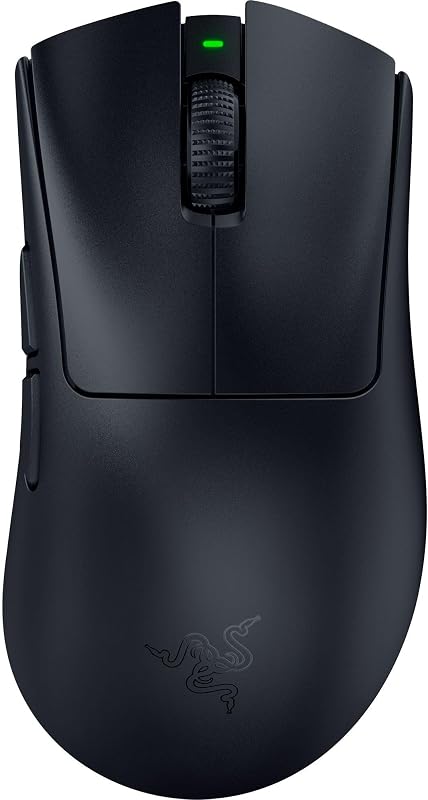 Ergonomic Winner Razer DeathAdder V4 Pro Wireless ergonomic esports mouse |
|---|---|---|---|---|---|---|---|---|---|---|
| BeastScore | 84 / 100 | 82 / 100 | 87 / 100 | 84 / 100 | 88 / 100 | 90 / 100 | 91 / 100 | 94 / 100 | 89 / 100 | 92 / 100 |
| Best for | A good wired gaming mouse for about $25 | Large hands that want the classic ergonomic shape | Wireless gaming on a budget, with weeks of battery per AA | The roomy DeathAdder shape without a cable, for about $50 | MMO and strategy players who know the classic G502 layout | Many-button setups: MMOs, strategy games and productivity | Competitive players who want a proven, simple shape | Competitive shooters, and the best flagship for most people | Right-handed players who want an ergonomic flagship for less | Right-handed palm and claw grips that want a light ergonomic mouse |
| Typical price (checked November 13, 2026) | $20–$30 | $20–$30 | $50–$70 | $40–$60 | $130–$150 | $120–$140 | $140–$160 | $150–$170 | $140–$160 | $160–$180 |
| Weight | 85 g | 96 g | 86 g with AA (68 g without) | 103 g with AA | 106 g | 112 g | 60 g | 49 g | 60 g | 56 g |
| Sensor | 8,000 DPI | 6,400 DPI optical | HERO 25K | 5G Advanced, 14K DPI | HERO 25K | Focus Pro 35K Gen-2 | HERO 2, 32K DPI | Focus Pro 50K Gen-3 | HERO 2, 32K DPI | Focus Pro 45K Gen-2 |
| Switches | Mechanical, metal springs | Mechanical, 10M clicks | LIGHTFORCE hybrid | Mechanical Gen-2, 60M clicks | LIGHTFORCE hybrid | Optical Gen-3, 90M clicks | LIGHTFORCE hybrid | Optical Gen-4, 100M clicks | LIGHTFORCE hybrid | Optical Gen-4, 100M clicks |
| Connection / polling | Wired USB | Wired USB | LIGHTSPEED + Bluetooth | HyperSpeed 2.4 GHz + Bluetooth | LIGHTSPEED wireless, USB-C | HyperSpeed, Bluetooth, USB-C | LIGHTSPEED, USB-C, up to 8 kHz | HyperSpeed Gen-2, up to 8 kHz | LIGHTSPEED, USB-C, up to 8 kHz | HyperSpeed Gen-2, up to 8 kHz, USB-C wired |
| Battery | None (wired) | None (wired) | 300+ hours (1 AA) | Up to 235 hours (1 AA) | Up to 130 hours | Up to 140 hours | Up to 95 hours | 180 hours at 1,000 Hz (45 hours at 8 kHz) | Up to 95 hours | Up to 150 hours at 1,000 Hz |
| Key features |
|
|
|
|
|
|
|
|
|
|
BeastScore here is our overall rating out of 100, based on published specs and Amazon owner reviews. Prices change daily, so tap "View on Amazon" for today's price. We may earn a small commission, at no extra cost to you. Learn more
Why each one made the list
What each pick does best, where it falls short, and the typical Amazon price when we checked.
- 1. Wired Budget Winner
Logitech G203
BeastScore 84 / 100Typically $20–$30 on Amazon (checked November 13, 2026)The G203 wins the wired tier on features. For about the same money as the DeathAdder Essential you get 6 programmable buttons, an 8,000 DPI sensor, five DPI steps you can cycle through and LIGHTSYNC RGB that you set up in Logitech G HUB. The listing says the main buttons are mechanical and tensioned with metal springs, and at 85 g it is lighter than the Razer. Logitech mice keep your settings on the mouse, so you only need G HUB once. Skip it if you have large hands and want a bigger palm shell, or if you want the longest-lasting switches: its buttons are mechanical.
Pros- 6 programmable buttons and 5 DPI steps for about $25
- Lighter than the DeathAdder Essential at 85 g
- LIGHTSYNC RGB and settings stored on the mouse
Cons- Mechanical buttons can start double-clicking with age
- Compact shell can feel cramped in a large hand
- 85 g is heavy next to the esports mice on this page
- 2. Wired Budget Runner-Up
Razer DeathAdder Essential
BeastScore 82 / 100Typically $20–$30 on Amazon (checked November 13, 2026)The DeathAdder Essential loses the wired tier by a small margin, but it is the one to buy if the shape matters more than the spec sheet. The listing calls it an ergonomic wired mouse with a 6,400 DPI optical sensor, mechanical switches rated for 10 million clicks and a ridged, rubberized scroll wheel. It is a few dollars cheaper than the G203 and bigger in the hand, which suits palm grips. The trade-offs are 5 buttons instead of 6 and 96 g instead of 85 g. Buttons are remapped in Razer Synapse. Skip it if you are left-handed or have small hands.
Pros- Classic ergonomic shape with a ridged, rubberized scroll wheel
- Usually a few dollars cheaper than the G203
- Mechanical switches rated for 10 million clicks
Cons- Right-handed only
- Only 5 programmable buttons and the lowest DPI of the 10 mice here
- Mechanical switches carry the same wear risk as the G203
- 3. Wireless Budget Winner
Logitech G309
BeastScore 87 / 100Typically $50–$70 on Amazon (checked November 13, 2026)The G309 is the best wireless mouse here for under about $70. It weighs 86 g with its AA battery (68 g with POWERPLAY charging, sold separately), runs 300+ hours on that one AA, and pairs the HERO 25K sensor with LIGHTFORCE hybrid switches. You can switch between LIGHTSPEED and Bluetooth. It beats the DeathAdder V2 X HyperSpeed on battery, weight and sensor and costs about $10 more. Skip it if you want a built-in rechargeable battery or a big ergonomic shell: it runs on a disposable AA and is a compact, 6-button mouse.
Pros- 300+ hours on one AA, the longest battery life on this page
- HERO 25K sensor and LIGHTFORCE hybrid switches under $70
- LIGHTSPEED and Bluetooth in one budget mouse
Cons- Runs on a disposable AA instead of a built-in battery
- 86 g with the AA is heavy next to the esports mice
- Compact shell can feel small in a large hand
- 4. Wireless Budget Runner-Up
Razer DeathAdder V2 X HyperSpeed
BeastScore 84 / 100Typically $40–$60 on Amazon (checked November 13, 2026)Pick the DeathAdder V2 X HyperSpeed when you want Razer’s big ergonomic shell, cable-free, for about $50. The listing gives it 7 programmable buttons, a 14K DPI optical sensor, gold-plated Gen-2 mechanical switches rated for 60 million clicks and up to 235 hours of HyperSpeed battery (615 over Bluetooth). It loses to the Logitech G309 on weight, battery and sensor, but it costs less and has more buttons and a fuller palm shape. Skip it if you want a light mouse, because it is about 103 g with its AA, or if you are left-handed.
Pros- 7 programmable buttons and a roomy ergonomic shell
- Up to 235 hours on one AA, plus Bluetooth
- Usually cheaper than the Logitech G309
Cons- Heavier than the G309 with its AA battery
- Mechanical switches, not optical, so the same wear risk as the G203
- Right-handed only
- 5. Multi-Button Runner-Up
Logitech G502 X Plus
BeastScore 88 / 100Typically $130–$150 on Amazon (checked November 13, 2026)The G502 X Plus is the pick if you want the classic G502 layout and the lighter body in the multi-button tier. The listing gives it 13 buttons, an infinite-scroll toggle wheel, LIGHTFORCE hybrid switches, the HERO 25K sensor and up to 130 hours of wireless battery, and it works with Logitech’s wireless charging pad. At 106 g it is about 6 g lighter than the Razer Basilisk V3 Pro 35K. It loses on price, usually about $20 more, and on sensor spec. Skip it if you have small hands or want a simple mouse: it is large and button-heavy.
Pros- 13 programmable buttons and an infinite-scroll toggle wheel
- 106 g, lighter than the Razer Basilisk V3 Pro 35K
- LIGHTFORCE hybrid switches and wireless charging compatibility
Cons- Costs about $20 more than the Basilisk V3 Pro 35K
- Large, button-heavy shell is a lot for small hands
- 6. Multi-Button Winner
Razer Basilisk V3 Pro 35K
BeastScore 90 / 100Typically $120–$140 on Amazon (checked November 13, 2026)The Basilisk V3 Pro 35K wins the multi-button tier on price, battery and optics. The listing says it has 13 customizable controls, a HyperScroll tilt wheel that switches between notched and free-spin scrolling, a Focus Pro 35K sensor and Gen-3 optical switches rated for 90 million clicks with no double-click issue. Battery is up to 140 hours on HyperSpeed (210 over Bluetooth), and it usually costs about $20 less than the G502 X Plus. True 8,000 Hz polling needs a dock or dongle, sold separately. Skip it if you want a light mouse: at 112 g it is the heaviest wireless mouse here.
Pros- Optical switches and a 35K sensor for about $20 less than the G502 X Plus
- Up to 140 hours of battery, 210 over Bluetooth
- 13 controls plus a free-spin tilt scroll wheel
Cons- 112 g is the heaviest wireless mouse on this page
- 8 kHz polling needs the Mouse Dock Pro or HyperPolling dongle, sold separately
- Right-handed only
- 7. Esports Runner-Up
Logitech G Pro X Superlight 2
BeastScore 91 / 100Typically $140–$160 on Amazon (checked November 13, 2026)The Superlight 2 is the safe esports choice and loses to the Viper V4 Pro only on paper. The listing says 60 g, a HERO 2 sensor, LIGHTFORCE hybrid switches, up to 95 hours of battery and POWERPLAY compatibility. Its minimal, symmetrical shell is common in pro esports. Pick it over the Viper if you already like the Superlight shape or prefer Logitech’s wireless and G HUB setup. The listing offers a 1K and an 8K polling option, so choose the 8K one if you want it. Skip it if you want side-button macros: it has five buttons and no lighting.
Pros- Simple symmetrical shell that suits most grips
- Up to 95 hours of battery and POWERPLAY compatibility
- LIGHTFORCE hybrid switches and a HERO 2 sensor
Cons- The Viper V4 Pro is 11 g lighter for about the same money
- Only five buttons and no lighting
- Roughly half the Viper V4 Pro’s quoted battery life
- 8. Best Overall
Razer Viper V4 Pro
BeastScore 94 / 100Typically $150–$170 on Amazon (checked November 13, 2026)The Viper V4 Pro is the best mouse here on paper, and it costs about the same as the Superlight 2. The listing says 49 g, the Focus Pro 50K sensor (up to 930 IPS), Gen-4 optical switches rated for 100 million clicks and an optical scroll wheel. HyperSpeed Gen-2 gives true 8,000 Hz polling, with 180 hours of battery at 1,000 Hz and 45 hours at 8,000 Hz. Optical switches also avoid the double-click failure that wears mechanical buttons. Skip it if you have a big palm grip or want side buttons: it is a low, symmetrical esports shell, and the newest mouse here.
Pros- 49 g, the lightest mouse on this page
- True 8 kHz polling and up to 180 hours at 1,000 Hz
- Gen-4 optical switches and an optical scroll wheel
Cons- Battery drops to about 45 hours at 8 kHz
- Slim symmetrical shell suits claw and fingertip grips better than a big palm grip
- Newest model here, so a shorter track record than the Superlight 2
- 9. Ergonomic Runner-Up
Logitech G Pro X Superlight 2 DEX
BeastScore 89 / 100Typically $140–$160 on Amazon (checked November 13, 2026)The Superlight 2 DEX is the Superlight 2 reshaped for a right hand, and it is the cheaper way into an ergonomic flagship. The listing says 60 g, a HERO 2 sensor, LIGHTFORCE switches, 5 programmable buttons, USB-C charging and up to 95 hours of battery. It usually costs about $15 less than the Razer DeathAdder V4 Pro. It loses on weight, battery and sensor on paper, and the listing offers 1K and 8K polling options. Skip it if you are left-handed or want a mouse with lots of buttons.
Pros- Ergonomic right-hand shape at just 60 g
- About $15 cheaper than the DeathAdder V4 Pro
- Up to 95 hours of battery and POWERPLAY compatibility
Cons- Right-handed only
- 4 g heavier than the DeathAdder V4 Pro, with less battery
- Only 5 programmable buttons
- 10. Ergonomic Winner
Razer DeathAdder V4 Pro
BeastScore 92 / 100Typically $160–$180 on Amazon (checked November 13, 2026)The DeathAdder V4 Pro wins the ergonomic tier by being lighter, longer-lasting and faster for a modest premium. The listing says 56 g, a 45K Focus Pro sensor, Gen-4 optical switches rated for 100 million clicks, an optical scroll wheel and up to 150 hours at 1,000 Hz, with 8,000 Hz polling wireless or over USB-C. It costs about $15 more than the Logitech DEX. Skip it if you are left-handed (the shape is for right hands), want lots of extra buttons, or do not want to spend flagship money.
Pros- 56 g, lighter than the Logitech DEX
- Up to 150 hours at 1,000 Hz and 8 kHz over wireless or USB-C
- Gen-4 optical switches and an optical scroll wheel
Cons- Right-handed only
- About $15 more than the Superlight 2 DEX
- Quoted battery life is at 1,000 Hz, so expect less at 8 kHz
All 10 compared, in one look
See every pick on one chart, or tap one to put it head to head with Razer Viper V4 Pro. Ratings out of 10 are our estimates from published specs and Amazon owner reviews, not hands-on tests. Bigger shape = better.
- LightnessRazer Viper V4 Pro · 9.8/10
- SensorRazer Viper V4 Pro · 9.6/10
- BatteryTie
- SwitchesTie
- ControlsTie
- ValueTie
Who wins where
The winner of each category, based on published specs and Amazon owner reviews. Pick the rounds that matter to you.
- Round 1
Wired budget (under $30)
Logitech G203 winsLogitech wins by a nose. The Logitech G203 gives you six buttons, an 8,000 DPI sensor, RGB and 85 g for about $25. The Razer DeathAdder Essential is a few dollars cheaper and fits large hands better, so buy it if shape matters more than buttons. Both use mechanical switches.
- Round 2
Wireless budget ($50–$70)
Logitech G309 winsLogitech wins clearly. The Logitech G309 lasts 300+ hours on one AA against 235, weighs 86 g against about 103 g, and adds a HERO 25K sensor and hybrid switches. The Razer DeathAdder V2 X HyperSpeed costs about $10 less and has seven buttons, so it is the pick for a bigger palm shell.
- Round 3
Many buttons ($120–$150)
Razer Basilisk V3 Pro 35K winsRazer wins on price and battery. The Razer Basilisk V3 Pro 35K costs about $20 less, lasts up to 140 hours against 130 and brings a 35K sensor and optical switches. The Logitech G502 X Plus is about 6 g lighter and has the classic G502 layout, so choose it if you already love that shape.
- Round 4
Esports flagship ($140–$170)
Razer Viper V4 Pro winsRazer wins on paper. The Razer Viper V4 Pro is 49 g against 60 g and runs up to 180 hours against 95, for about the same money. The Logitech G Pro X Superlight 2 is the pick if you already like its shape or want a longer track record.
- Round 5
Ergonomic flagship ($140–$180)
Razer DeathAdder V4 Pro winsRazer wins, at a price. The Razer DeathAdder V4 Pro is lighter, lasts longer and has the newer sensor, for about $15 more. The Logitech G Pro X Superlight 2 DEX is the better buy if you want to save that money and still get an ergonomic 60 g mouse.
Which one should you buy?
Find your situation below. That's your pick.
- You want a wired mouse for about $25
- You want six buttons, RGB and a lighter 85 g mouse
- You have large hands and want the classic ergonomic shape
- You want the cheapest decent wired mouse here
- You want a wireless mouse under $70
- You want 300+ hours on one AA and hybrid switches
- You want a roomy palm shell without a cable
- You want seven buttons for about $50
- You love the classic G502 layout
- You want 13 buttons in a slightly lighter body
- You play MMOs or strategy games and want many buttons
- You want optical switches and long battery for less
- You want Logitech’s proven symmetrical esports shape
- You prefer Logitech’s wireless and settings stored on the mouse
- You want the lightest flagship with true 8 kHz polling
- You want the best mouse here for most people, around $150 to $170
- You are right-handed and want an ergonomic 60 g mouse
- You want to save about $15 over the DeathAdder V4 Pro
- You want the lightest ergonomic mouse with 8 kHz polling
- You want up to 150 hours at 1,000 Hz
Razer Viper V4 Pro
The lightest, longest-lasting esports mouse of the 10, for about the price of a Superlight 2.
- 49 g
- True 8,000 Hz polling
- Up to 180 hours at 1,000 Hz
Quick tips before you buy
Big palm-grip hands suit the DeathAdder, Basilisk and G502 shells. Claw and fingertip grips suit the low, symmetrical Viper and Superlight.
Razer optical switches and Logitech LIGHTFORCE hybrids avoid the double-click failure that mechanical buttons can develop. Under $70, the G309 is the only one here with them.
The G309 and DeathAdder V2 X HyperSpeed run on a replaceable AA for 235 to 300+ hours. The flagships have built-in batteries and charge over USB-C.
High polling asks more of your PC and cuts battery life. The listing quotes the Viper V4 Pro at 45 hours on 8 kHz against 180 on 1 kHz, and many players stay on 1 kHz.
Quick answers
Is Razer or Logitech better for gaming mice?+
Neither wins every tier. In this guide Logitech wins both budget tiers (the G203 and the G309) and Razer wins the three above $120 (the Basilisk V3 Pro 35K, Viper V4 Pro and DeathAdder V4 Pro) on weight, battery and polling on paper. Under $70, buy Logitech. At $130 and up, Razer’s current flagships are lighter and last longer between charges.
Logitech vs Razer mouse durability: which lasts longer?+
Switch type is the best guide. Razer’s current premium mice use optical switches rated for 90 to 100 million clicks, which avoid double-click failures. Logitech’s G309, G502 X Plus and Superlight 2 use LIGHTFORCE hybrid optical-mechanical switches. The cheapest mice here (G203, DeathAdder Essential, DeathAdder V2 X HyperSpeed) use mechanical switches, which are the ones that can start double-clicking with age. We don’t test hands-on, so this is based on listings and owner reports.
G HUB vs Synapse: which mouse software is better?+
Both do the job. Owners often call G HUB buggy, but Logitech mice store your settings on the mouse, so you can set them once and close it. Razer Synapse is often called bloated, and some features need it running. If you want the least software to live with, Logitech’s onboard memory is the easier path.
Which brand has better wireless, Logitech or Razer?+
Both are fast enough for competitive play. Logitech’s LIGHTSPEED is the one owners praise for reliability and battery: the G309 runs 300+ hours on one AA. Razer’s HyperSpeed Gen-2 powers the Viper V4 Pro and DeathAdder V4 Pro, which offer 8,000 Hz polling and 150 to 180 hours at 1,000 Hz. Logitech’s Superlight 2 reaches 8 kHz too, in its 8K option.
Which is lighter, Logitech or Razer?+
Razer at the top: the Viper V4 Pro is 49 g and the DeathAdder V4 Pro 56 g, against 60 g for both Logitech Superlight 2 mice. In the budget tiers Logitech is lighter: the G309 is 86 g with its AA, against about 103 g for the Razer DeathAdder V2 X HyperSpeed with an AA, and the wired G203 (85 g) beats the DeathAdder Essential (96 g).
Logitech G305 vs Razer DeathAdder: which should I buy?+
The G305 is Logitech’s older budget wireless mouse (the listing says Hero 12K sensor), usually around $30. We picked the newer Logitech G309 because it adds LIGHTFORCE hybrid switches, the HERO 25K sensor and Bluetooth. Against the Razer DeathAdder V2 X HyperSpeed, the G309 wins on weight and battery. If you only have $30, look at the G305. If you can spend $50 to $70, get the G309.
Which Logitech or Razer mouse should I skip?+
Skip the Viper V4 Pro if you have large palm-grip hands or want side buttons. Skip the G502 X Plus and Basilisk V3 Pro 35K if you have small hands or want a light mouse, since both are large and over 100 g. Skip the DeathAdder models and the Superlight 2 DEX if you are left-handed. Skip any flagship if you only play casually: the G309 is plenty.
Keep comparing
Best Gaming Mice: Top 5 on AmazonLighter, faster, wireless. The best gaming mice compared. Best Gaming Keyboards: Top 5 on AmazonHall effect, rapid trigger or wireless: the right board for how you play.
 Best Gaming Headsets: Top 5 on AmazonHear footsteps first and talk clearly to your team.
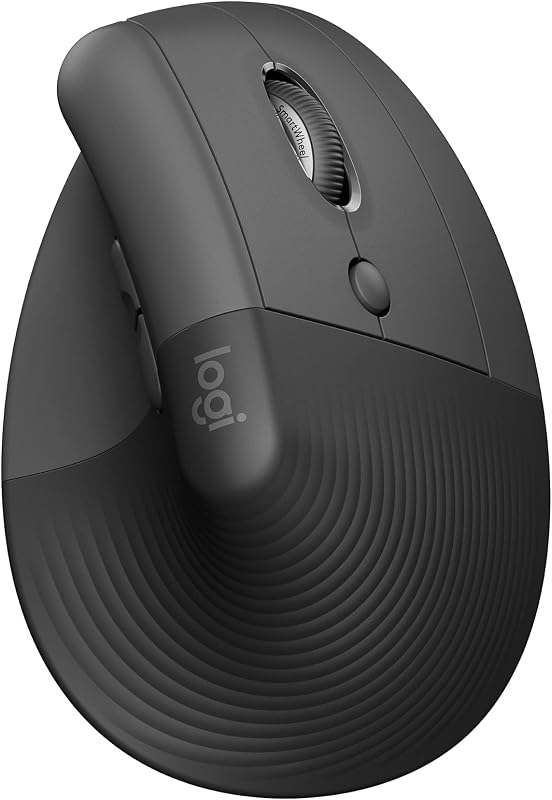 Best Ergonomic Mice: Vertical & Trackball PicksVertical and trackball mice that take strain off your wrist.