
Solar Security Camera Not Charging?
Free Fixes First, Then 8 Cams and Panels for Winter Sun
Our #1 pick is the Tapo C660 KIT 4K Outdoor Pan/Tilt Solar Camera. Shade, a loose cable, short winter days and freezing weather stop most solar cameras from charging. Here are the free fixes first, then 8 cameras and add-on panels labeled by the problem they solve, from about $30 to $120.
How we picked: we shortlist by Amazon Best Seller rank and number of ratings, then compare published specs. We don’t test these products hands-on.
By Jamilur Rahman, Founder & Editor · Updated November 7, 2026
- Owner reviews checked
- Features side by side
- Quick & easy compare
- Smarter purchase

The short answer
A solar security camera that stops charging usually has a cheap cause, not a dead battery: the panel sits in shade or faces the wrong way, it is dirty or covered in snow, winter gives it too few hours of direct sun, the cable or connector is loose, the battery is too cold to take a charge (makers say about 32°F), too many motion alerts and live views drain it faster than the panel refills it, or the panel is too small for the camera. The free fixes, in order: wipe the panel and clear any snow, push the cable in at both ends until the app shows the charging icon, move the panel into direct sun facing south (in the Northern Hemisphere), cut motion sensitivity and live views, and bring the camera indoors to charge if it has been below freezing. If it still will not charge, the best buy for short winter days is the Tapo C660 KIT: a 4K pan-and-tilt camera whose separate panel sits on a 13 ft cable, so it can sit on the sunniest wall while the camera watches the shade, for about $100 to $120.
Pick by what is going wrong. If the camera has to sit in the shade, you want a panel you can place apart from it: the Tapo C660 KIT or the eufy SoloCam S340, whose listing calls the panel removable. If your wall gets good sun and you want one tidy piece with no panel cable to loosen, take the Tapo C465 MagCam, the aosu fixed-panel camera or the eufy SoloCam S220. If you already own a camera that just drains too fast, a bigger panel may be all you need: the Ring Solar Panel (2nd Generation) for Ring cameras or the WYZE Solar Panel for the Wyze Cam Outdoor and Battery Cam Pro. And if a failed camera needs a cheap swap, the SEHMUA 2K 360 costs about $40. None of them beats a cold snap. Below about 32°F the battery protects itself and stops taking a charge, whatever the panel can do.
Skip the Tapo C660 KIT if you want one piece with nothing to run a cable to, or if your camera and your only sunny spot are the same place, because then the separate panel buys you nothing. Skip any camera here if your real problem is a shaded or dirty panel: fix that for free first. What the ranking pages miss: pages from Swann, aosu and solar camera blogs list fixes, but they rarely name a camera, a price or who should not buy it, and they do not say which model needs the least sun or lets you move the panel. This page labels every pick by the problem it fixes. How we picked: we checked every listing on Amazon.com on November 7, 2026, and read what each one says and what owners report. We did not test them hands-on. The causes and fixes come from eufy, Reolink and Ring support and community pages. We left out the Reolink Argus PT, the Reolink Argus Eco and the eufyCam C37, because owners rate them lower than the rest on their current listings.
Compare them side by side
Everything that matters, in one table. Swipe to see all 8.
| Product | Best overall · Fixes: short winter days, shaded camera spots Tapo C660 KIT 4K Outdoor Pan/Tilt Solar Camera 4K pan/tilt camera with a separate solar panel |  Best removable panel · Fixes: a panel stuck in the wrong spot eufy Security SoloCam S340 3K Dual-Lens Solar Camera 3K dual-lens pan/tilt camera with a removable solar panel | 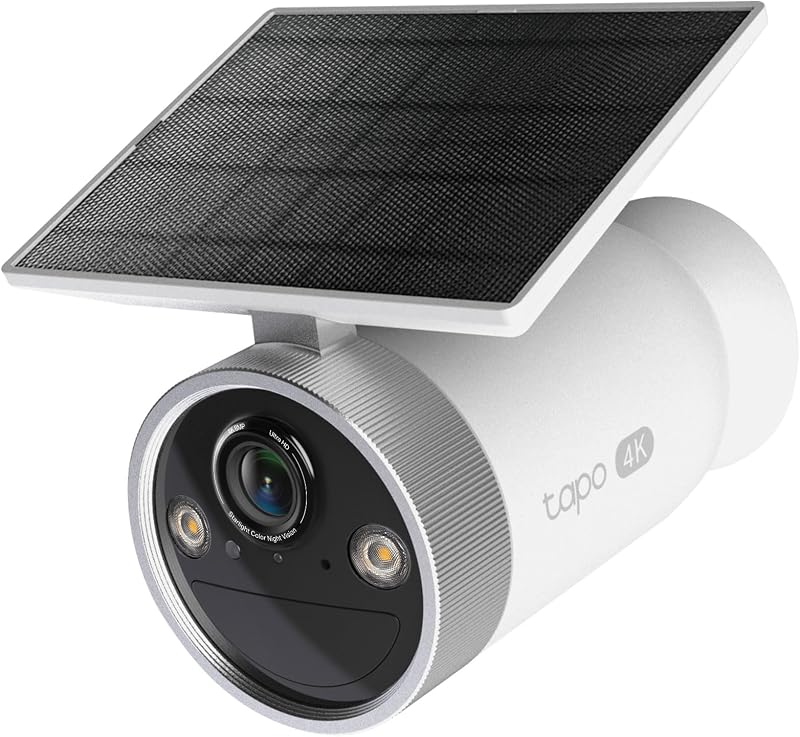 Best one-piece · Fixes: cloudy weeks, loose panel cables Tapo MagCam 4K Outdoor Solar Camera, C465 4K one-piece camera with a built-in solar panel |  Best add-on panel · Fixes: a Ring camera that drains faster than it charges Ring Solar Panel (2nd Generation), 4W Add-on solar panel for Ring cameras |  Best budget eufy · Fixes: false alerts that drain the battery eufy Security SoloCam S220 Solar Security Camera One-piece solar camera with built-in storage |  Best pan-and-tilt one-piece · Fixes: loose panel cables aosu Solar Camera Outdoor Wireless, Fixed Solar Panel 2K pan/tilt camera with an integrated solar panel |  Cheapest 360° · Fixes: a $40 swap for a failed camera SEHMUA 2K 360° Solar Security Camera 2K pan/tilt battery camera with solar power |  Cheapest add-on · Fixes: a Wyze camera that dies between charges WYZE Solar Panel for Wyze Cam Outdoor v1/v2 and Battery Cam Pro Add-on solar panel for Wyze cameras |
|---|---|---|---|---|---|---|---|---|
| BeastScore | 94 / 100 | 91 / 100 | 90 / 100 | 88 / 100 | 87 / 100 | 86 / 100 | 84 / 100 | 82 / 100 |
| Best for | Anyone whose camera spot gets little sun and who can mount a panel on a sunnier wall. | Buyers who want a removable panel, 3K video and no monthly fee at a price under the Tapo kits. | Anyone with a sunny wall who wants charging to be hands-off, with no panel cable to loosen. | Ring Outdoor Cam Plus, Stick Up Cam and Spotlight Cam owners who want to stop recharging by hand. | A sunny wall, a tight budget and anyone who wants no microSD card to buy and no monthly fee. | Anyone whose last camera kept losing its panel connection and who wants a camera that follows people. | A tight budget, a camera that has to be replaced and a spot that gets plenty of sun. | Wyze Cam Outdoor and Battery Cam Pro owners who keep climbing a ladder to recharge. |
| Typical price (checked November 7, 2026) | $100–$120 | $60–$80 | $100–$120 | $40–$60 | $60–$80 | $60–$80 | $30–$50 | $20–$40 |
| Solar panel | Separate panel on a 13 ft cable | Removable panel, per the listing | Built into the camera | Add-on, 4W, 6.5 ft cable | Not listed as removable | Integrated, fixed | See listing | Add-on, 2.5W maximum, 5V |
| Sun it asks for | 45 minutes a day, per the listing | See listing | 50 minutes a day, per the listing | Ring’s listing says 2–3 hours | 3 hours a day, per the listing | 3 hours of direct sun a day, per the listing | See listing | See listing |
| Pan and tilt | 360° pan, 98° tilt, auto tracking | 360° pan and tilt, installed vertically | None listed | Arm turns 360°, tilts 180° | None listed | 360° pan and tilt, tracks people | 355° pan, 100° tilt | See listing |
| Video / fits | 4K | 3K dual lens, 8× zoom | 4K 8MP, 18× digital zoom | Fits Ring Outdoor Cam Plus, Stick Up Cam Pro, Spotlight Cam Plus and Pro | See listing (black-and-white night vision) | 2K, color night vision | 2K, spotlight color night vision | Fits Wyze Cam Outdoor v1/v2 and Battery Cam Pro |
| Storage | microSD card, or the H500 hub (sold separately) | Local, no monthly fee | On-device AI, no subscription | Uses the camera’s own | Built-in 8GB, no monthly fee | microSD (not included) or optional cloud | Two ways, see listing | Uses the camera’s own |
| Key features |
|
|
|
|
|
|
|
|
BeastScore here is our overall rating out of 100, based on published specs and Amazon owner reviews. Prices change daily, so tap "View on Amazon" for today's price. We may earn a small commission, at no extra cost to you. Learn more
Why each one made the list
What each pick does best, where it falls short, and the typical Amazon price when we checked.
- 1. Best overall · Fixes: short winter days, shaded camera spots
Tapo C660 KIT 4K Outdoor Pan/Tilt Solar Camera
BeastScore 94 / 100Typically $100–$120 on Amazon (checked November 7, 2026)This is the pick when winter sun is the problem. The listing says the included panel keeps the camera running as long as it gets 45 minutes of sun a day, backed by a 10,000mAh battery for cloudy days. The panel sits on a 13 ft cable, so you can mount it on the sunniest wall while the camera watches a shady driveway. You also get 4K video with 360° pan and 98° tilt. Take it over the one-piece cameras if your camera spot is dim. Skip it if you want a single piece with nothing to run a cable to, because the panel is a second thing to mount.
Pros- Panel on a 13 ft cable, so it can sit in the sun while the camera does not
- Listing asks for only 45 minutes of sun a day and adds a 10,000mAh battery
- 4K video with 360° pan, 98° tilt and auto tracking
Cons- Costs more than the eufy and aosu one-piece cameras
- The listing gives no cold-weather charging limit, so expect the usual pause near 32°F
- A separate panel means a second mount and a cable run
- 2. Best removable panel · Fixes: a panel stuck in the wrong spot
eufy Security SoloCam S340 3K Dual-Lens Solar Camera
BeastScore 91 / 100Typically $60–$80 on Amazon (checked November 7, 2026)Choose the S340 if your old camera’s panel was stuck where the sun never reached. The listing calls the solar panel removable, and replacement panels are sold for it on Amazon. It also gives a real step up in what you see: 3K dual lenses with 8× zoom, 360° pan and tilt when it is installed vertically, and local storage with no monthly fee. It costs less than the Tapo kits. Skip it if you want a stated sun figure, because the listing gives no hours-per-day number or panel wattage, and know that eufy says its cameras may stop charging at 32°F or below.
Pros- Removable solar panel on the listing
- 3K dual-lens video with 8× zoom and 360° pan and tilt
- Local storage and no monthly fee
Cons- The listing gives no sun hours or panel wattage
- The full 360° view needs it installed vertically
- eufy says cameras may not charge at 32°F or below
- 3. Best one-piece · Fixes: cloudy weeks, loose panel cables
Tapo MagCam 4K Outdoor Solar Camera, C465
BeastScore 90 / 100Typically $100–$120 on Amazon (checked November 7, 2026)If your camera gets decent sun and you want charging to be hands-off, this is the tidy fix. The panel is built into the camera, so there is no panel cable to come loose. The listing says 50 minutes of direct sun powers it for a full day and the built-in battery lasts up to 180 days on one charge, and it records 4K video with 18× digital zoom. Take it over the eufy S220 for the sharper picture. Skip it if the wall is shaded, because the panel cannot move away from the camera, and note the listing says solar charging needs temperatures above 32°F.
Pros- Built-in panel, so nothing to unplug or reroute
- Listing asks for only 50 minutes of direct sun
- 4K video, 18× digital zoom and dual-band Wi-Fi
Cons- The panel cannot be moved to a sunnier spot
- The listing says solar charging needs temperatures above 32°F
- No pan or tilt listed, and it is a newer model with far fewer owner ratings
- 4. Best add-on panel · Fixes: a Ring camera that drains faster than it charges
Ring Solar Panel (2nd Generation), 4W
BeastScore 88 / 100Typically $40–$60 on Amazon (checked November 7, 2026)If your camera is a Ring Outdoor Cam Plus, Stick Up Cam Pro or Spotlight Cam Plus or Pro, you may not need a new camera at all. The listing says this 4W second-generation panel charges up to 60% faster than the first one, and its adjustable arm rotates 360° and tilts 180°, so you can aim it at the sun. It plugs in over USB-C, and a barrel adapter for older models is included. Skip it if your camera is not a Ring, because it fits Ring only, or if the sun is far away, since its 6.5 ft cable is half the Tapo C660’s.
Pros- 4W panel that charges up to 60% faster than the first generation, per the listing
- Adjustable arm to aim it at the sun
- USB-C plug plus a barrel adapter for older Ring cameras
Cons- Fits Ring cameras only
- The 6.5 ft cable is short if the sun is far from the camera
- Fixes charging only: it adds no camera features
- 5. Best budget eufy · Fixes: false alerts that drain the battery
eufy Security SoloCam S220 Solar Security Camera
BeastScore 87 / 100Typically $60–$80 on Amazon (checked November 7, 2026)The S220 fixes the battery drain that comes from a camera waking up for every branch and shadow. The listing says its AI human detection alerts you to people in your yard, which should mean fewer needless wake-ups, and 3 hours of sunlight keeps it running. It stores clips on its built-in 8GB, so there is no microSD card to buy and no monthly fee. It is the simplest camera here. Skip it for a shady wall, because 3 hours is a lot on a short day, or if you want pan and tilt or color night vision: the listing says spotlight color night vision is not supported.
Pros- Built-in 8GB storage, so no microSD card to buy
- AI human detection on the listing
- Simple wire-free install and no monthly fee
Cons- Asks for 3 hours of sun a day, which is a lot in winter
- No color night vision: the listing says spotlight color night vision is not supported
- No pan or tilt listed, and the panel is not listed as removable
- 6. Best pan-and-tilt one-piece · Fixes: loose panel cables
aosu Solar Camera Outdoor Wireless, Fixed Solar Panel
BeastScore 86 / 100Typically $60–$80 on Amazon (checked November 7, 2026)Pick the aosu if your last camera kept losing its panel connection. The listing says the panel is integrated, so there is no separate panel mount and no extra cable to loosen. You still get 360° pan and tilt, 2K video, full-color night vision and automatic person tracking, plus a 1-year warranty. It asks for about 3 hours of direct sun a day, and the listing says the panel needs unobstructed sun. Skip it if the wall is shady, since the panel cannot move away from the camera, or if you do not want to buy a microSD card, because one is not included.
Pros- No panel cable to come loose
- 360° pan and tilt with automatic person tracking
- 2K video, full-color night vision and a 1-year warranty
Cons- Needs about 3 hours of unobstructed direct sun a day
- The panel is fixed to the camera, so it cannot be moved
- The microSD card is not included, and it works on 2.4GHz Wi-Fi only
- 7. Cheapest 360° · Fixes: a $40 swap for a failed camera
SEHMUA 2K 360° Solar Security Camera
BeastScore 84 / 100Typically $30–$50 on Amazon (checked November 7, 2026)Choose the SEHMUA if you want to replace a failed camera for the least money. The listing says it records in 2K, turns 355° across and 100° up and down, has a spotlight for color night vision, two-way talk and a PIR motion sensor, and works from −4°F to 131°F. That is its operating range, not its charging range. It costs about half the price of the eufy and aosu cameras. Skip it if you want clear sun-hour guidance: the listing gives no daily sun figure and does not describe the panel in its bullets. It also works on 2.4GHz Wi-Fi only.
Pros- Lowest-priced pan-and-tilt camera here
- 2K video, two-way talk and a PIR motion sensor
- Listing gives a −4°F to 131°F operating range
Cons- No sun-hour figure and no panel details in the listing bullets
- 2.4GHz Wi-Fi only, and 5GHz is not supported
- Color night vision needs the spotlight turned on by hand
- 8. Cheapest add-on · Fixes: a Wyze camera that dies between charges
WYZE Solar Panel for Wyze Cam Outdoor v1/v2 and Battery Cam Pro
BeastScore 82 / 100Typically $20–$40 on Amazon (checked November 7, 2026)Pick this panel if your camera is a Wyze Cam Outdoor v1 or v2 or a Wyze Battery Cam Pro and you keep climbing a ladder to recharge it. It is the WYZE-branded panel, listed at 2.5W and 5V, weatherproof, and it costs the least of any brand-name panel here. Check the fit first: the title names only those three cameras. Skip it if you need guidance on sun hours, cable length or panel angle, because the listing gives none, or if your camera is a Ring or a Tapo, since those need their own panels. It also cannot fix a freezing battery.
Pros- Wyze’s own panel for three named Wyze cameras
- Lowest price of any brand-name panel here
- Weatherproof and 5V, per the listing
Cons- At 2.5W maximum, it is smaller than the Ring 4W panel
- The listing gives no sun hours, cable length or mounting details
- Fits only the Wyze Cam Outdoor v1/v2 and Battery Cam Pro
All 8 compared, in one look
See every pick on one chart, or tap one to put it head to head with Tapo C660 KIT 4K Outdoor Pan/Tilt Solar Camera. Ratings out of 10 are our estimates from published specs and Amazon owner reviews, not hands-on tests. Bigger shape = better.
- Winter chargingTapo C660 KIT 4K Outdoor Pan/Tilt Solar Camera · 9.6/10
- Panel placementTapo C660 KIT 4K Outdoor Pan/Tilt Solar Camera · 9.4/10
- Camera featuresTapo C660 KIT 4K Outdoor Pan/Tilt Solar Camera · 9.2/10
- Easy setupTie
- ValueSEHMUA 2K 360° Solar Security Camera · 9.6/10
Which one should you buy?
Find your situation below. That's your pick.
- Your camera spot is dim and you can mount a panel on a sunnier wall
- You want 4K video, pan and tilt and a listing that asks for only 45 minutes of sun a day
- You want a removable panel and 3K dual-lens video for under the Tapo kits
- You want local storage with no monthly fee
- Your wall gets good sun and you want no panel cable to loosen
- You want 4K video and a battery the listing says lasts up to 180 days
- You already own a compatible Ring camera that drains too fast
- You want an adjustable arm to aim the panel at the sun
- You want built-in storage and no monthly fee on a budget
- You want AI human detection to cut needless wake-ups
- Your last camera kept losing its panel connection
- You want pan and tilt with automatic person tracking
- A failed camera needs the cheapest 360° swap
- Your spot gets plenty of sun and your Wi-Fi is 2.4GHz
- You own a Wyze Cam Outdoor v1 or v2 or a Battery Cam Pro
- You want the cheapest brand-name panel to try before replacing a camera
Tapo C660 KIT 4K Outdoor Pan/Tilt Solar Camera
A 4K pan-and-tilt camera whose separate panel sits on a 13 ft cable, so it can charge in the sun while the camera watches the shade. The listing asks for 45 minutes of sun a day and adds a 10,000mAh battery.
- Panel on a 13 ft cable, aimed apart from the camera
- 45 minutes of sun a day, per the listing
- 4K video with 360° pan and 98° tilt
Quick tips before you buy
Face the panel south in the Northern Hemisphere, in direct sun, away from eaves and branches. Reolink says indirect light does not charge a panel. Wipe it with a soft cloth and brush off snow.
Push the connector in at the panel and at the camera until it is firm, then look for the charging or sun icon in the app. Reolink and Ring both list a loose cable as a first check.
eufy and Reolink both say charging stops near 32°F to protect the battery, and starts again when it warms up. Top the camera up fully before winter, or bring it indoors to charge.
Lower motion sensitivity, shorten live views and turn on a battery-saving mode. eufy suggests its Optimal Battery Life setting. Reolink says live viewing and many motion triggers can drain a camera faster than its panel refills it.
Quick answers
Why is my solar security camera not charging?+
Work down this list, because the cause is usually free to fix. Shade: a panel in the shadow of an eave, tree or wall barely charges, and indirect light does not count. Dirt and snow: wipe the panel and clear snow. Cable: push the connector in at both the panel and the camera, then look for the charging icon in the app. Winter: short days and a low sun cut the hours of direct light. Cold: below about 32°F the battery stops taking a charge to protect itself. Drain: many motion alerts, live views and recordings can use power faster than the panel adds it. Size: a small panel cannot keep up with a power-hungry camera. If none of these is the cause, charge the camera from a wall adapter, then test the panel in full sun. If it still fails, contact the seller or maker.
How much sun does a solar security camera need?+
It depends on the camera, and it has to be direct sun. The listings on this page ask for about 45 minutes a day for the Tapo C660 KIT, 50 minutes for the Tapo C465, and about 3 hours for the eufy S220 and the aosu camera. Ring’s listing for its newest panel says at least 2 to 3 hours of direct sun a day, and Ring staff have told owners to aim for at least 4. Those are brand figures, not tests. A panel behind glass, in shade or lit only by a porch light will charge little. In winter the days are shorter and the sun sits lower, so pick a camera that asks for the fewest hours if your wall is dim.
Do solar security cameras work in winter?+
Yes, but two things get in the way: fewer hours of direct sun, and cold. eufy says its cameras run from −4°F to 122°F, but may not charge when the inside of the camera is at 32°F or below, and charging starts again on its own once it warms. Reolink gives the same 32°F limit for its panels. So the camera keeps working on its battery in the cold, but the panel cannot top it up until it warms. Charge it fully before winter, clear snow off the panel, lower motion sensitivity and use a battery-saving mode. If your wall gets little winter sun, the Tapo C660 KIT lets you put the panel somewhere sunnier.
Why is my eufy solar panel not charging in winter?+
eufy’s own community team gives the likely reasons. The first is cold: at an internal temperature of 32°F or below the camera may not charge for battery safety, and it resumes on its own above freezing. The second is snow or poor sun, so clear the panel and move the camera to catch more light. The third is drain: lower the motion detection sensitivity and set the Working Mode to Optimal Battery Life. eufy also suggests fully charging the camera over USB before winter begins. If you own an S340, the listing calls the panel removable, so you can try mounting it somewhere sunnier. An S220 asks for about 3 hours of sun a day.
Why is my Ring solar panel not charging?+
Ring staff point to sunlight first: they have told owners to give the panel at least 4 hours of direct sun a day, and a Ring solar panel only trickle-charges, so it extends the time between charges rather than replacing a full charge. Next, check that the cable is firmly connected at both the panel and the camera, wipe the panel with a clean microfiber cloth, and reboot the camera from the Device Health page. If your panel is the older, smaller one, the second-generation 4W panel on this page lists up to 60% faster charging. Check that it fits your model before you buy.
How do I tell whether the panel or the camera has failed?+
Reolink’s support page gives a clean test that works for most brands. Charge the camera with a wall adapter (Reolink uses a 5V 2A one) until the battery is above 50%. Reconnect the panel, put it in direct sun and watch the battery level over the day. If the level rises, the panel works. If it does not, put a known-good panel in the same spot. If the camera charges, the first panel is likely faulty. If the camera will not charge even from the wall adapter, the camera or its battery is the problem. In both cases, contact the seller or maker if it is still under warranty.
What should you skip when buying a solar security camera?+
Skip listings that give no sun-hour figure and no battery size, because you cannot tell what they need. Skip a camera with a fixed panel if your wall is shaded, since you cannot move the panel. Skip no-name add-on panels that do not name your camera, because the plug and the voltage have to match: check for micro-USB, USB-C or a barrel plug. Skip renewed units and reseller listings priced far above the brand’s usual range. And skip buying anything if your only problem is a cold snap, a dirty panel or a loose cable: fix those first.
Keep comparing
 Best Home Security Cameras: Top 5 on AmazonCheck on your home from your phone, day or night.
 Black Friday 2026: security camera deals 4 real Ring drops to see who’s at your doorThree Ring cameras are at their lowest Amazon price ever: the Floodlight Cam 2K at $99.99 ($65 under its 3-month average), the Outdoor Cam 2K at $49.99 and the Indoor Cam 2K at $24.99.
 Which Ring Camera fits your spot: indoor, porch, yard or drivewayIndoor, porch, yard or driveway. Pick the Ring camera that fits the spot.
 Ring vs Blink: Which Amazon camera should you buy?Both are owned by Amazon. Here’s which outdoor camera fits your home.