
Desk Gadgets for Gamers
25 picks, most under $50
Grouped by desk zone so each pick has a clear job: mouse and surface, headset, lighting, controller charging, cables and space, comfort, streaming and a few fun extras.
Whole kit: about $990–$1,325 on Amazon (typical prices, checked November 16, 2026)
How we built this kit: one item for each job, picked from Amazon listings with strong owner reviews. Prices are typical price bands, not live prices. We don’t test these products hands-on.
By Jamilur Rahman, Founder & Editor · Updated November 16, 2026
- One item per job
- Owner reviews checked
- Typical prices shown
- Add the kit in one click
Why this kit
Gamers who already own a mouse, keyboard and headset need desk gadgets that fix four daily annoyances: no room for the mouse, a headset with no home, controllers that are dead when you sit down, and a pile of cables. The best first buy is the Razer Gigantus V2 Cloth Gaming Mouse Pad (XXL), a 37 by 16 inch cloth mat that suits PC players who want the keyboard and mouse on one big surface; console-only players should start with a charging dock for their controllers instead. The other 24 picks are grouped below by desk zone: mouse and surface, headset and audio, lighting, controller charging for PS5, Xbox and Switch 2, cables and space, comfort and cooling, streaming add-ons, and a few fun extras. Most ranking pages we compared list gaming desk gear in one long pile with no price bands, no kit total and no “who should skip this”; here every pick has a price band, and 18 of the 25 have a band that tops out at $50.
Which should you buy? Don’t buy all 25. The kit total at the top adds every pick, roughly $990 to $1,325, and that includes three console-specific chargers when you only need the one for your console. A PC starter five is the Razer Gigantus V2 XXL mat, the New Bee headset stand, the Glorious wrist rest, the Gaiatop clip-on fan and the HUANUO FlowLift Pro arm, about $90 to $140 together. A console starter four is the charging dock for your console, the New Bee stand, the Gaiatop fan and the Quntis light bar, about $85 to $130. A streamer add-on set is the Stream Deck MK.2, the Wave Mic Arm Low Profile, the Logitech C920S and the Elgato Key Light, about $410 to $520, and it only pays off if you actually go live. Small desks should lean on the KDD clamp, the Gaiatop fan and the HUANUO arm, because none of them take desk surface. Who should skip what: skip the mouse bungee and the wrist rest if you play with a controller or a wireless mouse, the Stream Deck and the key light if you never stream, the cooling pad if you game on a desktop, the PC mount if you use a laptop or a console, and the PlayStation light if you play on Xbox or Switch.
What to skip: gimmicky RGB that does no job (a headset stand, a charger and a mouse pad that all glow add cost and glare, not function), no-name mouse bungees that tip over or snag the cable, and cheap monitor arms rated below your monitor’s weight; the HUANUO Pro in this kit takes 4.4 to 15.4 lbs, so check your monitor’s weight without its stand before you buy any arm. How we picked: we read the live Amazon listing for each item, checked the specs and who it suits, read owner reports and compared the big ranking pages for gaming desk accessories, and kept only real brand listings with plenty of buyers behind them. We left out the mouse, keyboard and headset themselves, which our guides to the best gaming mice, keyboards and headsets cover. We don’t test products hands-on, and the specs here come from the listings. Price bands were checked on November 15, 2026.
What’s in the kit
25 items, one job each. Already own one? Skip it and get the rest.
- 1
 One big surface for mouse and keyboard
Razer Gigantus V2 Cloth Gaming Mouse Pad (XXL)
XXL cloth desk mat · typically $25–$35 on AmazonA mouse mat is the one gadget your hand touches on every swipe, and an XXL one is the best first upgrade for a gaming desk. This mat holds the keyboard and the mouse on one piece, so you never run out of room mid-flick and the desk edge feels softer on your forearms. The listing says the micro-weave cloth is calibrated for all mouse sensors and the 4 mm foam base has an anti-slip grip. It measures about 37 by 16 inches and weighs 2 lb. Skip it if you play on a couch with a controller, or if your desk is under about 40 inches wide.
- Keyboard and mouse sit on one surface
- Works with any mouse sensor, per the listing
- Thick foam base stays flat and grips the desk
- 2
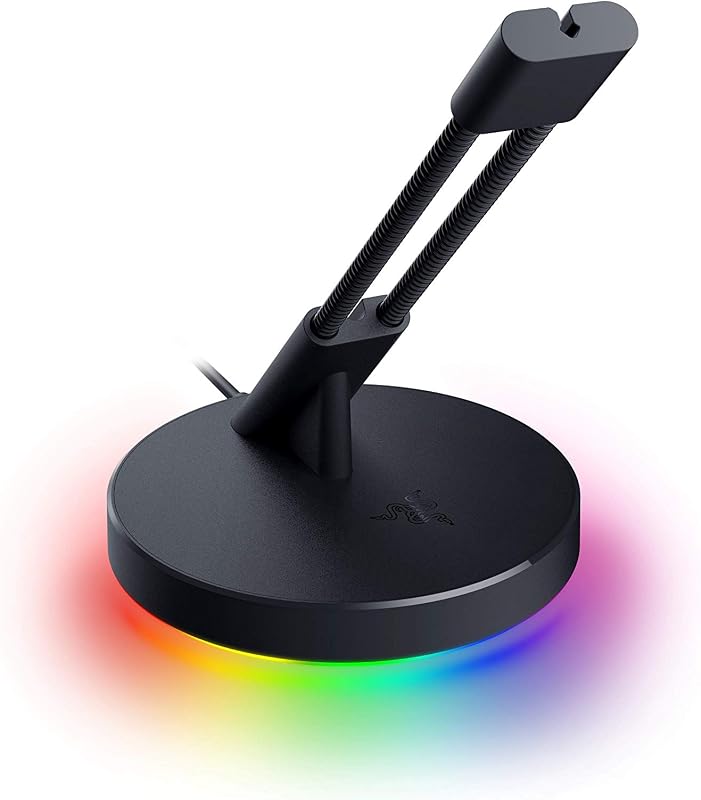 Lifts the mouse cable off the desk
Razer Gaming Mouse Bungee V3 Chroma
Weighted mouse cable holder · typically $35–$45 on AmazonA wired mouse drags its cable across the desk edge and catches on the keyboard. A bungee lifts the cable so the mouse moves as if it were wireless. This Razer one has an adjustable spring arm and a weighted 240 g base with non-slip feet, in a small frame, and the listing says it fits rubber, braided and paracord cables from major brands. It costs about as much as a basic mouse and fixes a problem that a wireless mouse removes completely. Skip it if your mouse is wireless, and skip the RGB underglow if you want a quiet-looking desk.
- Weighted base keeps it from tipping during fast play
- Fits rubber, braided and paracord cables
- Small frame leaves room on the desk
- 3
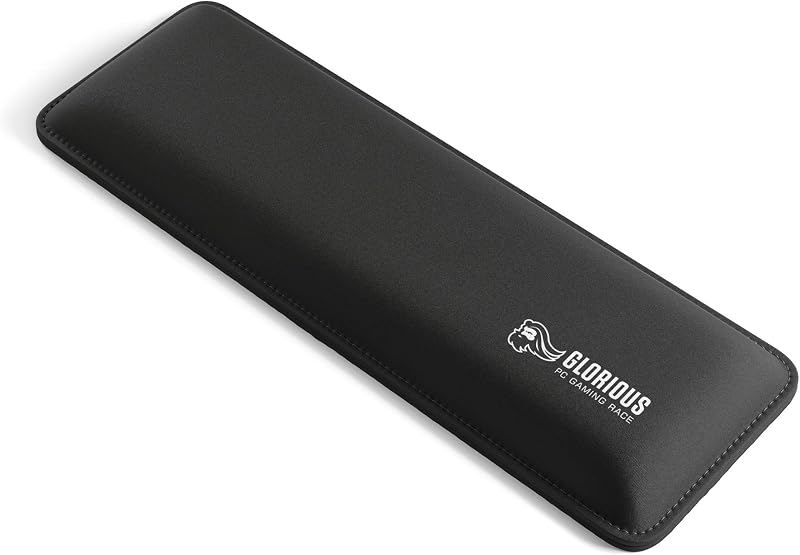 Lifts your wrists to keyboard height
Glorious Gaming Keyboard Wrist Rest (Compact)
Foam wrist rest, 12 × 4 × 1 in · typically $15–$25 on AmazonLong sessions on a flat desk bend your wrists back, and a wrist rest lifts the heel of your hand to keyboard height. This Glorious pad is the compact size, 12 by 4 inches and 1 inch thick, made for 60% and 65% keyboards. The listing says the dual-lock stitched frame resists fraying, the rubber base does not skid and the cloth top is smooth over foam of medium firmness. Skip it if you use a full-size or tenkeyless keyboard, because this size is too short and you would need a longer one, or if your hands float over the keys when you play.
- Cheapest comfort upgrade on the page
- Grippy base stays put during fast hand movement
- Stitched edges built to resist fraying
- 4
 Gives the headset a home and adds two ports
New Bee Headphone Stand with RGB Lighting
Aluminum headset stand with USB-C and USB ports · typically $15–$25 on AmazonA headset thrown on the desk gets squashed and lost under paper. This stand gives it a home and adds a USB-C and a USB port within reach, which the listing says work plug-and-play on Windows, Linux and Mac for files and phone charging. It is aluminum with a TPU rest that protects the headband, 9.5 inches tall on a 4.5-inch base with non-slip pads, and the listing says it fits all headset sizes. Seven RGB modes switch off with a long press. Console players get the stand but should check the ports, since the listing names only computers. Skip it if your headset already has its own charging dock.
- Cheap, stable aluminum stand that fits any headset size
- Two ports within reach of the keyboard
- RGB can be switched off with a long press
- 5
 Holds a drink and a headset off the desk
KDD 4 in 1 Desk Cup Holder
Clamp-on cup holder and headphone hanger · typically $15–$25 on AmazonOn a small desk, a headset stand and a drink fight for the same spot. This clamp holds both off the surface. The listing says it clamps to tabletops 5 to 50 mm thick without glue or holes, the headphone hook rotates 360 degrees and tucks under the desk, and the box detaches to hold a cup, phone or pens. Rubber pads and a cable holder keep the headset from slipping. Skip it if you already own the New Bee stand, since both do the headset job, or if your desk edge has a lip or drawer in the way.
- Frees desk surface for a drink, headset and pens
- No drilling and a wide 5 to 50 mm clamp range
- Rubber pads protect the desk and hold the headset
- 6
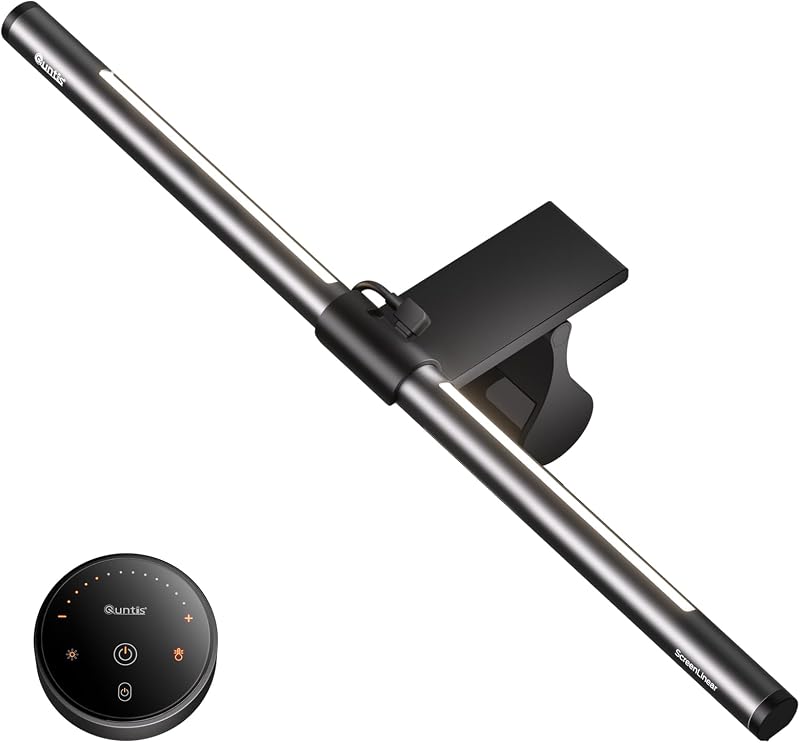 Glare-free desk light and screen glow
Quntis Computer Monitor Light Bar with Backlight
Monitor light bar with a backlight and remote · typically $40–$50 on AmazonPlaying in a dark room with a bright screen tires your eyes, and a desk lamp throws glare on the monitor. This light bar sits on top of the screen, so it takes no desk space, and the listing says its optical design and eye-care hood keep light off the screen. A separate backlight glows behind the monitor and softens the contrast between screen and wall, and a touch remote adjusts brightness and color temperature for both lights. Skip it if you want colors that react to the game, like the Govee bars below, or if you mostly play in a bright room.
- Takes no desk space and keeps glare off the screen
- Front light and backlight adjust separately
- Remote sets brightness and color temperature
- 7
 Game-reactive color behind the desk
Govee RGBIC Gaming Light Bars H6047
Wi-Fi RGBIC light bars with a desk dial · typically $50–$70 on AmazonIf you want color on the desk, lighting that reacts to the game beats a plain LED strip. The Govee bars use RGBIC, where each part of a bar can show a different color, and the listing says they sync with Razer Chroma through the Govee Desktop app, react to game audio and have a desk dial for brightness and mode. They are for atmosphere, not light to work by. The listing is clear about one limit: there is no camera, so they do not pick colors from the screen. Skip them if you want Ambilight-style screen matching.
- Razer Chroma sync for PC players
- A desk dial beats digging through an app
- 60+ scene modes
- 8
 Keeps two PS5 controllers charged
PlayStation 5 DualSense Charging Station
Official dual controller charger · typically $25–$35 on AmazonA controller that dies mid-match is the most common console annoyance. This official Sony station charges two DualSense controllers at once without plugging them into the PS5, so a pad is always ready when you sit down and the console’s USB ports stay free. The listing is short, so check the product page for details such as power and cables before you order. It only charges DualSense controllers. Skip it if you have one controller and charge it from the console, or if a cheaper third-party dock is enough for you.
- Official Sony hardware
- Charges two controllers at once
- Frees the console’s USB ports
- 9
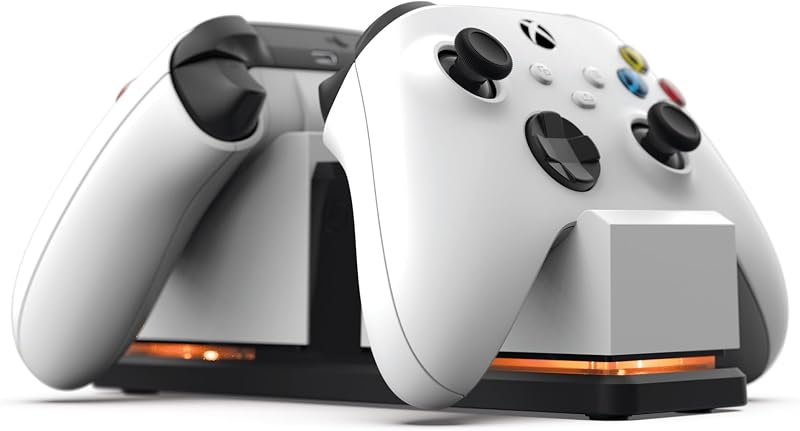 Keeps two Xbox controllers charged
PowerA Dual Charging Station for Xbox Series X|S
Dual charger with two rechargeable batteries · typically $20–$30 on AmazonXbox controllers eat AA batteries unless you give them a rechargeable pack. This PowerA dock ships with two 1100 mAh rechargeable batteries and four battery doors, so the controller you set down charges while the one in your hands keeps going. The listing says it snaps down to charge, shows status with a color-change LED and runs from an AC adapter, so it does not tie up a USB port. Skip it if you play on PC with a cable, or if you rarely use a second controller.
- Two rechargeable batteries and four battery doors in the box
- Snap-down charging with a status LED
- AC adapter keeps USB ports free
- 10
 Charges and stores Switch 2 controllers
FASTSNAIL Charging Dock for Joy-Con 2 and Pro Controllers
Magnetic Switch 2 charging dock · typically $25–$35 on AmazonSwitch 2 Joy-Con are small, easy to lose and easy to forget to charge. This dock holds four Joy-Con 2 and two Pro controllers in one place and charges all of them, with a magnetic seat that lines each one up and six LEDs that show charging status. It doubles as storage, so the desk is not covered in loose controllers. The listing is firm on compatibility: it is for the 2025 Joy-Con 2 and the official Pro Controller only. Skip it if you play handheld and charge the console itself, or if you own original Switch Joy-Con, which are not covered.
- One dock for Joy-Con 2 and Pro controllers
- Magnetic plug-and-play seat with status lights
- Doubles as desk storage for loose controllers
- 11
 Frees desk space and sets screen height
HUANUO FlowLift Pro Monitor Arm
Single monitor arm for 13–32 inch screens · typically $25–$35 on AmazonA monitor arm lifts the screen off the desk, which frees room for the mat and lets you set the height and distance. This HUANUO Pro tilts, swivels and rotates, and the listing says it snaps on with a tool-free plate. The weight limit matters: the listing says the monitor must weigh between 4.4 and 15.4 lbs, have 75 or 100 mm VESA holes and be 13 to 32 inches, and it recommends wood desks only. Skip it if your monitor is heavier, has no VESA holes, or sits on a glass or very thin desk.
- Frees the desk and fixes screen height
- Tilt, swivel and rotation in one arm
- Tool-free VESA plate speeds up the install
- 12
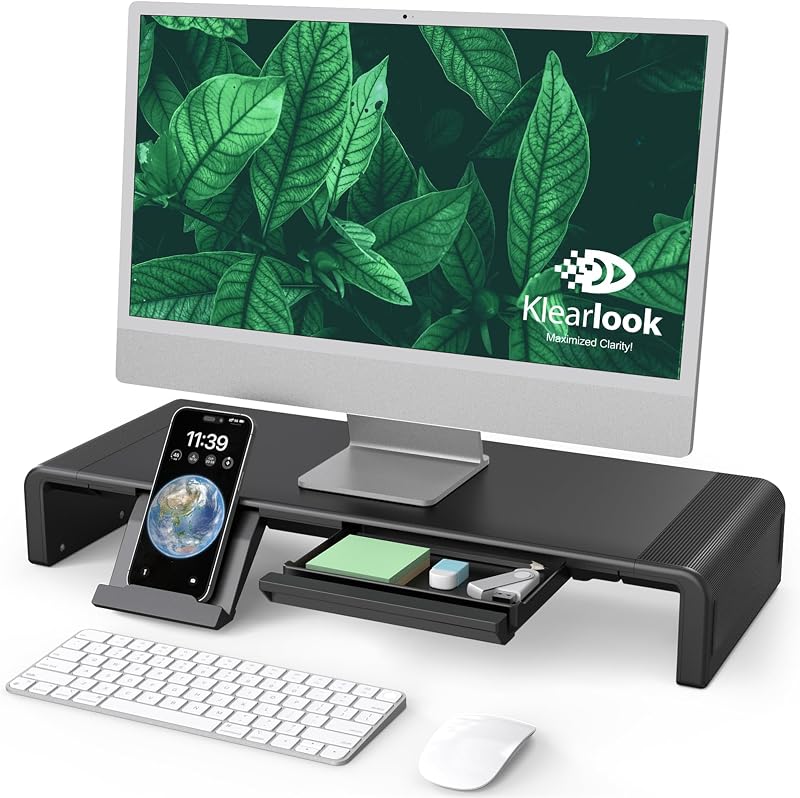 Raises the screen and stores small gear
Klearlook Monitor Stand Riser with Storage Drawer
Foldable monitor riser with a drawer · typically $30–$40 on AmazonA riser is the no-install answer for a screen that sits too low. This Klearlook stand lifts the monitor, and the listing says it unfolds to three widths of 16.5, 18.5 and 20.5 inches, holds up to 55 lbs and leaves room underneath for a full-size keyboard. A drawer holds controllers, cables and spare batteries, and a phone or tablet holder is built in. It needs no assembly and no clamping, so it works on any desk. Skip it if you already use a monitor arm, since both do the same job, or if you want to clear the desk completely, because an arm frees more room.
- No clamp or tools, so it fits any desk
- Drawer for controllers, cables and batteries
- Keyboard slides underneath when you are done
- 13
 Hides power strips and bricks under the desk
Univivi No Drill Under Desk Cable Management Tray
Fabric under-desk cable tray, 36 inch · typically $35–$45 on AmazonGaming desks collect power bricks, a hub, a console charger and a power strip, and they all end up on the floor. This tray hangs under the desk and holds them. The listing says it clamps on with no drilling or screws in, works on wood, glass and metal tops, unfolds for easy loading and has built-in ties. It measures 36 by 5.5 by 5.5 inches, in flame-retardant fabric, and needs at least 5.3 inches of clear space along the edge if your desk has drawers or a back rod. Skip it if your desk is under about 40 inches wide or has a crossbar in the way.
- No drilling, with a screw option for a firmer hold
- Fits wood, glass and metal desks
- Built-in ties hold a power strip and bricks
- 14
 Covers the power strip and plugs
YECAYE 2 Pack Cable Management Box
Cord and power strip cover boxes · typically $25–$35 on AmazonIf the tray is for under the desk, the box is for the floor or the desk top. These two boxes hide a power strip, a console brick and charger cords inside plastic, with vent holes for airflow and a lid that the listing calls dustproof, bite-proof and child-resistant. The large box takes a full power strip, and the medium one suits the desk top for chargers. It needs no tools and keeps dust off the plugs. Skip it if the Univivi tray already hides your cables, or if you own a bulky surge protector that may not fit the listed sizes.
- Two sizes for the floor and the desk top
- Vent holes let a power strip breathe
- Keeps pets and kids away from plugs
- 15
 Gets the PC tower off the floor
VIVO Under Desk and Wall Large Office PC Mount
Adjustable under-desk PC holder · typically $45–$55 on AmazonA tower on the floor collects dust and gets kicked. This mount hangs it under the desk, or on a wall. The listing says it holds up to 44 lbs, adjusts to 8.3 to 13 inches wide and 14.6 to 25.2 inches tall, swivels 135 degrees to reach the rear ports and has padding that protects the case. The desk must be at least 1 inch thick, with an overhang as wide as the PC. A full-size gaming tower can be heavy and wide, so check both numbers. Skip it if you use a laptop or a console, or if your case is wider than 13 inches.
- Gets the tower off the floor and the dust
- Swivel reaches the rear ports
- Adjusts to many case sizes
- 16
 Puts airflow under a gaming laptop
havit HV-F2056 Laptop Cooling Pad
Laptop cooling pad with 3 fans · typically $20–$30 on AmazonA gaming laptop on a flat desk runs hot with no air under it. This pad lifts the laptop and puts three fans under it. The listing says it fits 15.6 to 17 inch laptops, has two height settings that tilt the keyboard toward you and a metal-mesh top, and adds an extra USB port. A fan pad only helps if your laptop pulls air from the bottom, so check where your model’s vents are. Skip it if you game on a desktop, or on a thin laptop with side vents. The cable is USB to USB, so a laptop with only USB-C needs an adapter.
- Lifts the laptop and adds airflow under it
- Two height settings for a better typing angle
- Pass-through USB port
- 17
 Cools you without taking desk space
Gaiatop Portable Clip on Fan
Rechargeable clip-on desk fan · typically $10–$20 on AmazonA long ranked session gets warm, and a clip-on fan is the cheap fix. The Gaiatop clips to a desk edge or monitor stand, so it takes no surface space. The listing says it runs from a 2000 mAh battery for 2.5, 5 or 10 hours depending on speed, works while charging, has a brushless motor, rotates 360 degrees both ways and has 5.5 mm gaps in the cage. It weighs 0.71 lb. Skip it if your desk edge is thicker than 1 inch, if you want to cool a whole room, or if your mic sits next to the fan, because it will pick up the sound.
- Clips on, so it uses no desk surface
- Battery runs a full session and works while charging
- Rotates 360 degrees in both directions
- 18
 Keeps drinks cold within reach
Cooluli 4L Mini Fridge
Thermoelectric desk fridge and warmer · typically $45–$60 on AmazonA cold drink beside you means no trip to the kitchen between rounds. The Cooluli is a thermoelectric box that holds about six cans, the listing says it cools 40 to 45°F below the room and warms to 122 to 144°F, and it comes with AC, DC and USB cords. At 7.25 by 10.25 inches and 4 lbs it sits on a shelf or the floor beside the desk. The listing calls it energy-efficient and ultra-quiet, though any fan unit adds some hum. It is a luxury. Skip it if the desk is small, if a mic sits near it, or if the kitchen is a short walk away.
- Cold drinks within reach of the chair
- Also warms, and runs on AC, DC or USB
- Holds about six cans
- 19
 One-key scenes, mute and chat actions
Elgato Stream Deck MK.2
15-key LCD macro controller · typically $110–$150 on AmazonA Stream Deck puts the clicks you repeat on one key each: switch scene, mute the mic, trigger a light. The listing says the MK.2 has 15 LCD keys that show what each one does, runs one-touch or multi-step actions and has plugins for OBS, Twitch, YouTube, Discord, Spotify and Philips Hue. It also works for non-streamers who run macros, but at this price it pays off only if you go live or edit video often. Skip it if you do not stream: your keyboard shortcuts will do the same job for free.
- 15 labeled keys cover scenes, mute and lights
- Plugins for OBS, Twitch, YouTube and Discord
- Visual feedback on each key
- 20
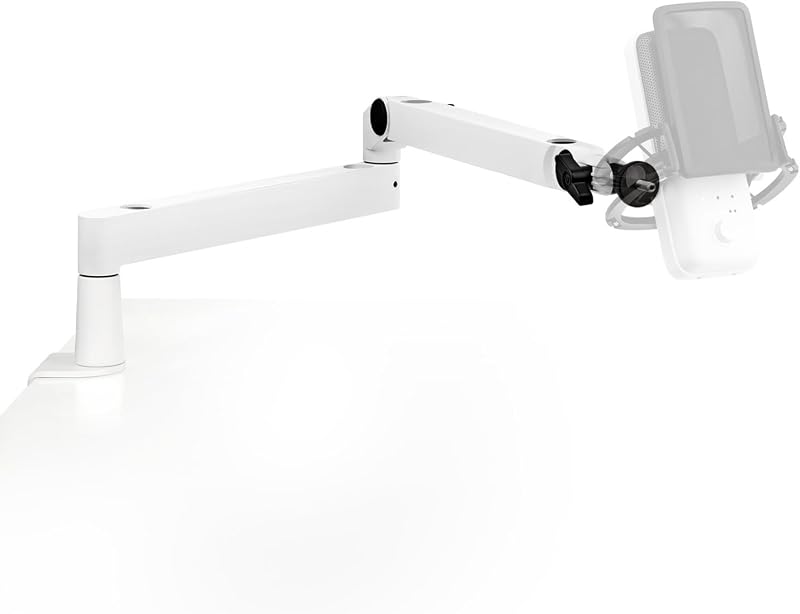 Holds the mic near you, off the desk
Elgato Wave Mic Arm Low Profile
Low-profile microphone boom arm · typically $90–$110 on AmazonA mic on a desk stand picks up keyboard thuds and blocks your view. A boom arm lifts it to your mouth and out of the way. The Wave Mic Arm Low Profile is all metal, and the listing says it sits below the shoulder line so it does not block the screen, hides the cable in magnetic channels and reaches 29.1 inches for a big desk. It is the premium option and costs as much as a decent USB mic. Skip it if you only use a headset mic, or if you want a cheaper arm and do not mind a bulkier one.
- Low profile keeps the screen view clear
- Long 29.1 inch reach for a big desk
- Magnetic channels hide the mic cable
- 21
 A clear face cam for streams and calls
Logitech C920S HD Pro Webcam
1080p webcam with a privacy cover · typically $60–$80 on AmazonA face cam makes a stream feel personal, and a laptop camera rarely looks good in a dim room. The C920S is Logitech’s long-running model: 1080p at 30 frames a second, a fixed 78-degree view that frames you and the space behind, autofocus, RightLight 2 exposure correction and a cover that blocks the lens when you are done. It has two built-in mics, but a headset or desk mic sounds better. It is not for 60 fps or 4K video. Skip it if you already own a good camera, or if you never stream or video chat.
- Sharp 1080p picture with autofocus
- Privacy cover for the lens
- RightLight 2 helps in dim rooms
- 22
 Even, flattering light on your face
Elgato Key Light
Wi-Fi desk key light panel · typically $150–$180 on AmazonA key light is the biggest picture upgrade for a face cam, because it lights you evenly so the webcam looks clean. The Key Light puts out 2800 lumens, ranges from 2900 to 7000 K (sunset amber to arctic blue) and uses 160 OSRAM LEDs that the listing says run cool next to a soft box, behind an opal glass face for even, glare-free light. It is Wi-Fi enabled, so you switch it and tune it from the desktop app. It is the most expensive pick on the page. Skip it if you do not stream or video chat, or if a cheap clip-on light would be enough for you.
- Bright 2800 lumens that dim right down
- Wide 2900 to 7000 K color range
- Controlled from the desktop app
- 23
 A playable retro desk toy
My Arcade Pac-Man Micro Player Pro
Tabletop mini arcade cabinet · typically $30–$40 on AmazonA desk toy for a gamer should be a game. This mini cabinet is about 6.8 inches tall, plays by itself with no PC or console and has a headphone jack for quiet breaks. It is an officially licensed Bandai Namco Pac-Man title with artwork inspired by the original arcade cabinet, and the listing says to press START/CREDIT to add coins. It runs on four AA batteries or a USB-C cable, and the listing says neither is included. It is a novelty with a small screen, not a handheld console. Skip it if you want a library of games, or a toy that fits a very small desk.
- Plays by itself, with no PC or console needed
- Officially licensed arcade artwork
- Headphone jack for quiet breaks
- 24
 Blows dust out of keys and vents
WOLFBOX MegaFlow 50 Compressed Air Duster
Cordless electric air duster · typically $30–$40 on AmazonDust slows a PC and clogs a console’s vents, and cans of compressed air run out. This cordless duster is a reusable swap: the listing says it spins up to 110,000 RPM on three speeds, ships with four nozzles and a lanyard, weighs 0.45 lb and recharges over USB-C in about 3.5 hours, with up to 240 minutes on the lowest setting. It suits keyboards, PC vents and consoles. It blows dust around rather than away, so use it away from the desk. Skip it if you rarely clean, or if you already own a canned duster you like.
- Reusable, with no cans to buy
- Four nozzles for keys, vents and corners
- Charges over USB-C
- 25
 A themed glow for the desk
Paladone PlayStation Controller Icons Light
USB or battery desk light · typically $20–$30 on AmazonA themed light is the simplest way to make a desk look like a gamer’s. This Paladone light is the PlayStation triangle, circle, cross and square as a lamp about 12 inches wide and 4 inches tall, officially licensed, with three modes: standard, color phasing and sound reactive. It plugs in over USB or runs on three AAA batteries, which are not included. It is decoration with a soft glow, not task light, and the theme is PlayStation only. Skip it if you play on Xbox or Switch, or if you want a light to read or work by.
- Fun, recognizable PlayStation shapes
- Three light modes including sound reactive
- Runs on USB or batteries
The kit at a glance
- 1. Razer Gigantus V2 Cloth Gaming Mouse Pad (XXL)One big surface for mouse and keyboard$25–$35
- 2. Razer Gaming Mouse Bungee V3 ChromaLifts the mouse cable off the desk$35–$45
- 3. Glorious Gaming Keyboard Wrist Rest (Compact)Lifts your wrists to keyboard height$15–$25
- 4. New Bee Headphone Stand with RGB LightingGives the headset a home and adds two ports$15–$25
- 5. KDD 4 in 1 Desk Cup HolderHolds a drink and a headset off the desk$15–$25
- 6. Quntis Computer Monitor Light Bar with BacklightGlare-free desk light and screen glow$40–$50
- 7. Govee RGBIC Gaming Light Bars H6047Game-reactive color behind the desk$50–$70
- 8. PlayStation 5 DualSense Charging StationKeeps two PS5 controllers charged$25–$35
- 9. PowerA Dual Charging Station for Xbox Series X|SKeeps two Xbox controllers charged$20–$30
- 10. FASTSNAIL Charging Dock for Joy-Con 2 and Pro ControllersCharges and stores Switch 2 controllers$25–$35
- 11. HUANUO FlowLift Pro Monitor ArmFrees desk space and sets screen height$25–$35
- 12. Klearlook Monitor Stand Riser with Storage DrawerRaises the screen and stores small gear$30–$40
- 13. Univivi No Drill Under Desk Cable Management TrayHides power strips and bricks under the desk$35–$45
- 14. YECAYE 2 Pack Cable Management BoxCovers the power strip and plugs$25–$35
- 15. VIVO Under Desk and Wall Large Office PC MountGets the PC tower off the floor$45–$55
- 16. havit HV-F2056 Laptop Cooling PadPuts airflow under a gaming laptop$20–$30
- 17. Gaiatop Portable Clip on FanCools you without taking desk space$10–$20
- 18. Cooluli 4L Mini FridgeKeeps drinks cold within reach$45–$60
- 19. Elgato Stream Deck MK.2One-key scenes, mute and chat actions$110–$150
- 20. Elgato Wave Mic Arm Low ProfileHolds the mic near you, off the desk$90–$110
- 21. Logitech C920S HD Pro WebcamA clear face cam for streams and calls$60–$80
- 22. Elgato Key LightEven, flattering light on your face$150–$180
- 23. My Arcade Pac-Man Micro Player ProA playable retro desk toy$30–$40
- 24. WOLFBOX MegaFlow 50 Compressed Air DusterBlows dust out of keys and vents$30–$40
- 25. Paladone PlayStation Controller Icons LightA themed glow for the desk$20–$30
Quick tips before you buy
The HUANUO FlowLift Pro takes monitors that weigh 4.4 to 15.4 lbs with 75 or 100 mm VESA holes. The VIVO mount holds 44 lbs and fits cases 8.3 to 13 inches wide. The Univivi tray needs about 5.3 inches of free space along the desk edge. Check your own numbers first, because these limits are the usual reason an order goes back.
The New Bee stand lists Windows, Linux and Mac for its USB-C and USB ports, so a console may only get the stand. The havit cooling pad uses a USB-to-USB cable, so a USB-C-only laptop needs an adapter. The PowerA Xbox dock runs from an AC adapter, so it needs a wall outlet nearby.
A gaming tower on the VIVO mount still needs room around its vents, and a laptop cooling pad only helps if your model pulls air in from the bottom. The Gaiatop clip-on fan opens to about 1 inch, so check your desk edge, and keep it away from the mic.
The My Arcade Pac-Man needs four AA batteries or a USB-C cable, and the listing says neither is included. The Paladone light runs on three AAA batteries, also not included, or on its USB cable. The PowerA Xbox dock comes with two rechargeable batteries and four battery doors.
Quick answers
What should every gaming desk have?+
A mat big enough for the keyboard and mouse, a home for the headset, a charger for your controllers, a way to hide power bricks and cables, and a light that does not glare on the screen. In this guide that is the Razer Gigantus V2 XXL, the New Bee stand, a charging dock for your console, the Univivi tray and the Quntis light bar, about $135 to $190 together.
What are good desk toys for gamers?+
The best desk toys either play or glow. The My Arcade Pac-Man Micro Player Pro is a mini arcade cabinet that plays on its own, and the Paladone PlayStation Controller Icons Light adds a themed, sound-reactive glow. Skip fragile figures if your desk is small or you move a lot, because they get knocked over.
How do I make my gaming setup look better on a budget?+
Clear the surface first. A cable tray, a headset stand and a big mat cost about $75 to $105 together and change the look more than lights do. Then add one light, such as the Quntis light bar, and keep one color temperature. A desk full of different RGB colors looks busier, not better.
Are monitor light bars worth it for gaming?+
Yes if you play at night or in a dim room, because a bar on top of the screen lights the desk without glare and softens the contrast between screen and wall. The Quntis bar has a separate backlight and a remote. The Govee bars are more for color and do not match the screen’s colors, since the listing says they have no camera. Skip both if you play in a bright room.
What gadgets do streamers need on their desk?+
A mic arm, a key light, a webcam and a macro pad are the four that change a stream most. The Elgato Wave Mic Arm Low Profile, Elgato Key Light, Logitech C920S and Elgato Stream Deck MK.2 cost about $410 to $520 together. Console streamers also need a capture card, which is not in this kit. If you are not live yet, buy the webcam first and add the rest as you grow.
Are there gaming desk accessories for men, women or kids?+
The picks are not gendered, so choose by the desk and the console. For kids, start with a controller dock, a headset stand and a light bar, which are cheap and safe to leave on a desk. Skip the mini fridge, the air duster and the PC mount for younger players. The wrist rest and mat suit anyone on a PC.
Do console players need desk gadgets too?+
Yes, if you play at a desk. The controller dock, the headset stand, the cable box and a light bar all help, and none need a PC. Skip the mouse mat, the wrist rest and the mouse bungee, because they are for keyboard and mouse play. The charging docks are the most useful pick, and each one fits only one console, so buy the one for yours.
More combo packs and guides
All combo packs → Best Gifts for Gamers: PC, PS5, Switch and phoneGifts gamers actually use, from $60 controllers to a VR headset.
 Best Gaming Mice: Top 5 on AmazonLighter, faster, wireless. The best gaming mice compared.
 Best Gaming Headsets: Top 5 on AmazonHear footsteps first and talk clearly to your team.
 Desk Gadgets for Productivity 18 worth the space18 desk gadgets for productivity, grouped by the job each one does, with a price band for every pick, a starter kit and a clear list of what to skip.
As an Amazon Associate, BeastCompare earns from qualifying purchases. Prices change often; check the price on Amazon before you buy. Affiliate disclosure