
iPhone Photography Accessories
9 fixes for blurry, dark and shaky shots
Blurry at night, hazy in daylight, soft up close or shaky on video? Each of these nine fixes one named problem. Start with the free fixes, then buy only what matches your symptom.
Whole kit: about $330–$435 on Amazon (typical prices, checked November 7, 2026)
How we built this kit: one item for each job, picked from Amazon listings with strong owner reviews. Prices are typical price bands, not live prices. We don’t test these products hands-on.
By Jamilur Rahman, Founder & Editor · Updated November 7, 2026
- One item per job
- Owner reviews checked
- Typical prices shown
- Add the kit in one click
Why this kit
Most blurry or dark iPhone shots come from three things: hand shake while Night mode holds the shutter open, a smudged lens, and the zoom lens quietly handing off to a crop of the main camera in dim light. After the free fixes, the accessory that fixes the most blur is the EUCOS 62" Phone Tripod with Remote: it holds the phone still, and the Bluetooth remote means you never touch the screen. The free fixes come first, though: wipe the lens, hold still for the whole Night mode count, use the 3-second timer, and press and hold on your subject to lock focus and exposure. The other eight in this kit each fix one named problem, from a dirty lens to a dying battery, and the whole kit costs about $330 to $435 on Amazon US (price bands, checked in November 2026).
Pick by the problem you have, not by the gadget. The lists that rank for this search sort gear by type, with no prices added up and no one told to skip anything. This page starts from the symptom. Blurry in the dark: the EUCOS tripod, or the UBeesize flexible mini if you only need a table-top rest. Hazy, glowing shots: the LensPen. Dim, grainy shots of people close by: the Ulanzi VL49 light. Soft close-ups: the NEEWER macro clip lens. Shaky walking video: the DJI Osmo Mobile 8. A wobbly one-hand hold: the COMITOK MOCA grip. Dark faces when the sun is behind your subject: the NEEWER reflector. A phone that dies mid-shoot: the Anker MagGo. Owners on Apple’s forums also say the telephoto lens can hand off to a crop of the main camera in poor light. No accessory changes that, so in the dark shoot at 1x and crop later.
Who should skip the top pick: skip the EUCOS tripod if you shoot mostly in daylight. Bright scenes use fast shutter speeds, so shake is rarely the problem there, and a clean lens plus the timer will do more. If you want a pocket-size rest instead of a 62-inch stand, the UBeesize flexible mini does the same job for less. What to skip: don’t buy both tripods unless you really shoot both ways, skip the Osmo Mobile 8 if you rarely film video, skip the macro lens if your iPhone’s own Macro mode already gets close enough, and don’t stack a MagSafe grip, light and battery, because they all want the same magnets on the back of the phone. Everything here comes from the Amazon US listings and what owners report, not from our own tests.
What’s in the kit
9 items, one job each. Already own one? Skip it and get the rest.
- 1
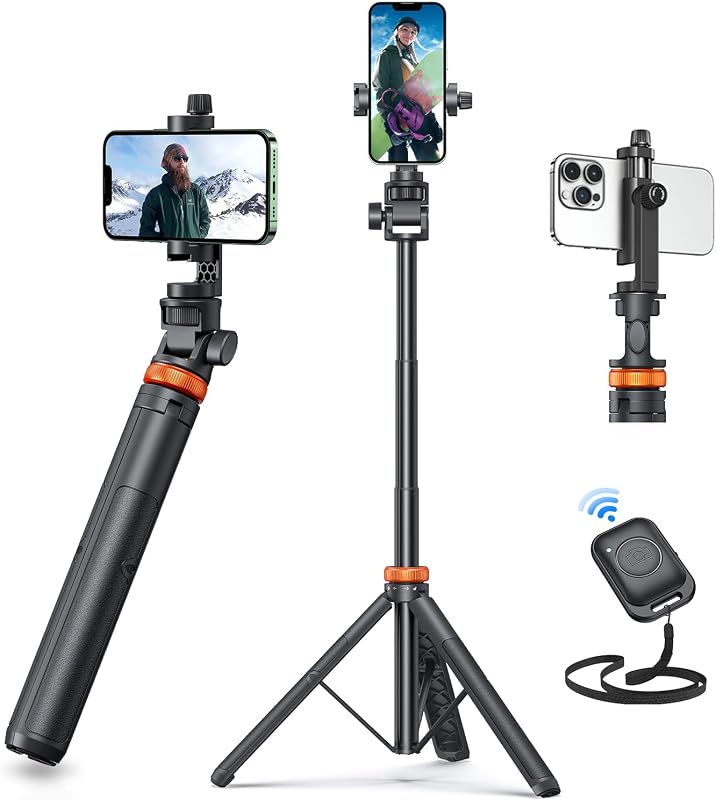 Fixes: shake in Night mode shots
EUCOS 62" Phone Tripod with Remote
Extendable phone tripod with Bluetooth remote · typically $20–$30 on AmazonMost blur in dim light is shake. Night mode keeps the shutter open for a few seconds, so even a steady hand moves, and tapping the screen adds a jolt. A tripod takes your hands out of it. The listing says this one extends to 62 inches, holds phones from 2.2 to 3.6 inches wide (enough for an iPhone in a case) and comes with a wireless remote that works up to 33 feet. It lists a built-in cold shoe, where the Ulanzi light below can sit. Owners like the remote and the light weight. Reports on stability are mixed, so keep the legs short in wind.
- The remote fires the shutter with no screen touch, which cuts shake
- Clamp opens 2.2 to 3.6 inches, which covers an iPhone in a case
- Cold shoe on the holder takes a light or mic
- 2
 Fixes: hazy shots from a smudged lens
LensPen NLP-1 Camera Lens Cleaning Pen
Lens cleaning pen with brush and carbon tip · typically $10–$15 on AmazonBefore you buy anything big, clean the lens. A thumbprint makes photos look hazy and puts a glow around lights, and it is the cheapest blur fix there is. The LensPen has a soft brush at one end and a carbon cleaning tip at the other, and the listing says it needs no fluid and is safe on optical surfaces. Brush off grit first, then wipe the lens in small circles. The listing gives the tip as 12 mm round, so check it against your phone’s lens ring. Owners say it clears fingerprints and dust without smears.
- No liquid to spill, and nothing dries out
- Brush and wipe in one pen, so you remove grit before you rub
- Small enough for a jacket pocket
- 3
 Fixes: dim, grainy close-up shots
Ulanzi VL49 On-Camera LED Video Fill Light
Rechargeable pocket LED light · typically $15–$25 on AmazonGrainy photos happen because the phone pushes its sensitivity up when the room is dark. More light removes the cause. The VL49 is a pocket light, 130 g by the listing, with 49 LEDs, five brightness levels, 5500K daylight color and a CRI of 95+. Its 2000 mAh battery runs up to about 120 minutes at full power. It has a cold shoe base and a 1/4-inch screw hole, so it should sit on the EUCOS tripod. It lights people and things within a few steps, not a skyline. Owners praise the brightness; some report it failing after about two years.
- Five brightness levels, so faces are not blown out
- Daylight color and a CRI of 95+ per the listing, for natural color
- Takes a tripod screw or a cold shoe
- 4
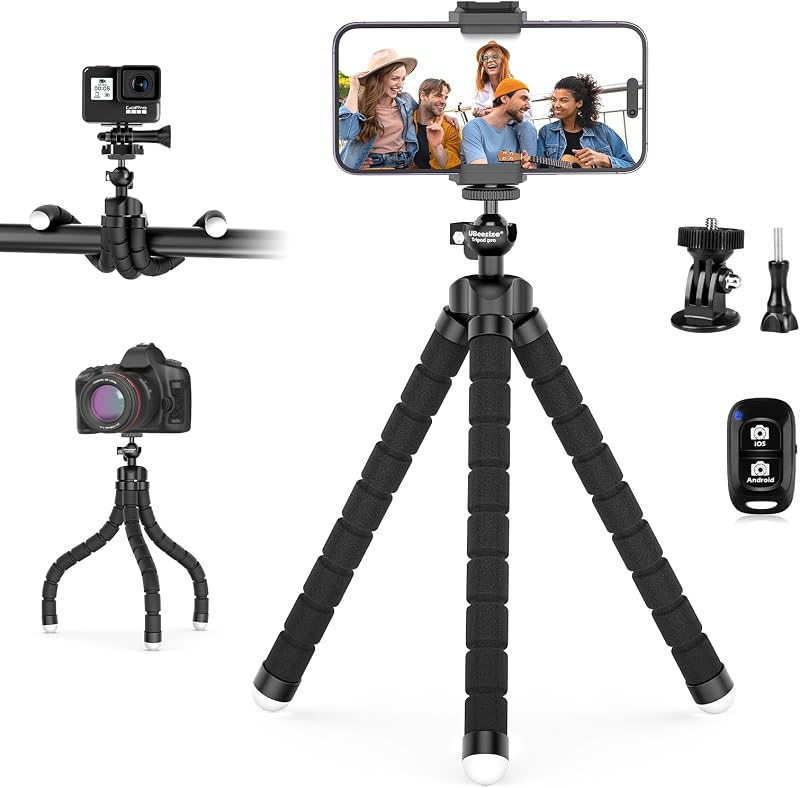 Fixes: no flat spot for the phone
UBeesize Flexible Mini Phone Tripod with Wireless Remote
Bendy mini tripod with Bluetooth remote · typically $15–$25 on AmazonA tall tripod is no help at a café or on a trip, where you rest the phone on a rail, a wall or a table. This mini does that. The listing says its flexible legs bend into any angle, the ball head tilts, and a wireless remote works up to about 30 feet. It holds phones up to 3.7 inches wide, which covers a big iPhone in a case. Owners say the legs wrap around stair rails and the remote pairs easily. Reports on sturdiness are mixed: a heavy phone in a thick case can tip it, so test it on a flat surface first.
- Bendy legs rest on a table, wrap a rail or lie flat
- Remote included, so no screen touch in Night mode
- Small and cheap enough to keep in every bag
- 5
 Fixes: one-hand shake and screen jabs
COMITOK MOCA iPhone Camera Grip
Magnetic camera grip with removable remote · typically $15–$25 on AmazonHandheld shots go soft when you hold a slab of glass in one hand and jab the screen with the other. A grip gives your fingers something solid, and a button fires the shot without the jolt. The listing says this one is built for iPhone 17 and works with the native Camera app, and its removable remote can switch modes, flip lenses, adjust exposure and focus, and open the camera. It has a 1/4-inch thread for a tripod. Setup takes a few Settings changes, and the listing warns iOS 26.2 may let a needed setting be turned off. Owners like the hold; some report unresponsive buttons.
- A real grip and shutter button, so you stop jabbing the screen
- Remote detaches from the grip
- Built-in 1/4-inch thread fits a tripod
- 6
 Fixes: shaky walking video
DJI Osmo Mobile 8 Gimbal Stabilizer
3-axis phone gimbal · typically $140–$160 on AmazonWalking while you film is where phone video shakes most, and built-in stabilization only goes so far. A gimbal uses motors to keep the phone level while your hands move. The listing says the Osmo Mobile 8 has 3-axis stabilization, subject tracking, a built-in extension rod and tripod, and a 10-hour battery that can charge your phone. Owners call the stabilization smooth and the tripod legs sturdy; a few say tracking is slow or not working properly. It is the priciest item in the kit, and the older Osmo Mobile 7 sells for less. Skip it if you mostly shoot stills.
- Smooths out walking, running and panning video
- Built-in tripod and extension rod, so it doubles as a stand
- Long battery that can top up your phone
- 7
 Fixes: soft, out-of-focus close-ups
NEEWER Basics LS-69 15x Macro Phone Lens Kit
15x macro clip-on lens · typically $20–$30 on AmazonA phone can’t focus on things very close, so close-ups go soft. A macro clip lens lets you move in. The listing says this one gives 15x magnification at about 0.8 to 1.6 inches from the subject, uses two-element glass and a 37 mm clamp, and names iPhone 18 Pro Max, 18 Pro, 17 Pro Max, 16, 16e and 15 as compatible. It clips over one camera, so line it up carefully. The listing also warns that vignetting (dark corners) varies by model and suggests tightening the lens and zooming to 1.1x or more. It has few reviews so far.
- Real glass optics, not plastic, per the listing
- Pocket size, with a clip that fits most phones
- Lets you get inside the phone’s normal focus distance
- 8
 Fixes: dark faces in backlit shots
NEEWER 32-Inch 5-in-1 Collapsible Light Reflector
32-inch collapsible reflector and diffuser · typically $25–$35 on AmazonWhen the sun or a window is behind your subject, the phone exposes for the bright background and the face goes dark. A reflector bounces light back onto the face, and costs far less than a lighting kit. This 32-inch disc has five surfaces: gold to warm, silver to brighten, white to fill shadows, black to block light and translucent to soften. It folds into a pouch. Owners say it is sturdy and big enough for portraits of one to three people. It only helps where there is light to bounce, so skip it for night shots. You also need a second person or a stand to hold it.
- Fills shadows on faces for far less than a light kit
- Five surfaces cover warm, bright, fill and shade jobs
- Folds into a pouch, and owners call it sturdy
- 9
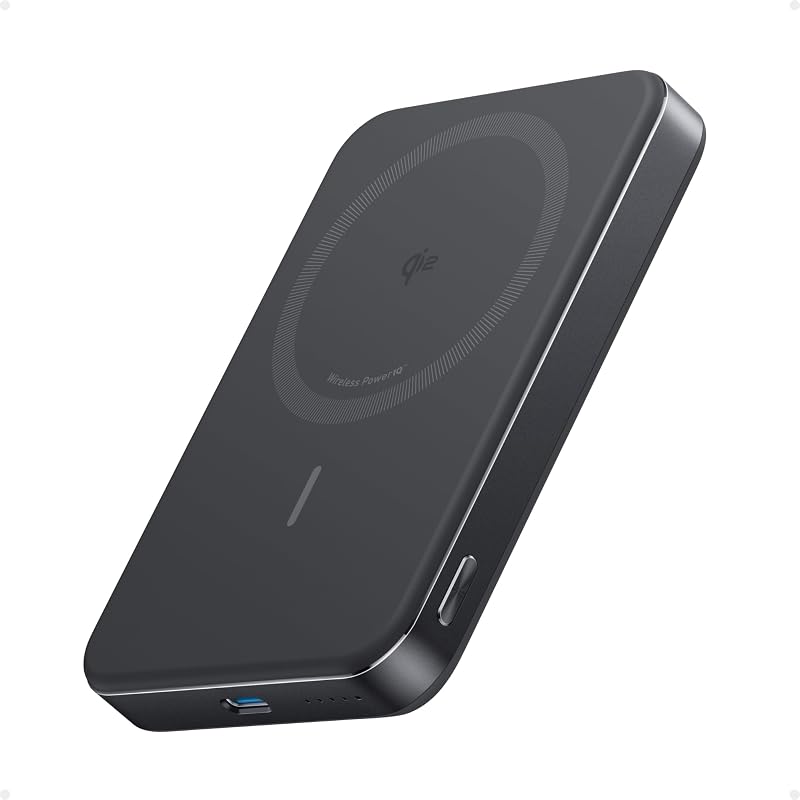 Fixes: a dead phone mid-shoot
Anker MagGo Power Bank 10,000mAh (Qi2, 15W)
Slim magnetic power bank · typically $70–$90 on AmazonNight mode, video and a bright screen drain a battery fast, and a dead phone ends the shoot. The Anker MagGo snaps onto the back of a MagSafe-style iPhone. The listing says it holds 10,000 mAh, charges at 15W Qi2 wireless plus a 30W USB-C port, is 0.58 inches thick and gives up to about 1.8 charges for an iPhone 15 Pro. It names iPhone 12 to 16, so check your model. Owners like the strong magnets. Some say it runs warm, charges slower than expected, or costs too much. Skip it if you use a magnetic grip and don’t want to swap magnets.
- Snaps on, so there is no cable to dangle during a shoot
- Slim enough for a pocket, and flight-approved per the listing
- Also has a USB-C port at up to 30W
The kit at a glance
- 1. EUCOS 62" Phone Tripod with RemoteFixes: shake in Night mode shots$20–$30
- 2. LensPen NLP-1 Camera Lens Cleaning PenFixes: hazy shots from a smudged lens$10–$15
- 3. Ulanzi VL49 On-Camera LED Video Fill LightFixes: dim, grainy close-up shots$15–$25
- 4. UBeesize Flexible Mini Phone Tripod with Wireless RemoteFixes: no flat spot for the phone$15–$25
- 5. COMITOK MOCA iPhone Camera GripFixes: one-hand shake and screen jabs$15–$25
- 6. DJI Osmo Mobile 8 Gimbal StabilizerFixes: shaky walking video$140–$160
- 7. NEEWER Basics LS-69 15x Macro Phone Lens KitFixes: soft, out-of-focus close-ups$20–$30
- 8. NEEWER 32-Inch 5-in-1 Collapsible Light ReflectorFixes: dark faces in backlit shots$25–$35
- 9. Anker MagGo Power Bank 10,000mAh (Qi2, 15W)Fixes: a dead phone mid-shoot$70–$90
Quick tips before you buy
Wipe the lens, take the case off if it covers the camera, and use the 3-second timer so the phone settles after you tap. Press and hold the subject to lock focus and exposure. These cost nothing and fix more blur than most gear.
The higher the rod goes, the more it moves. For Night mode, extend only what you need, and keep the legs wide and the phone low to the ground.
A MagSafe grip, light and power bank all use the ring on the back of the phone. Pick the one you need for the shoot, and use a cabled bank or the tripod’s cold shoe for the rest.
Night mode shows a count while it builds the shot, so keep the phone still until it finishes. A tripod or a solid surface and the timer do this best.
Quick answers
Why are my iPhone photos blurry in low light?+
In dim light the phone slows the shutter to gather light, so any movement shows as blur. Night mode (iPhone 11 and later) takes a few seconds to build the shot, so your hands moving counts too. Fix it by holding the phone against something solid, using the 3-second timer, or putting it on a tripod with a Bluetooth remote. Also wipe the lens, because a smudge looks like blur. If the subject itself is moving, such as a person or a pet, no tripod will freeze it: add light or turn Night mode off.
Why are my iPhone photos blurry when I zoom in?+
Owners on Apple’s forums report that in poor light the telephoto lens can hand off to a crop of the main camera, which looks soft. A crop of the main sensor, called digital zoom, has less detail than a real telephoto shot. Light is the usual fix, so zoom in where it is bright, or shoot at 1x and crop later. A tripod helps because zoomed shots magnify shake. Closer than the telephoto’s focus distance, step back or use the main lens.
How do I fix grainy iPhone photos?+
Grain comes from the phone raising its sensitivity in a dark scene. The fix is more light: move to a brighter spot, add a small LED light such as the Ulanzi VL49 for subjects within a few steps, or turn on Night mode and hold still. Shooting at 1x instead of zoom also helps in the dark. A tripod lets Night mode collect more light without shake, which reduces grain. If a scene is just too dark, a little grain is normal for a phone sensor.
Do clip-on lenses work on iPhone 17 Pro?+
Often, but check the listing. A clip-on lens sits over one camera, and a Pro phone has several, so you line the clip up over the lens you want and avoid covering the others. The NEEWER LS-69 listing names iPhone 17 Pro Max, and also warns that dark corners vary by model, which you fix by tightening the lens and zooming to 1.1x or more. If your case blocks the clip, take it off for the shot. Many newer iPhones can already do close-ups with Macro mode, so try that before you buy.
Do I need a gimbal for iPhone video?+
Not if you film from a fixed spot or a tripod. A gimbal helps when you walk, run or pan while filming, which is where built-in stabilization runs out. If you mostly take stills or short clips from one spot, skip it and use the tripod. The Osmo Mobile 8 is the priciest item here, and the older Osmo Mobile 7 sells for less if you only want smooth walking video.
What iPhone photography accessories should I buy first?+
Buy in the order of your problems. Start free: clean the lens and use the timer. Then spend about $20 to $30 on a tripod with a Bluetooth remote, which fixes the most blur. Add the LensPen for about $10 to $15. After that, pick by symptom: a light for dim indoor shots, a gimbal for walking video, a reflector for dark faces, a macro lens for close-ups. The full kit costs about $330 to $435, and most people need only two or three items.
What iPhone camera accessories should I skip?+
Skip a second tripod unless you shoot both ways, a gimbal if you rarely film video, a macro lens if Macro mode already works for you, and a reflector if you shoot alone or at night. Skip cheap multi-lens kits with fisheye and telephoto clips: quality varies a lot, so start with one lens that names your phone. And don’t stack MagSafe accessories: a grip, light and battery all need the same magnets on the back of the phone.
More combo packs and guides
All combo packs → Best iPhone 18 Pro Max Camera Lens Protectors: Top 5 on AmazonKeep scratches off the glass that takes the photos.
 Which DJI Osmo should you buy?Pocket, Action, 360, Nano or Mobile: one DJI Osmo for each kind of creator.
 Power Bank Price Comparison 5 on Amazon, Cost per 1,000 mAhWhat a power bank really costs: price per 1,000 mAh, packs counted per unit.
 Best Gifts for Photographers: Top 5 on AmazonGear upgrades that fit any camera: memory, a strap, a bag, a tripod and a cleaning kit.
As an Amazon Associate, BeastCompare earns from qualifying purchases. Prices change often; check the price on Amazon before you buy. Affiliate disclosure