Top 5 3D Printers
on Amazon
Our #1 pick is the Creality K1C. From a $200 starter to a fully assembled Prusa. We compared the 5 best 3D printers you can buy on Amazon, including enclosed, multicolor and beginner picks.
How we picked: we shortlist by Amazon Best Seller rank and number of ratings, then compare published specs. We don't test these products hands-on.
By Jamilur Rahman, Founder & Editor · Updated October 10, 2026
- Owner reviews checked
- Features side by side
- Quick & easy compare
- Smarter purchase

The short answer
For most makers, the Creality K1C is the 3D printer to buy on Amazon. It is a fully enclosed CoreXY machine that the listing rates at up to 600 mm/s, with a hardened-steel nozzle for carbon-fiber filaments, a built-in AI camera that watches for failed prints and a carbon air filter. The enclosure means it handles ABS and ASA as well as PLA and PETG, and a quiet mode keeps it livable in a home office.
If you want color, the Flashforge AD5X prints in up to four colors from its side-mounted filament system for not much more money. First-timers on a budget should look at the Flashforge Adventurer 5M, an open-frame CoreXY with one-click auto leveling, or the Creality Ender 3 V3 SE at the very bottom of the price ladder. If you want a printer that just keeps working for years, the Original Prusa MK4S arrives fully assembled and is backed by Prusa’s long-term support.
Don’t buy the K1C if you mainly want multicolor prints or you hate enclosed boxes on your desk. It prints one color at a time and takes more room than the open-frame picks. And note that Bambu Lab printers, which many makers shortlist, were not sold on Amazon US when we checked, so they are not in this list.
Compare them side by side
Everything that matters, in one table. Swipe to see all 5.
| Product | Best Overall Creality K1C Enclosed CoreXY |  Best Multicolor Flashforge AD5X 4-color CoreXY | 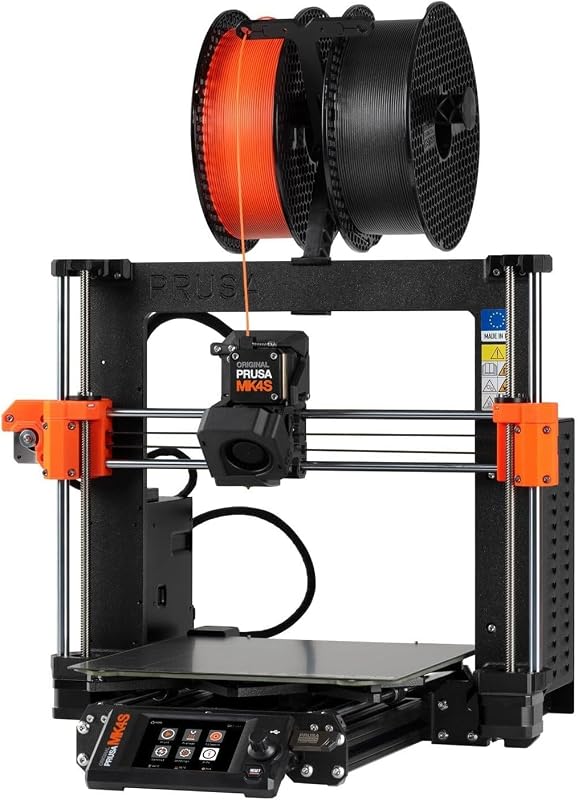 Most Reliable Original Prusa MK4S Assembled bed-slinger |  Best for Beginners Flashforge Adventurer 5M Open CoreXY |  Best Budget Creality Ender 3 V3 SE Budget bed-slinger |
|---|---|---|---|---|---|
| BeastScore | 92 / 100 | 89 / 100 | 90 / 100 | 87 / 100 | 82 / 100 |
| Best for | Makers who want speed and tough materials | Colorful toys, signs and gifts | Workshops and anyone who values uptime | First printer, PLA and PETG | Trying the hobby for as little as possible |
| Typical price (checked October 10, 2026) | $350–$400 | $330–$380 | $1,250–$1,350 | $230–$270 | $180–$220 |
| Build volume | See listing | See listing | 9.84 x 8.3 x 8.6 in | 220 x 220 x 220 mm | See listing |
| Max speed | 600 mm/s | 600 mm/s | See listing | 600 mm/s | 250 mm/s |
| Design | Enclosed CoreXY | Open CoreXY | Open, fully assembled | Open CoreXY | Open, quick assembly |
| Colors | 1 | Up to 4 | 1 | 1 | 1 |
| Key features |
|
|
|
|
|
BeastScore here is our overall rating out of 100, based on published specs and Amazon owner reviews. Prices change daily, so tap "View on Amazon" for today's price. We may earn a small commission, at no extra cost to you. Learn more
Why each one made the list
What each pick does best, where it falls short, and the typical Amazon price when we checked.
- 1. Best Overall
Creality K1C
BeastScore 92 / 100Typically $350–$400 on Amazon (checked October 10, 2026)The K1C gets the most right for the money. The listing rates it at up to 600 mm/s with 20,000 mm/s² acceleration, and the enclosed CoreXY frame keeps prints warm enough for ABS and ASA. A hardened-steel nozzle tip lets it run carbon-fiber PLA and PETG, which wear out brass nozzles. Creality says the clog-free extruder is good for 1,000 hours, the nozzle and heat break swap as one unit, and the AI camera flags failed prints and records time-lapses. A carbon filter and a silent mode (45 dB or less, by the listing) help in shared rooms. Owners report good results out of the box; common gripes are Creality’s software and the noise outside silent mode.
Pros- Very fast CoreXY speed in an enclosed body
- Handles carbon-fiber, ABS and ASA filaments
- AI camera spots failures and records time-lapses
Cons- Single color only
- Enclosed box takes more desk space
- Owners find Creality’s app and slicer less polished than rivals
- 2. Best Multicolor
Flashforge AD5X
BeastScore 89 / 100Typically $330–$380 on Amazon (checked October 10, 2026)The AD5X is the cheapest sensible way into multicolor printing. Its Intelligent Filament System sits beside the printer and feeds up to four spools, so you can print multicolor models or load four of the same color as automatic backup. The listing rates it at 600 mm/s on an all-metal CoreXY frame with vibration compensation, plus full auto leveling for a clean first layer. Supported filaments include PLA, PETG, TPU, silk and CF blends. Owners like the compact side-by-side spool layout. The usual multicolor trade-offs apply: color changes purge filament and add time, and it is an open frame, so it is not built for ABS.
Pros- Four-color printing at a low price
- Fast CoreXY motion with auto leveling
- Spool backup keeps long prints running
Cons- Color swaps waste filament and add print time
- Open frame is a poor fit for ABS and ASA
- More moving parts to maintain than a single-color printer
- 3. Most Reliable
Original Prusa MK4S
BeastScore 90 / 100Typically $1,250–$1,350 on Amazon (checked October 10, 2026)The MK4S is for people who want the printer to disappear and the parts to keep coming. It ships fully assembled, and the listing pitches it at day-to-day workshop and production use, with input shaping to cut ringing at speed and Prusa’s open-source firmware and upgrade path. You get a 1 kg spool of Prusament PLA and Prusa’s lifetime technical support, which owners rate as the best in the hobby. The build volume is a usable 9.84 x 8.3 x 8.6 inches. The trade-offs are price and speed: it costs over three times the K1C, and its bed-slinger design is not as quick as the CoreXY picks.
Pros- Arrives assembled and tested, ready to print
- Excellent long-term support and firmware updates
- Open-source and easy to repair or upgrade
Cons- Costs several times more than the other picks
- Slower than CoreXY rivals
- Open frame, so no enclosure for ABS
- 4. Best for Beginners
Flashforge Adventurer 5M
BeastScore 87 / 100Typically $230–$270 on Amazon (checked October 10, 2026)The Adventurer 5M is the easiest fast printer to start with. The listing says it goes from unboxing to printing in about 10 minutes, and one-click auto leveling handles the step that trips up most beginners. It is a CoreXY machine rated at 600 mm/s, with vibration compensation against ghosting and a quick-detach nozzle that reaches 280°C. A filament run-out sensor and power-loss recovery protect long prints. The build plate is a flexible, double-sided PEI sheet, so parts pop off easily. Owners report clean PLA results with little tuning. Limits: the 220 mm cube is smaller than some rivals, and the open frame isn’t made for ABS.
Pros- Fast setup and one-click leveling for beginners
- Quick CoreXY speed at a low price
- Run-out sensor and resume after power loss
Cons- Open frame: not suited to ABS or ASA
- 220 mm build volume is average
- Single color only
- 5. Best Budget
Creality Ender 3 V3 SE
BeastScore 82 / 100Typically $180–$220 on Amazon (checked October 10, 2026)The Ender 3 V3 SE is the cheapest printer here that we would still recommend. The listing rates it at 250 mm/s, less than half the CoreXY picks, but it adds the features that used to need upgrades: CR Touch auto leveling with automatic Z-offset, a Sprite direct-drive extruder that handles PLA, PETG and TPU, and dual Z-axis lead screws to cut wobble. Assembly takes a few simple steps. Owners like it as a learning machine and for its huge parts and mod community. It is rated a notch below the others on Amazon, and owners report more tinkering to dial in prints than on the Flashforge.
Pros- Lowest price in this guide
- Auto leveling and direct-drive extruder included
- Huge community for help and upgrades
Cons- Much slower than CoreXY printers
- Needs some assembly and more tuning
- Owners rate it a notch below the other picks
All 5 compared, in one look
See every pick on one chart, or tap one to put it head to head with Creality K1C. Ratings out of 10 are our estimates from published specs and Amazon owner reviews, not hands-on tests. Bigger shape = better.
- Print qualityOriginal Prusa MK4S · 9.6/10
- SpeedCreality K1C · 9.6/10
- Ease of useTie
- MaterialsCreality K1C · 9.4/10
- ReliabilityOriginal Prusa MK4S · 9.8/10
- ValueCreality Ender 3 V3 SE · 9.6/10
Creality K1C
A fast, enclosed printer that handles tough filaments and watches itself with an AI camera.
- 600 mm/s CoreXY
- Carbon-fiber ready
- AI failure detection
Quick tips before you buy
PLA and PETG print fine on open frames. ABS and ASA warp without the warm air of an enclosed printer.
Put the printer on a solid table away from drafts, and ventilate the room when printing anything but PLA.
Damp filament causes stringing and weak parts. Store spools sealed with desiccant, especially PETG and TPU.
A 220 mm cube fits most toys and parts. Cosplay helmets and large prints need a bigger bed.
Quick answers
What is the best 3D printer for beginners?+
The Flashforge Adventurer 5M is the easiest fast printer to start with thanks to one-click auto leveling and quick setup. On a tight budget, the Creality Ender 3 V3 SE also has auto leveling for less money but needs more tuning.
Is CoreXY better than a bed-slinger?+
CoreXY printers move the print head, not the bed, so they can run much faster with less wobble. Bed-slingers like the Prusa MK4S and Ender 3 are simpler and easier to repair. For speed, pick CoreXY; for simplicity, a bed-slinger is fine.
Do I need an enclosed 3D printer?+
Only if you plan to print ABS, ASA or other high-temperature filaments, which warp in cool air. An enclosure also cuts noise and helps keep fumes contained. For PLA and PETG, an open frame works well.
Can I buy a Bambu Lab printer on Amazon?+
When we checked Amazon US, only Bambu Lab accessories and spare parts were listed, not the printers themselves. Bambu sells direct from its own store, so we left it out of this Amazon list.
How much does it cost to run a 3D printer?+
Filament is the main cost: a 1 kg spool of PLA makes dozens of small prints. Power use is modest, similar to a desktop PC. Budget for spare nozzles and a replacement build plate over time.
Is multicolor 3D printing worth it?+
It is great for toys, signs and figurines, but every color change purges some filament and adds time. If you mostly print functional parts in one color, a single-color printer like the K1C is faster and simpler.