
Best Laptop Stands
9 Picks by Use, and Who Should Skip Each
Our #1 pick is the Lamicall Adjustable Laptop Stand. The 9 laptop stands worth buying, sorted by who they suit: desk, true eye level, travel, gaming, bed and a closed-lid dock, with price bands, lift heights and who should skip each.
How we picked: we shortlist by Amazon Best Seller rank and number of ratings, then compare published specs. We don’t test these products hands-on.
By Jamilur Rahman, Founder & Editor · Updated November 16, 2026
- Owner reviews checked
- Features side by side
- Quick & easy compare
- Smarter purchase

The short answer
The best laptop stand for most people is the Lamicall Adjustable Laptop Stand, a foldable aluminum riser that fits laptops from 10 to 17.3 inches, changes height and angle, and usually costs $30 to $40. It suits anyone who works at a desk for hours, moves a laptop between desk and bag, or owns a bigger laptop than a MacBook Air. Plan on a separate keyboard and mouse, because a stand that lifts the screen also lifts the keys out of comfortable reach.
Pick by how you work. For a fixed, no-moving-parts MacBook stand with a stated 5.9 inch lift, buy the Rain Design mStand. For a screen that really reaches eye level, the Roost V3 lifts 6.5 to 12.5 inches and weighs about 6 oz, and the Nulaxy C5 Pull-Out runs from 1.2 to 20 inches if you also stand at the desk. The Tonmom Foldable stand is the budget buy at roughly $9 to $20. A gaming laptop that runs hot should look at the Kootek 5-Fan cooling stand. The MOFT Invisible stand sticks to the lid for a bag-friendly tilt, the UGREEN Vertical stand parks a closed laptop beside an external monitor, and the SAIJI Adjustable Lap Desk is the one for bed or couch.
Skip the Lamicall if you want a stated lift height before you buy: its listing gives none, while the mStand and Roost publish theirs. Skip the mStand if your laptop is deeper than 10.4 inches or you need to change height. Skip the Roost at about $90 if you never carry the stand, since the Nulaxy and Lamicall cost far less. Skip the MOFT if your laptop has vents on the bottom, because it covers them. Skip every raised stand here if you can only type on the laptop’s own keyboard: with the screen at eye level the keys sit too high, and a low stand like the Tonmom or MOFT is the better fit.
How we picked: we started from the stands that the big ranking pages and Amazon’s best-seller lists keep returning to, then opened each Amazon listing to check the lift range, laptop sizes, weight and material, and read the owner summaries for wobble, stuck adhesive and broken parts. Many ranking pages stop at 4 to 7 stands, order them by their own test and skip the stand for a bed, a closed lid or a hot gaming laptop, and some give no budget pick. This guide gives every stand a price band and a "who should skip it" line, and sorts them by who they suit. We don’t claim hands-on tests: these picks come from listings, specs and owner reports. Prices are bands checked in November 2026.
Compare them side by side
Everything that matters, in one table. Swipe to see all 9.
| Product | Best Overall Lamicall Adjustable Laptop Stand Foldable aluminum riser, 10–17.3 in | 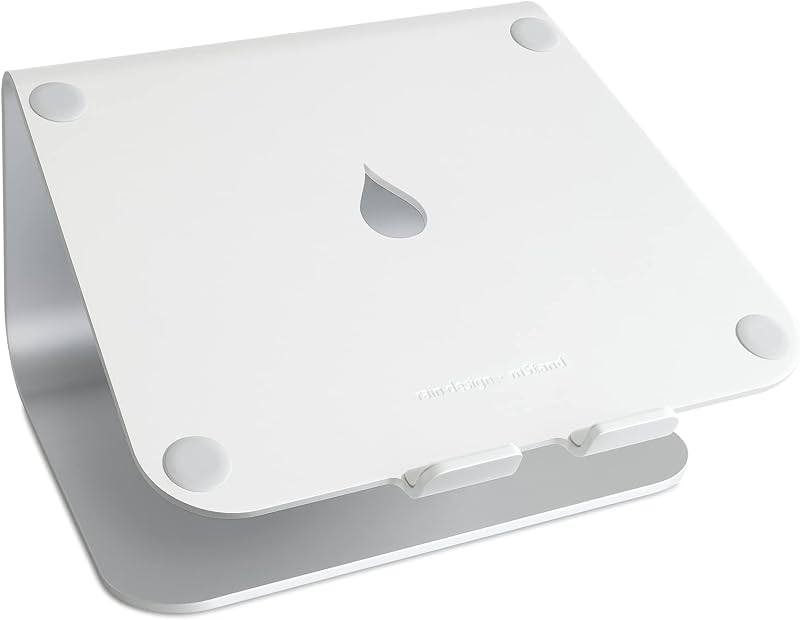 Best Fixed Desk Stand Rain Design mStand Fixed aluminum desk stand |  Best for True Eye Level Roost V3 Laptop Stand Ultralight adjustable, 6.5–12.5 in lift | 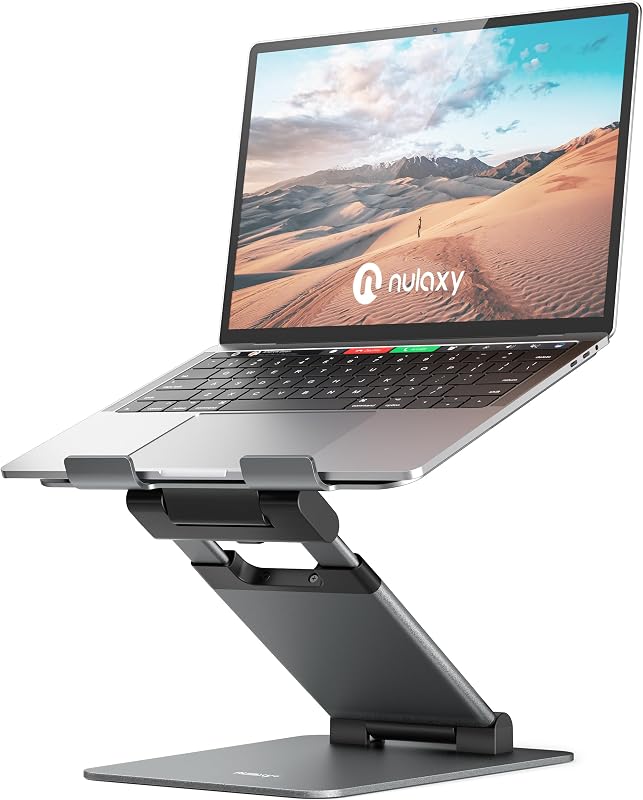 Best Sit-to-Stand Riser Nulaxy C5 Pull-Out Laptop Stand Sit-to-stand riser, up to 20 in |  Best Budget Pick Tonmom Foldable Laptop Stand Fold-flat riser, 7 heights |  Best With Cooling Fans Kootek 5-Fan Laptop Cooling Stand Cooling pad stand, 12–17 in |  Best Vertical Stand UGREEN Vertical Laptop Stand Upright dock for a closed laptop |  Best Stick-On Stand MOFT Invisible Laptop Stand Stick-on adhesive riser, 11–16 in |  Best for Bed and Couch SAIJI Adjustable Lap Desk Foldable bed and couch desk |
|---|---|---|---|---|---|---|---|---|---|
| BeastScore | 93 / 100 | 91 / 100 | 90 / 100 | 89 / 100 | 88 / 100 | 86 / 100 | 85 / 100 | 84 / 100 | 84 / 100 |
| Best for | Most desks: one adjustable stand for a laptop from 10 to 17.3 inches, at a mid-range price. | MacBook owners who want a rock-steady stand with no moving parts. | People who carry a stand and want a screen at true eye level in a cafe, hotel or office. | Desk workers who switch between sitting and standing and want the most height for about $50. | Anyone who wants a stand for under $20, or a spare that lives in the laptop bag. | Gamers and heavy users with a laptop that gets hot and breathes through the bottom. | A docked setup: a closed laptop beside an external monitor and keyboard, with the desk left clear. | Commuters and students who want nothing extra in the bag and only a modest lift. | Working or studying from bed, a couch or the floor, where no desk stand fits. |
| Typical price (checked November 16, 2026) | $30–$40 | $40–$50 | $90–$100 | $45–$55 | $9–$20 | $25–$30 | $20–$25 | $25–$30 | $30–$40 |
| Max lift height | Not stated on listing | 5.9 in, fixed | 6.5–12.5 in | 1.2–20 in | 2.78–6.5 in (7 levels) | 6 settings, not stated in inches | None (holds the laptop upright) | 2 in or 3 in (two angles) | 9.4–12.6 in (5 heights) |
| Adjustable or fixed | Height and angle | Fixed | Height and angle, memorized setting | Height and angle, pull handle | Height | Six height settings | Slot width 0.47–1 in | Two fixed angles | Height and 0–36° tilt |
| Folds / weight | Folds flat for a bag | No fold; listing weight 1 kg | Folds flat; about 6 oz | Folds; about 4.2 lb | Folds to 10.5 in long; 0.53 lb | No fold; about 2.6 lb | No fold; about 6 oz | Folds flat; 3 oz, 0.1 in thick | Folds flat to 1.8 in; 3.8 lb |
| Laptop size range | 10–17.3 in | Up to 10.4 in deep | 12–18 in | 10–17 in | 10–15.6 in | 12–17 in | Up to 17.3 in | 11–16 in, no bottom vents | Top is 20.5 x 11.8 in |
| Material | Aluminum | Anodized aluminum | See listing | Aluminum | ABS, aluminum, silicone | Metal mesh | Aluminum | PU and fiberglass | Wood top, metal legs |
| Cooling | Vent holes (passive) | Aluminum acts as a heat sink | None (open frame) | Vent holes in the panel | Open design | 5 USB fans, switchable | None | None; covers bottom vents | None |
| Key features |
|
|
|
|
|
|
|
|
|
BeastScore here is our overall rating out of 100, based on published specs and Amazon owner reviews. Prices change daily, so tap "View on Amazon" for today's price. We may earn a small commission, at no extra cost to you. Learn more
Why each one made the list
What each pick does best, where it falls short, and the typical Amazon price when we checked.
- 1. Best Overall
Lamicall Adjustable Laptop Stand
BeastScore 93 / 100Typically $30–$40 on Amazon (checked November 16, 2026)The Lamicall is the stand most desks need: a wide aluminum base that lifts the laptop, changes in both height and angle, and folds flat for a bag. The listing says it fits laptops from 10 to 17.3 inches, has vent holes in the top and carries a 2-year warranty, and owners say it holds older heavy notebooks and modern gaming laptops. It costs about a third of the Roost. The catch: the listing gives no lift range in inches, and owners are split on wobble, with some reporting it shakes while typing. Skip it if you want a stated height up front, or you type hard and hate any flex.
Pros- Fits laptops from 10 to 17.3 inches, gaming laptops included
- Adjusts height and angle, then folds flat for a bag
- A 2-year warranty on the listing at about $30 to $40
Cons- The listing gives no lift range in inches
- Owners are split on wobble while typing
- Some owners say it takes effort to open and adjust
- 2. Best Fixed Desk Stand
Rain Design mStand
BeastScore 91 / 100Typically $40–$50 on Amazon (checked November 16, 2026)The mStand is the classic fixed stand: one piece of anodized aluminum that lifts the laptop 5.9 inches and does nothing else, which is why it does not wobble. The listing says the metal acts as a heat sink, there is a 2 inch cable hole behind and a slot that stashes the keyboard, and it fits laptops less than 10.4 inches deep, including MacBook Air and Pro. Owners praise the Apple-like finish and the firm hold. Take it over the Lamicall if you want zero moving parts. Do not buy it for a deeper gaming laptop, to change height, or to carry in a bag, as it does not fold.
Pros- One-piece aluminum with no hinges to loosen
- Stated 5.9 inch lift and a 2 inch cable hole
- Finish that owners say matches a MacBook
Cons- Height is fixed, so you cannot tune it to your eyes
- Only fits laptops less than 10.4 inches deep
- Does not fold, and the listing weight is 1 kg
- 3. Best for True Eye Level
Roost V3 Laptop Stand
BeastScore 90 / 100Typically $90–$100 on Amazon (checked November 16, 2026)The Roost is the stand to buy when eye level matters most and you carry it around. The listing gives a 6.5 to 12.5 inch lift, a rigid truss frame with self-adjusting grips for 12 to 18 inch laptops, and a weight of about 6 oz, with a carrying sleeve in the box. It pops open to a memorized height, so setup takes seconds. Owners say it is strong enough for a 16-inch MacBook Pro. Take it over the Lamicall for the stated range and the weight. Skip it if you stay at one desk: at about $90 it costs far more than the Nulaxy, and the listing itself recommends an external keyboard and mouse.
Pros- Stated 6.5 to 12.5 inch lift with a memorized height
- About 6 oz and packs thin, with a sleeve included
- Fits 12 to 18 inch laptops with self-adjusting grips
Cons- Around $90, roughly three times the Lamicall
- Needs an external keyboard and mouse, says the listing
- Some owners call it a little pricey for a stand
- 4. Best Sit-to-Stand Riser
Nulaxy C5 Pull-Out Laptop Stand
BeastScore 89 / 100Typically $45–$55 on Amazon (checked November 16, 2026)The Nulaxy C5 is the cheaper way to get a screen all the way up, even to standing height. The listing says it raises a laptop from 1.2 to 20 inches with a retractable pull handle, supports up to 22 lb on a ventilated aluminum panel and fits 10 to 17 inch laptops. It folds on Z-hinges and weighs about 4.2 lb. Owners like the adjustability and say it helps their posture, though some report wobble and that it needs two hands to adjust. Take it over the Roost if you sometimes stand and want to spend about $50. Skip it if you carry a stand daily: 4.2 lb is heavy for a bag.
Pros- Stated lift of 1.2 to 20 inches, from lap height to standing
- Holds up to 22 lb on a vented aluminum panel
- Fits laptops from 10 to 17 inches and folds for storage
Cons- Some owners report wobble and say it needs two hands to adjust
- About 4.2 lb, heavy for daily carry
- At full height you need a separate keyboard and mouse
- 5. Best Budget Pick
Tonmom Foldable Laptop Stand
BeastScore 88 / 100Typically $9–$20 on Amazon (checked November 16, 2026)The Tonmom is the cheap stand that still does the main job: a fold-flat riser that lifts a 10 to 15.6 inch laptop from 2.78 to 6.5 inches in seven steps. The listing says it weighs 0.53 lb and folds to 10.5 x 1.96 x 0.68 inches, so it slips into any bag. At roughly $9 to $20 it costs less than a lunch. Owners say it is light, good value and easy to carry, but they disagree on stability, and some report slipping on the lowest setting. Take it over the Lamicall if price or weight rules. Skip it for a heavy laptop, a 17-inch laptop or long typing sessions.
Pros- Seven height levels from 2.78 to 6.5 inches
- Weighs 0.53 lb and folds to 10.5 x 1.96 x 0.68 inches
- Costs roughly $9 to $20
Cons- Owners disagree on stability, and some report slipping on the lowest setting
- Only fits laptops up to 15.6 inches
- Lift stops at 6.5 inches, below the Roost and Nulaxy
- 6. Best With Cooling Fans
Kootek 5-Fan Laptop Cooling Stand
BeastScore 86 / 100Typically $25–$30 on Amazon (checked November 16, 2026)The Kootek is a cooling pad that doubles as a stand, so it fits a laptop that runs hot under load and pulls air in through the bottom. The listing says it has 5 fans (switch on 1, 4 or all 5), 6 height settings, stoppers for 12 to 17 inch laptops and a 2-port USB hub. Owners say it keeps laptops cool and is good value, but others report fans that barely blow, glaring blue lights and a few failures after about three months. Take it over the Lamicall if you game. Skip it if you want eye level: its height settings are not given in inches, and it needs a strong USB port.
Pros- 5 fans with switches for 1, 4 or all 5
- Six height settings and stoppers for 12 to 17 inch laptops
- Extra 2-port USB hub built in
Cons- Owners report mixed airflow and some failures after months
- Bright blue lights that some owners wish they could turn off
- Not a way to reach eye level, and heavy at about 2.6 lb
- 7. Best Vertical Stand
UGREEN Vertical Laptop Stand
BeastScore 85 / 100Typically $20–$25 on Amazon (checked November 16, 2026)The UGREEN does the opposite of the other stands: it holds a closed laptop upright beside an external monitor, so the laptop takes almost no desk space. The listing says a twist screw widens the slot to fit laptops 0.47 to 1 inch thick, up to 17.3 inches, in aluminum with silicone pads, in a compact 5.9 x 3.2 x 2 inch size. Owners say it is stable and works with thick 17-inch workstations, though a few say it does not fit the newest MacBook Airs. Take it if the monitor does the work at eye level. Skip it if you use the laptop’s own screen, because it raises nothing.
Pros- Frees desk space with a compact 5.9 x 3.2 x 2 inch body
- Slot adjusts to laptops 0.47 to 1 inch thick
- Aluminum with silicone pads for about $20 to $25
Cons- Does not raise the screen at all
- A few owners say it does not fit newer MacBook Airs
- Needs an external monitor, keyboard and mouse
- 8. Best Stick-On Stand
MOFT Invisible Laptop Stand
BeastScore 84 / 100Typically $25–$30 on Amazon (checked November 16, 2026)The MOFT is a thin stand that sticks to the back of your laptop: 0.1 inch thick, about 3 oz and rated for 11 lb on the listing. It folds out to two angles that raise the laptop about 2 or 3 inches, a gentle tilt rather than true eye level. It fits 11 to 16 inch laptops, but the listing says it is for laptops without bottom vents, since it covers them. Owners are mixed: some say it holds a 15-inch laptop, others find it wobbly at the corners or the adhesive wears off. Take it for a bag with no room to spare. Skip it for a heavy 16-inch or vented laptop.
Pros- Paper-thin: 0.1 inch and about 3 oz, nothing extra to carry
- Two built-in angles that fold flat in a second
- Holds up to 11 lb on the listing
Cons- Only for laptops without bottom vents
- Owners report wobble at the corners and adhesive wear
- Lift is 2 to 3 inches, too low for true eye level
- 9. Best for Bed and Couch
SAIJI Adjustable Lap Desk
BeastScore 84 / 100Typically $30–$40 on Amazon (checked November 16, 2026)The SAIJI is the pick for bed, couch or floor, where no desk stand works. The listing says the top tilts from 0 to 36° and sits at 5 heights from 9.4 to 12.6 inches, with a wrist pad and a retractable stopper so the laptop cannot slide off. The metal legs are listed as holding 80 lb, and it folds flat to 1.8 inches and weighs 3.8 lb. Owners like the size and the price, but some say the legs get wobbly over time. Skip it for desk work, where a riser costs less and sits steadier. The 20.5 x 11.8 inch version is the one shown, and a 23.6 x 13 inch size is sold separately.
Pros- Tilts 0 to 36° and sets at five heights
- Folds flat to 1.8 inches and weighs 3.8 lb
- Wrist pad and stopper keep the laptop in place
Cons- Owners report wobbly legs over time
- The shown version has a 20.5 x 11.8 inch top, so check the larger size if you need room
All 9 compared, in one look
See every pick on one chart, or tap one to put it head to head with Lamicall Adjustable Laptop Stand. Ratings out of 10 are our estimates from published specs and Amazon owner reviews, not hands-on tests. Bigger shape = better.
- Eye-level reachNulaxy C5 Pull-Out Laptop Stand · 9.8/10
- StabilityRain Design mStand · 9.6/10
- PortabilityTie
- CoolingKootek 5-Fan Laptop Cooling Stand · 9.6/10
- ValueTonmom Foldable Laptop Stand · 9.8/10
Which one should you buy?
Find your situation below. That's your pick.
- You want one adjustable, foldable stand for a laptop from 10 to 17.3 inches
- You are fine without a stated lift range and want to spend about $30 to $40
- You want a rock-steady fixed stand with no hinges
- Your laptop is a MacBook or another model under 10.4 inches deep
- You carry the stand and want a stated 6.5 to 12.5 inch lift at about 6 oz
- You will pay about $90 for the lightest eye-level stand here
- You switch between sitting and standing at the desk
- You want up to 20 inches of lift for about $50 and can live with 4.2 lb
- You want a stand for under $20
- You need a spare that folds into the laptop bag
- You game or render on a laptop that runs hot
- Your laptop breathes through the bottom and you want fans and a USB hub
- You dock a closed laptop under an external monitor
- You want the desk clear and the laptop out of the way
- You want nothing extra in the bag and a gentle 2 to 3 inch tilt
- Your laptop has no bottom vents and is 11 to 16 inches
- You work from bed, a couch or the floor
- You want a tilting top with a wrist pad that folds flat
Lamicall Adjustable Laptop Stand
The adjustable, foldable stand that fits almost any laptop at a mid-range price.
- Fits 10–17.3 inch laptops
- Height and angle adjust
- About $30–$40
Quick tips before you buy
Sit up and look straight ahead: the top of the screen should sit at or just below eye level. Measure the gap from desk to eyes first, because a fixed 5.9 inch stand suits some desks and not others.
The mStand wants a laptop under 10.4 inches deep and the Tonmom stops at 15.6 inches, while the Lamicall and Nulaxy take 17 inches. Read the size range on the listing before you order.
Aluminum and vent holes add some airflow, and only the Kootek adds fans. Do not stick a MOFT over bottom vents.
Once the screen is at eye level the laptop keyboard sits too high for long typing. Plan on a separate keyboard and mouse, or pick a lower stand and sit closer.
Quick answers
Are laptop stands worth it?+
Yes, if you use a laptop for more than an hour or two and can add a separate keyboard and mouse. The stand lifts the screen so you look ahead instead of down. If you only type on the laptop’s own keyboard, a high stand does little and can make typing awkward, so start with a cheap low riser like the Tonmom or MOFT.
Do laptop stands help neck pain?+
They can help with the cause, which is looking down at a low screen for hours. Owners of the Roost and Nulaxy say they sit straighter and strain less, but a stand does not replace breaks, a good chair height or a doctor if the pain keeps coming back.
What height should a laptop stand be?+
High enough that the top of the screen sits at or just below your eye level when you sit tall. That depends on your desk and chair, so measure the gap. The stands here range from 2.78 inches of lift on the Tonmom to 20 inches on the Nulaxy, and the Roost sits in between at 6.5 to 12.5 inches.
What is the best laptop stand for MacBook Pro?+
The Rain Design mStand if you want a fixed stand: its listing names MacBook Pro and Air and fits laptops under 10.4 inches deep. The Lamicall is the adjustable choice, and owners say the Roost holds a 16-inch MacBook Pro. Skip the MOFT for a 16-inch Pro, since some owners report it wobbles with one.
Do I need an external keyboard with a laptop stand?+
For the taller stands, yes. The Roost listing itself recommends an external keyboard and mouse, and the same goes for the Nulaxy at full height. With a 2 to 3 inch tilt, like the MOFT or the Tonmom on its low settings, most people can keep typing on the laptop.
Do laptop stands help cooling, and are they bad for a gaming laptop?+
A stand is not bad for a laptop as long as it holds the base and leaves the vents clear. Aluminum and vent holes, as on the Rain Design and Lamicall, add some airflow. For a gaming laptop with bottom vents, the Kootek adds five fans, but owners report mixed airflow, so treat it as a help rather than a fix.
Which laptop stands should I skip?+
Skip a stand that lists no laptop size range or weight limit, and check that its range covers your laptop and its weight (the MOFT lists 11 lb, the Nulaxy 22 lb). Skip the MOFT if your laptop has bottom vents, and a lap desk like the SAIJI for desk work. A cooling pad helps most on laptops that pull air in through the bottom, so check your vents first.
Keep comparing
 Best Ergonomic Keyboards: Top 5 on AmazonSplit, wave or curved: easier on sore wrists.
 Best Ergonomic Mice: Vertical & Trackball PicksVertical and trackball mice that take strain off your wrist.
 Best Standing Desks: Top 5 on AmazonSit less, feel better. Electric desks and converters compared.
 Best USB-C Hub for MacBook: Air and Pro: 10 Picks, No MirroringWhich USB-C hub fits your MacBook, why dual HDMI hubs only mirror, and 10 hubs that each fix one problem.