
Best Laser Engravers
Top 5 on Amazon
Our #1 pick is the xTool S1 40W. From a $170 open-frame starter to a 40W enclosed cutter for a small business, these are the laser engravers to buy on Amazon right now.
How we picked: we shortlist by Amazon Best Seller rank and number of ratings, then compare published specs. We don't test these products hands-on.
By Jamilur Rahman, Founder & Editor · Updated October 14, 2026
- Owner reviews checked
- Features side by side
- Quick & easy compare
- Smarter purchase

The short answer
For makers who want to sell what they make, the xTool S1 40W is the laser engraver to buy. The listing says its 40W diode laser cuts 18 mm cherry wood in one pass and engraves at up to 600 mm/s on a large 23.93 × 15.16-inch bed. It is a Class 1 enclosed machine, so the cover blocks laser light and keeps smoke in, and this bundle adds a rotary for tumblers and cups. Auto-focus and xTool’s free software make it a realistic first machine, not just an expert tool.
Home crafters who mostly make gifts, stickers and leather tags should look at the xTool M2 10W: an enclosed Class 1 machine with two cameras for “place and go” alignment, at well under half the price. The Creality Falcon A1 Pro is the enclosed 20W alternative with a touchscreen, and the xTool F2 is the portable pick for metal, with a second infrared laser for color marking. On a tight budget, the Twotrees TTS-55 Pro is an open-frame starter that still cuts thin plywood.
Skip the S1 if you only plan to make a few personalized gifts a year, or if you have no space to vent smoke outside. A 40W laser is a big, loud tool that needs an exhaust path, and the M2 does small crafts with far less fuss. We also left out the Glowforge Aura: on Amazon it is mostly sold through third-party resellers, and owner feedback on the listing is mixed.
How we picked: we compared the most popular laser engravers on Amazon, read what owners say after months of use, and checked each listing’s power, bed size, safety class and what ships in the box. We don’t claim hands-on tests. Picks and price bands checked October 14, 2026.
Compare them side by side
Everything that matters, in one table. Swipe to see all 5.
| Product | Best Overall xTool S1 40W Enclosed diode laser + rotary |  Best for Home Crafters xTool M2 10W Enclosed craft laser |  Best Enclosed Value Creality Falcon A1 Pro 20W Enclosed diode laser |  Best for Metal xTool F2 Portable dual laser (15W diode + 5W IR) | 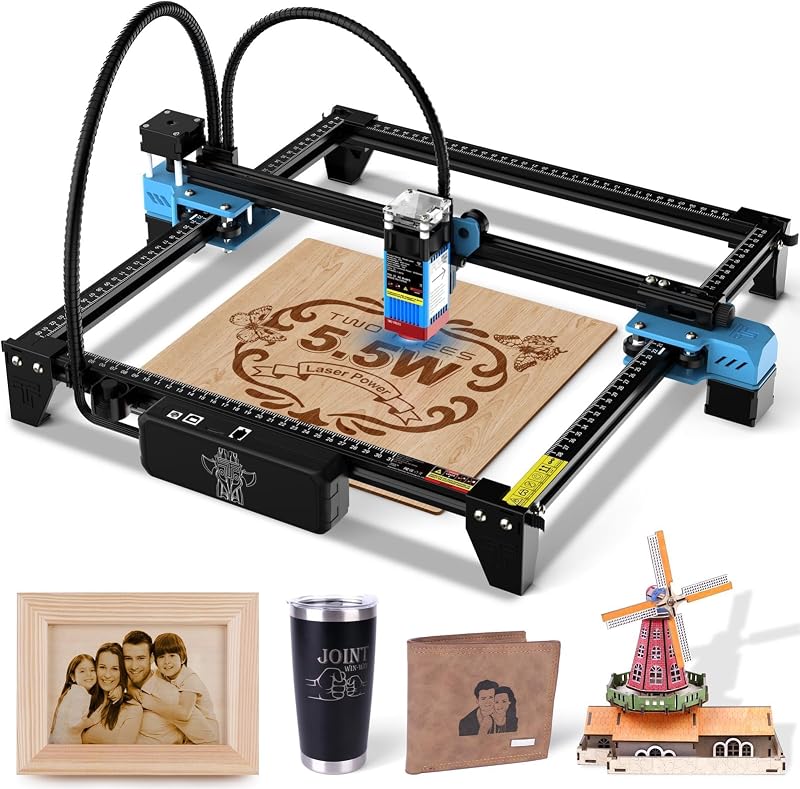 Best Budget Twotrees TTS-55 Pro Open-frame diode laser |
|---|---|---|---|---|---|
| BeastScore | 93 / 100 | 89 / 100 | 87 / 100 | 86 / 100 | 82 / 100 |
| Best for | Small businesses and serious makers | Gifts, stickers, leather and paper crafts | More power than the M2 without S1 money | Jewelry, metal tags and on-site engraving | Trying laser engraving for under $200 |
| Typical price (checked October 14, 2026) | $1,700–$1,900 | $650–$700 | $1,000–$1,100 | $1,600–$1,700 | $150–$180 |
| Laser | 40W diode | 10W diode | 20W blue diode | 15W diode + 5W IR | 5.5W diode |
| Work area | 23.93 × 15.16 in | See listing | See listing (fits 460 × 346 mm honeycomb) | See listing | See listing |
| Enclosure | Class 1 enclosed | Class 1 enclosed | Full enclosure, Class 1 | Enclosed body, Class 4 laser per listing | Open frame with red laser shield |
| Camera | See listing | Dual built-in cameras | HD camera | 50MP camera | None |
| Key features |
|
|
|
|
|
BeastScore here is our overall rating out of 100, based on published specs and Amazon owner reviews. Prices change daily, so tap "View on Amazon" for today's price. We may earn a small commission, at no extra cost to you. Learn more
Why each one made the list
What each pick does best, where it falls short, and the typical Amazon price when we checked.
- 1. Best Overall
xTool S1 40W
BeastScore 93 / 100Typically $1,700–$1,900 on Amazon (checked October 14, 2026)The S1 is the machine that turns a hobby into a side business. The listing claims its 40W diode cuts 18 mm cherry wood in a single pass and engraves at up to 600 mm/s across a roomy 23.93 × 15.16-inch bed. It is Class 1: the lid filters laser light, so nobody in the room needs goggles, and the enclosure keeps smoke and noise in. Auto-focus, presets for hundreds of tested materials and xTool Creative Space software make setup easier, and this bundle includes a rotary for tumblers and mugs. Owners praise the cut quality. The downsides are size, price and the need to vent fumes outside.
Pros- 40W power cuts thick wood and acrylic in fewer passes
- Class 1 enclosure is safer with kids and pets around
- Large bed plus rotary for cups and tumblers
Cons- Big and heavy: it needs a dedicated table
- Needs an exhaust route or a purifier for smoke
- Expensive if you only make the odd gift
- 2. Best for Home Crafters
xTool M2 10W
BeastScore 89 / 100Typically $650–$700 on Amazon (checked October 14, 2026)The M2 is built for crafters rather than woodshops. Two built-in cameras give a live view of the bed, so you drop in a coaster or leather patch and line up the design on screen. The listing says it works on 300+ materials, including cardstock, felt, fabric, leather and wood, and xTool Studio ships with hundreds of templates. It is Class 1 enclosed for safe use at home. A CMYK inkjet module and a 3W IR laser for metal are optional add-ons. The 10W diode is the limit: it cuts thin material well but is slower and weaker on thick wood than the S1 or Falcon.
Pros- Dual cameras make alignment simple for beginners
- Class 1 enclosed design for home use
- Optional color inkjet module for full-color crafts
Cons- 10W is slow on thick wood and acrylic
- Inkjet and IR modules cost extra
- Newer model with a smaller owner base so far
- 3. Best Enclosed Value
Creality Falcon A1 Pro 20W
BeastScore 87 / 100Typically $1,000–$1,100 on Amazon (checked October 14, 2026)The Falcon A1 Pro lands between the two xTools. It is a fully enclosed, Class 1 machine with a 20W blue diode, which the listing says cuts 10 mm basswood and 8 mm black acrylic at speeds up to 600 mm/s. A phone-style touchscreen, app control, an HD camera and auto-focus keep it simple, and it ships about 80% assembled. A 2W infrared module for metal and plastic is optional. Owners like the speed for batch work. The trade-offs: the IR module costs extra, the honeycomb panel is a specific size, and Creality’s software is less polished than xTool’s.
Pros- 20W power in a fully enclosed body
- Touchscreen plus app control and HD camera
- Comes mostly assembled
Cons- IR module for metal is sold separately
- Only fits its own size of honeycomb panel
- Software is less refined than xTool’s
- 4. Best for Metal
xTool F2
BeastScore 86 / 100Typically $1,600–$1,700 on Amazon (checked October 14, 2026)The F2 is for people who engrave small items fast, often in front of customers. It pairs a 15W diode for wood and leather with a 5W infrared laser that does deep, dark and color marking on metal, which a plain diode can’t. A 50MP camera helps place small pieces, and the listing claims speeds up to 6000 mm/s, about three seconds for a card. At 4.6 kg it is easy to carry to markets. The listing classifies it as a Class 4 laser, so follow its safety guidance. Its work area suits small items, not big sheets, and it costs as much as larger machines.
Pros- IR laser marks metal, including color marking
- Very fast for small-batch work
- Light enough to take to markets and pop-ups
Cons- Small work area, not for big panels
- Class 4 laser per listing, so safety gear and care matter
- High price for its size
- 5. Best Budget
Twotrees TTS-55 Pro
BeastScore 82 / 100Typically $150–$180 on Amazon (checked October 14, 2026)The TTS-55 Pro is the cheap way to find out if you enjoy laser crafting. The listing lists a 5.5W diode with an air-assist nozzle and a red laser shield, and says it cuts 5 mm plywood and 3 mm acrylic. It runs from Wi-Fi, a computer or a TF card, and works with LightBurn and LaserGRBL, so you can grow your skills on pro software. Owners like the value. But it is an open-frame machine: you need proper laser goggles, good ventilation and a fire-safe surface, and there is no camera or enclosure. You also assemble it yourself.
Pros- Very low price for a real diode laser
- Air assist helps cleaner cuts
- Supports LightBurn as your skills grow
Cons- Open frame: goggles and ventilation are a must
- No camera, so aligning designs takes trial and error
- Needs assembly
All 5 compared, in one look
See every pick on one chart, or tap one to put it head to head with xTool S1 40W. Ratings out of 10 are our estimates from published specs and Amazon owner reviews, not hands-on tests. Bigger shape = better.
- Cutting powerxTool S1 40W · 9.6/10
- SpeedxTool F2 · 9.8/10
- SafetyxTool M2 10W · 9.6/10
- Ease of usexTool M2 10W · 9.6/10
- MaterialsxTool F2 · 9.4/10
- ValueTwotrees TTS-55 Pro · 9.6/10
Which one should you buy?
Find your situation below. That's your pick.
- You sell what you make
- You cut thick wood or do lots of tumblers
- You make gifts, stickers and leather crafts
- You want the easiest enclosed machine
- You want 20W in an enclosure
- You like a touchscreen and app control
- You engrave metal, jewelry or tags
- You work at markets or in a shop
- You want to try lasers for under $200
- You have a ventilated garage or shed
xTool S1 40W
A safe, enclosed 40W laser with a large bed and a rotary, strong enough for a small business.
- 40W diode
- Class 1 enclosed
- Rotary included
Quick tips before you buy
Class 1 machines like the S1 and M2 block laser light. Open frames need real laser goggles for everyone in the room.
Every laser makes fumes. Vent through a window hose or buy a purifier before your first cut.
Measure the biggest sign or board you want to make. A small bed limits you more than low power does.
Wood and acrylic can catch fire. Stay with the machine and keep a fire extinguisher nearby.
Quick answers
What is the best laser engraver for a small business?+
The xTool S1 40W. It is enclosed and Class 1, has a large bed and a rotary for tumblers, and the listing says it cuts 18 mm cherry wood in one pass, which keeps orders moving.
What is the best laser engraver for beginners?+
The xTool M2 10W. It is fully enclosed, uses two cameras so you can line up designs on screen, and comes with ready-made templates. The Twotrees TTS-55 Pro is the cheaper way to start if you are comfortable with an open frame.
Can a diode laser engrave metal?+
A plain diode laser can mark coated metal but struggles with bare steel. For deep or color marks on metal, you want an infrared laser like the 5W IR in the xTool F2, or an IR add-on module for the M2 or Falcon A1 Pro.
Do I need ventilation for a laser engraver?+
Yes. Burning wood, leather and acrylic makes smoke and fumes. Vent the exhaust outside through a window or use an air purifier made for lasers, even with an enclosed machine.
Is the Glowforge better than xTool?+
Glowforge machines are easy to use, but on Amazon the Aura is mostly sold through resellers and owner feedback on the listing is mixed. The xTool M2 offers a similar enclosed, camera-guided crafting experience and is sold by xTool’s official store.
How thick can a 10W or 20W laser cut?+
It depends on the material and the number of passes. The Creality Falcon A1 Pro 20W listing says 10 mm basswood and 8 mm black acrylic. A 10W machine like the M2 is best on thin wood, leather, paper and felt.
Keep comparing
 Best Cutting Machines: Top 5 for CraftersVinyl decals, cards and custom shirts. Cricut vs Silhouette vs Brother compared.
 Best 3D Printers: Top 5 on AmazonFast, reliable printers for makers. The best 3D printers compared.
 Best 3D Printers for Beginners: Plug in and printUnbox, calibrate on its own, print. The easiest 3D printers compared.
 Best Sewing Machines for Beginners: Easy to thread, easy to learnLearning to sew? These machines thread themselves and won’t scare you off.