
Best OLED Monitors
QD-OLED vs WOLED, ranked
Our #1 pick is the ASUS ROG Swift PG27UCDM. OLED monitors finally cost less than a good GPU. We compared five QD-OLED and WOLED screens on Amazon, from a 4K 240Hz flagship to a 1440p panel near $300.
How we picked: we shortlist by Amazon Best Seller rank and number of ratings, then compare published specs. We don't test these products hands-on.
By Jamilur Rahman, Founder & Editor · Updated October 15, 2026
- Owner reviews checked
- Features side by side
- Quick & easy compare
- Smarter purchase

The short answer
The best OLED monitor for most people is the ASUS ROG Swift PG27UCDM. It packs a 4K resolution into a 26.5-inch 4th-gen QD-OLED panel, so text looks sharp enough for work, and it runs at 240Hz for games. It also has the most complete port list here (DisplayPort 2.1a UHBR20, HDMI 2.1 and 90W USB-C) and a 3-year warranty that covers burn-in, which is the single biggest worry with OLED.
If you want a bigger screen, the MSI MPG 321URX gives you the same 4K 240Hz recipe on a 31.5-inch QD-OLED for less money. The LG UltraGear 32GX850A is the WOLED pick: a glossy 32-inch 4K panel that can flip to 1080p at 330Hz for fast shooters. On a budget, the ASUS ROG XG27AQDMGR and AOC Q27GAZD bring 1440p OLED at 240Hz for a fraction of the flagship price.
Skip the PG27UCDM if your graphics card can’t push 4K, or if you mostly play esports titles where frame rate matters more than detail. A mid-range GPU will get more out of a 1440p panel like the XG27AQDMGR. And if your desk sits under a bright window, keep in mind that every OLED here is dimmer on a full white screen than a good Mini LED monitor.
How we picked: we compared the most popular OLED monitors on Amazon US, read what owners say after months of use, and checked each listing’s panel type, refresh rate, ports and warranty side by side. We don’t claim lab tests. Listings checked October 2026.
Compare them side by side
Everything that matters, in one table. Swipe to see all 5.
| Product | Best Overall ASUS ROG Swift PG27UCDM 27" 4K 240Hz QD-OLED |  Best 32-Inch MSI MPG 321URX 32" 4K 240Hz QD-OLED |  Best WOLED / Dual-Mode LG UltraGear 32GX850A-B 32" 4K glossy WOLED |  Best Value ASUS ROG XG27AQDMGR 27" 1440p 240Hz WOLED | 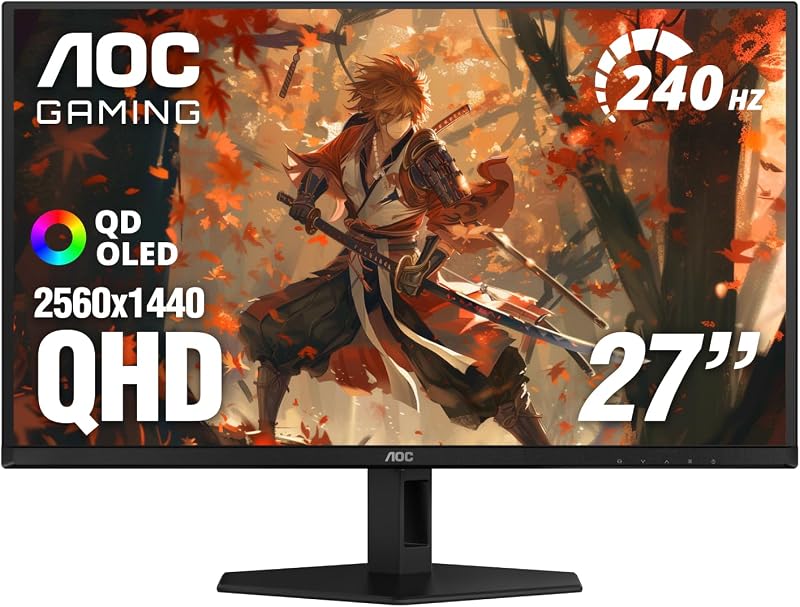 Best Budget AOC Q27GAZD 27" 1440p 240Hz QD-OLED |
|---|---|---|---|---|---|
| BeastScore | 93 / 100 | 91 / 100 | 90 / 100 | 88 / 100 | 85 / 100 |
| Best for | Sharp text and high-end gaming | A big 4K screen for games and movies | Story games and fast shooters on one screen | Mid-range PCs and first OLED buyers | The cheapest way into OLED |
| Typical price (checked October 15, 2026) | $900–$1,000 | $680–$760 | $720–$800 | $360–$420 | $300–$350 |
| Size / resolution | 26.5" 3840 x 2160 | 31.5" 3840 x 2160 | 32" 3840 x 2160 | 26.5" 2560 x 1440 | 27" 2560 x 1440 |
| Refresh rate | 240Hz, 0.03ms | 240Hz, 0.03ms | 165Hz 4K / 330Hz 1080p | 240Hz, 0.03ms | 240Hz, 0.03ms |
| Panel type | 4th-gen QD-OLED | QD-OLED | Glossy WOLED (MLA+) | Glossy WOLED | QD-OLED |
| Key ports | DP 2.1a UHBR20, HDMI 2.1, USB-C 90W | HDMI, DP, USB-C 90W, KVM | HDMI, DP | See listing | See listing |
| Key features |
|
|
|
|
|
BeastScore here is our overall rating out of 100, based on published specs and Amazon owner reviews. Prices change daily, so tap "View on Amazon" for today's price. We may earn a small commission, at no extra cost to you. Learn more
Why each one made the list
What each pick does best, where it falls short, and the typical Amazon price when we checked.
- 1. Best Overall
ASUS ROG Swift PG27UCDM
BeastScore 93 / 100Typically $900–$1,000 on Amazon (checked October 15, 2026)The PG27UCDM fixes the old complaint about OLED monitors: fuzzy text. Squeezing 4K into 26.5 inches gives it the highest pixel density here, so documents and code look crisp, and the listing says the 4th-gen QD-OLED panel lasts longer than earlier ones. It still runs at 240Hz with 0.03ms response. ASUS adds a Neo Proximity Sensor that turns the screen black when you leave the desk, plus a 3-year warranty that covers burn-in. Full-bandwidth DP 2.1a and 90W USB-C make it easy to use with a laptop too. The catch is price and the need for a strong GPU.
Pros- 4K at 27 inches gives the sharpest text of any pick here
- Full 80Gbps DisplayPort 2.1a, HDMI 2.1 and 90W USB-C
- Burn-in covered for 3 years, plus a proximity sensor
Cons- Costs roughly three times the 1440p picks
- You need a high-end GPU to drive 4K at high frame rates
- QD-OLED can show a purple tint on black in a bright room
- 2. Best 32-Inch
MSI MPG 321URX
BeastScore 91 / 100Typically $680–$760 on Amazon (checked October 15, 2026)The 321URX is the easiest way to get a large 4K OLED without paying flagship money. The 31.5-inch QD-OLED panel runs at 4K and 240Hz, and the listing promises 99% DCI-P3 color with a Delta E of 2 or less, so it suits photo work as well as games. It carries VESA DisplayHDR True Black 400, 90W USB-C, and a built-in KVM that lets one keyboard and mouse switch between a desktop and a laptop. MSI’s OLED Care 2.0 runs pixel refresh in the background. Owners like the size for immersive games. Text is a little softer than on the denser 27-inch ASUS.
Pros- Large 4K 240Hz OLED for well under the ASUS flagship
- KVM switch and 90W USB-C for a two-computer desk
- Wide color gamut that also suits creative work
Cons- Lower pixel density than the 27-inch 4K, so text is softer
- Older DisplayPort spec than the newer 322URX
- Listing does not state the burn-in warranty terms
- 3. Best WOLED / Dual-Mode
LG UltraGear 32GX850A-B
BeastScore 90 / 100Typically $720–$800 on Amazon (checked October 15, 2026)LG’s WOLED panels handle reflections and black levels differently from QD-OLED, and the 32GX850A is a strong case for them. The glossy finish keeps colors punchy, and the listing says Micro Lens Array+ makes it brighter than earlier UltraGear OLEDs, at 275 nits typical. Its party trick is Dual-Mode: run 4K at 165Hz for single-player games, then hit a hotkey for 1080p at 330Hz in competitive shooters. The stand adjusts in every direction, which is rare at this price. The trade-offs: 4K tops out at 165Hz instead of 240Hz, and there is no USB-C for laptops.
Pros- Switch between 4K 165Hz and 1080p 330Hz with one button
- Glossy WOLED with MLA+ is bright for an OLED
- Fully adjustable stand included
Cons- 4K mode stops at 165Hz, below the 240Hz QD-OLEDs
- No USB-C or KVM listed
- Glossy screen shows lamps and windows behind you
- 4. Best Value
ASUS ROG XG27AQDMGR
BeastScore 88 / 100Typically $360–$420 on Amazon (checked October 15, 2026)This is the OLED we would point most gamers to first. A 1440p panel at 240Hz is easy for a mid-range graphics card to feed, so you see the full refresh rate in more games. The glossy WOLED gives deep blacks and rich color, with a listed 99% DCI-P3 gamut and True Black 400 HDR. What sets it apart from other budget OLEDs is the protection: the same Neo Proximity Sensor and 3-year burn-in warranty as the pricier ROG models. Owners say it is a big jump from an IPS screen. Text is less sharp than on a 4K panel, and the glossy coat picks up reflections.
Pros- Burn-in warranty and proximity sensor at a budget price
- 1440p 240Hz is easy for mid-range GPUs to drive
- Wide color and true 10-bit panel
Cons- 1440p text is softer than 4K for office work
- Glossy finish reflects bright rooms
- Port details are thin on the listing
- 5. Best Budget
AOC Q27GAZD
BeastScore 85 / 100Typically $300–$350 on Amazon (checked October 15, 2026)The AOC proves you no longer need to spend big for OLED. It uses a QD-OLED panel at 1440p and 240Hz with a 0.03ms response time, the same core specs as monitors that cost far more a year ago. The listing claims a wide color gamut and HDR400 True Black certification, and it is G-SYNC Compatible for tear-free play on Nvidia cards. Owners like the color and motion for the money. To hit the price, AOC keeps the extras basic: the listing says little about ports, stand adjustment or burn-in warranty, so check those details before you buy if you leave static windows on screen.
Pros- Lowest price for a 240Hz OLED in this guide
- QD-OLED color and per-pixel contrast
- G-SYNC Compatible for Nvidia GPUs
Cons- Burn-in warranty terms are not stated on the listing
- Basic feature set compared with the ASUS models
- 1440p text is softer than 4K
All 5 compared, in one look
See every pick on one chart, or tap one to put it head to head with ASUS ROG Swift PG27UCDM. Ratings out of 10 are our estimates from published specs and Amazon owner reviews, not hands-on tests. Bigger shape = better.
- PictureASUS ROG Swift PG27UCDM · 9.6/10
- MotionLG UltraGear 32GX850A-B · 9.6/10
- Text clarityASUS ROG Swift PG27UCDM · 9.6/10
- PortsASUS ROG Swift PG27UCDM · 9.6/10
- Burn-in careASUS ROG Swift PG27UCDM · 9.6/10
- ValueAOC Q27GAZD · 9.8/10
Which one should you buy?
Find your situation below. That's your pick.
- You want the sharpest text on an OLED
- You have a high-end GPU and want burn-in coverage
- You want a big 32-inch 4K OLED
- You share one desk between a PC and a laptop
- You play both story games and fast shooters
- You prefer WOLED blacks and a glossy finish
- You have a mid-range graphics card
- You want burn-in coverage on a budget
- You want the cheapest 240Hz OLED
- You mostly game and rarely leave static windows up
ASUS ROG Swift PG27UCDM
The sharpest OLED here, with full-bandwidth ports and a 3-year burn-in warranty.
- 4K at 240Hz
- 4th-gen QD-OLED
- Burn-in covered 3 years
Quick tips before you buy
OLED can burn in with static images. Pick a model whose warranty names burn-in, like the ASUS ROG models.
4K at 240Hz needs a high-end card. A mid-range GPU is happier with a 1440p OLED.
QD-OLED blacks can look gray-purple in a bright room. Glossy WOLED reflects lamps. Place the desk away from windows.
Leave the monitor plugged in so it can run its refresh cycle when you turn it off. Use a dark taskbar and screensaver.
Quick answers
What is the difference between QD-OLED and WOLED?+
QD-OLED (Samsung Display panels, used by ASUS PG27UCDM, MSI and AOC here) uses quantum dots for very bright, saturated color, but its blacks can look slightly purple in a lit room. WOLED (LG Display panels, used by LG and the ASUS XG27AQDMGR) adds a white subpixel, holds deeper blacks in bright rooms and often comes with a glossy finish.
Do OLED monitors still get burn-in?+
They can, but newer panels and care features make it much less likely for normal use. Pixel refresh, screen savers and proximity sensors help. The safest move is buying a model with a warranty that covers burn-in, such as the 3-year coverage on the ASUS ROG picks.
Is a 4K OLED monitor worth it over 1440p?+
Yes if you read a lot of text or have a high-end GPU. 4K on a 27-inch screen makes text noticeably sharper. If you mostly game on a mid-range card, a 1440p OLED at 240Hz gives you more frames for less than half the price.
Are OLED monitors good for office work?+
They are fine if you vary what is on screen and use a dark theme for the taskbar. Pick a 4K model for the clearest text, and lean on the built-in care features. If you leave the same spreadsheet open eight hours a day, an IPS monitor is the lower-risk choice.
Can I use an OLED monitor with a PS5 or Xbox?+
Yes. All of these have HDMI inputs, and the MSI MPG 321URX adds a Console Mode. Consoles run at up to 120Hz, so a 4K OLED gets the most out of them.
What is the best budget OLED monitor?+
The AOC Q27GAZD is the cheapest 1440p 240Hz QD-OLED in this guide. For a little more, the ASUS ROG XG27AQDMGR adds a 3-year burn-in warranty and a proximity sensor, which we think is worth the extra.
Keep comparing
 Best Gaming Monitors: Top 5 on AmazonHigh refresh, deep blacks, zero blur. The best gaming monitors compared.
 Best Monitors: Top 5 on AmazonOne great screen for work, play or photos. The best monitors compared.
 Best Graphics Cards: Top 5 on AmazonRTX 50 or Radeon RX 9000? The best GPUs for 1440p and 4K compared.
 Best Gaming Laptops: Top 5 with RTX 50-series graphicsDesktop-class frame rates you can carry. The best RTX 50 laptops compared.