
Best Smart Light Bulbs
7 Picks + the Offline Fix
Our #1 pick is the Philips Hue Starter Kit. Smart bulbs that keep dropping off Wi-Fi are almost always a router or power problem, not a bad bulb. Try the free fixes, then pick the bulb that suits your home: a Hue hub kit, a Matter bulb or a cheap Wi-Fi bulb.
How we picked: we shortlist by Amazon Best Seller rank and number of ratings, then compare published specs. We don’t test these products hands-on.
By Jamilur Rahman, Founder & Editor · Updated November 8, 2026
- Owner reviews checked
- Features side by side
- Quick & easy compare
- Smarter purchase

The short answer
Smart bulbs usually drop offline because a 2.4 GHz-only bulb is stuck on a router that blends both Wi-Fi bands, the signal is weak at the far end of the house, a cheap router has too many gadgets on it, a wall switch cuts the power, or the router gave the bulb a new address. The free fix comes first: leave the wall switch on, turn off band steering or give your 2.4 GHz band its own name, move the router (or add a mesh node) closer to the dead room, and reserve each bulb’s IP address in the router. Do those four things and most dropouts stop before you spend a cent.
If bulbs still drop, or you plan 10 or more of them, stop buying plain Wi-Fi bulbs. Go with a hub: the Philips Hue starter kit runs its own Zigbee mesh, so your bulbs leave your Wi-Fi for good. If you use Apple Home, Home Assistant or more than one voice assistant, pick a Matter bulb such as the TP-Link Tapo L535E (best value), the Govee 1000-lumen pair (best color) or the WiZ 2-pack. Matter bulbs that run over Thread are the other route for big homes, but they need a Thread border router such as a HomePod mini, a Nest Hub or a newer Echo. For one lamp or two, a cheap Wi-Fi bulb is fine: the Kasa KL110 for plain white, the Kasa color pair for color, or the Amazon Basics bulb if you only use Alexa.
Skip the Hue kit if you only want one to three bulbs in a single room. The Bridge needs an Ethernet cable to your router and costs several times what a Wi-Fi bulb does, and Philips says Bluetooth alone handles up to 10 lights in one room. How we picked: we compared current Amazon listings, specs and what owners report, then ranked seven bulbs by how well they stay online, how easy they are to set up and what they work with. We don’t claim lab tests. Prices are bands, checked 8 November 2026.
Compare them side by side
Everything that matters, in one table. Swipe to see all 7.
| Product | Best Overall Philips Hue Starter Kit Bridge + 2 color bulbs |  Best Value Matter Bulb TP-Link Tapo L535E Matter color Wi-Fi bulb |  Best Color Pick Govee Smart Bulbs 1000LM Matter color Wi-Fi bulb (2-pack) |  Best for Apple Home & Home Assistant WiZ Connected Smart Bulbs Matter color Wi-Fi bulb (2-pack) |  Best No-Hub Color on a Budget Kasa Smart Color Bulb (KL125) Color Wi-Fi bulb (2-pack) |  Best White-Only Budget Bulb Kasa Smart Bulb KL110 Dimmable white Wi-Fi bulb | 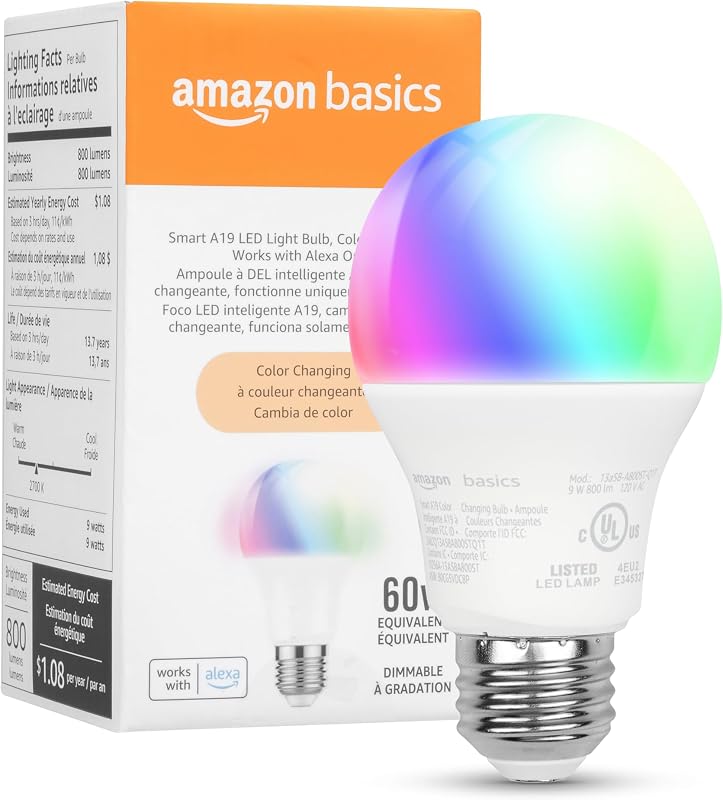 Cheapest Way to Start Amazon Basics Smart Color Bulb Alexa-only color Wi-Fi bulb |
|---|---|---|---|---|---|---|---|
| BeastScore | 91 / 100 | 89 / 100 | 87 / 100 | 86 / 100 | 85 / 100 | 83 / 100 | 81 / 100 |
| Best for | Big homes and bulbs that keep dropping offline | Apple Home or Home Assistant on a budget | Bright color scenes without the Hue price | Local control and Apple Home without a hub | A few color bulbs near the router | Bedrooms and basic dimming | Alexa-only homes testing smart bulbs |
| Typical price (checked November 8, 2026) | $70–$90 | $10–$20 | $20–$30 | $20–$30 | $10–$20 | $10–$20 | $9–$15 |
| Connection | Zigbee via Bridge (Bluetooth for one room) | Wi-Fi | Wi-Fi + Bluetooth (2.4 GHz) | Wi-Fi (2.4 GHz) | Wi-Fi (2.4 GHz only) | Wi-Fi (2.4 GHz) | Wi-Fi (2.4 GHz) |
| Matter | Yes, through the Bridge | Yes | Yes, per the listing | Yes | No | No | No |
| Works with | Alexa, Apple Home, Google | Apple Home, Alexa, Google, SmartThings | Matter, Alexa, Google, Apple Home | Apple Home, Alexa, Google, SmartThings | Alexa, Google | Alexa, Google | Alexa only |
| Light | Color + warm to cool white | Color + 2500–6500K white | Color + 2700–6500K white | Color + warm to cool white | Color + 2500–6500K white | Soft white only (2700K) | 16 preset colors |
| Hub needed | Yes, Bridge in the box | No | No | No | No | No | No |
| Key features |
|
|
|
|
|
|
|
BeastScore here is our overall rating out of 100, based on published specs and Amazon owner reviews. Prices change daily, so tap "View on Amazon" for today's price. We may earn a small commission, at no extra cost to you. Learn more
Why each one made the list
What each pick does best, where it falls short, and the typical Amazon price when we checked.
- 1. Best Overall
Philips Hue Starter Kit
BeastScore 91 / 100Typically $70–$90 on Amazon (checked November 8, 2026)Fixes: bulbs that keep dropping off your Wi-Fi. The Bridge plugs into your router with an Ethernet cable and talks to the bulbs over its own Zigbee mesh, so they stop competing with your phones and laptops for Wi-Fi. Philips lists the standard Bridge at up to 50 lights across the whole home, with Matter support, so Apple Home, Alexa and Google all see the same lights. The kit has the Bridge plus two white-and-color A19 bulbs. Skip it if you only want one or two bulbs in one room: Philips says Bluetooth alone covers up to 10 lights there.
Pros- A separate Zigbee mesh keeps bulb traffic off your Wi-Fi
- One Bridge covers the whole home and adds Matter
- Works with Alexa, Apple Home and Google, and you can add switches and sensors later
Cons- Costs several times a plain Wi-Fi bulb, because of the Bridge
- The Bridge needs an Ethernet cable to your router
- Overkill for one lamp
- 2. Best Value Matter Bulb
TP-Link Tapo L535E
BeastScore 89 / 100Typically $10–$20 on Amazon (checked November 8, 2026)Fixes: app and voice control that dies when the internet drops, and brand lock-in. The L535E is Matter-certified and joins Wi-Fi directly with no hub. The listing says Matter devices on your home network keep working when the internet goes offline, and that it works with Apple Home, Alexa, Google Home and SmartThings. At 1100 lumens it is also the brightest color bulb here, for about the price of a plain one. It is still a Wi-Fi bulb, so the router fixes above apply. Skip it if you plan more than 10 bulbs: a hub stays steadier.
Pros- Matter works with Apple Home, Alexa, Google and SmartThings
- Brightest color bulb here at 1100 lumens
- Priced like a plain Wi-Fi bulb, even with Matter
Cons- Still a Wi-Fi bulb, so a weak signal can still drop it
- The listing doesn’t state the Wi-Fi band, so plan on 2.4 GHz
- Single bulb, so a whole room costs more than a multi-pack
- 3. Best Color Pick
Govee Smart Bulbs 1000LM
BeastScore 87 / 100Typically $20–$30 on Amazon (checked November 8, 2026)Fixes: dim 800-lumen color bulbs and being stuck in one app. This H6006 pair is Govee’s newer bulb. It joins Wi-Fi and Bluetooth, and the listing says you can control it through Matter, Alexa or Google. You keep what people buy Govee for: 16 million colors, 54 scenes and music sync. The listing also says it only works on 2.4 GHz Wi-Fi and can’t be used with smart switches. It replaces the older 800-lumen Govee bulb in this guide. Skip it if you use smart wall switches, or if you want a whole-home system with Hue-style steadiness.
Pros- 1000 lumens is brighter than most color bulbs
- Matter support plus Govee’s scenes and music sync
- Two bulbs for a low price
Cons- 2.4 GHz only, with no 5 GHz support
- Not for use with smart switches, per the listing
- Music sync needs your phone’s microphone free
- 4. Best for Apple Home & Home Assistant
WiZ Connected Smart Bulbs
BeastScore 86 / 100Typically $20–$30 on Amazon (checked November 8, 2026)Fixes: wanting Apple Home or Home Assistant without buying a hub. WiZ is made by Signify, the company behind Hue, and this 2-pack is Matter-certified per the listing, so it adds to Apple Home, Alexa or Google Home with no bridge. Home Assistant has a WiZ integration that talks to the bulbs over your local network, so automations don’t depend on a cloud login. The listing also mentions motion detection from the bulbs themselves. Skip it if you need more than 800 lumens or a Zigbee mesh: these are plain 2.4 GHz Wi-Fi bulbs.
Pros- Matter-certified, so it works across Apple, Amazon and Google
- Home Assistant integration that works over your local network
- Two color bulbs for a low price
Cons- 800 lumens is dimmer than the Tapo or the 1000-lumen Govee
- Wi-Fi only, on 2.4 GHz
- Motion sensing is a niche feature many homes won’t use
- 5. Best No-Hub Color on a Budget
Kasa Smart Color Bulb (KL125)
BeastScore 85 / 100Typically $10–$20 on Amazon (checked November 8, 2026)Fixes: paying extra for color and auto white when you only need a few bulbs. The Kasa color pair gives 16 million colors and 2500K to 6500K white, and the white can shift with natural light from dawn to dusk. The listing says it tracks energy use and is UL certified, and Home Assistant supports Kasa bulbs like this one over the local network. It is an older design: no Matter, and it works with Alexa and Google only, on 2.4 GHz Wi-Fi. Skip it if you use Apple Home, or if the bulbs sit far from your router.
Pros- Color plus auto white that follows daylight
- Energy use tracking in the Kasa app
- Supported by Home Assistant over the local network
Cons- No Matter, so no native Apple Home
- 2.4 GHz only, which is where most dropouts start
- Alexa and Google are the only assistants listed
- 6. Best White-Only Budget Bulb
Kasa Smart Bulb KL110
BeastScore 83 / 100Typically $10–$20 on Amazon (checked November 8, 2026)Fixes: overpaying for plain white bulbs. If you only want a lamp that dims from a phone and turns on by voice, color is wasted money. The KL110 gives soft white at 2700K, dims from 1% to 100% and runs on 9 W for 800 lumens, with no hub. The listing says it needs a secured 2.4 GHz network, and Home Assistant supports this model over the local network. It is the cheapest sensible entry point for a bedroom. Skip it if you want color, Matter or Apple Home: this bulb has none of the three.
Pros- Cheap, simple soft white that dims smoothly
- Works with Alexa and Google and needs no hub
- Supported by Home Assistant over the local network
Cons- White only, with no color or tunable white
- No Matter and no Apple Home
- Needs a secured 2.4 GHz network
- 7. Cheapest Way to Start
Amazon Basics Smart Color Bulb
BeastScore 81 / 100Typically $9–$15 on Amazon (checked November 8, 2026)Fixes: the cost of trying smart bulbs in an Alexa home. You screw it in, open the Alexa app and it tells you it found your first light bulb, with no extra app or skill. It gives 16 preset colors, dims from 5% to 100% by voice or in the app, and groups by room. The listing is blunt that it works with Alexa only: not Google, Apple Home or SmartThings, and not with a physical dimmer. Skip it if anyone in the house uses Google Home or an iPhone, or if you want more than 16 colors.
Pros- The lowest price here, with almost instant Alexa setup
- Room groups in the Alexa app
- The listing says it suits damp rooms like bathrooms
Cons- Alexa only, so no Google, Apple Home or SmartThings
- Only 16 preset colors
- Doesn’t work with a physical dimmer
All 7 compared, in one look
See every pick on one chart, or tap one to put it head to head with Philips Hue Starter Kit. Ratings out of 10 are our estimates from published specs and Amazon owner reviews, not hands-on tests. Bigger shape = better.
- Stays onlinePhilips Hue Starter Kit · 9.8/10
- Easy setupAmazon Basics Smart Color Bulb · 9.6/10
- Smart home supportPhilips Hue Starter Kit · 9.6/10
- Color & white rangeGovee Smart Bulbs 1000LM · 9.4/10
- BrightnessTie
- ValueTie
Which one should you buy?
Find your situation below. That's your pick.
- Your bulbs keep dropping offline, or you plan 10+ of them
- You use Apple Home and want the steadiest system
- You want a Matter bulb that works with Apple Home, Alexa and Google
- You want the brightest color bulb for the least money
- You want 1000-lumen color scenes and music sync
- You want Matter without paying Hue prices
- You use Home Assistant or Apple Home and want local control
- You want a Matter pair from the maker of Hue
- You want a few color bulbs with auto white near the router
- You use Alexa or Google and don’t need Matter
- You only need dimmable white for a bedroom or hallway
- You want the cheapest simple bulb for Alexa or Google
- You have an Echo and want the easiest Alexa setup
- You want to try one bulb for under $15
Philips Hue Starter Kit
A separate Zigbee mesh takes your bulbs off Wi-Fi, so they stop dropping offline.
- Own Zigbee mesh
- Matter via the Bridge
- Alexa, Apple Home, Google
Quick tips before you buy
A bulb with its switch off has no power, so the app shows it as offline. Dim or switch it from the app or by voice.
Turn off band steering (often called Smart Connect) or name the 2.4 GHz band, such as HomeWiFi-2G, and join your bulbs to it.
Put the router near the middle of the house, off the floor and out of a closet. A mesh node near far rooms helps more than a new bulb.
In your router, reserve an IP address for every bulb. It stops address clashes after a power blip or reboot.
Quick answers
Why do my smart bulbs keep going offline, and how do I fix it?+
The usual causes are a 2.4 GHz-only bulb on a router that merges both Wi-Fi bands, a weak signal at the far end of the house, too many gadgets on a cheap router, a wall switch cutting power, and a router that hands the bulb a new address. Fix them in this order, all free: leave the wall switch on; turn off band steering or name your 2.4 GHz band, then re-add the bulb; move the router toward the middle of the house or add a mesh node near the far rooms; reserve each bulb’s IP address; and update the bulb and router firmware. Bulb makers say one router or mesh node copes with a few dozen low-power devices before performance dips. If you are past 10 bulbs, move to a hub like Hue.
Why does my smart bulb keep turning off or disconnecting (Kasa, Tapo, Feit, Sylvania, Smart Life, IKEA)?+
The causes belong to your network and power, not to one brand, so the same checks apply to Kasa, Tapo, Govee, Feit, Sylvania, Smart Life and IKEA. First look for a schedule, timer or sunrise and sunset routine in the app that switches the bulb off. Then check the wall switch, and whether the bulb sits in an enclosed fixture, because heat hurts a bulb’s radio. If one bulb drops and its neighbors don’t, that bulb has a weak signal, so move it or add a mesh node. If every bulb drops at once, look at the router. If the app says offline but voice still works, the maker’s cloud may be down.
What are the best smart light bulbs for Alexa, Apple Home, Google Home and Home Assistant?+
Every pick here works with Alexa, and the Amazon Basics bulb sets itself up fastest. For Apple Home, choose the Hue kit, Tapo L535E, Govee H6006 or WiZ, which all work with it. For Google Home, every pick except the Amazon Basics bulb works. For Home Assistant, Hue works through its Bridge, WiZ has a local integration, and Home Assistant supports the Kasa KL110 and KL125 over the local network (newer Kasa and Tapo devices still need your TP-Link login to authenticate). Matter bulbs can also join Home Assistant through its Matter integration.
What is the cheapest, best entry-level smart light bulb?+
The Amazon Basics Smart Color bulb is usually the cheapest, but it only works with Alexa. For plain white, the Kasa KL110 is the simple pick. For color, the Tapo L535E is the best entry-level bulb to start with: it sits in the same price band, is the brightest color bulb here and uses Matter, so it still works if you switch to Apple Home or Google later.
How do smart light bulb prices compare?+
Price bands checked 8 November 2026: Amazon Basics about $9–$15 for one bulb; Kasa KL110 and Tapo L535E about $10–$20 for one bulb; the Kasa color KL125 pair about $10–$20; the Govee 1000-lumen pair and the WiZ pair about $20–$30; the Hue starter kit about $70–$90 for the Bridge and two bulbs. Hue costs the most up front because of the Bridge, which you pay for once. Extra Hue bulbs are sold separately in multi-packs.
What are the safest, most secure and most reliable smart bulbs?+
For reliability, the Hue kit: a separate Zigbee mesh and its own Bridge keep bulbs off your Wi-Fi. For security, no bulb is hack-proof, but Philips says the standard Bridge uses AES-128 encryption per device, and Matter bulbs keep control on your local network. The Kasa color listing says it is UL certified, which covers electrical safety, not cyber security. Update firmware, and for 10 or more bulbs put them on a guest or IoT Wi-Fi network.
What should I skip?+
Skip a plain Wi-Fi bulb for every room of a big home; use a hub. Skip any Hue listing marked “Old Version”, such as the older White Ambiance 2-pack, which we replaced. Skip the Amazon Basics bulb if you use Google or Apple Home. Skip Govee or Amazon Basics bulbs behind smart wall switches or physical dimmers, because both listings say they don’t work with them. Skip no-name bulbs with no brand app and no Matter support: when they drop offline, there is nothing to fix them with.
Keep comparing
 Govee vs Philips Hue: Cheap RGB or premium smart lights?Govee is cheap and colorful. Hue is polished and reliable. Which one fits your home?
 Best WiFi Router 17 Picks, Mesh to Wi-Fi 7, From $55Mesh or one router? 17 picks from $55 to Wi-Fi 7.
 Best Smart Plugs: Top 5 on AmazonThe cheapest way into a smart home. The best smart plugs compared.
 Best Echo Devices: Top 5 on AmazonEcho Dot, Spot or Show? Pick the right one in a minute.