
Best Tablets for Seniors
Easy video calls, big screens
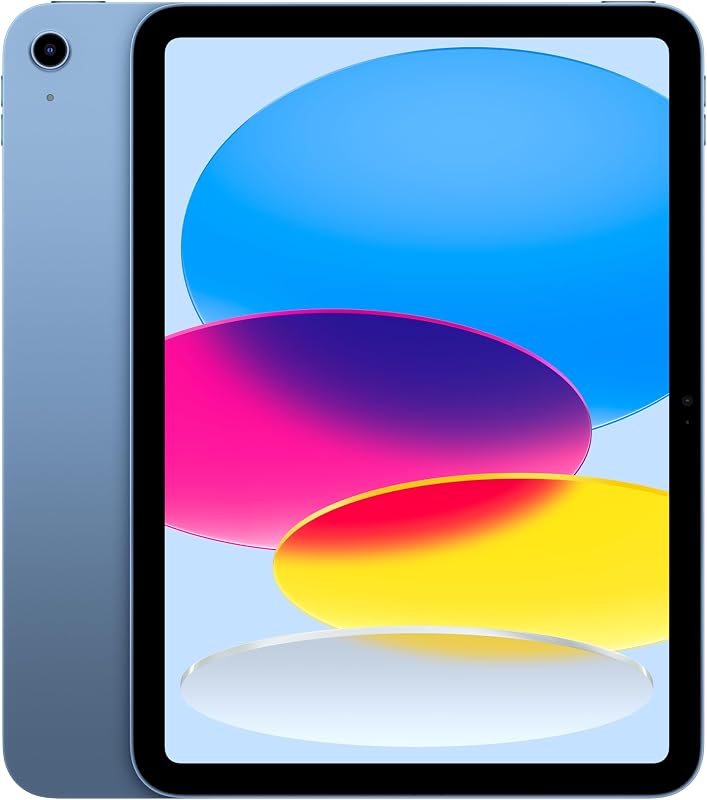
Our #1 pick is the Apple iPad 11-inch (A16). Setting up a tablet for a parent or grandparent? We compared five on Amazon, from the simple iPad to a 13-inch Galaxy, with one goal: easy video calls and a screen that is easy to read.
How we picked: we shortlist by Amazon Best Seller rank and number of ratings, then compare published specs. We don't test these products hands-on.
By Jamilur Rahman, Founder & Editor · Updated October 14, 2026
- Owner reviews checked
- Features side by side
- Quick & easy compare
- Smarter purchase
The short answer
For most older adults, the best tablet is the Apple iPad 11-inch (A16). FaceTime is built in, so a grandchild with an iPhone can call with one tap. The 11-inch screen is big enough for large text, Touch ID in the top button means no passcode to forget, and Apple’s Assistive Access mode can strip the home screen down to a few big buttons. If the family already uses iPhones, this is the easiest tablet to set up and to help with over the phone.
If your parent struggles to read small screens, go bigger. The Samsung Galaxy Tab S10 FE+ has a 13.1-inch screen and is water resistant by the listing, and the Lenovo Idea Tab Plus gets you a 12.1-inch screen, quad speakers, a pen and a folio case for much less. On a tight budget, the Amazon Fire HD 10 handles Zoom calls, reading and streaming for a fraction of the price. For someone who mostly reads in a chair or in bed, the light iPad mini is the easiest to hold.
Skip the iPad if the family runs on Android phones and Google accounts, because the shared photos and video calls are easier on a Samsung or Lenovo. Also skip it if your parent only wants to watch shows and read, and will never take a video call. The Fire HD 10 does that for a lot less money. And if they find any touchscreen frustrating, a digital photo frame or an Echo Show may be a better first gadget than a tablet.
How we picked: we compared popular tablets on Amazon for the things that matter to older users: screen size, how simple video calls are, accessibility settings, sound and weight, plus what owners say after months of use. We checked each listing’s specs. We don’t claim hands-on tests. Prices are typical bands, checked October 14, 2026.
Compare them side by side
Everything that matters, in one table. Swipe to see all 5.
| Product | Best Overall Apple iPad 11-inch (A16) 11-inch tablet |  Best Big Screen Samsung Galaxy Tab S10 FE+ 13.1-inch tablet |  Best Budget Amazon Fire HD 10 10.1-inch tablet |  Best Big Screen Value Lenovo Idea Tab Plus 12.1-inch tablet with pen and folio |  Easiest to Hold Apple iPad mini (A17 Pro) 8.3-inch tablet |
|---|---|---|---|---|---|
| BeastScore | 93 / 100 | 90 / 100 | 87 / 100 | 88 / 100 | 86 / 100 |
| Best for | Families who use iPhones | Low vision and Android families | Reading, streaming and the odd Zoom call | A big screen and loud speakers on a budget | Reading in a chair or in bed |
| Typical price (checked October 14, 2026) | $330–$430 | $600–$700 | $110–$160 | $260–$300 | $500–$570 |
| Screen | 11-inch Liquid Retina | 13.1-inch | 10.1-inch 1080p Full HD | 12.1-inch 2.5K, 90 Hz | 8.3-inch Liquid Retina |
| Storage | 128 GB | 128 GB | 32 GB + microSD | 128 GB, 8 GB RAM | 128 GB |
| Front camera | 12 MP | See listing | 5 MP | See listing | 12 MP with Center Stage |
| Unlock | Touch ID (top button) | See listing | PIN or pattern | See listing | Touch ID |
| In the box / extras | Wi-Fi 6, USB-C | S Pen included, water resistant | 13-hour battery, Alexa | Pen and folio case included | Wi-Fi 6E, USB-C |
| Key features |
|
|
|
|
|
BeastScore here is our overall rating out of 100, based on published specs and Amazon owner reviews. Prices change daily, so tap "View on Amazon" for today's price. We may earn a small commission, at no extra cost to you. Learn more
Why each one made the list
What each pick does best, where it falls short, and the typical Amazon price when we checked.
- 1. Best Overall
Apple iPad 11-inch (A16)
BeastScore 93 / 100Typically $330–$430 on Amazon (checked October 14, 2026)The iPad is the easiest tablet for someone who doesn’t want to learn a tablet. The listing lists an 11-inch Liquid Retina display, the A16 chip, 128 GB of storage and a 12 MP front camera, and FaceTime is ready to go out of the box. Touch ID in the top button unlocks it with a fingerprint, which owners say ends the forgotten-passcode calls. iPadOS can make text bigger and bolder, and Assistive Access reduces the screen to a few large buttons like Calls, Messages and Photos. It is also easy to help remotely if you have an iPhone. Downsides: it costs more than the Fire, and it is less useful in an Android family.
Pros- FaceTime calls with one tap, no setup
- Touch ID unlock instead of a passcode
- Assistive Access and big-text settings for a simpler screen
Cons- Costs more than Android and Fire tablets
- Best only if the family uses Apple devices
- Case and stand sold separately
- 2. Best Big Screen
Samsung Galaxy Tab S10 FE+
BeastScore 90 / 100Typically $600–$700 on Amazon (checked October 14, 2026)If small text is the problem, screen size is the fix, and this is the biggest screen here. The listing says the Tab S10 FE+ has a 13.1-inch display and dual speakers, so video calls, word games and photos are easy to see across a table. It is water resistant by Samsung’s listing, a plus for a tablet that lives in the kitchen. The S Pen is included for handwriting notes and lists. Samsung’s One UI has an Easy mode with bigger icons, and Google Meet and WhatsApp work well for Android families. The trade-offs are weight and price: at 13 inches it is a two-hand or stand tablet, and it costs the most here.
Pros- Biggest screen here, easiest to read
- Water resistant for kitchen and bedside use
- S Pen included for notes and puzzles
Cons- Too big and heavy to hold for long in one hand
- Most expensive pick
- 3. Best Budget
Amazon Fire HD 10
BeastScore 87 / 100Typically $110–$160 on Amazon (checked October 14, 2026)The Fire HD 10 is the low-risk choice: if your parent never warms to a tablet, you have not spent much. The listing says it has a 10.1-inch Full HD screen, up to a 13-hour battery and a 5 MP front camera for Zoom calls with family. The glass is strengthened, and Amazon says it is 2.7 times as durable as a Galaxy Tab A8 in a tumble test. Kindle books, Prime Video and Alexa are right on the home screen, which suits someone who mostly reads and watches. The catches: there is no Google Play Store, so no FaceTime and fewer apps, and the home screen shows Amazon ads and offers.
Pros- A fraction of the price of an iPad
- Long battery life and a sharp 10.1-inch screen
- Kindle, Prime Video and Alexa built in
Cons- No Google Play Store or FaceTime
- Home screen shows Amazon offers and ads
- Weaker 5 MP camera for calls
- 4. Best Big Screen Value
Lenovo Idea Tab Plus
BeastScore 88 / 100Typically $260–$300 on Amazon (checked October 14, 2026)The Idea Tab Plus gets you most of the big-screen benefit of the Samsung for less than half the price. The listing says it has a 12.1-inch 2.5K screen up to 800 nits, quad Dolby Atmos speakers and a Dimensity 6400 chip with 8 GB of memory. For older ears, the four speakers are a real help on video calls. This bundle includes a pen and a folio case, so there is nothing else to buy, and it weighs just over a pound by the listing. It runs Android with Google Play, so WhatsApp, Meet and Zoom all work. The downsides: Lenovo updates arrive slower than Samsung’s, and there is no simple-mode as polished as Apple’s.
Pros- 12.1-inch screen at a mid-range price
- Quad speakers make calls easier to hear
- Pen and folio case in the box
Cons- No built-in simple mode as polished as iPad’s
- Fewer years of updates than Apple or Samsung
- 5. Easiest to Hold
Apple iPad mini (A17 Pro)
BeastScore 86 / 100Typically $500–$570 on Amazon (checked October 14, 2026)Some seniors put a tablet down because it is too heavy to hold. The iPad mini fixes that. The listing says it has an 8.3-inch display, the A17 Pro chip and a 12 MP front camera with Center Stage, which keeps the face in frame during FaceTime even if the tablet drifts. It runs the same iPadOS, with Touch ID, big-text settings and Assistive Access, so it is just as easy as the bigger iPad. It is ideal for e-books, news and photos in an armchair. The catch is the screen: 8.3 inches is small for people with low vision, and it costs more than the bigger 11-inch iPad.
Pros- Light and easy to hold with one hand
- Center Stage camera keeps faces framed
- Same simple iPadOS, FaceTime and Touch ID
Cons- Small screen for low vision
- Costs more than the bigger 11-inch iPad
All 5 compared, in one look
See every pick on one chart, or tap one to put it head to head with Apple iPad 11-inch (A16). Ratings out of 10 are our estimates from published specs and Amazon owner reviews, not hands-on tests. Bigger shape = better.
- Ease of useApple iPad 11-inch (A16) · 9.6/10
- Video callsApple iPad 11-inch (A16) · 9.8/10
- Screen sizeSamsung Galaxy Tab S10 FE+ · 9.8/10
- SoundLenovo Idea Tab Plus · 9.4/10
- Light to holdApple iPad mini (A17 Pro) · 9.8/10
- ValueAmazon Fire HD 10 · 9.8/10
Which one should you buy?
Find your situation below. That's your pick.
- The family uses iPhones
- Video calls are the main reason to buy
- Your parent has low vision and needs the biggest screen
- The family uses Android
- They mostly read, stream and use Alexa
- You want to spend as little as possible
- You want a big screen on a budget
- Loud, clear speakers matter for calls
- They read in bed or an armchair
- A heavy tablet would go unused
Apple iPad 11-inch (A16)
The easiest tablet for video calls with family, with big-text and simple-mode settings built in.
- FaceTime built in
- 11-inch screen
- Touch ID unlock
Quick tips before you buy
iPhone families should pick an iPad for FaceTime and shared photos. Android families should pick Samsung or Lenovo.
Set bigger, bolder text and larger icons before you hand it over. It makes the biggest difference.
A stand keeps the camera steady for video calls and saves tired hands.
Save key contacts as favorites, turn on automatic updates and write down the Apple or Google login somewhere safe.
Quick answers
What is the easiest tablet for a senior to use?+
The Apple iPad. FaceTime works out of the box, Touch ID removes passcodes, and Assistive Access can shrink the home screen to a few large buttons. It is also the easiest to help with over the phone if you use an iPhone.
Is an iPad or Samsung tablet better for seniors?+
Pick the iPad if the family uses iPhones and FaceTime. Pick a Samsung if the family uses Android, or if a bigger screen matters more: the Galaxy Tab S10 FE+ has a 13.1-inch display.
Is the Amazon Fire tablet good for seniors?+
For reading, streaming and Alexa, yes, and it costs far less. It is weaker for video calls: there is no FaceTime or Google Play Store, and the home screen shows Amazon offers.
What size tablet is best for elderly users?+
Ten to 13 inches suits most people with tired eyes. An 11-inch iPad is a good middle ground. Go to 12 or 13 inches for low vision, or 8 inches only if weight is the bigger problem.
Is GrandPad sold on Amazon?+
Not as a new, current GrandPad listing when we checked. GrandPad is sold directly with a monthly plan. A regular iPad with Assistive Access turned on gives a similar simplified experience without a subscription.
Does a tablet for a senior need cellular data?+
Usually not. Most stay at home on Wi-Fi. A cellular model only makes sense if they have no home internet or want to video call while out.
Keep comparing
Best Tablets: Top 5 on AmazoniPad vs Galaxy Tab vs Fire: the right tablet for you. Best Cell Phones for Seniors: Big buttons, loud speakers, SOSEasy phones for mom and dad, from simple flips to big-screen smartphones.
 Best Digital Photo Frames: Top 5 on AmazonThe gift grandparents actually use. Aura, Nixplay, Skylight and Frameo compared.Fire HD 8 vs Fire HD 10 vs Fire Max 11Every Fire tablet, side by side, before Prime Day.