
Gifts for Programmers
5 Desk Upgrades Coders Love
Our #1 pick is the Keychron K8. Skip the joke mug. These five gifts upgrade the things a programmer touches for eight hours a day: the keyboard, the mouse, the headphones, the eyes and the shortcuts.
How we picked: we shortlist by Amazon Best Seller rank and number of ratings, then compare published specs. We don’t test these products hands-on.
By Jamilur Rahman, Founder & Editor · Updated October 26, 2026
- Owner reviews checked
- Features side by side
- Quick & easy compare
- Smarter purchase

The short answer
The best gift for a programmer is a desk upgrade they use every single day, and the Keychron K8 wireless mechanical keyboard is our top pick. A coder types for hours, so a better keyboard is felt on the first morning. It pairs with up to three devices over Bluetooth, works wired over USB-C, and has a compact tenkeyless layout that leaves room for a mouse.
Why desk gear and not a mug or a T-shirt? Programmers sit in one spot for most of the day, usually on a laptop keyboard and a trackpad, and many never upgrade because the old setup “works”. That is the gap a gift can fill. The five picks here cover the parts of the job that wear a person down: typing, mousing, noise, tired eyes and repeated shortcuts. They also stay neutral on language and editor, so you will not buy the wrong “Team Vim” item.
Pick by budget and by what is missing from their desk. The Benicci blue light glasses are a $22 stocking stuffer, the Logitech Lift is an easy $60 upgrade for anyone with sore wrists, the Elgato Stream Deck MK.2 suits the tinkerer who loves automating things, and the Sony WH-1000XM5 is the splurge for someone who works in a noisy home or office. Skip the keyboard if they already own a custom mechanical one, and skip the glasses if they wear prescription lenses and are happy with them. Prices are typical bands checked October 2026.
Compare them side by side
Everything that matters, in one table. Swipe to see all 5.
| Product | Best Overall Keychron K8 Wireless mechanical keyboard | 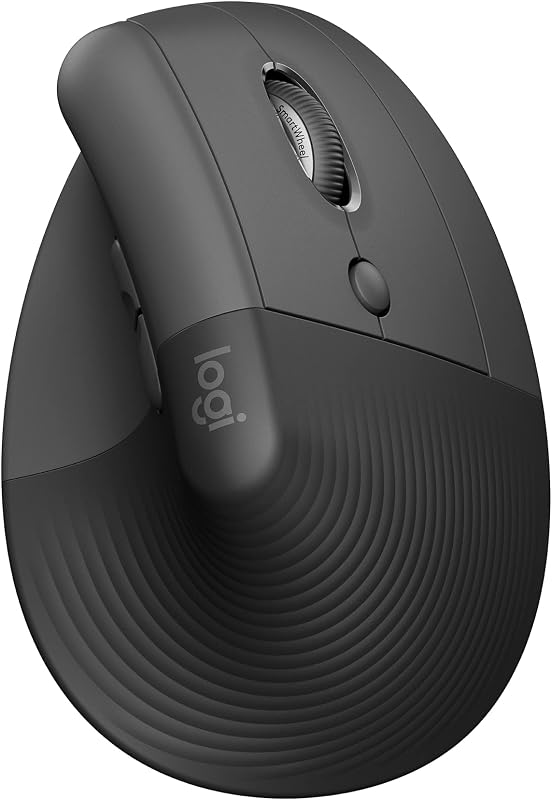 Best for Sore Wrists Logitech Lift Vertical ergonomic mouse |  Best for Tinkerers Elgato Stream Deck MK.2 15-key macro controller |  Best Splurge Sony WH-1000XM5 Noise cancelling headphones |  Best Budget Gift Benicci Blue Light Glasses Computer glasses |
|---|---|---|---|---|---|
| BeastScore | 93 / 100 | 91 / 100 | 88 / 100 | 90 / 100 | 82 / 100 |
| Best for | The coder who still types on a laptop keyboard or a cheap membrane board. | The developer who already mentions wrist, hand or forearm aches after a long day. | The coder who loves automating tasks and would enjoy a button for every repeated step. | The developer who needs deep focus in a noisy home, cafe or open office. | The coder who ends the day with tired, dry or sore eyes and has a tight gift budget. |
| Typical price (checked October 26, 2026) | $50–$70 | $60–$70 | $120–$150 | $250–$330 | $20–$25 |
| What it upgrades | Keyboard | Mouse | Shortcut pad | Headphones | Eyes |
| Connection | Bluetooth 5.1 (3 devices) or USB-C | Bluetooth or Logi Bolt USB | USB | Bluetooth, multipoint | None |
| Key detail | 87 keys, tactile Brown switches | 57 degree vertical angle, small to medium right hands | 15 customizable LCD keys | Up to 30 hours of battery | Non-prescription lenses, men and women styles |
| Key features |
|
|
|
|
|
BeastScore here is our overall rating out of 100, based on published specs and Amazon owner reviews. Prices change daily, so tap "View on Amazon" for today's price. We may earn a small commission, at no extra cost to you. Learn more
Why each one made the list
What each pick does best, where it falls short, and the typical Amazon price when we checked.
- 1. Best Overall
Keychron K8
BeastScore 93 / 100Typically $50–$70 on Amazon (checked October 26, 2026)The keyboard is the one thing a programmer touches more than anything else, which is why it tops the list. The K8 uses a tenkeyless layout, so the arrow and navigation keys are still there but the number pad is gone and the mouse sits closer. The listing says it connects to three devices over Bluetooth 5.1, so one key press moves it from a work laptop to a personal one, and it also works wired over USB-C. Tactile Brown switches give a clear bump without the loud click of blue ones. Both Mac and Windows keycaps are in the box, which removes the usual “which system do they use?” worry. The listing quotes up to 200 hours of battery with the backlight off. Owners praise the typing feel for the price; common complaints are that the keys are on the louder side and that wireless mode is limited to six keys pressed at once.
Pros- Bluetooth for three devices plus a wired USB-C mode
- Mac and Windows keycaps included, so no system guesswork
- Listing quotes up to 200 hours of battery with the backlight off
Cons- Keys are louder than a laptop board, so shared rooms notice
- No number pad, which some finance or data people miss
- Wireless mode supports only six keys pressed together
- 2. Best for Sore Wrists
Logitech Lift
BeastScore 91 / 100Typically $60–$70 on Amazon (checked October 26, 2026)Programmers click and scroll for hours, and a flat mouse twists the forearm. The Lift tilts the hand to 57 degrees, closer to a handshake, which the listing says promotes a more natural forearm posture. It is certified ergonomic by the maker, has a soft textured grip and a thumb rest, and the clicks are quiet enough for a shared office. You can connect it by Bluetooth or the Logi Bolt USB receiver to Windows, macOS, Linux, ChromeOS and iPadOS, and the listing quotes up to two years on one battery. It is also one of the most-reviewed vertical mice, so you are not guessing. The catch: it is sized for small to medium right hands, so check the hand size first, and the first few days feel odd. Left-handed and large-hand versions exist as separate listings.
Pros- 57 degree vertical shape eases forearm twist
- Quiet clicks, and works over Bluetooth or a USB receiver
- Listing quotes up to two years of battery life
Cons- Fits small to medium right hands best
- Takes a few days to get used to the upright grip
- Not ideal for fast gaming or drawing work
- 3. Best for Tinkerers
Elgato Stream Deck MK.2
BeastScore 88 / 100Typically $120–$150 on Amazon (checked October 26, 2026)It was built for streamers, but a coder with a taste for shortcuts gets plenty out of it. Each of the 15 LCD keys can launch an app, mute the mic on a call, open a folder, paste a snippet or run a multi-step action from one press, and the key image changes so you can see what happened. The listing says it works with plugins for OBS, Discord, Spotify and Philips Hue, so a coder can mute a meeting, switch a light and start a focus playlist with one tap. It is a gift most people would never buy for themselves, which makes it memorable. Setup takes an evening, and the real value depends on whether they enjoy building their own shortcuts. If they like tinkering, it becomes a toy that pays them back. If they do not, it sits unused.
Pros- One key can chain several actions, ideal for repeated tasks
- LCD keys show what each button does
- Plugins for OBS, Discord, Spotify and smart lights
Cons- Needs an evening of setup before it pays off
- Costs more than the other desk picks except the headphones
- Made for streamers, so some menus talk about streaming
- 4. Best Splurge
Sony WH-1000XM5
BeastScore 90 / 100Typically $250–$330 on Amazon (checked October 26, 2026)Deep work needs quiet, and these are the headphones most often named by people who want it. The listing says two processors control eight microphones to cancel noise, and an Auto NC Optimizer adjusts to the room. The battery is rated for up to 30 hours, with three minutes of charging giving about three hours. The multipoint link lets a coder keep them paired to a laptop and a phone at once, so a call does not mean re-pairing. The four microphones make video calls clearer than most rivals. They are light and the leather pads suit long sessions. The trade-offs: they cost far more than anything else here, the newer XM6 has since appeared, and the fold-flat design of the older XM4 is gone, so the case is larger. The XM5 often gets discounted, so watch the price band.
Pros- Eight-microphone noise cancelling, great for open offices
- Up to 30 hours of battery, with quick charge
- Multipoint connection to a laptop and a phone at once
Cons- The most expensive pick in this guide
- The newer XM6 has since launched, so some buyers will want that
- Bulkier case than older folding Sony models
- 5. Best Budget Gift
Benicci Blue Light Glasses
BeastScore 82 / 100Typically $20–$25 on Amazon (checked October 26, 2026)This is the “small and thoughtful” pick. Programmers spend most of the day looking at a bright screen from a short distance, and many report tired eyes and headaches by evening. Blue light glasses are cheap, light and easy to wear, and a well-liked pair costs about the price of a lunch. The Benicci frames are among the most-reviewed in the category, with tens of thousands of owners, and they come in a mix of looks so you can pick something that suits the wearer. A fair warning: the science on blue light is mixed, and eye doctors say that taking breaks and checking your vision matter more than lens tint. Treat these as a comfort aid, not a medical device. Owners mostly say they feel less glare in the evening; a few say the effect is subtle.
Pros- Under $25 and easy to wrap
- Lightweight enough to wear through a long coding session
- Plenty of owner reviews and several frame styles
Cons- Evidence for blue light filtering is mixed, so benefits vary
- Non-prescription, so no use for someone who needs corrective lenses
- Fit is a guess if you do not know their face shape
All 5 compared, in one look
See every pick on one chart, or tap one to put it head to head with Keychron K8. Ratings out of 10 are our estimates from published specs and Amazon owner reviews, not hands-on tests. Bigger shape = better.
- Daily useKeychron K8 · 9.8/10
- ComfortLogitech Lift · 9.6/10
- FocusSony WH-1000XM5 · 9.8/10
- Geek appealElgato Stream Deck MK.2 · 9.8/10
- ValueBenicci Blue Light Glasses · 9.8/10
- Safe giftSony WH-1000XM5 · 9.4/10
Which one should you buy?
Find your situation below. That's your pick.
- They type on a laptop keyboard all day
- You want the safest useful gift for a developer
- They mention wrist or forearm aches
- They have small to medium right hands
- They love automating and customizing their setup
- They want a gift they would not buy themselves
- They work in a noisy home, cafe or open office
- You have room for a splurge
- They get tired eyes at night
- You have about $25 to spend
Keychron K8
A wireless mechanical keyboard is the upgrade a programmer feels every minute of the day.
- Bluetooth for 3 devices
- Mac and Windows keycaps
- Compact 87-key layout
Quick tips before you buy
Ask or look at their desk. Mac or Windows, left or right hand, and whether they already own a mechanical keyboard.
Tactile or clicky keyboards are loud. If they share a room or take calls, choose the quieter option.
Wrist and eye comfort items help, but they work best with breaks and a good chair and screen height.
Keyboards and mice are personal. A gift receipt lets them swap a layout or hand size without awkwardness.
Quick answers
What is the best gift for developers?+
A desk upgrade they use every day. The Keychron K8 keyboard is our top pick because typing is the main thing a developer does. If they already own a good keyboard, the Logitech Lift mouse or the Sony WH-1000XM5 headphones are the next best choices.
What do you get a programmer who has everything?+
Aim for something they would not buy themselves but would use daily. The Elgato Stream Deck MK.2 is the classic example: a programmable shortcut pad most coders never think to buy. Good coffee, a gift subscription to a learning site or conference tickets also work.
What are good cheap gifts for programmers?+
The Benicci blue light glasses are about $22 and are easy to wear through a long day. For a bit more, the Logitech Lift mouse at about $60 and the Keychron K8 keyboard at about $50 to $70 are the best-value everyday upgrades.
What should I avoid buying for a programmer?+
Avoid joke mugs and shirts that assume a language or editor, such as a Vim or Emacs slogan. Avoid anything where their size, hand or operating system matters unless you have checked first. Tool-neutral gear is safer than novelty items.
Is a mechanical keyboard a good gift for a coder?+
Yes, for most coders. The feel is better than a laptop keyboard and it lasts for years. Choose a model that works with their system, like the K8 with its Mac and Windows keycaps, and think about noise if they share a room.
Are ergonomic gifts worth it for programmers?+
They can be. Wrist and forearm strain is common in people who type and mouse all day. A vertical mouse like the Logitech Lift is a low-risk start. If they already have pain, suggest they see a doctor too, because a mouse alone will not fix it.
What can I give a programmer for Christmas that is not tech?+
Think hobbies and rest: a LEGO set, a good board game, nice coffee, or a warm throw. Many programmers like puzzles that give a break from the screen. If you want to stay on theme, a desk lamp or a footrest is useful without being gadget-heavy.
Keep comparing
 Best Mechanical Keyboards: For Typing and WorkGreat-feeling keyboards for typists, coders and hobbyists.Best Ergonomic Mice: Vertical & Trackball PicksVertical and trackball mice that take strain off your wrist.
 Best Tech Gifts Under $50: Top 8 on AmazonUseful gadgets from Apple, Amazon, JBL and Anker, all under $50.
 Best Gifts for Gamers: PC, PS5, Switch and phoneGifts gamers actually use, from $60 controllers to a VR headset.