
Which Bambu Lab Printer
A1 mini to P2S Combo
For most people, get the Bambu Lab P2S Combo. Bambu Lab sells a lot of similar-looking printers. We lined up the five you can buy on Amazon US, from the small A1 mini to the enclosed P2S Combo, and sorted them by who each one suits.
How we picked: we shortlist by Amazon Best Seller rank and number of ratings, then compare published specs. We don't test these products hands-on.
By Jamilur Rahman, Founder & Editor · Updated October 19, 2026
- Owner reviews checked
- Features side by side
- Quick & easy compare
- Smarter purchase
The short answer
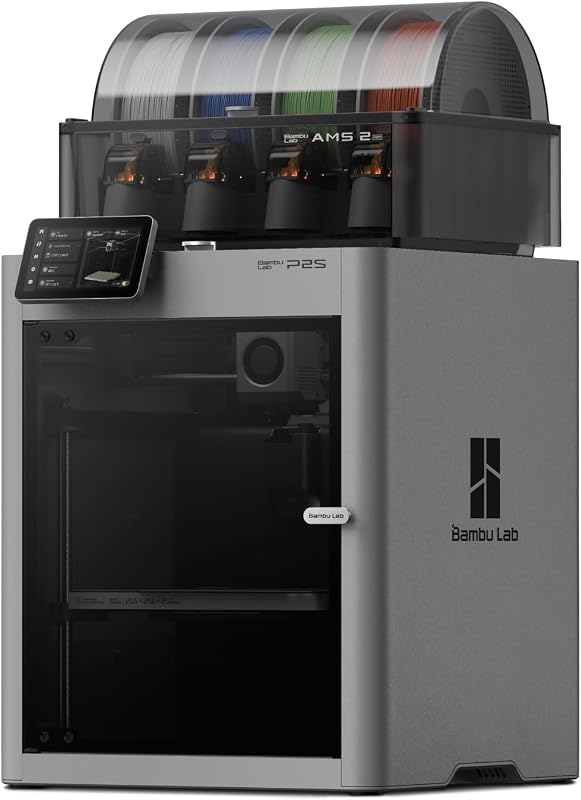
If you want one Bambu Lab printer and do not want to think about it again, buy the P2S Combo. It is enclosed, so it handles more filament types and keeps noise and smells in, it ships with the AMS 2 Pro for multi-color printing and built-in filament drying, and the listing says it prints at up to 600 mm/s. It costs the most of the five printers here, but it is the one you are least likely to outgrow.
Most other buyers should pick by budget and by whether they want multi-color. The A1 Combo is the best-value way into multi-color: an open-frame printer with the AMS lite for about $400 to $440. The A1 mini is the cheapest, smallest and easiest way in, and it fits on a desk or shelf. The P1S Combo is the older enclosed model with the original AMS, and it is the pick when you want an enclosure but the P2S price is too high.
Skip the P2S Combo if you only print small gifts and figures in PLA, or if the printer will sit in a classroom or a kid’s room. The open A1 mini or A1 Combo do that job for much less, and you will not miss the enclosure. Also note what is not here: when we checked in October 2026, we did not find the X-series or H2-series printers sold on Amazon US, so they are not in this lineup. Those are sold on Bambu Lab’s own store.
How we picked: we looked at every Bambu Lab printer sold by the Bambu Lab Store on Amazon US, checked each listing’s title and bullet points, and compared them on ease of use, speed, multi-color, enclosure and value. We do not claim hands-on tests. Specs come from the listings and from what owners report. Prices are bands checked in October 2026 and will move with sales.
Compare them side by side
Everything that matters, in one table. Swipe to see all 5.
| Product | Best Overall Bambu Lab P2S Combo Enclosed printer + AMS 2 Pro |  Best Value Multi-Color Bambu Lab A1 Combo Open printer + AMS lite |  Best Budget Enclosed Bambu Lab P1S Combo Enclosed printer + AMS |  Best for Small Spaces Bambu Lab A1 mini Compact open printer | 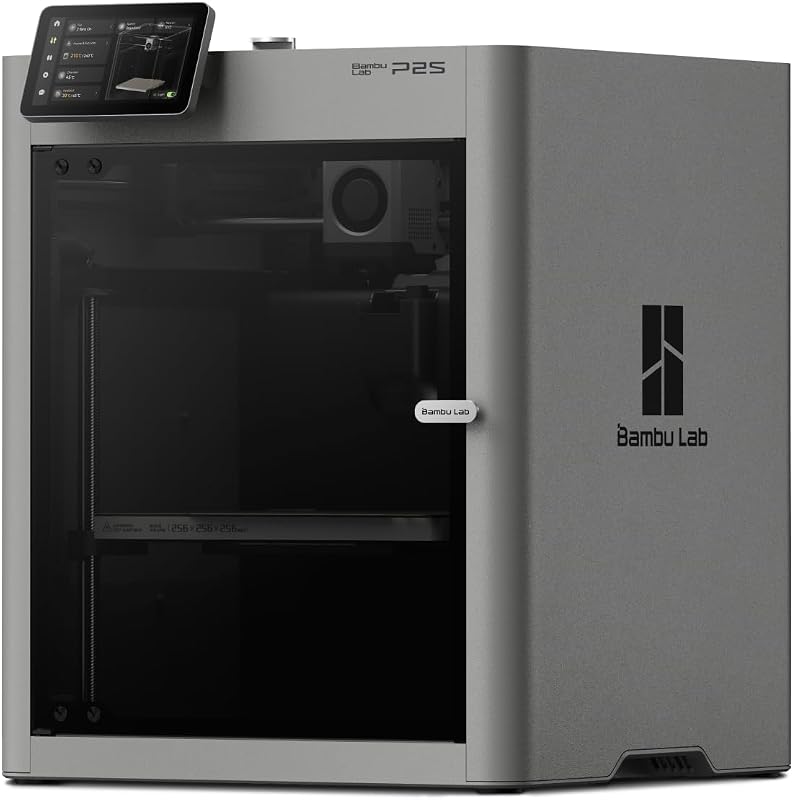 Best Enclosed Single-Color Bambu Lab P2S Enclosed printer, no AMS |
|---|---|---|---|---|---|
| BeastScore | 93 / 100 | 90 / 100 | 88 / 100 | 86 / 100 | 84 / 100 |
| Best for | One printer to last for years | Beginners who want colorful prints | An enclosure without the P2S price | Kids, classrooms and small desks | Engineering filaments in one color |
| Typical price (checked October 19, 2026) | $740–$800 | $400–$440 | $520–$560 | $240–$260 | $540–$580 |
| Series | P series | A series | P series | A series | P series |
| Speed claim | Up to 600 mm/s | 10,000 mm/s² acceleration | Up to 500 mm/s | See listing | Up to 600 mm/s |
| Multi-color | AMS 2 Pro, with drying up to 65 °C | AMS lite | AMS, up to 16 colors | Single color unless you add an AMS lite | Single color; Combo needed for multi-color |
| Enclosure | Yes, 50 °C chamber mode | No, open frame | Yes | No, open frame | Yes, 50 °C chamber mode |
| Key features |
|
|
|
|
|
BeastScore here is our overall rating out of 100, based on published specs and Amazon owner reviews. Prices change daily, so tap "View on Amazon" for today's price. We may earn a small commission, at no extra cost to you. Learn more
Why each one made the list
What each pick does best, where it falls short, and the typical Amazon price when we checked.
- 1. Best Overall
Bambu Lab P2S Combo
BeastScore 93 / 100Typically $740–$800 on Amazon (checked October 19, 2026)The P2S Combo is the newest printer in the lineup and the most complete. The listing says it prints up to 600 mm/s, uses a servo extruder with active flow compensation, and sets up in 15 minutes. Its adaptive airflow can hold a 50 °C chamber for tougher filaments, and a carbon filter cleans the air. The AMS 2 Pro in the Combo feeds several colors and dries filament at up to 65 °C, which matters if you live somewhere humid. Owners praise how little tinkering it needs. The trade-offs are price and size: it is the most expensive printer here, and an enclosed frame takes more desk space than an A1.
Pros- Enclosed body with adaptive airflow for more filament types
- AMS 2 Pro dries filament while it feeds colors
- Fast, with AI failure detection and auto calibration
Cons- Most expensive printer in the lineup
- Needs real desk space compared with the A1 mini
- Overkill if you only print small PLA models
- 2. Best Value Multi-Color
Bambu Lab A1 Combo
BeastScore 90 / 100Typically $400–$440 on Amazon (checked October 19, 2026)The A1 Combo is the Bambu printer most first-time buyers should look at. It pairs the open-frame A1 with the AMS lite for multi-color work, and this listing also includes an LED Lamp Kit for printing light-up decor. The listing highlights 10,000 mm/s² acceleration, full-auto calibration, active flow rate compensation and a one-clip quick-swap nozzle, plus motor noise cancelling for quieter running. Owners like that it handles most PLA and PETG projects without fuss, at close to half the price of the P2S Combo. The catch is the open frame: it is not built for tougher filaments, and drafts or pets can affect prints.
Pros- Multi-color printing for well under the cost of the P2S Combo
- Auto calibration, so setup is quick and gentle on beginners
- Includes the LED Lamp Kit for light-up projects
Cons- Open frame, so no enclosure for tougher filaments
- AMS lite does not dry filament
- Less quiet than an enclosed printer
- 3. Best Budget Enclosed
Bambu Lab P1S Combo
BeastScore 88 / 100Typically $520–$560 on Amazon (checked October 19, 2026)The P1S Combo is the older enclosed Bambu, and it is still a strong buy when the P2S is out of budget. The listing claims 500 mm/s and 20,000 mm/s² acceleration, a fully enclosed body, automatic bed leveling and a 15-minute setup. With the original AMS attached it can print up to 16 colors. The listing names ABS, ASA, PETG, TPU and PA among the supported or capable filaments, which is the main reason to choose it over the open A1. It is an older design, so you give up the P2S extras such as the newer AMS 2 Pro and its built-in drying. Owners still call it a safe, proven workhorse.
Pros- Fully enclosed, so ABS and ASA are in reach
- Fast, with auto bed leveling and a 15-minute setup
- About $200 to $250 less than the P2S Combo
Cons- Older design than the P2S
- Original AMS does not offer the AMS 2 Pro’s drying
- Larger and heavier than the A1 models
- 4. Best for Small Spaces
Bambu Lab A1 mini
BeastScore 86 / 100Typically $240–$260 on Amazon (checked October 19, 2026)The A1 mini is the cheapest and smallest way into the Bambu ecosystem. The listing describes automatic calibration, simple setup and quiet running in a compact body that suits a home, studio or workspace, and this version also includes the LED Lamp Kit. It connects to MakerWorld’s large model library and the Bambu Handy app, so a beginner can go from box to first print quickly. It does the basics well and costs about $250. The limits are size and color: this listing is the printer alone, so it prints in one color at a time, and the smaller build area rules out big models. Owners say it is a great gift or a first printer.
Pros- Lowest price in the lineup
- Compact and quiet, fits almost any desk
- Same easy Bambu software and model library as pricier printers
Cons- Single color unless you buy an AMS lite separately
- Smaller build area for larger models
- Open frame, so PLA and PETG only in practice
- 5. Best Enclosed Single-Color
Bambu Lab P2S
BeastScore 84 / 100Typically $540–$580 on Amazon (checked October 19, 2026)This is the P2S printer on its own. The listing says it is the same machine as the Combo, with the servo extruder, AI failure detection, quick-swap nozzles and the adaptive airflow system that can keep a 50 °C chamber, but without the AMS 2 Pro. The listing is clear that multi-color printing needs the Combo version. It makes sense if you want a fast enclosed printer for functional parts in one color and may add the AMS later. The downside is value: the Combo costs only about $200 more and includes the dryer and color system. If you think you will ever want color, the Combo is the better buy.
Pros- Enclosed and fast, same printer as the Combo
- Lets you start single-color and add an AMS later
- Adaptive airflow suits engineering filaments
Cons- No multi-color without adding an AMS
- Close in price to the Combo, which adds more
- Takes up the most desk space of the single-color options
All 5 compared, in one look
See every pick on one chart, or tap one to put it head to head with Bambu Lab P2S Combo. Ratings out of 10 are our estimates from published specs and Amazon owner reviews, not hands-on tests. Bigger shape = better.
- Easy to useTie
- SpeedTie
- Multi-colorBambu Lab P2S Combo · 9.6/10
- MaterialsTie
- Desk friendlyBambu Lab A1 mini · 9.8/10
- ValueBambu Lab A1 Combo · 9.6/10
Who wins where
The winner of each category, based on published specs and Amazon owner reviews. Pick the rounds that matter to you.
- Round 1
Easiest to start
Bambu Lab A1 mini winsThe A1 mini is the simplest box-to-print printer here, with auto calibration, a small footprint and a lower price. Every Bambu on this page calibrates itself, so none is hard to use. The mini just asks the least of your desk and your budget.
- Round 2
Speed
Bambu Lab P2S Combo winsThe P2S and P2S Combo claim up to 600 mm/s, ahead of the P1S Combo at 500 mm/s. The A1 models quote acceleration instead of a top speed. In daily use the gap matters most on big, long prints.
- Round 3
Multi-color value
Bambu Lab A1 Combo winsThe A1 Combo gives you the AMS lite and multi-color printing for about $400 to $440. That is hundreds less than the P1S Combo or P2S Combo, so it is the cheapest way to print in several colors.
- Round 4
Materials and enclosure
Bambu Lab P2S Combo winsBoth P series printers are enclosed, which helps with ABS, ASA and similar filaments. The P2S adds an adaptive airflow system and a 50 °C chamber mode, and its AMS 2 Pro dries filament while it feeds. The open A1 models are best kept to PLA and PETG.
- Round 5
Small spaces
Bambu Lab A1 mini winsThe A1 mini is the compact pick. The listing calls it compact and quiet, and it fits on a shelf or school desk where the enclosed printers will not.
- Round 6
Overall value
Bambu Lab A1 Combo winsFor most beginners the A1 Combo delivers the most per dollar: multi-color, auto calibration and the LED Lamp Kit. If you can stretch the budget, the P2S Combo is the better long-term printer.
Which one should you buy?
Find your situation below. That's your pick.
- You want the best Bambu printer on Amazon
- You want an enclosure, multi-color and filament drying in one box
- You are a beginner who wants colorful prints
- You want multi-color without paying P series prices
- You want an enclosed printer for ABS or ASA
- You want a proven model and the P2S price is too high
- You want the cheapest way into Bambu
- You print small PLA models on a small desk, or for a kid
- You want an enclosed printer for single-color functional parts
- You may add an AMS later and want to spend less now
Bambu Lab P2S Combo
The fastest, most capable printer in the lineup, enclosed and ready for multi-color with the AMS 2 Pro.
- Up to 600 mm/s
- Enclosed, 50 °C chamber mode
- AMS 2 Pro with drying
Quick tips before you buy
Enclosed P series printers need far more room than the A1 mini. Measure before you buy.
Damp filament ruins prints. The AMS 2 Pro in the P2S Combo dries it as it feeds.
Open A1 printers suit PLA and PETG. For ABS or ASA, choose an enclosed P series.
The Combo packs include the color system. Buying a printer alone and adding an AMS later usually costs more.
Quick answers
Which Bambu Lab printer should I buy?+
For most people, the P2S Combo. It is fast, enclosed and ready for multi-color with drying. If the budget is tighter, the A1 Combo is the best value, and the A1 mini is the cheapest and smallest.
What is the difference between the Bambu Lab A1 and P1S?+
The A1 is an open-frame printer that is cheaper, quieter and easier to place. The P1S is fully enclosed, which helps with filaments like ABS and ASA, and it is faster by the listing’s numbers. Pick the A1 for PLA and PETG, the P1S for tougher plastics.
Is the Bambu Lab P2S worth it over the P1S?+
Yes if you can afford it. The P2S claims 600 mm/s against 500 mm/s, adds an adaptive airflow system and a 50 °C chamber mode, and the Combo includes the AMS 2 Pro with drying. The P1S Combo still prints well and costs about $200 to $250 less.
Do I need the Combo or just the printer?+
Buy the Combo if you want multi-color printing. The P2S listing says multi-color needs the Combo version, and the A1 listing says the AMS lite is required. Single-color buyers can save money with the printer alone.
What is the best Bambu Lab printer for beginners?+
The A1 Combo or the A1 mini. Both calibrate themselves and set up quickly. Choose the Combo if you want colors, and the mini if you want the lowest price and the smallest size.
Are the Bambu Lab X1 Carbon and H2D on Amazon?+
When we checked in October 2026, we did not find them sold on Amazon US, so this lineup covers the A and P series only. If you want the X or H series, check Bambu Lab’s own store.
Can the A1 mini print multi-color?+
Not out of the box. The listing here is the printer alone. Bambu sells an AMS lite for the A series, so you can add multi-color later, but then the A1 Combo is usually the better deal.
Which Bambu Lab printer is the quietest?+
The A1 models advertise motor noise cancelling, and the A1 mini is billed as quiet and compact. Enclosed P series printers also keep part of the noise in. Owners’ experience varies, so treat these as claims, not measurements.
Keep comparing
Bambu Lab vs Creality: Which 3D printer brand?The easy-mode leader vs the budget giant. Which 3D printer brand should you buy? Best 3D Printers for Beginners: Plug in and printUnbox, calibrate on its own, print. The easiest 3D printers compared.
 Best 3D Printers: Top 5 on AmazonFast, reliable printers for makers. The best 3D printers compared.