
Bambu Lab vs Creality
Which 3D printer brand?
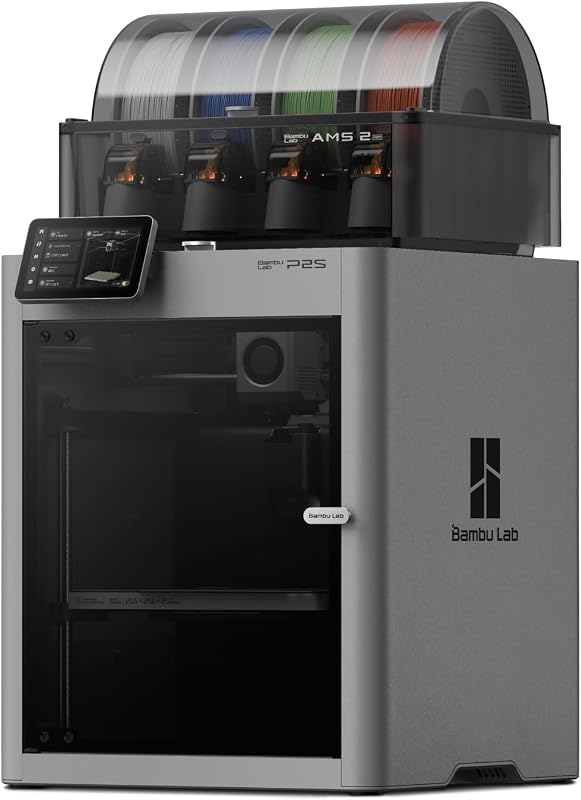
Our overall winner is the Bambu Lab P2S Combo. Bambu Lab made fast, multi-color 3D printing easy. Creality made 3D printing cheap and now builds big CoreXY machines of its own. We compared five printers from both brands on Amazon.
How we picked: we shortlist by Amazon Best Seller rank and number of ratings, then compare published specs. We don't test these products hands-on.
By Jamilur Rahman, Founder & Editor · Updated October 14, 2026
- Owner reviews checked
- Features side by side
- Quick & easy compare
- Smarter purchase
The short answer
For most people, Bambu Lab is the better 3D printer brand. Its printers set up in about 15 minutes, calibrate themselves, and print multi-color jobs with little fuss through Bambu Studio and the MakerWorld model library. Our top pick is the Bambu Lab P2S Combo: an enclosed printer rated up to 600 mm/s, with AI failure detection and the AMS 2 Pro, which feeds four colors and dries filament as it prints. On Amazon, owners rate Bambu printers a little higher than Creality’s.
Creality wins on price and size. The Ender 3 V3 SE is one of the cheapest good printers you can buy, and the K2 Combo matches the P2S Combo’s multi-color setup and enclosure for less money. The K2 Plus Combo offers something Bambu’s consumer line on Amazon doesn’t: a huge 350 mm cube build volume with a heated chamber up to 60°C for engineering filaments. For beginners who want color on a budget, the Bambu Lab A1 Combo is the friendliest start.
Skip Bambu if you like to tinker, mod and repair your printer with third-party parts, or need a very large build plate. Creality’s machines are more open and its K2 Plus prints far bigger parts. And skip both premium combos if you just want to try 3D printing: a single-color A1 or Ender 3 V3 SE teaches the basics for a fraction of the price.
How we picked: we compared Bambu Lab and Creality’s best-selling printers on Amazon by ease of setup, speed, multi-color systems, build size and materials, plus what owners say after months of printing. We checked each listing’s specs. We don’t claim hands-on tests. Prices are typical bands, checked October 14, 2026.
Compare them side by side
Everything that matters, in one table. Swipe to see all 5.
| Product | Best Overall Bambu Lab P2S Combo Enclosed printer + AMS 2 Pro |  Best for Beginners Bambu Lab A1 Combo Open printer + AMS lite |  Best for Big Prints Creality K2 Plus Combo Large enclosed printer + CFS |  Best Value Multi-Color Creality K2 Combo Enclosed printer + CFS |  Best Budget Creality Ender 3 V3 SE Budget single-color printer |
|---|---|---|---|---|---|
| BeastScore | 93 / 100 | 90 / 100 | 89 / 100 | 86 / 100 | 84 / 100 |
| Best for | Most people who want great prints with no fuss | First printer, with color | Large parts and engineering filaments | Enclosed multi-color for less | Trying 3D printing for the least money |
| Typical price (checked October 14, 2026) | $700–$780 | $380–$420 | $1,000–$1,200 | $500–$550 | $180–$220 |
| Brand | Bambu Lab | Bambu Lab | Creality | Creality | Creality |
| Build volume | See listing | See listing | 350 x 350 x 350 mm | 260 x 260 x 260 mm | See listing |
| Max speed | Up to 600 mm/s | 10,000 mm/s² acceleration | Up to 600 mm/s | Up to 600 mm/s | Up to 250 mm/s |
| Multi-color | AMS 2 Pro with filament drying | AMS lite (included) | CFS, up to 16 colors with 4 units | CFS (1 unit), up to 16 colors with 4 | No (single color) |
| Enclosure | Yes, 50°C chamber mode | No | Yes, heated to 60°C | Yes | No |
| Key features |
|
|
|
|
|
BeastScore here is our overall rating out of 100, based on published specs and Amazon owner reviews. Prices change daily, so tap "View on Amazon" for today's price. We may earn a small commission, at no extra cost to you. Learn more
Why each one made the list
What each pick does best, where it falls short, and the typical Amazon price when we checked.
- 1. Best Overall
Bambu Lab P2S Combo
BeastScore 93 / 100Typically $700–$780 on Amazon (checked October 14, 2026)The P2S Combo is why Bambu leads this matchup. The listing says it prints up to 600 mm/s with a servo-driven extruder and Active Flowrate Compensation, sets up in 15 minutes, and calibrates itself, with AI failure detection and quick-swap nozzles. The included AMS 2 Pro handles multi-color and multi-material jobs and dries filament at up to 65°C, which helps with damp PETG and TPU. An Adaptive Airflow system cools PLA or holds a 50°C chamber for tougher materials, with a carbon filter. Bambu Studio and MakerWorld make finding and printing models simple. The catch is price: it costs more than Creality’s K2 Combo, and parts are more proprietary.
Pros- Easiest high-end printer to set up and run
- AMS 2 Pro dries filament while it feeds colors
- Polished software and a huge model library
Cons- Costs more than the Creality K2 Combo
- Closed, proprietary design is harder to mod
- 2. Best for Beginners
Bambu Lab A1 Combo
BeastScore 90 / 100Typically $380–$420 on Amazon (checked October 14, 2026)The A1 Combo is the friendliest way to start 3D printing in color. The listing says it uses full-auto calibration (bed leveling and Z-offset included), Active Flow Rate Compensation and a 1-clip quick-swap nozzle, and it accelerates at 10,000 mm/s². The AMS lite in the box handles multi-color prints, and active motor noise canceling keeps it quieter in a home. This bundle adds an LED Lamp Kit for printing working lamps, a fun first project. Owners like how little there is to learn. The limits: it is open, not enclosed, so it is best with PLA and PETG, and the build area is smaller than the K2 Plus.
Pros- Easiest printer here for a beginner
- Multi-color AMS lite included
- Quiet for a home or classroom
Cons- Open frame: not ideal for ABS or ASA
- Smaller build size than Creality’s K2 machines
- 3. Best for Big Prints
Creality K2 Plus Combo
BeastScore 89 / 100Typically $1,000–$1,200 on Amazon (checked October 14, 2026)The K2 Plus is where Creality beats Bambu outright. The listing says it has a 350 mm cube build volume, big enough for helmets and large cosplay parts in one piece, and an actively heated chamber that holds up to 60°C for ASA and PPA. A hardened steel nozzle up to 350°C handles abrasive filaments. Step-servo motors push 600 mm/s and 30,000 mm/s² acceleration, and dual AI cameras watch for spaghetti failures and tune flow. The CFS reads RFID spools and chains up to four units for 16 colors. The trade-offs: it costs the most here, and owners report more setup tuning than on a Bambu.
Pros- Huge 350 mm build volume
- Heated 60°C chamber and 350°C hardened nozzle
- Dual AI cameras catch failed prints
Cons- Most expensive printer here
- Owners report more tuning than a Bambu
- Large and heavy
- 4. Best Value Multi-Color
Creality K2 Combo
BeastScore 86 / 100Typically $500–$550 on Amazon (checked October 14, 2026)The K2 Combo is Creality’s direct answer to Bambu’s enclosed combos, for less money. The listing says it has a 260 mm cube build volume, prints at up to 600 mm/s using step-servo motors, arrives 95% pre-assembled, and includes one CFS unit for multi-color printing (chain four for 16 colors). A silent mode keeps it about as loud as typing on a laptop, and an AI camera watches for spaghetti and idling. It handles PLA, PETG, ABS, PLA-CF and PET by the listing. Owners rate it a notch below Bambu, with more complaints about first-time setup and software quirks.
Pros- Enclosed multi-color printer for less than the P2S Combo
- Quiet silent mode
- Bigger build volume than Bambu’s A1
Cons- Owners rate it below the Bambu picks
- Creality’s software is less polished than Bambu Studio
- 5. Best Budget
Creality Ender 3 V3 SE
BeastScore 84 / 100Typically $180–$220 on Amazon (checked October 14, 2026)The Ender 3 V3 SE is why Creality is the budget giant. For about half the price of an A1 Combo, the listing says you get CR Touch auto leveling, a Sprite direct drive extruder for PLA, PETG and TPU, dual Z-axis lead screws for steadier layers, automatic filament loading and a flexible PC spring-steel plate you bend to pop prints off. It tops out at 250 mm/s, well below the CoreXY machines here, and prints one color at a time. Owners like it as a learning printer and a tinkerer’s base. Expect more hands-on tuning than a Bambu, and no multi-color upgrade path.
Pros- Cheapest way into a capable printer
- Auto leveling and direct drive extruder
- Open design is easy to repair and mod
Cons- Single color only
- Slowest printer in this comparison
- More tuning than Bambu’s A1
All 5 compared, in one look
See every pick on one chart, or tap one to put it head to head with Bambu Lab P2S Combo. Ratings out of 10 are our estimates from published specs and Amazon owner reviews, not hands-on tests. Bigger shape = better.
- Ease of useBambu Lab P2S Combo · 9.8/10
- SpeedTie
- Multi-colorBambu Lab P2S Combo · 9.6/10
- Build sizeCreality K2 Plus Combo · 9.8/10
- MaterialsCreality K2 Plus Combo · 9.8/10
- ValueCreality Ender 3 V3 SE · 9.8/10
Who wins where
The winner of each category, based on published specs and Amazon owner reviews. Pick the rounds that matter to you.
- Round 1
Ease of use
Bambu Lab P2S Combo winsBambu’s printers calibrate themselves and set up in about 15 minutes, and Bambu Studio and MakerWorld make it simple to find and slice models. Creality has closed the gap with pre-assembled K2 machines, but owners still report more tuning.
- Round 2
Multi-color
Bambu Lab P2S Combo winsBoth brands chain up to four units for 16 colors: Bambu’s AMS and Creality’s CFS. Bambu’s AMS 2 Pro also dries filament at up to 65°C, and its system is more mature. Creality’s CFS reads RFID spools.
- Round 3
Build size
Creality K2 Plus Combo winsThe K2 Plus prints a 350 mm cube, far larger than the other printers here. The K2 Combo’s 260 mm cube is also roomy for the price.
- Round 4
Materials
Creality K2 Plus Combo winsThe K2 Plus has an actively heated 60°C chamber and a 350°C hardened nozzle, the best setup here for ASA, PPA and carbon-filled filaments. The P2S Combo holds a 50°C chamber.
- Round 5
Price
Creality Ender 3 V3 SE winsCreality wins at every price point: the Ender 3 V3 SE is the cheapest printer here, and the K2 Combo undercuts the P2S Combo for an enclosed multi-color setup.
- Round 6
Owner satisfaction
Bambu Lab P2S Combo winsOn Amazon, owners rate Bambu’s printers a little higher than Creality’s. Common Creality complaints are setup, software and support; Bambu complaints are mostly about price and proprietary parts.
Which one should you buy?
Find your situation below. That's your pick.
- You want the most reliable multi-color printer
- You want to print, not tinker
- It is your first printer and you want color
- You print mostly PLA
- You print large parts like helmets or props
- You need ASA, PPA or carbon-filled filaments
- You want an enclosed multi-color printer for less
- You are comfortable with some tuning
- You want to try 3D printing cheaply
- You enjoy upgrading and modding
Bambu Lab P2S Combo
Fast, enclosed, self-calibrating and multi-color out of the box, with the easiest software.
- Up to 600 mm/s
- AMS 2 Pro with drying
- 15-minute setup
Quick tips before you buy
Check the build volume before you buy. Of these printers, only the K2 Plus (350 mm cube) fits big helmets and props in one piece.
Damp filament causes stringing and weak prints. Store spools sealed, or use a printer that dries them.
ABS and ASA give off fumes. Print them in an enclosed printer with a filter, in a ventilated room.
Color changes purge filament. Group colors smartly in the slicer to waste less.
Quick answers
Is Bambu Lab better than Creality?+
For most people, yes. Bambu printers are easier to set up, calibrate themselves and have more polished software and multi-color systems, and owners rate them a little higher. Creality is better if you want the lowest price, the largest build volume or a printer you can freely mod.
Bambu P2S Combo vs Creality K2 Combo: which should I buy?+
The P2S Combo is easier to use and its AMS 2 Pro dries filament. The K2 Combo costs less and has a 260 mm cube build volume. Pick the Bambu if reliability matters most; pick the Creality to save money.
Is the Bambu A1 or Creality Ender 3 V3 SE better for beginners?+
The A1 is easier: full-auto calibration, quiet motors and Bambu’s simple software, and the Combo adds color. The Ender 3 V3 SE costs about half as much and is a good choice if you want to learn how a printer works by tuning it.
Can Creality printers print in multiple colors?+
Yes. The K2 and K2 Plus work with Creality’s CFS, which holds four spools and chains up to four units for 16 colors. The Ender 3 V3 SE prints one color at a time.
Which brand has better software?+
Bambu. Bambu Studio, the Bambu Handy app and the MakerWorld model library work together smoothly. Creality has its own slicer and cloud app, which owners describe as improving but less polished.
Do I need an enclosed 3D printer?+
Only for ABS, ASA and other heat-sensitive filaments, or to keep dust, kids and pets away. For PLA and PETG, an open printer like the A1 or Ender 3 V3 SE works well.
Keep comparing
 Best 3D Printers: Top 5 on AmazonFast, reliable printers for makers. The best 3D printers compared.
 Best 3D Printers for Beginners: Plug in and printUnbox, calibrate on its own, print. The easiest 3D printers compared.
 Best Cutting Machines: Top 5 for CraftersVinyl decals, cards and custom shirts. Cricut vs Silhouette vs Brother compared.
 Best STEM Toys: Top 5 on AmazonGifts that teach. The best STEM toys for curious kids compared.