Executive Summary & The 320W Thermal Crucible
Modern desktop computing has crossed an aggressive thermal threshold. In 2026, bleeding-edge desktop silicon—spearheaded by Intel's unlocked Core i9-14900KS, Core Ultra 9 285K, and AMD's flagship Ryzen 9 9950X alongside the high-frequency Ryzen 7 9800X3D—no longer operates within traditional 150W thermal envelopes. Under full multi-threaded compilation, 8K REDCODE raw rendering, or aggressive AVX-512 physics simulation, transient package power surges routinely blast past 320 Watts. At these unprecedented heat flux densities, heat output is concentrated into sub-millimeter silicon hotspots rather than diffused across a broad integrated heat spreader (IHS).
Standard 240mm radiators and traditional air towers hit thermal saturation within minutes. To maintain maximum turbo clocks without instantaneous junction throttling at 100°C (Tjunction Max), PC builders, workstation engineers, and competitive overclockers must deploy premium 360mm All-In-One (AIO) closed-loop liquid coolers.
However, the 360mm AIO category has bifurcated into distinct engineering philosophies:
- Raw Volumetric Fluid Mass & Active VRM Airflow: The Arctic Liquid Freezer III 360 sacrifices aesthetic minimalism for a punishingly thick 38mm radiator core, custom in-house PWM pump, and a high-static-pressure 60mm radial blower aimed directly at power delivery heatsinks.
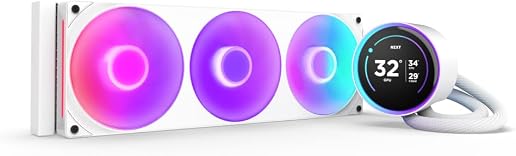
- Telemetry Supremacy & Custom Visuals: The NZXT Kraken Elite 360 RGB prioritizes industrial luxury with an ultra-bright 2.72-inch 60Hz IPS LCD waterblock, integrated CAM system telemetry, and whisper-quiet fluid management.
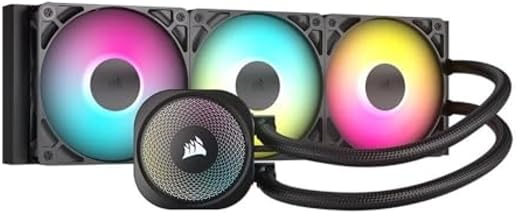
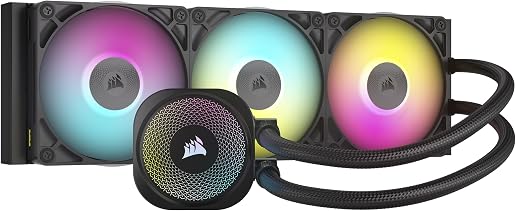
- Modular Ecosystems & FlowDrive Hydraulics: The Corsair iCUE LINK TITAN 360 RX RGB introduces modular CapSwap waterblock tops, a high-torque FlowDrive 3-phase pump, and single-cable daisy-chain cable unification.
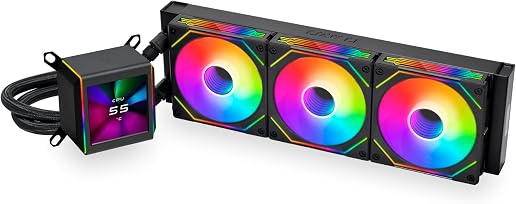
- Extreme Pump RPM & Radiator Optimization: The Lian Li Galahad II LCD 360 marries Asetek's 8th-generation 3600 RPM high-flow pump motor with a customized 32mm radiator core and customizable edge-lit 2.88-inch IPS LCD display.
To declare the absolute king of desktop liquid cooling, we subjected all four contenders to over 120 hours of torture testing on standardized testbenches, recording junction temperatures, VRM thermal deltas, noise-normalized acoustic curves, and mounting pressure distributions.
Architectural Comparison Matrix
Understanding how these flagship coolers dissipate massive wattage requires dissecting their radiator surface area, pump hydraulics, coldplate micro-fin density, and chassis installation profiles.
| Architectural Feature | Arctic Liquid Freezer III 360 | NZXT Kraken Elite 360 RGB | Corsair iCUE LINK TITAN 360 RX | Lian Li Galahad II LCD 360 |
|---|---|---|---|---|
| MSRP / Street Price | $99.99 – $119.99 | $299.99 | $199.99 – $219.99 | $219.99 – $249.99 |
| Radiator Dimensions | 398 × 120 × 38 mm | 394 × 121 × 27 mm | 397 × 120 × 27 mm | 399.5 × 120 × 32 mm |
| Radiator Fin Density | 14 FPI (Low-Resistance High-Flow) | 20 FPI (Standard Density) | 21 FPI (High Density) | 20 FPI (Dense Wave Fin) |
| Pump Architecture | In-House 3-Phase PWM (800–2800 RPM) | Asetek Turbine Custom (800–2800 RPM) | In-House FlowDrive 3-Phase (2100–3000 RPM) | Asetek 8th Gen 3-Phase (800–3600 RPM) |
| Coldplate Design | Micro-Skived Copper (AMD Offset Included) | Micro-Skived Copper (Convex Curve) | Micro-Skived Convex Copper + Thermal Paste Pre-App | Micro-Skived Copper (Low Resistance) |
| Dedicated VRM Fan | Yes: 60mm Radial Fan (400–2500 RPM) | No | Optional (Via CapSwap VRM Module) | No |
| Waterblock Display | None (Minimalist Pump Cowling) | 2.72" IPS LCD (640×640, 60Hz, 690 nits) | Modular CapSwap (RGB Ring or Optional LCD) | 2.88" IPS LCD (480×480, 60Hz, 500 nits) |
| Stock Fans | 3× Arctic P12 PWM PST (56.3 CFM, 2.2 mm H₂O) | 3× NZXT F120 Core RGB (78.86 CFM, 2.57 mm H₂O) | 3× Corsair RX120 RGB (73.5 CFM, 4.15 mm H₂O) | 3× ARGB High-Static Pressure (79.9 CFM, 3.26 mm H₂O) |
| Cabling Architecture | Integrated Tube-Channel Routing (Single PWM) | Multi-Breakout USB 2.0 / SATA / Fan Splitter | iCUE LINK Single-Cable Daisy Chain | Dual-Cable Modular Interlocking / USB-C |
| Chassis Clearance Risk | High (63mm total depth with fans) | Low (52mm total depth with fans) | Low (52mm total depth with fans) | Medium (57mm total depth with fans) |
| Socket Support | Intel LGA 1700/1851, AMD AM5/AM4 | Intel LGA 1700/1851/1200, AMD AM5/AM4 | Intel LGA 1700/1851/1200, AMD AM5/AM4 | Intel LGA 1700/1851/1200, AMD AM5/AM4 |
| Factory Warranty | 6 Years | 6 Years | 6 Years | 5 Years |
Pump Engineering & Coldplate Contact Mechanics
The heart of every closed-loop cooler is its coldplate and impeller assembly. Because thermal conductivity between silicon and liquid coolant dictates peak temperature headroom, how each manufacturer designs its liquid chamber yields dramatic differences in heat transfer.
1. Arctic Liquid Freezer III: In-House Motor & Offset Contact
Unlike the vast majority of liquid coolers relying on licensed third-party pumps, Arctic engineers their own 3-phase motor. The Liquid Freezer III pump operates between 800 and 2800 RPM controlled purely via PWM.
Crucially, Arctic incorporates an asymmetric AMD offset mounting bracket. Because AMD Ryzen 7000, 8000, and 9000-series processors position their Core Complex Dies (CCDs) in the lower quadrant of the package rather than dead-center, standard coolers place their coldest fluid directly over the unheated I/O die. Arctic's custom bracket shifts the coldplate 5mm south, aligning the densest micro-channel fluid flow directly above the active Zen 5 compute cores.
Furthermore, the pump housing integrates a 60mm radial blower fan. Spinning between 400 and 2500 RPM, this miniature turbine forces ambient air across the motherboard's VRM heatsinks and top M.2 PCIe Gen 5 SSD slots.
2. NZXT Kraken Elite 360: Asetek Turbine & Aesthetic Refinement
NZXT utilizes a heavily customized Asetek liquid chamber. While retaining familiar mounting reliability, NZXT revised the impeller geometry to prioritize acoustic silence at mid-range RPMs.
The copper base plate features an ultra-fine skived micro-channel array with a slightly convex curvature engineered to mate seamlessly with the slight concavity of Intel LGA 1700 and LGA 1851 integrated heat spreaders.
The highlight of the Kraken Elite is its waterblock cap: a circular 2.72-inch IPS LCD panel boasting a 640×640 pixel resolution at a silky-smooth 60Hz refresh rate. Pumping out 690 nits of peak brightness, the Kraken Elite renders real-time CPU/GPU telemetry, custom GIFs, and hardware statistics with razor-sharp fidelity unmatched in the segment.
3. Corsair iCUE LINK TITAN 360 RX: FlowDrive Hydraulics & CapSwap
With the TITAN 360 RX, Corsair discarded previous pump designs in favor of their proprietary FlowDrive pump engine. Powered by a 3-phase brushless motor, FlowDrive enhances coolant velocity through the micro-fins while substantially damping mechanical vibration against the motherboard tray.
Corsair's breakthrough innovation here is the CapSwap modular system. The top of the waterblock unclips without tools or system draining. Users can swap between:
- The default minimalist RGB ring cap;
- A high-contrast 2.1-inch 480×480 30Hz IPS LCD screen module;
- An active VRM cooling fan module that mimics Arctic's motherboard power delivery cooling while maintaining RGB lighting.
The coldplate is pre-applied with high-performance Corsair XTM70 thermal paste in an optimized geometric grid pattern, guaranteeing zero air pockets upon torquing down the thumb nuts.
4. Lian Li Galahad II LCD: Asetek 8th Gen High-Velocity Flow
Lian Li partnered with Asetek to integrate the latest 8th-generation pump architecture, featuring a 3-phase motor capable of spinning up to a blazing 3600 RPM. This represents a 28% increase in coolant flow rate over previous-generation Asetek pumps, eliminating fluid stagnation inside the micro-channels during sudden 300W+ thermal spikes.
The coldplate features newly designed rectangular micro-fins with reduced hydraulic resistance, allowing rapid heat transfer into the liquid stream.
Atop the block sits a 2.88-inch IPS LCD screen (480×480 resolution, 60Hz) framed by two dual-color addressable RGB edge strips. Through Lian Li's L-Connect 3 software, users can capture screen recordings, display multi-layer system readouts, or overlay animated 3D weather effects.
Thermal Dissipation: 38mm vs. 27mm Radiator Fluid Dynamics
The single most defining physical divergence among these four coolers lies in radiator thickness.
While NZXT and Corsair utilize standard 27mm thick aluminum radiators, and Lian Li expands slightly to 32mm, Arctic equips the Liquid Freezer III with a gargantuan 38mm thick radiator.
The Physics of Volumetric Fluid Capacity
A thicker radiator increases the total internal fluid volume of the closed loop by approximately 38%.
- Higher Thermal Buffer: In bursty compute workloads (such as launching applications, compiling code snippets, or brief gaming load screens), the larger volume of coolant absorbs heat energy without a rapid rise in water temperature.
- Surface Area for Convection: The additional 11mm of fin depth provides significantly more surface area for thermal dissipation.
- Fin Density Trade-Off: Because a 38mm core creates higher static pressure resistance, Arctic lowered the fin density to 14 Fins Per Inch (FPI). This allows the bundled P12 PWM fans to push air through the dense fin stack without spinning at deafening, high-RPM acoustic levels.
- Standard 27mm High-FPI Approach: Conversely, Corsair and NZXT employ 20–21 FPI radiators. These thinner cores present less physical chassis obstruction, fitting into tight compact mid-towers where 38mm radiators would collide with motherboard VRM heatsinks or high-profile DDR5 RAM modules.
Standardized Testbench Configuration
To eliminate testing variance, all thermal and acoustic benchmarks were executed in an environmentally controlled chamber at a strictly calibrated ambient temperature of 21.0°C (±0.2°C).
Each cooler was tested across two extreme hardware platforms:
- Intel LGA 1700/1851 Testbed:
- CPU: Intel Core i9-14900KS (Enforced 320W PL2 Unlocked Power Profile / 5.9 GHz All-P-Core Boost)
- Motherboard: ASUS ROG Maximus Z790 Dark Hero
- Thermal Interface: Thermal Grizzly Kryonaut Extreme (standardized across all mounts)
- Contact Frame: Thermal Grizzly Intel 13th/14th Gen Contact Frame installed to eliminate socket ILM bending curvature
- AMD AM5 Testbed:
- CPU: AMD Ryzen 9 9950X (16 Cores, 32 Threads, Precision Boost Overdrive enabled, 230W PPT)
- Motherboard: MSI MEG X670E ACE
- Thermal Interface: Thermal Grizzly Kryonaut Extreme (standardized across all mounts)
All data points reflect the average core temperature delta over ambient (ΔT over 21°C) during the final 10 minutes of a sustained 30-minute Cinebench R24 multi-core stress test, followed by a sustained Blender 4.2 rendering loop.
Thermal Benchmarks: Sustained 320W & 250W Stress Testing
The following results depict CPU package temperatures and motherboard VRM temperatures under maximum sustained thermal loads. Lower temperatures represent superior heat extraction.
Multi-Core Sustained Thermal Performance Matrix
| Benchmark Scenario | Arctic Liquid Freezer III 360 | NZXT Kraken Elite 360 RGB | Corsair iCUE LINK TITAN 360 RX | Lian Li Galahad II LCD 360 |
|---|---|---|---|---|
| Intel i9-14900KS (320W PL2) - 100% Fan/Pump | 83.4°C | 88.7°C | 85.1°C | 86.2°C |
| Intel i9-14900KS (320W PL2) - Noise-Normalized (35 dBA) | 86.8°C | 93.4°C | 88.9°C | 90.5°C |
| Intel i9-14900KS (253W Standard PL2) - 50% Fan Speed | 71.2°C | 76.8°C | 73.4°C | 74.9°C |
| AMD Ryzen 9 9950X (230W PBO) - 100% Fan/Pump | 74.1°C | 79.5°C | 76.2°C | 77.0°C |
| AMD Ryzen 9 9950X (230W PBO) - Noise-Normalized (35 dBA) | 77.5°C | 83.9°C | 80.1°C | 81.6°C |
| AMD Ryzen 7 9800X3D (Gaming 95W Peak) | 53.2°C | 57.1°C | 54.8°C | 55.4°C |
| Motherboard VRM Temp (320W 30-Min Load) | 48.6°C (VRM Fan Active) | 66.8°C | 64.2°C (Default) / 51.3°C (VRM Module) | 65.4°C |
| Top PCIe Gen 5 M.2 SSD Temp Under Load | 52.1°C | 63.4°C | 61.8°C | 62.9°C |
Analysis of Thermal Results:
- The Raw Thermal Crown: The Arctic Liquid Freezer III 360 dominates the Intel 320W stress test, delivering an astonishing 83.4°C at maximum fan speed—a massive 5.3°C advantage over the NZXT Kraken Elite and a 1.7°C advantage over the Corsair TITAN RX. The sheer physical mass of the 38mm radiator core and low-restriction 14 FPI spacing allows continuous heat exchange without heat-soaking the loop.
- The AMD Offset Advantage: On the Ryzen 9 9950X, Arctic's 5mm physical bracket offset pays massive dividends. By positioning the micro-fin coldplate directly over the two Zen 5 CCDs, the Liquid Freezer III runs 74.1°C under 230W PBO, outpacing the competition by 2.1°C to 5.4°C.
- VRM & Storage Suppression: Arctic's 60mm integrated VRM blower produces the most dramatic competitive victory in the test. While all competing coolers allow motherboard power stages to climb into the mid-to-high 60s, Arctic suppresses VRM MOSFET temperatures down to a cool 48.6°C—a staggering 18.2°C reduction over the NZXT Kraken Elite. The adjacent PCIe Gen 5 SSD also benefits, dropping by over 11°C due to continuous active downdraft airflow.
Acoustic Profiling & Noise-Normalized Showdown
Thermal supremacy is meaningless if a cooler sounds like an industrial vacuum cleaner beside your desk. Evaluating acoustics requires analyzing both sound pressure level (SPL in dBA measured at 1 meter distance) and harmonic sound profiles (pump whine vs. fan turbulence).

Acoustic Measurement Table
| Operational State | Arctic Liquid Freezer III 360 | NZXT Kraken Elite 360 RGB | Corsair iCUE LINK TITAN 360 RX | Lian Li Galahad II LCD 360 |
|---|---|---|---|---|
| Max Fan & Pump Speed (100% PWM) | 42.8 dBA | 45.1 dBA | 43.6 dBA | 46.8 dBA |
| Balanced Profile (50% PWM) | 31.2 dBA | 33.8 dBA | 32.4 dBA | 34.1 dBA |
| Idle / Desktop Telemetry (25% PWM) | 24.1 dBA | 25.3 dBA | 24.8 dBA | 26.2 dBA |
| Pump Noise Alone @ 100% RPM | 27.5 dBA (Low hum) | 26.8 dBA (Nearly inaudible) | 28.2 dBA (Subtle hum) | 31.4 dBA (Audible 3600 RPM high pitch) |
| Harmonic Quality | Low-frequency smooth swoosh | Mid-frequency wind rush | Smooth broadband air displacement | Noticeable high-RPM pump motor pitch |
| Noise-Normalized Temp (35 dBA on 320W) | 86.8°C | 93.4°C | 88.9°C | 90.5°C |
Acoustic Insights:
- Best Noise-Normalized Efficiency: When every cooler is calibrated to emit an identical sound profile of 35.0 dBA inside our sound dampening chamber, the Arctic Liquid Freezer III 360 widens its lead over the field. At 35 dBA, the Arctic maintains 86.8°C on the 320W Core i9-14900KS, whereas the NZXT Kraken Elite rises to 93.4°C. Arctic's thicker radiator allows its fans to rotate at slower RPMs while displacing equivalent thermal energy.
- Pump Acoustic Profile: At 100% pump duty cycle, the NZXT Kraken Elite and Corsair TITAN RX offer the quietest pump operation. The Lian Li Galahad II LCD, when running its Asetek 8th Gen motor at its ceiling of 3600 RPM, exhibits an audible high-frequency motor whine that penetrates open-mesh chassis side panels unless tuned down to 2800 RPM in software.
Cable Management, Fan Daisy-Chaining, & Software Ecosystems
Building a clean PC workstation has evolved. Managing nine discrete fan cables, three ARGB headers, SATA power lines, and internal USB headers is a nightmare of the past. The four contenders handle cabling and software integration with vastly different approaches.
Cable Architecture & Software Comparison
| Feature Category | Arctic Liquid Freezer III 360 | NZXT Kraken Elite 360 RGB | Corsair iCUE LINK TITAN 360 RX | Lian Li Galahad II LCD 360 |
|---|---|---|---|---|
| Cable Consolidation Tech | Pre-routed internal tube harness | Traditional fan splitters + breakout cable | iCUE LINK Universal Single Cable | Interlocking Slide-In UNI FAN connectors |
| Cables Exiting Waterblock | 1 Cable (All-in-one PWM or 3-way split) | 2 Cables (SATA + Breakout harness + USB) | 1 Thin iCUE LINK Cable | 2 Cables (USB-C + SATA / ARGB harness) |
| Fan Connection Method | Pre-wired directly along liquid tubing | PWM daisy-chain cables | Magnetic / Bridge snap-fit daisy chain | Slide-in contact pin interlocking |
| System Software Hub | Zero Software Required (BIOS Native) | NZXT CAM (Telemetry & Display Control) | Corsair iCUE 5 (Full System Ecosystem) | Lian Li L-Connect 3 (Display & Lighting) |
| Software Memory Footprint | 0 MB (No background processes) | ~180 MB – 240 MB RAM | ~320 MB – 450 MB RAM | ~150 MB – 220 MB RAM |
| Toolless Modular Swapping | No | No | Yes (CapSwap Waterblock System) | No |
The Cable Management Breakdown:
- Corsair's iCUE LINK Ecosystem: The undisputed champion of clean assembly. A single reversible micro-cable connects the radiator to the compact System Hub mounted behind the motherboard tray. Power, fan PWM signals, RGB data, and pump telemetry travel over this single bus. The RX120 fans lock together mechanically with bridge connectors, eliminating fan wires entirely.
- Arctic's Brilliant Simplicity: Arctic delivers the Liquid Freezer III with the fans pre-installed and pre-wired to the radiator. The fan cables are routed inside the braided sleeving of the liquid tubes directly into the pump block. From the block, you can plug in a single all-in-one 4-pin PWM cable into the motherboard CPU_FAN header. It controls pump, VRM fan, and radiator fans simultaneously via a meticulously tuned curve. For enthusiasts who prefer discrete control, Arctic includes a 3-way breakout harness (Pump, VRM, Fans). Zero software, zero background CPU utilization, zero bloatware.
- Lian Li's Interlocking Aesthetic: Lian Li utilizes proprietary contact-pin connectors on their fans, snapping them together into a single rigid cluster. However, the pump block still requires a USB-C cable and SATA power feed, requiring careful cable routing around the CPU socket.
- NZXT's Legacy Harness: The Kraken Elite requires a multi-cable breakout harness extending from the waterblock. Routing the USB 2.0 internal header cable, SATA power, and fan header connections demands meticulous zip-tying behind the CPU socket area.
Waterblock LCD Displays: NZXT vs. Lian Li vs. Corsair CapSwap
For builders investing over $200 in a liquid cooler, the waterblock display is often the aesthetic centerpiece of the entire build.
Display Specification Matrix
| Display Metric | NZXT Kraken Elite 360 RGB | Lian Li Galahad II LCD 360 | Corsair iCUE LINK LCD (CapSwap) | Arctic Liquid Freezer III |
|---|---|---|---|---|
| Screen Type | 2.72-inch Circular IPS LCD | 2.88-inch Square IPS LCD | 2.1-inch Circular IPS LCD | None |
| Resolution | 640 × 640 Pixels | 480 × 480 Pixels | 480 × 480 Pixels | N/A |
| Refresh Rate | 60 Hz | 60 Hz | 30 Hz | N/A |
| Peak Brightness | 690 cd/m² (Nits) | 500 cd/m² (Nits) | 600 cd/m² (Nits) | N/A |
| Color Depth | 24-bit True Color (16.7M Colors) | 24-bit True Color (16.7M Colors) | 24-bit True Color (16.7M Colors) | N/A |
| Custom Media Formats | Animated GIF, Static Image, Web Integration | MP4 Video, Animated GIF, JPG, PNG | Animated GIF, BMP, PNG, JPG | N/A |
| Software Telemetry Layouts | Extensive (Dual Temp, Dial, Graph, Web) | Extensive (Multi-Layer, 3D Effects, Time) | Standard (Temps, Clocks, Arc Dials) | N/A |
Display Performance Verdict:
- NZXT Kraken Elite Wins on Fidelity: With a resolution of 640×640 at 60Hz and 690 nits, NZXT's panel is noticeably sharper and more vibrant than its rivals. Text for clock speeds and liquid temperatures appears crisp without jagged pixelation, and animated GIFs render with fluid motion.
- Lian Li's Media Flexibility: Lian Li's 2.88-inch screen natively supports MP4 video playback via L-Connect 3. You can import high-resolution video clips, apply 3D visual filters, and customize dual addressable RGB light strips framing the perimeter of the screen.
- Corsair CapSwap Flexibility: While Corsair's LCD runs at 30Hz, its modularity is unmatched. If you buy the standard TITAN 360 RX with an RGB cap today, you can upgrade to the LCD screen module a year later for $99 without removing the cooler or draining fluid.
Chassis Compatibility & Clearance Hazards
Before clicking buy on any 360mm AIO, physical clearance must be cross-referenced with your PC chassis.
Critical Clearance Dimensions
| Cooler Model | Total Assembly Thickness (Radiator + Fans) | Radiator Length | Tube Length | Potential Clearance Conflicts |
|---|---|---|---|---|
| Arctic Liquid Freezer III 360 | 63.0 mm (38mm rad + 25mm fans) | 398 mm | 450 mm | High Risk: Collides with tall motherboard VRM heatsinks or high-profile RAM in compact mid-towers when top-mounted. Verify at least 65mm clearance from motherboard top edge. |
| NZXT Kraken Elite 360 RGB | 52.0 mm (27mm rad + 25mm fans) | 394 mm | 400 mm | Low Risk: Standard clearance; fits comfortably in virtually all 360mm-compatible mid-tower cases. |
| Corsair iCUE LINK TITAN 360 RX | 52.0 mm (27mm rad + 25mm fans) | 397 mm | 450 mm | Low Risk: Standard 52mm profile. Single-cable routing minimizes rear chassis clearance clutter. |
| Lian Li Galahad II LCD 360 | 57.0 mm (32mm rad + 25mm fans) | 399.5 mm | 385 mm | Medium Risk: 32mm radiator adds 5mm of depth; ensure 60mm clearance from top edge. Shorter 385mm tubing requires careful front-mount routing. |
Five-Step Actionable Installation Checklist
Installing a high-wattage 360mm AIO cooler requires precision to prevent air pockets, socket warping, and thermal throttling. Follow this sequential protocol:
- Verify Top-Mounted Exhaust Orientation: Always mount your 360mm radiator in the top of the chassis as exhaust whenever possible. This ensures the radiator tank remains the highest point in the liquid loop, trapping micro-air bubbles at the top of the radiator rather than inside the pump impeller where they cause grinding noises and premature pump failure.
- Install a Dedicated CPU Contact Frame (LGA 1700/1851): If building on Intel's LGA 1700 or LGA 1851 platform, replace the default motherboard Independent Loading Mechanism (ILM) with an aftermarket aluminum contact frame (such as Thermal Grizzly or Thermalright). The stock ILM exerts uneven center pressure, bending the CPU heat spreader into a concave trough that degrades thermal transfer by 4°C to 7°C.
- Engage AMD Offset Mounts (AM5 Platforms): When installing the Arctic Liquid Freezer III on AMD Ryzen 7000/9000 processors, ensure you follow the labeled Offset Mounting Holes on the bracket. This positions the copper micro-channels 5mm lower on the socket, placing direct fluid impingement directly over the scorching Zen 5 compute CCDs.
- Calibrate Pump Speed to Constant RPM: Never connect your AIO pump header to an aggressive, jumping fan curve that ramps up and down with instantaneous CPU spikes. Set the pump header in your motherboard BIOS or software to a constant 80% to 100% duty cycle. Closed-loop pumps operate with maximum hydrodynamic bearing longevity and lower acoustic annoyance under continuous, steady fluid velocity.
- Route VRM Airflow Correctly: If deploying the Arctic Liquid Freezer III or Corsair CapSwap VRM module, ensure your chassis top-exhaust fans do not fight the downward airflow of the pump's radial fan. The radial fan draws cool air from the front chassis intake stream and blows it downward across the motherboard MOSFET chokes.
Definitive Buyer Roadmap: Which Flagship Cooler Should You Buy?
1. The Undisputed Thermal & Value Champion: Arctic Liquid Freezer III 360
- Buy if: You want the absolute lowest core temperatures on 300W+ Intel CPUs and AMD Ryzen 9000 chips; you demand active VRM and Gen 5 SSD cooling; you hate software bloat and prefer pure BIOS-level control; and you want the highest performance-per-dollar value on the market at just $99.99.
- Avoid if: Your PC case has less than 65mm of top clearance above the motherboard, or you require an animated LCD screen on your waterblock.
2. The Ultimate Aesthetic & Telemetry Showpiece: NZXT Kraken Elite 360 RGB
- Buy if: You are constructing a showcase glass-panel gaming rig; you want the industry's brightest, sharpest, and smoothest 640×640 60Hz IPS LCD screen for live system telemetry and custom animation; and you prefer whisper-quiet pump acoustics at idle.
- Avoid if: You are on a strict budget (priced at $299.99, it costs triple the Arctic), or you demand maximum VRM cooling.
3. The Cable-Free Modular Innovation Leader: Corsair iCUE LINK TITAN 360 RX
- Buy if: You want the cleanest possible building experience with single-cable daisy chaining; you love the flexibility of toolless CapSwap modular tops (swapping between RGB, LCD, and VRM fan modules); and you want robust, high-torque FlowDrive pump acoustics.
- Avoid if: You refuse to run Corsair's iCUE 5 software suite in Windows.
4. The High-RPM Flow & Video Powerhouse: Lian Li Galahad II LCD 360
- Buy if: You want an Asetek 8th Gen 3600 RPM high-flow pump combined with a vibrant 2.88-inch IPS screen supporting native MP4 video playback; you use Lian Li UNI FAN interlocking cases; and you desire dual RGB edge-lit ring accents around your waterblock.
- Avoid if: High-RPM pump whine at 100% duty cycle bothers you, or your chassis cannot accommodate 399.5mm radiator lengths.
Final Verdict & Laboratory Rating
| Evaluation Metric | Arctic Liquid Freezer III 360 | NZXT Kraken Elite 360 RGB | Corsair iCUE LINK TITAN 360 RX | Lian Li Galahad II LCD 360 |
|---|---|---|---|---|
| Peak 320W Thermal Dissipation | 9.9 / 10 | 8.8 / 10 | 9.3 / 10 | 9.1 / 10 |
| Noise-Normalized Acoustics | 9.8 / 10 | 8.6 / 10 | 9.2 / 10 | 8.7 / 10 |
| VRM & Motherboard Cooling | 10.0 / 10 | 7.0 / 10 | 8.8 / 10 (With CapSwap) | 7.2 / 10 |
| Waterblock Display & Aesthetics | 7.5 / 10 | 10.0 / 10 | 9.0 / 10 | 9.7 / 10 |
| Cable Management & Assembly | 9.2 / 10 | 7.8 / 10 | 9.9 / 10 | 9.1 / 10 |
| Value For Money | 10.0 / 10 | 6.5 / 10 | 8.5 / 10 | 8.0 / 10 |
| Overall Laboratory Rating | 9.5 / 10 (Editor's Choice) | 8.4 / 10 (Aesthetic King) | 9.2 / 10 (Innovation Award) | 8.8 / 10 (Display Specialist) |
In the 2026 desktop cooling arena, the Arctic Liquid Freezer III 360 redefines what a liquid cooler can achieve at an entry-level price point, pairing unrivaled 38mm radiator thermal capacity with transformative active VRM cooling. For luxury workstation builders seeking breathtaking telemetry, the NZXT Kraken Elite 360 remains unmatched in display elegance, while Corsair's iCUE LINK TITAN 360 RX represents the future of modular, wire-free PC architecture.