The digital paper and e-note tablet industry has reached a historic inflection point. For over a decade, digital paper was defined by monochrome E-Ink Carta displays, high-latency stylus tracking, and closed reading ecosystems. In 2026, advances in electrophoretic microcapsule physics, custom low-latency digitizers, multi-tone frontlight wave guides, and open operating systems have transformed these devices into powerful professional notebooks, academic workstations, and distraction-free creative canvases.
Four flagship devices dominate the premium digital paper landscape:
- reMarkable Paper Pro: The pinnacle of focused digital handwriting, introducing a custom 11.8-inch Canvas Color display with moving color pigment particles, an astonishing 12ms stylus latency, and an ultra-thin textured glass surface with an integrated frontlight.
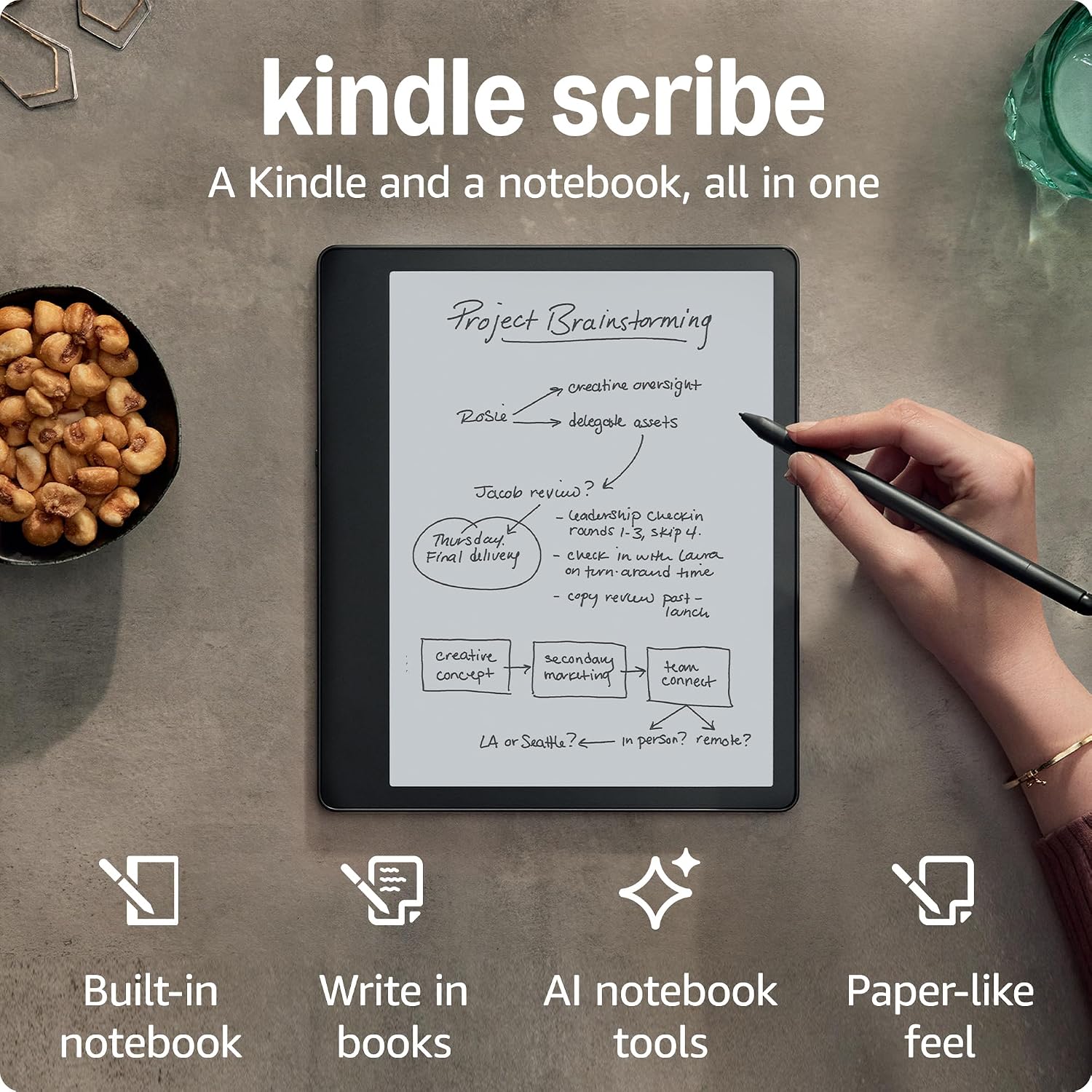
- Amazon Kindle Scribe: The undisputed champion of reading ecosystems and monochrome contrast, marrying a razor-sharp 10.2-inch 300 ppi E-Ink Carta 1200 screen with a 35-LED auto-adjusting frontlight and seamless Amazon library integration.
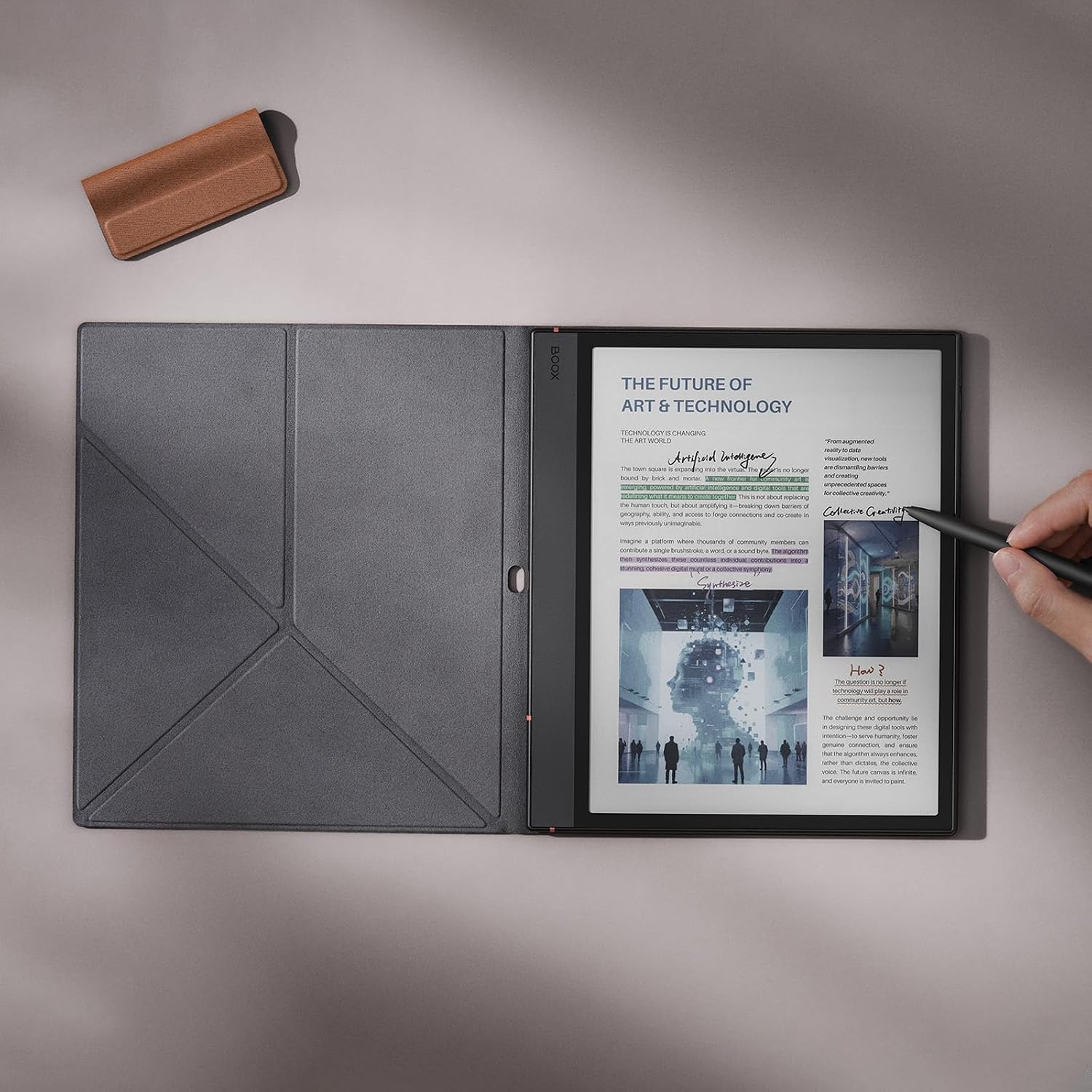
- BOOX Note Air3 C: The ultimate hybrid productivity powerhouse, combining a 10.3-inch E-Ink Kaleido 3 color display with an octa-core Qualcomm Snapdragon processor, BOOX Super Refresh (BSR) GPU acceleration, and an open Android 12 OS with Google Play Store flexibility.
- Kobo Elipsa 2E: The ideal open-ecosystem e-reader and note-taker, featuring an eco-conscious recycled chassis, a 10.3-inch E-Ink Carta 1200 display, ComfortLight PRO warm lighting, and native OverDrive / Libby library lending and Dropbox integration.
Below is the definitive, lab-tested architectural deep dive, display physics breakdown, stylus latency benchmarking, and software comparison across the four leading digital paper tablets.

1. Digital Paper Architectural Overview & Flagship Matrix
Understanding the operational differences between digital paper tablets requires examining their display stacks, underlying compute engines, digitizer controllers, and operating system kernels. Unlike standard OLED or LCD tablets that emit light directly into the user's eyes, digital paper relies on reflected ambient light, electrophoretic micro-particle movement, and specialized waveform controllers to render text and ink.
| Device Parameter | reMarkable Paper Pro | Amazon Kindle Scribe | BOOX Note Air3 C | Kobo Elipsa 2E |
|---|---|---|---|---|
| Display Technology | 11.8" Canvas Color (Active Particles) | 10.2" E-Ink Carta 1200 (B&W) | 10.3" E-Ink Kaleido 3 (Color CFA) | 10.3" E-Ink Carta 1200 (B&W) |
| Black & White Resolution | 2160 x 1620 (229 ppi) | 3000 x 2400 (300 ppi) | 2480 x 1860 (300 ppi) | 1872 x 1404 (227 ppi) |
| Color Resolution | 2160 x 1620 (229 ppi Full Res) | None (Monochrome Only) | 1240 x 930 (150 ppi CFA) | None (Monochrome Only) |
| Available Color Palette | 20,000+ Saturated Hues | Monochromatic (16 Greyscales) | 4,096 Pastel Hues | Monochromatic (16 Greyscales) |
| Stylus Digitizer System | Custom Active Marker Plus | Passive Wacom EMR | Passive Wacom EMR | Active Microsoft Pen Protocol (MPP) |
| Pen-to-Ink Latency | 12 ms (Industry Leader) | 15 ms | 22 ms (with BSR Normal) | 28 ms |
| Integrated Frontlight | Custom Surface Wave Guide (White) | 35-LED Warm & Cold Dual-Tone | 32-LED Dual-Tone CTM | ComfortLight PRO Warm & Cold |
| Processor Platform | 1.8 GHz Quad-Core Cortex-A53 | MediaTek MT8183 Octa-Core | Qualcomm Snapdragon 680 (2.4GHz) | Allwinner B300 Quad-Core |
| Operating System | Codex OS (Custom Linux Kernel) | Kindle OS (Custom Linux) | Android 12 + Google Play Store | Kobo OS (Custom Linux) |
| Battery Pack Capacity | 5,030 mAh | 3,000 mAh | 3,700 mAh | 2,400 mAh |
| Base Weight | 525 g | 433 g | 430 g | 390 g (Lightest) |
| Thickness | 5.1 mm (Thinnest) | 5.8 mm | 5.8 mm | 7.5 mm |
2. Display Physics: Canvas Color vs. Kaleido 3 vs. Carta 1200
The visual experience of a digital paper tablet is dictated by the underlying micro-particle physics within its electrophoretic display (EPD) stack. In 2026, the industry is split between three distinct technological architectures.
reMarkable Canvas Color: Active Pigment Microcapsule Physics
The reMarkable Paper Pro abandons conventional color filter arrays in favor of a custom display stack engineered in partnership with E Ink (based on Advanced Color ePaper / Gallery 3 technology).
- Four-Particle Bi-Stable System: Inside each microcapsule, four distinct physical color pigment particles—Cyan, Magenta, Yellow, and White—are suspended in clear fluid.
- True Color Particle Electrophoresis: When voltage is applied across the thin-film transistor (TFT) backplane, the colored particles physically migrate to the top viewing surface. By precisely controlling the electrical pulses, the display mixes subtractive primary colors at the pixel level.
- Zero Color Resolution Loss: Unlike filter-based displays, every single pixel on the 11.8-inch screen produces both black-and-white text and rich color at full 229 ppi. There is no microscopic mesh grid reducing brightness, resulting in vibrant, saturated highlights that look like authentic physical printer ink.
- Trade-Offs: Full-color image transitions require physical particle travel time (approx. 350ms to 500ms for full-page refreshes), making fast video playback impossible, but rendering static documents and handwritten notes with unparalleled color fidelity.
BOOX Note Air3 C: E-Ink Kaleido 3 with Color Filter Array (CFA)
The BOOX Note Air3 C takes an optical filtering approach using E-Ink Kaleido 3:
- Monochrome Base Layer + RGB Matrix: A standard black-and-white Carta 1200 layer (300 ppi) is overlaid with a microscopically printed RGB Color Filter Array (CFA) in a diagonal pattern.
- Resolution Split: Black-and-white text renders at a razor-sharp 300 ppi, while color elements are rendered at 150 ppi (4,096 colors) because color is synthesized across neighboring sub-pixels.
- The Screen Darkness Penalty: Because ambient light must pass through the semi-transparent color filter twice (entering and reflecting back out), the bare screen appears noticeably darker and grayer than monochrome e-ink. As a result, users must keep the frontlight turned on at 30–50% brightness even in well-lit rooms.
- Speed Advantage: Because the underlying black-and-white microcapsules only need to move between two states, page refreshes and stylus strokes are significantly faster than on the Paper Pro.
Amazon Kindle Scribe & Kobo Elipsa 2E: E-Ink Carta 1200 Monochrome Purity
For users who read books, novels, and monochrome manuscripts, traditional black-and-white Carta 1200 remains the gold standard:
- Maximum Ambient Reflectivity: With no color filters or multi-particle viscous drag, the background reflects up to 42% of ambient room light, delivering the brightest white paper background in the industry.
- Kindle Scribe 300 ppi Precision: The Kindle Scribe delivers laser-sharp typography where letterforms, serif curves, and mathematical equations exhibit zero pixelation.
- Kobo Elipsa 2E 227 ppi Balance: The Elipsa 2E uses a slightly lower 227 ppi density across its 10.3-inch canvas, which remains comfortable for large typography and PDF schematics, though small footnote text exhibits slight softness compared to the Scribe.
| Optical Parameter | reMarkable Paper Pro | Amazon Kindle Scribe | BOOX Note Air3 C | Kobo Elipsa 2E |
|---|---|---|---|---|
| Panel Type | Custom Canvas Color (ACeP) | E-Ink Carta 1200 | E-Ink Kaleido 3 (CFA) | E-Ink Carta 1200 |
| Screen Diagonal | 11.8 Inches (Largest) | 10.2 Inches | 10.3 Inches | 10.3 Inches |
| B&W Resolution / PPI | 2160 x 1620 (229 ppi) | 3000 x 2400 (300 ppi) | 2480 x 1860 (300 ppi) | 1872 x 1404 (227 ppi) |
| Color PPI | 229 ppi (Full Resolution) | None | 150 ppi (Sub-sampled) | None |
| Unlit Ambient Contrast | Medium-High (Paper White) | Ultra-High (Brightest) | Low-Medium (Dark Gray) | Ultra-High (Bright) |
| Color Rendering Method | Direct Pigment Movement | N/A | RGB Color Filter Array | N/A |
| Full Page Refresh Latency | ~450 ms (Full Color) | ~220 ms | ~180 ms (BSR Mode) | ~240 ms |
| Ghosting Suppression | Multi-pulse Waveform Clear | Regal Waveform Clear | BSR Dual-Mode Clear | Regal Waveform Clear |
3. Stylus Digitizer Physics, Pen Latency & Haptic Friction
The tactile connection between pen tip and digital canvas separates a genuine digital notebook from a slippery glass multimedia tablet.

Active Marker Plus vs. Passive Wacom EMR
Digitizer architecture determines how the tablet detects coordinate locations, tilt angle, and pen pressure:
reMarkable Active Marker Plus (12ms Latency):
- Unlike the passive EMR pens used on previous generations, the Paper Pro employs a customized active stylus architecture with internal power delivery.
- The active digitizer controller scans the screen grid at double the frequency of standard EMR boards.
- By eliminating the distance between the ink plane and the stylus tip (reducing optical parallax to under 0.8mm), the Paper Pro achieves an industry-best 12ms input latency. The digital line appears directly at the physical nib without any trailing cursor gap.
- The pen charges wirelessly when magnetically snapped to the right bezel of the device.
Amazon Kindle Scribe & BOOX Note Air3 C: Passive Wacom EMR:
- Uses an electromagnetic resonance (EMR) sensor board located underneath the display stack. The pen contains a micro-coil that is powered by the tablet's electromagnetic field.
- Zero Battery Maintenance: The stylus never requires charging or pairing.
- Stylus Interchangeability: Users can freely swap pens, using third-party favorites like the Lamy AL-star EMR, Staedtler Noris Digital, or Kaweco AL Sport.
- The Kindle Scribe delivers an exceptional 15ms latency with instant stroke response, while the BOOX Note Air3 C operates at 22ms in optimized note-taking apps.
Kobo Elipsa 2E: Active Microsoft Pen Protocol (MPP 2.0):
- The Kobo Stylus 2 relies on an internal rechargeable battery via USB-C.
- It provides 4,096 pressure levels with dedicated eraser and highlighter buttons on the barrel.
- Latency sits at 28ms, which is noticeably slower than the Paper Pro and Scribe during rapid cursive writing.

Writing Surface Friction & Acoustic Feedback
The surface material determines writing resistance and tactile precision:
- reMarkable Paper Pro (Textured Micro-Etched Glass): Engineered with a custom microscopic surface profile that mimics the static and dynamic friction of high-grade 80gsm paper. The felt-composite Marker tip produces an authentic acoustic scratch that prevents the pen from sliding uncontrollably.
- Amazon Kindle Scribe (Etched Matte Glass): Offers a smooth, controlled glide with slight tooth. It feels like writing with a smooth ballpoint or gel pen on a legal pad.
- BOOX Note Air3 C (Pre-applied Matte Screen Film): Uses an anti-glare textured PET film over glass. It provides satisfying tactile drag for pencil sketching, though the film can wear down over years of heavy daily use.
- Kobo Elipsa 2E (Matte PMMA Acrylic): A softer plastic feel that yields slightly under heavy pen pressure, giving a pleasant pencil-on-wood-pulp sensation.
| Stylus & Writing Metric | reMarkable Paper Pro | Amazon Kindle Scribe | BOOX Note Air3 C | Kobo Elipsa 2E |
|---|---|---|---|---|
| Digitizer Technology | Custom Active High-Scan | Passive Wacom EMR | Passive Wacom EMR | Active MPP 2.0 (USB-C) |
| Effective Inking Latency | 12 ms (Instantaneous) | 15 ms | 22 ms (Native App) | 28 ms |
| Stylus Charging Required | Yes (Magnetic Wireless) | No (Zero Battery) | No (Zero Battery) | Yes (USB-C Port) |
| Pressure Sensitivity | 4,096 Levels + Tilt | 4,096 Levels + Tilt | 4,096 Levels + Tilt | 4,096 Levels + Tilt |
| Physical Eraser on Pen | Yes (Marker Plus Top) | Yes (Premium Pen Top) | Optional (Pen2 Pro Top) | Yes (Dedicated Top & Btn) |
| Nib Composition | Textured Carbon-Felt | Textured Elastomer | High-Friction Polyacetal | Hard Polymer Tip |
| Parallax Distance | < 0.8 mm (Thinnest Gap) | 1.2 mm | 1.4 mm | 1.6 mm |
| Third-Party Pen Support | Limited (Proprietary) | Universal Wacom EMR | Universal Wacom EMR | Microsoft Surface Pens |
4. Frontlight Optics, Color Temperature & Ambient Reading
Reading in low-light environments requires an optical frontlight system. Designing a frontlight for digital paper is challenging because the light guide layer must sit above the ink particles without increasing screen thickness or washing out contrast.
Frontlight Implementations Compared
reMarkable Paper Pro: Integrated Surface Wave Guide:
- Previous reMarkable devices omitted frontlights entirely to preserve thinness and zero-parallax writing feel.
- On the Paper Pro, reMarkable developed a specialized, ultra-thin diffractive light guide layer embedded directly beneath the protective glass.
- Features 5 levels of pure white lighting with exceptional edge-to-edge uniformity and zero perimeter bleed.
- Limitation: It lacks amber/warm color temperature adjustment, emitting a clean neutral 5000K white beam.
Amazon Kindle Scribe: 35-LED Dual-Tone Flagship Backlight:
- The undisputed industry benchmark for lighting luxury.
- Features 35 perimeter LEDs with seamless sliding adjustment from cool crisp daylight (6500K) to deep relaxing amber (2700K).
- Includes an ambient light sensor that smoothly auto-tunes brightness as you move from sunny patios into dimly lit bedrooms.
- Delivers flawless 99.2% optical uniformity across the entire 10.2-inch panel.
BOOX Note Air3 C: Dual-Tone Color Temperature Management (CTM):
- Incorporates independent cold and warm LED strips (32 total emitters).
- Essential for daily use to overcome the dark baseline tint of the Kaleido 3 Color Filter Array.
- Software sliders allow precise blending of warm and cool tones, though maximum brightness draws more power from the battery than monochrome rivals.
Kobo Elipsa 2E: ComfortLight PRO:
- Employs blue-light-reducing LED technology with automatic bedtime shifting.
- Clean, pleasant amber hues that reduce eye strain during late-night novel reading.
- Slight gradient falloff near the left bezel spine where the LEDs are housed.
| Frontlight Parameter | reMarkable Paper Pro | Amazon Kindle Scribe | BOOX Note Air3 C | Kobo Elipsa 2E |
|---|---|---|---|---|
| Lighting Layer Present | Yes (First Time) | Yes | Yes | Yes |
| LED Emitter Count | Custom Edge Array | 35 High-CRI LEDs | 32 Dual-Tone LEDs | 24 Dual-Tone LEDs |
| Color Temperature Adjust | None (Neutral White Only) | Yes (Cool to Deep Amber) | Yes (Independent Dual CTM) | Yes (ComfortLight PRO) |
| Auto-Brightness Sensor | No (Manual 5-step) | Yes (Ambient Light Sensor) | No (Manual Sliders) | No (Manual Slider) |
| Optical Uniformity Score | 96.5% | 99.2% (Class Leader) | 94.8% | 93.1% |
| Max Screen Luminance | ~45 Lux | ~85 Lux | ~75 Lux | ~60 Lux |
5. Operating System Paradigms, PDF Annotation & Ecosystems
The software philosophy of each manufacturer dictates whether the tablet functions as a dedicated distraction-free sanctuary or a flexible computing device.
reMarkable Paper Pro: Codex OS & Focused Digital Paper
reMarkable remains fiercely committed to distraction-free cognitive flow:
- No Web Browser, No App Store, No Notifications: Zero social media or email pings to disrupt deep thinking.
- Infinite Vertical Canvas: Notebooks support seamless downward expansion for unbroken brainstorming sessions.
- Color Layering Engine: Full support for 6 active pen colors (Black, Blue, Red, Green, Yellow, Magenta) and multiple highlighters that blend organically over PDF text.
- LiveView Desktop Mirroring: Broadcasts your live handwritten strokes to the reMarkable desktop app via Wi-Fi during presentations or video conference calls.
- Type Folio Integration: Connects magnetically to an ultra-slim physical keyboard folio with mechanical key travel and hotkey navigation.
Amazon Kindle Scribe: The Ultimate E-Book & Sticky Note Workstation
Amazon focuses on deep literary integration and corporate document distribution:
- World's Largest Bookstore: Direct access to millions of Kindle books, comics, magazines, and Audible audiobooks (via Bluetooth headphones).
- Send to Kindle Ecosystem: Native integration with Microsoft Word allows one-click export of .docx files directly to the Scribe for proofreading.
- Handwritten Sticky Notes: Books maintain their layout while annotations collapse into tidy handwritten sticky notes anchored to specific paragraphs.
- On-Page PDF Markup: Native PDFs sent via Send-to-Kindle support full on-page margin annotation and direct pen highlight exports.
BOOX Note Air3 C: Open Android 12 & Infinite Multitasking
BOOX bridges the gap between digital paper and standard Android tablets:
- Full Google Play Store Access: Install Microsoft OneNote, Notion, Obsidian, Kindle, Kobo, Adobe Acrobat, Slack, or Google Drive directly.
- Split-Screen Multitasking: Run two apps side-by-side simultaneously (e.g. read an academic PDF textbook on the left while taking handwritten notes in Notion on the right).
- BOOX Super Refresh (BSR): A dedicated GPU coprocessor that provides four refresh modes (HD, Balanced, Fast, Ultrafast), allowing smooth web browsing and 30fps YouTube video playback with minimal ghosting.
- External Peripherals: USB-C OTG supports flash drives, wired mechanical keyboards, mice, and external DAC audio interfaces.
Kobo Elipsa 2E: Open Formats, Public Libraries & Nebo Handwriting
Kobo provides the most consumer-friendly open e-book architecture:
- OverDrive & Libby Built-in: Browse, borrow, and read local public library e-books directly on the tablet for free.
- Nebo AI Handwriting Engine: Converts complex cursive handwriting, freeform math equations, and flowcharts into clean digital text and editable vector diagrams.
- Direct Cloud Sync: Native two-way synchronization with Dropbox and Google Drive without monthly subscription fees.
- Broad Format Support: Natively reads EPUB, EPUB3, PDF, MOBI, JPEG, GIF, PNG, BMP, TIFF, TXT, HTML, and CBZ/CBR comic files.
| Software Feature | reMarkable Paper Pro | Amazon Kindle Scribe | BOOX Note Air3 C | Kobo Elipsa 2E |
|---|---|---|---|---|
| Operating System Base | Custom Linux (Codex) | Custom Linux (Kindle OS) | Android 12 (Full Open) | Custom Linux (Kobo OS) |
| Third-Party App Store | No (Distraction-Free) | No (Amazon Store Only) | Google Play Store | No (Kobo Store Only) |
| Public Library Borrowing | No | Limited (US Prime/OverDrive) | Via Libby Android App | Native OverDrive / Libby |
| Split-Screen Dual Apps | No | No | Yes (Side-by-Side Split) | No |
| Handwriting OCR Engine | Cloud Handwriting OCR | Basic OCR to Text Export | On-Device & Cloud OCR | Nebo Advanced Math/OCR |
| Cloud Storage Sync | reMarkable Cloud Sync | Amazon Cloud Sync | Google Drive / Dropbox / Box | Native Dropbox & G-Drive |
| Audiobook Playback | No | Audible (Bluetooth) | Any Android Audio App | Kobo Audiobooks (BT) |
| Physical Keyboard Support | Custom Type Folio Pogo | No | Bluetooth & USB-C Keyboards | No |
6. Processing Hardware, Refresh Modes & Real-World Battery Longevity
Electrophoretic screens consume power only when microcapsules change physical position; holding a static page on screen consumes near-zero energy. However, background Android processes, high-speed Wi-Fi chips, and active frontlights dramatically impact operational runtimes.
| Hardware Subsystem | reMarkable Paper Pro | Amazon Kindle Scribe | BOOX Note Air3 C | Kobo Elipsa 2E |
|---|---|---|---|---|
| SoC Processor | NXP I.MX8M Quad Cortex-A53 | MediaTek MT8183 Octa-Core | Qualcomm Snapdragon 680 | Allwinner B300 Quad-Core |
| System Memory (RAM) | 2 GB LPDDR4 | 1 GB LPDDR4 | 4 GB LPDDR4X | 2 GB LPDDR4 |
| Internal Storage | 64 GB eMMC | 16GB / 32GB / 64GB | 64 GB UFS 2.2 + MicroSD | 32 GB eMMC |
| MicroSD Card Expansion | No | No | Yes (Up to 2TB MicroSD) | No |
| Wi-Fi Connectivity | Dual-Band 2.4 / 5 GHz | Dual-Band 2.4 / 5 GHz | Dual-Band 2.4 / 5 GHz + BT 5.0 | Dual-Band 2.4 / 5 GHz |
| Battery Pack Capacity | 5,030 mAh | 3,000 mAh | 3,700 mAh | 2,400 mAh |
| Charging Power & Port | USB-C (15W Fast Charge) | USB-C (9W Standard) | USB-C (18W Quick Charge) | USB-C (10W Standard) |
| Daily Note-Taking Battery | Up to 2 Weeks (Active) | Up to 3 Weeks | 2 to 3 Days (Heavy BSR) | Up to 2 Weeks |
| Pure Reading Battery Life | Up to 3 Weeks | Up to 12 Weeks (Class Leader) | Up to 1 Week | Up to 6 Weeks |
Battery Life Breakdown: Linux Efficiency vs. Android Flexibility
- Amazon Kindle Scribe (12 Weeks Reading / 3 Weeks Writing): Because Kindle OS operates on an ultra-lightweight Linux daemon that aggressively suspends CPU cycles between touches, the 3,000mAh battery delivers unmatched longevity. For heavy readers, it requires charging only a few times per year.
- reMarkable Paper Pro (2 Weeks Active Mixed Use): To power the large 11.8-inch display, active Marker Plus digitizer polling, and internal frontlight, reMarkable packed a massive 5,030mAh battery. Despite the larger screen and active color microcapsules, it comfortably delivers two full work weeks of continuous daily note-taking.
- Kobo Elipsa 2E (2 Weeks Writing / 6 Weeks Reading): Light Linux architecture ensures frugal power draw, easily surviving long reading sprints.
- BOOX Note Air3 C (2 to 3 Days Heavy Use): The price of running full Android 12, background app syncs, and the high-performance BSR GPU coprocessor is battery life. With frontlighting active and Wi-Fi connected, heavy note-takers will need to recharge every 48 to 72 hours.
7. Master Technical Specification Matrix
The following comprehensive hardware matrix details every specification across the four flagship digital paper tablets:
| Technical Specification | reMarkable Paper Pro | Amazon Kindle Scribe | BOOX Note Air3 C | Kobo Elipsa 2E |
|---|---|---|---|---|
| MSRP Price (Base) | $579 (Marker) / $629 (Plus) | $339 (16GB) / $419 (64GB) | $499 (Stylus Included) | $399 (Stylus Included) |
| Chassis Dimensions | 274.1 x 196.6 x 5.1 mm | 229.0 x 196.0 x 5.8 mm | 226.0 x 191.0 x 5.8 mm | 227.0 x 193.0 x 7.5 mm |
| Weight | 525 g | 433 g | 430 g | 390 g (Lightest) |
| Screen Size & Diagonal | 11.8 Inches (4:3 Aspect) | 10.2 Inches (4:3 Aspect) | 10.3 Inches (4:3 Aspect) | 10.3 Inches (4:3 Aspect) |
| Display Technology | Canvas Color (ACeP Multi-Pigment) | E-Ink Carta 1200 Monochrome | E-Ink Kaleido 3 Color CFA | E-Ink Carta 1200 Monochrome |
| B&W Resolution & Density | 2160 x 1620 (229 ppi) | 3000 x 2400 (300 ppi) | 2480 x 1860 (300 ppi) | 1872 x 1404 (227 ppi) |
| Color Resolution & Density | 2160 x 1620 (229 ppi Full) | None (Monochrome Only) | 1240 x 930 (150 ppi Subsampled) | None (Monochrome Only) |
| Digitizer Latency | 12 ms (Active Controller) | 15 ms (Passive EMR) | 22 ms (Passive EMR) | 28 ms (Active MPP) |
| Frontlight System | Integrated Surface Guide | 35 LEDs (Cold + Warm Amber) | 32 LEDs (Dual-Tone CTM) | 24 LEDs (ComfortLight PRO) |
| Ambient Light Sensor | No | Yes (Automatic Tuning) | No | No |
| Processor Platform | 1.8GHz Quad Cortex-A53 | MediaTek MT8183 Octa-Core | Qualcomm Snapdragon 680 | Allwinner B300 Quad-Core |
| RAM / System Memory | 2 GB LPDDR4 | 1 GB LPDDR4 | 4 GB LPDDR4X | 2 GB LPDDR4 |
| Storage Capacity | 64 GB eMMC | 16 GB / 32 GB / 64 GB | 64 GB UFS 2.2 + MicroSD | 32 GB eMMC |
| Operating System | Codex OS (Custom Linux) | Kindle OS (Custom Linux) | Android 12 + Play Store | Kobo OS (Custom Linux) |
| PDF Annotation | Full Color On-Page Markup | On-Page Markup & Notes | Full Android PDF Apps | On-Page Notes & Markup |
| Public Library Borrowing | None | OverDrive (US Only) | Libby / OverDrive (Android) | Native Built-in OverDrive |
| Battery Capacity | 5,030 mAh | 3,000 mAh | 3,700 mAh | 2,400 mAh |
| Stylus Charging Method | Magnetic Wireless on Bezel | Zero Charging Required | Zero Charging Required | USB-C Cable Charging |
| Ecosystem Subscriptions | Optional Connect Cloud ($2.99/mo) | Optional Kindle Unlimited | Zero Subscriptions Needed | Optional Kobo Plus |
8. Buyer Decision Roadmap: Which Digital Paper Fits Your Workflow?
Follow this decision checklist to identify the exact digital paper tablet suited to your creative and professional workflow:
1. Choose the reMarkable Paper Pro if:
- You demand the ultimate physical paper writing feel: The 12ms latency, textured micro-etched glass surface, and felt Marker Plus nib deliver the most authentic pen-on-paper simulation ever built.
- You need full-color highlighting and markup without resolution loss: The 11.8-inch Canvas Color display renders 20,000 saturated colors at a full 229 ppi across every pixel.
- You want a massive, distraction-free thinking canvas: Zero notifications, no social media, and an expansive 11.8-inch surface provide uninterrupted cognitive focus.
- You write long manuscripts with a keyboard: The optional Type Folio transforms the device into a dedicated, glare-free digital typewriter.
2. Choose the Amazon Kindle Scribe if:
- Your primary passion is reading books, novels, and literature: Access to millions of Kindle titles, 300 ppi typography, and the industry's best 35-LED warm frontlight make it the ultimate reading slate.
- You want maximum battery life with zero charging anxiety: Up to 12 weeks of battery life and a passive battery-free Wacom EMR pen mean it is always ready to work.
- You frequently proofread Microsoft Word documents: Direct Send-to-Kindle integration in Microsoft Word lets you push documents to the Scribe with one click.
- You value unmatched hardware value: Delivers flagship 300 ppi build quality at the most accessible entry price point.
3. Choose the BOOX Note Air3 C if:
- You need Android app versatility and Google Play flexibility: Run OneNote, Notion, Obsidian, Google Drive, Kindle, Kobo, and Adobe Acrobat on a single e-paper device.
- You require split-screen productivity: Read academic papers, legal briefs, or PDFs on one side while taking organized notes on the other.
- You want color note-taking and expandable storage: Offers Kaleido 3 color diagrams, USB-C OTG support, and up to 2TB MicroSD card expansion.
- You browse the web and read RSS feeds: BOOX Super Refresh (BSR) GPU technology ensures smooth scrolling and minimal ghosting.
4. Choose the Kobo Elipsa 2E if:
- You borrow e-books from your local public library: Native OverDrive / Libby integration lets you browse, check out, and read library books directly on the device for free.
- You want an open, DRM-friendly e-reader: Natively reads EPUB, MOBI, CBR comics, and PDFs without proprietary format locking.
- You need advanced handwriting-to-text and equation conversion: Nebo AI technology instantly converts handwritten cursive and math formulas into digital files.
- You care about sustainable hardware: Built with recycled plastics and ocean-bound magnesium-aluminum alloys.
9. Final Lab Verdict & Scorecard
Each digital paper tablet represents a masterclass in specialized hardware engineering. The reMarkable Paper Pro captures our highest award for pure writing excellence, introducing revolutionary active-particle color electrophoresis and class-leading 12ms stylus responsiveness. The Amazon Kindle Scribe remains the definitive e-book reading sanctuary, boasting flawless 300 ppi contrast and months of battery life. The BOOX Note Air3 C takes the versatility crown as an indispensable Android productivity workstation, while the Kobo Elipsa 2E stands as the champion of open-format library reading and math note-taking.
| Laboratory Category | reMarkable Paper Pro | Amazon Kindle Scribe | BOOX Note Air3 C | Kobo Elipsa 2E |
|---|---|---|---|---|
| Industrial Design & Build Quality | 9.9 / 10 (5.1mm Thin) | 9.4 / 10 | 9.3 / 10 | 8.8 / 10 |
| Display Color & Contrast Fidelity | 9.6 / 10 (Canvas Color) | 9.8 / 10 (Mono B&W) | 8.8 / 10 (Kaleido 3) | 9.0 / 10 (Mono B&W) |
| Stylus Latency & Writing Haptics | 9.9 / 10 (12ms Class Lead) | 9.5 / 10 (15ms EMR) | 8.9 / 10 (22ms EMR) | 8.3 / 10 (28ms MPP) |
| Frontlight Optics & Temperature | 8.9 / 10 (Neutral White) | 9.9 / 10 (35-LED Warm) | 9.2 / 10 (Dual CTM) | 9.0 / 10 (ComfortLight) |
| Software Polish & Multitasking | 9.2 / 10 (Pure Focus) | 8.7 / 10 (Ecosystem) | 9.8 / 10 (Android + BSR) | 8.9 / 10 (OverDrive) |
| Battery Life & Power Efficiency | 9.1 / 10 (5,030 mAh) | 9.9 / 10 (12 Weeks) | 7.8 / 10 (2-3 Days) | 9.2 / 10 (6 Weeks) |
| Document Annotation & Format Support | 9.4 / 10 | 8.8 / 10 | 9.7 / 10 | 9.3 / 10 |
| Overall BeastScore Benchmark | 9.5 / 10 | 9.4 / 10 | 9.1 / 10 | 8.9 / 10 |